
License Key Server vs GitHub Repo Access: Which One a Code Seller Needs
Comparison page for code sellers choosing between a license key server and GitHub repo access: what Keygen and provider-issued keys do, why a license check inside source code does not hold, what a repository gives a buyer, how the two combine, and which fits a boilerplate, a library, an app or a snapshot.
RepoAccess Pro has no license key. A buyer pays, lands in a GitHub team, runs git clone, and keeps every version they download while their updates last. Nothing in the code checks a key, and nothing stops working when a date passes.
I sell it that way on purpose, and the reason is the subject of this page. What the buyer receives is source code, and a license check inside source code is a line they can delete.
License key server vs GitHub repo access: two different questions
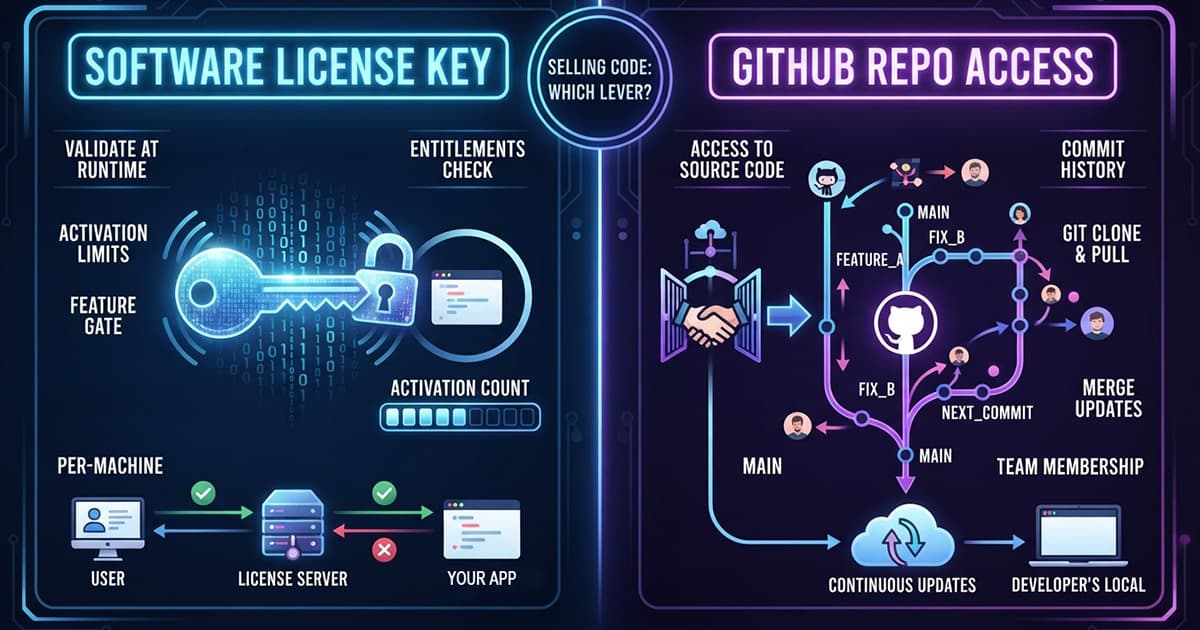
A license server answers one question: may this copy run, or may this customer download this build. Repo access answers another: does this buyer get the source, its history and the next commit. They look like rivals because both sit behind the same checkout, but they gate different things.
So the choice follows what you hand over. A compiled app, or a package the buyer installs and never opens, is the license server’s home ground. Boilerplates, starter kits and self-hosted products that the buyer forks and changes belong in a repository.
TL;DR
- A license key server (Keygen is the self-hosted example) issues keys, checks activations and can gate package downloads; it never adds anyone to a GitHub repository
- Lemon Squeezy, Gumroad and Polar already issue license keys with a validation endpoint; Paddle Billing leaves keys to your webhook
- Inside source code a license check is removable, so for boilerplates and starter kits the lever is who gets the next commit
- Neither a revoked key nor a removed team member takes back code the buyer already has; both gate the next version
What a self-hosted license key server does: Keygen as the example
Keygen describes itself as a “software licensing and distribution API”, and it is where a search for self-hosted licensing usually ends up. It issues license keys under policies you define, tracks the machines that activate them, and attaches entitlements your app checks before it switches a feature on.
The distribution half matters more to a code seller than the name suggests. Keygen runs license-gated package engines for npm, PyPI, RubyGems, Tauri updates and raw downloads, and the buyer authenticates with the license key itself as the password. A container registry exists too, but the self-hosting page lists it under the Enterprise Edition.
Self-hosting the Community Edition is free and runs through Docker, on a server with at least 500 MB of RAM, Postgres 13 or newer and Redis 6.2 or newer. It runs a single account with best-effort community support. Request and event logs, environments, permissions and SSO come with the paid Enterprise Edition, which needs a license key of its own to start.
The source is under the Fair Core License, which bars offering it as a competing product and turns into Apache 2.0 two years after each version is released. If you would rather not run it, Keygen Cloud has a free Dev tier for up to 100 active licensed users and 10 releases, and Keygen says it will never take a percentage of revenue.
Wiring it to a checkout is your code. Keygen publishes example integrations for Paddle and Stripe that turn payment webhooks into licenses. What it does not do is touch GitHub: nothing in it puts a buyer in a team or a repository.
The license keys your payment provider already issues
Before running a license server, check what your checkout already gives you. Three providers issue keys with a public validation endpoint, and for a check at launch that is often all an app needs.
Lemon Squeezy’s validate endpoint takes the key alone, with no API key, and returns its status: active, inactive, expired or disabled. On a subscription product the key follows the subscription, so a lapsed plan shows up as an expired key.
Gumroad’s verify call takes a product ID and the key and returns the purchase, including whether it was refunded, disputed or charged back and whether a subscription ended or failed. It also counts uses by default, so an app that verifies on every launch should pass increment_uses_count=false or watch the counter climb.
Polar sells keys as a benefit with activation limits and expiry, and revokes them when a subscription is cancelled. Paddle Billing has no keys of its own; its digital products guide leaves that to your webhook handler, which “grants access, sends a license key, or unlocks the download”.
Every one of these answers “is this key valid”. None of them adds a buyer to a repository, which is where the RepoAccess pages for Lemon Squeezy and Gumroad pick up the same sale.
A license check inside source code is one edit from gone
A license check works when the buyer cannot easily change the program that runs it. A signed desktop build or a compiled CLI makes removal a chore. A TypeScript boilerplate makes it a one-line edit, because the buyer holds the file that makes the call.
That is why RepoAccess Pro ships without one; its README tells buyers “There is no time bomb and no license check.” A buyer keeps every version they download during their twelve months of updates. What a refund takes away is the next commit, not the copy they already run.
What binds a buyer of source code is the license file and the terms they accepted when they paid. Enforcement is a contract question, and the technical lever you hold is access to what comes next.
What GitHub repo access gives a buyer that a key cannot
A repository delivers more than files. The buyer gets the commit history, so they can see why a change was made, and they can merge your next release into a copy they have already modified instead of diffing two zips by hand.
Access also ends cleanly on your side. Removing the buyer from the team stops every future pull, and a refund or chargeback webhook can do it without you. It does not recall a clone, and a revoked key does not uninstall a package either: both gate the next version, never the last one.
The costs sit on GitHub’s side. The buyer needs a GitHub account, an invitation that expires if ignored, and a place in your organization, and GitHub caps a free organization under a month old at 50 invitations a day. The boilerplate setup guide covers the organization settings, and the GitHub App and token comparison covers the key the delivery worker holds.
License keys and repo access together: the key as a claim ticket
The two are not exclusive, and some sellers combine them. The buyer receives a license key at checkout, pastes it with a GitHub username into an activation form, and a small app checks the key and sends the invitation. Lemon Squeezy and Gumroad keys suit this because both validate over a public endpoint.
The full comparison of ways to sell access to a private repo walks through the templates and storefronts built this way, including one that revokes repository access when a license expires. The key there is a claim ticket, and the repository is still the product.
RepoAccess skips the ticket. Where the checkout collects a GitHub username, the buyer is invited on payment; where it does not, they get a one-time claim link and confirm the username there. There is no key to leak, share or validate.
Which one does your product need: a boilerplate, a library, an app or a snapshot?
The deciding question is what the buyer does with what you ship. Editing points to a repository, running points to a key, and installing sits in between.
| What you sell | What the buyer does with it | Gate it with |
|---|---|---|
| Boilerplate, starter kit, template | Forks it, edits it, merges your updates | GitHub repo access |
| Self-hosted product sold as source | Deploys it on their own account, patches it | GitHub repo access |
| Library or SDK | Installs it as a dependency | A license-gated package registry, or repo access if they patch it |
| Desktop app, CLI binary, plugin | Runs your build | A license key with activations |
| One-off snapshot with no updates | Downloads it once | A license key on a zip, or a plain download link |
The library row is the one real overlap. If buyers only install your package, a license-gated npm or PyPI registry delivers updates through the tool they already use; if they read, patch or fork it, a repository fits better.
When a license key server is the right call
Run a license server when the product runs on the buyer’s machine and you need to limit where: seats, machines, trials, or feature tiers that switch on at runtime. Those are Keygen’s strengths, and a provider’s built-in keys cover the simpler end of them.
Choose repo access when the buyer gets your source and your next commit is what they paid for. That is the case RepoAccess is built for: the free core and RepoAccess Pro grant and revoke team membership from the payment webhook, on your own Cloudflare account, with no per-sale cut.
The provider pages and the other comparisons are collected on the RepoAccess guides page.
Frequently Asked Questions
Do I need a license key server to sell a boilerplate or starter kit?
No. A license server answers whether a copy may run, and a boilerplate is source code the buyer edits, so any license check inside it is a line the buyer can delete. What a boilerplate buyer pays for is the code and the updates that follow, and the lever that controls updates is access to the private GitHub repository: the buyer joins a team on payment and leaves it on refund. The terms that bind the buyer live in the license file they accept at checkout. RepoAccess Pro itself ships this way, with no license check in the code and delivery by git clone from a GitHub team.
What is the difference between a license key server and GitHub repo access?
A license key server issues keys, tracks activations and answers one question at runtime: may this copy run, or may this customer download this build. GitHub repo access puts a buyer in a team that can read a private repository, so they get the source, its commit history and every commit that follows until access is removed. The first gates execution and downloads of builds; the second gates delivery of source and updates. Neither recalls what the buyer already has: a revoked key does not uninstall a package, and a removed team member keeps their clone. Both gate the next version.
Can Keygen give buyers access to a private GitHub repository?
No. Keygen is a software licensing and distribution API: it issues license keys under policies, tracks machine activations, attaches entitlements and distributes releases through license-gated engines for npm, PyPI, RubyGems, Tauri updates and raw downloads, with a container registry in its Enterprise Edition. Buyers authenticate to those engines with the license key itself. It has no call that adds anyone to a GitHub team or repository, so selling repo access with Keygen means writing that GitHub step yourself, or using the key only as a claim ticket that a separate app exchanges for an invitation.
How much does it cost to self-host Keygen?
The Community Edition is free and self-hosted through Docker, on an x86_64 server with at least 500 MB of RAM, Postgres 13 or newer and Redis 6.2 or newer. It runs a single account with best-effort community support. Request and event logs, environments, permissions, import and export, the container registry and SSO are in the paid Enterprise Edition, which needs its own license key to start. The code is under the Fair Core License, which bars competing use and converts to Apache 2.0 two years after each version is released. Keygen Cloud has a free Dev tier for up to 100 active licensed users and 10 releases.
Do Lemon Squeezy, Gumroad and Polar license keys work without a separate license server?
Yes, for a basic check. Lemon Squeezy validates a key at a public endpoint without an API key and returns active, inactive, expired or disabled, and subscription keys follow the subscription. Gumroad's verify call returns the purchase with refunded, disputed and chargebacked flags plus subscription end and failure dates; it increments a uses counter on every call unless you pass increment_uses_count=false. Polar sells keys as a benefit with activation limits and expiry and revokes them when a subscription is cancelled. Paddle Billing issues no keys of its own. None of these adds a buyer to a GitHub repository.
Can a license key or a repo revoke take back code a buyer already downloaded?
No. A revoked license key stops the next validation, the next activation or the next package download; a copy that never checks again keeps running. Removing a buyer from a GitHub team stops the next pull; the clone on their disk stays. Both mechanisms gate the next version, never the last one. That is why the license file and the terms accepted at checkout carry the legal weight, and why the useful technical lever for a code seller is who receives the next commit or release. For source code the check itself is removable, so repo access is the gate that holds.
Resources & Further Reading
- Keygen Docs - Self-hosting
- Keygen Docs - Distribution engines
- Keygen API - source and Fair Core License
- Lemon Squeezy Docs - Validate a license key
- Gumroad API - Licenses
- Polar Docs - License keys
- Paddle Developer Docs - Paddle for digital products
- RepoAccess Core - GitHub repository
- RepoAccess Pro - product page