

How to Set Up a Boilerplate for Sale on GitHub, Before the First Buyer
Seller-side setup guide for a boilerplate or starter kit sold as private GitHub repo access: organization, one team per tier, the template setting, releases, the buyer README, the licence file, the updates promise and a refund policy for code the buyer can clone.
RepoAccess Pro is sold exactly the way this article describes: one organization on GitHub Free, one team that holds the repo, twelve months of updates, and a seven-day refund window. Every one of those was a decision I had to make before the first sale, and not one of them was about which payment provider to use.
How to sell a boilerplate through a private GitHub repo: the decisions before checkout
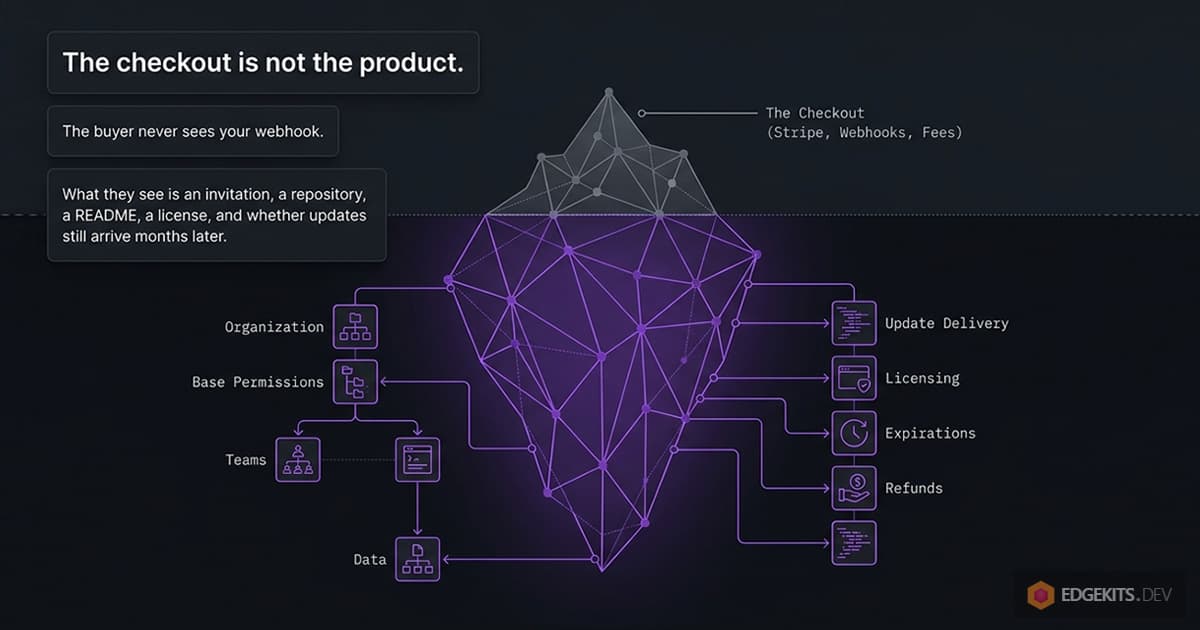
Most advice on selling a boilerplate starts at the checkout: which platform, what fee, which webhook. The buyer never sees any of that. What the buyer sees is an invitation, a repository, a README, a licence and, months later, whether updates still arrive.
This guide covers that side, in the order you set it up. Choosing the payment and delivery tool is a separate question with its own answer in the comparison of every way to sell private repo access, and what each option costs for your numbers is in the repo access cost calculator.
TL;DR
- Sell from a separate organization on GitHub Free, set base permissions to No permission, and make each tier a team, so access is a membership you add and remove.
- Leave “Template repository” off if you sell updates: a template copy shares no history with your releases.
- Ship updates as tagged releases with a changelog, and tell buyers to watch releases only.
- Replace any MIT file: a paid repo needs a licence that says who may use the code and what they may not redistribute.
- Decide whether access ends, and write a refund policy that assumes the buyer keeps what they cloned.
- Selling through GitHub means every buyer needs a GitHub account, and a new organization is capped at 50 invitations a day.
Put the product in its own GitHub organization and lock it down
Why a separate organization on GitHub Free, and what it saves you in seats, is covered in the comparison guide linked above, in its section on personal accounts and organizations. This section is about what happens after: every buyer becomes a member of that organization, so its settings decide what a paying customer can do inside it.
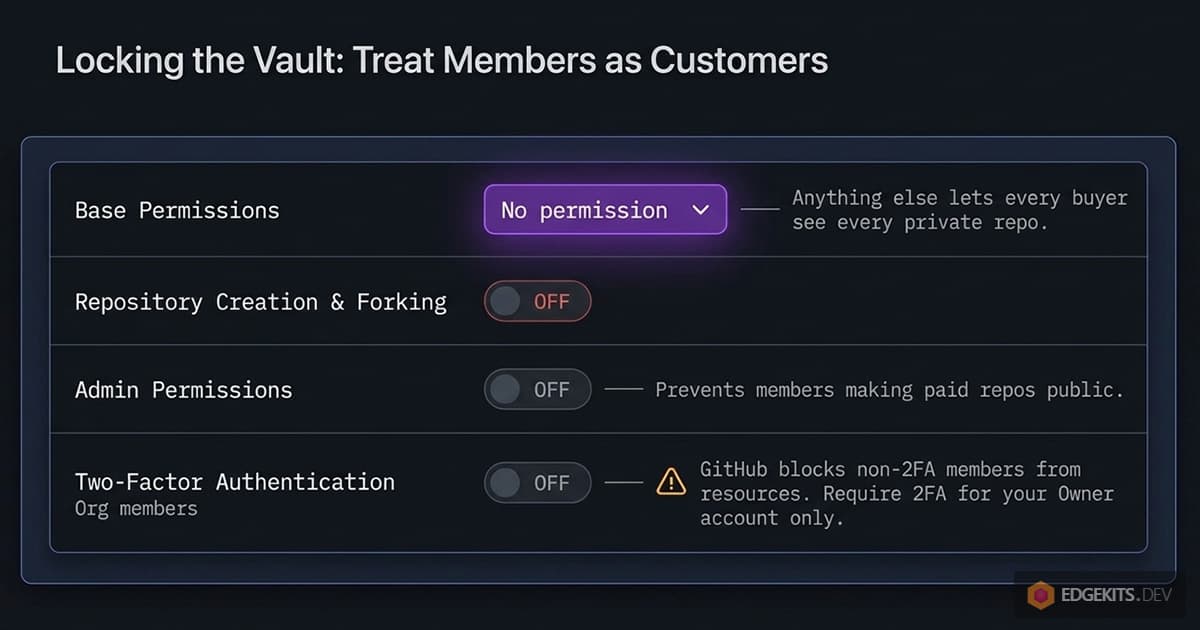
Treat members as customers, not colleagues. These are the settings I change before a single buyer joins, most of them under the organization’s Settings → Member privileges:
- Base permissions: No permission. This is the one that matters most. With any other value, every member can see every private repository in the organization, and your tiers stop meaning anything.
- Repository creation and forking off. Members should not be able to create repositories in your organization or fork the private ones.
- Admin repository permissions off, changing repository visibility above all, so no member can make a paid repository public. Team creation, Pages creation and project access off as well.
- Read, not write, on every team’s repositories. Buyers clone; they never push.
- Do not require two-factor authentication for the organization. Per GitHub’s docs, members without 2FA “will not be able to access your organization’s resources until they enable 2FA”, and outside collaborators without it are removed. Turn 2FA on for your own owner account instead.
- Third-party access restricted, and if your delivery tool uses a fine-grained personal access token: allow fine-grained tokens for the organization, require administrator approval for members’ tokens, set a maximum lifetime, and give the tool’s token nothing beyond what it needs (for team-based delivery, organization Members read and write). Note the expiry date; delivery stops the day the token lapses.
The organization name is what the buyer reads in the invitation email and then in their GitHub sidebar for as long as they have access, so name it after the product or the brand. RepoAccess Pro lives in the EdgeKits organization for that reason, next to the open-source repos a buyer may already know.
Keep your personal experiments out of it. Every repository in the selling organization is one misconfigured team away from a buyer, and a clean organization is easier to audit before a launch.
One repository per product, tiers and bundles as teams
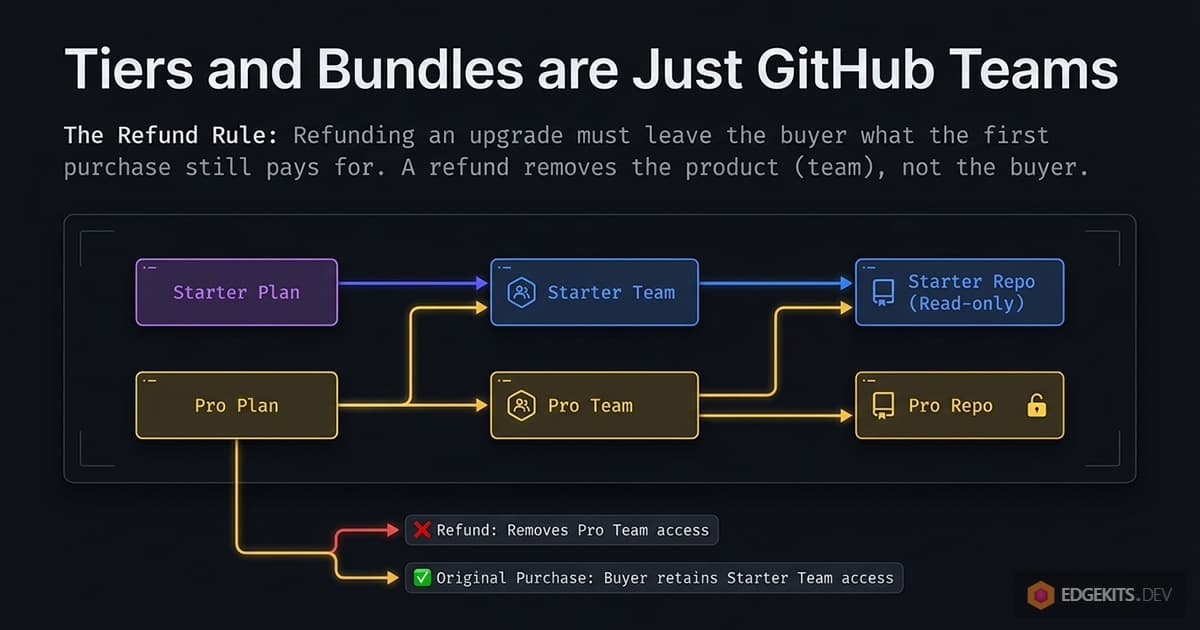
A tier is a team, and what a buyer can read is the sum of the teams they hold. GitHub lets a team hold several repositories and one repository belong to several teams, so there are two ways to draw tiers, and both work.
The first is one team per tier with overlapping repositories: the Pro team reads the Starter repository and the Pro repository, and a Pro buyer joins one team. The second is one team per repository, with each product granting a list of teams: Starter grants kit-starter, Pro grants kit-starter and kit-pro. The second shape holds up better once you add upgrades and bundles, because every product is just a different list.
Here is what a buyer actually receives in each shape. I tested each of these on a real organization, paying and refunding with real money, before documenting them for RepoAccess Pro buyers, and in every case the only messages the buyer gets are GitHub’s own emails:
- One product, one team. An “invited you to join the organization” email, then, after the buyer accepts, “added you to the team”. A refund sends “removed from the team” and “removed from the organization”.
- An upgrade or a second product. The buyer is already a member, so there is no invitation: they are added to the new team directly and get a single “added you to the team” email.
- Two price points for one repository, such as a launch price and a regular price, or a buyer who paid twice by mistake. Both map to the same team, and the second purchase changes nothing on GitHub.
- A bundle and one of its items. The bundle grants
kit-aandkit-b, the item grantskit-a. Someone who already has the item and later buys the bundle only gainskit-b.
The refund is where delivery scripts go wrong. Refunding an upgrade must leave the buyer what the first purchase still pays for, and refunding a bundle must leave the item they bought separately. The rule is that a refund removes the product that was refunded, not the buyer: teams that no other purchase still entitles are removed, and the organization membership goes only when no team is left.
Avoid one repository per buyer. It looks tidy for the first ten sales and turns every release into a hundred pushes. Delivery tools that invite buyers as repository collaborators instead of team members make tiers harder to express, which is one of the trade-offs the comparison guide lays out under collaborator invites and team membership.
RepoAccess, which I build, is team-based for this reason: its config maps each product id from the payment provider to the list of teams it grants, and the refund rule above is how it revokes. RepoAccess Pro itself is sold through one team, repoaccess-pro.
Should buyers get a “Use this template” button?
GitHub has a checkbox in every repository’s settings, Settings → General → “Template repository”. Turn it on and a “Use this template” button appears next to “Code”. GitHub’s docs say that “anyone with read access to a template repository can create a repository from that template”, so every buyer in the team gets the button.
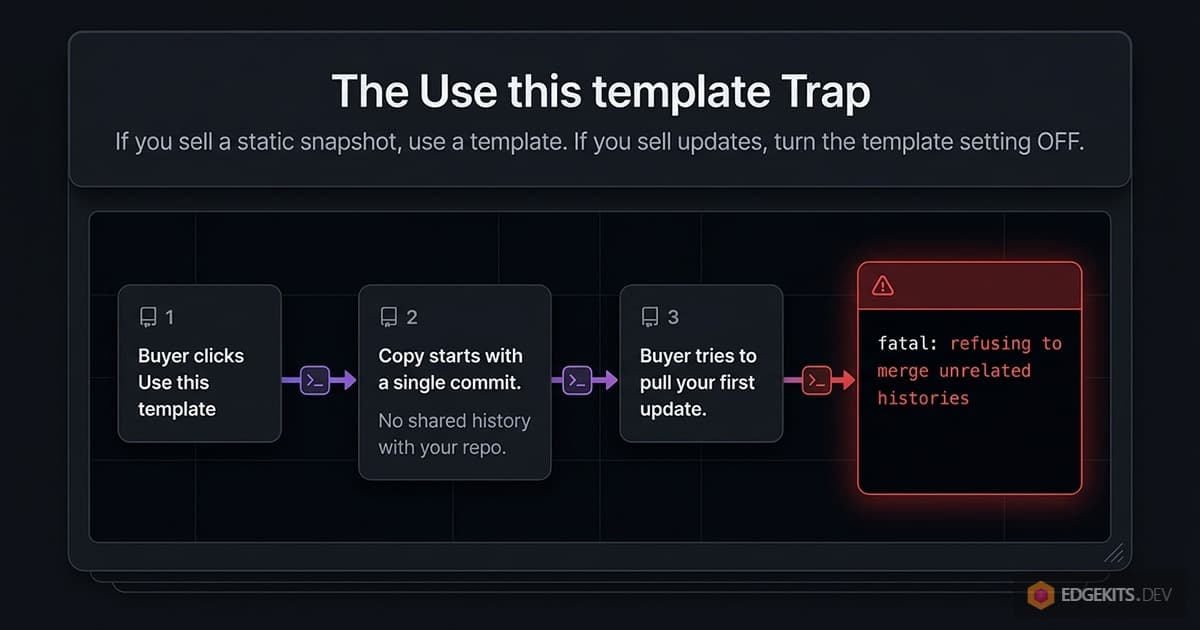
What the buyer gets is a new repository in their own account, and per the same page it “starts with a single commit”, without your history. For a starter kit that is a pleasant first minute: a clean project, named after the buyer’s product, with no trace of your commits.
The cost shows up at the first update. The buyer’s copy shares no history with yours, so when they try to merge your next release, git refuses with “refusing to merge unrelated histories”. The git merge docs list the --allow-unrelated-histories flag that forces it, after which every file both sides touched is a conflict to resolve by hand.
There is a second consequence. The copy is a new repository, not a fork, so the rule under which GitHub deletes forks of a private repository when you remove someone does not describe it; like a local clone, it stays with the buyer.
My rule: if you sell a snapshot with no updates, the template button is a nice touch. If you sell updates, leave it off and document the clone-plus-upstream path in the README instead. It is off on the RepoAccess Pro repository.
Releases your buyers can follow without asking you
Buyers who paid for updates want to know when one exists. Tag every release with a semantic version, publish it as a GitHub Release with notes, and keep a CHANGELOG file in the repository that says what changed and what breaks.
Then tell buyers how to hear about it. GitHub’s notification settings let anyone watching a repository choose Custom and pick releases, which mutes issue and commit noise and keeps the one event they care about. One line in the README asking for Watch → Custom → Releases saves you a newsletter.
The update path itself belongs in the README too, as commands rather than prose:
git remote add upstream git@github.com:your-org/your-kit.git
git fetch upstream --tags
git merge v1.4.0
Buyers who built a product on your kit will resolve conflicts in the files they changed, and that is expected. A major version with breaking changes deserves its own migration notes in the release, written for someone who last looked at your code six months ago.
For RepoAccess Pro, a buyer updates with git pull and redeploys to their own Cloudflare account, and their config and secrets sit in files no update touches. Designing where buyer-owned files live is part of making updates cheap.
Write the README for the first five minutes after the invite
The first question a new buyer asks is where the access is. The payment went through, and now GitHub has to send an invitation email to the account whose username they entered. Say that on the page the buyer lands on after paying, before anything else.
What that text needs, in order:
- The invitation comes from GitHub, to the email address on the buyer’s GitHub account, which may not be the one they paid with. It also shows up in their GitHub notifications, and it can be opened at
https://github.com/orgs/<your-org>/invitation. Check spam. - Sign in to the GitHub account whose username you gave at checkout before accepting; access appears only after you accept.
- Clone, install, and run one command that proves it works.
- Where the licence is, where the changelog is, and where to ask for help.
Put the same text, minus the invitation part, at the top of the repository README. A buyer who got this far should never have to email you to find the start command.
The licence file decides what a buyer may do with your code
If the LICENSE file in your paid repository is the MIT file your framework template shipped with, check what it says. The MIT License grants “the rights to use, copy, modify, merge, publish, distribute, sublicense, and/or sell copies of the Software”. That includes selling your kit to someone else the day after they bought it.
A paid boilerplate needs a commercial licence, and whatever wording you end up with has to answer five questions:
- Who may use it: one person, a team, a company?
- On how many projects, and may the buyer build products for clients with it?
- What may never be redistributed: the source as a kit, a template, a course or a competing boilerplate?
- What the buyer keeps when the update period ends or a refund is issued?
- Which text governs if your sales page and the licence disagree?
The RepoAccess Pro licence answers the first three in one sentence on the product page, and the licensing page explains how it sits next to the open-source core: it covers the buyer’s own business, “on as many deployments and for as many customers as you like, modifying the code, and writing your own adapters”, and rules out resale, passing a copy to someone else, and a hosted service built on managing other people’s repositories. The complete text is the LICENSE file in the repo, and the source files carry SPDX-License-Identifier: LicenseRef-RepoAccess-Pro-License in their headers, so the terms travel with the code.
I am not a lawyer. Have one in your jurisdiction read the final text once; it is the one file in the repo you cannot fix with a patch release.
Lifetime updates or twelve months: decide what access means when it ends
This is a pricing decision disguised as a technical one. Lifetime updates are simple to run: the buyer joins the team and stays in it, and the only cost is that your team grows for ever and every future release is included in the first payment.
Time-boxed updates, such as twelve months, sell the next year separately. The promise for RepoAccess Pro is written that way on its product page: if you do not renew, “the version you have keeps working”, and you stop receiving updates until you renew.
GitHub will not enforce the twelve months for you. Team membership has no expiry, so time-boxed access needs three things from whatever tool or script runs your delivery:
- a record of each buyer’s start date;
- a reminder about a week before the end, with a renewal offer;
- automatic removal from the team when they do not renew.
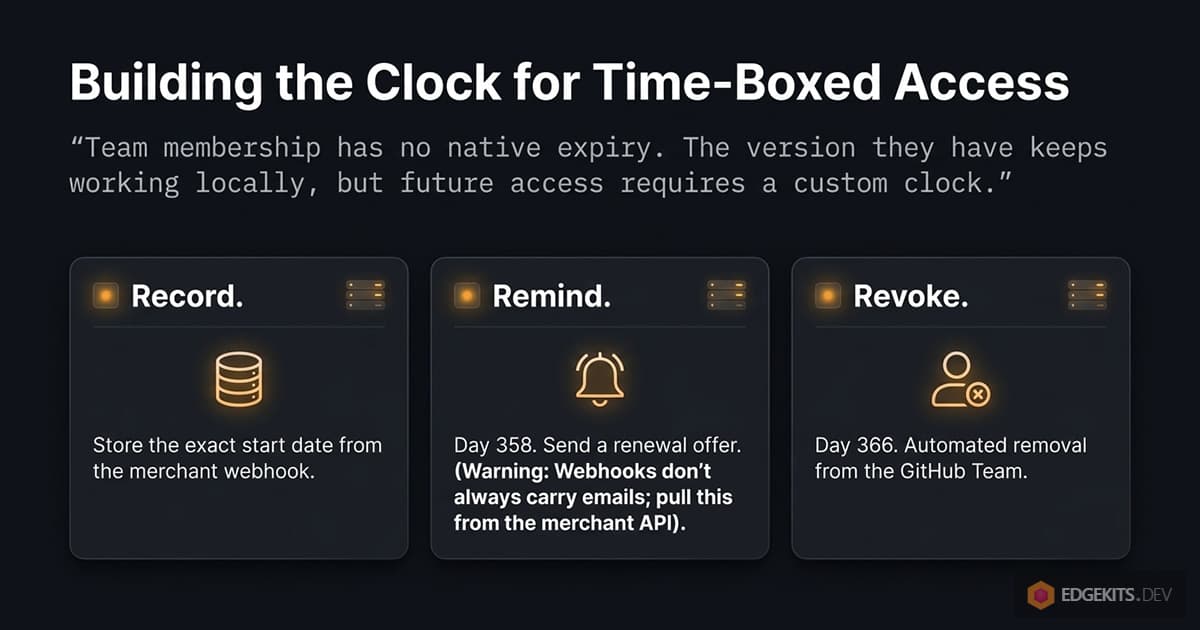
The reminder is the awkward part. A payment provider’s purchase webhook does not always carry the buyer’s email address, so a seller who wants to write to buyers later has to read it from the provider’s API, from the transaction records. Decide this before launch, because changing an update promise after people have paid for it is a support thread you will not win.
A refund policy for code the buyer can already clone
A refund cannot take code back. GitHub’s page on removing an outside collaborator says it plainly: forks of private repositories are deleted when you remove someone, and local clones stay. What a refund recovers is the future: the next release, the issues, the discussions.
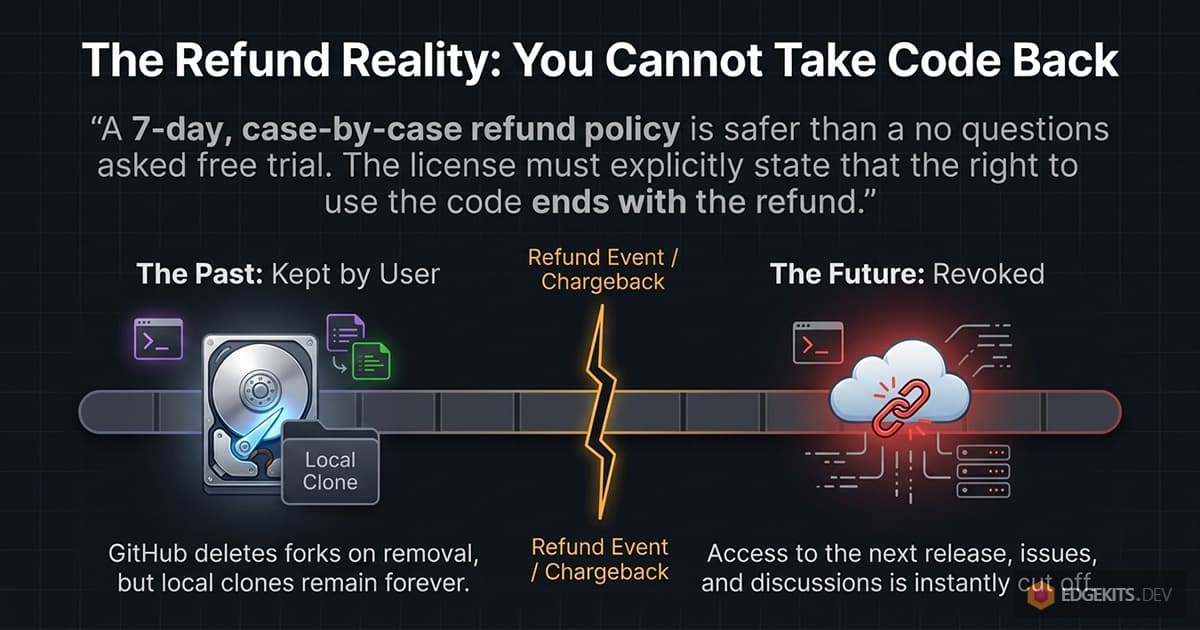
So write the policy around that. A long no-questions window turns your repository into a free trial with a download button, and a flat “no refunds” is hard to defend when a buyer paid twice or typed someone else’s username.
My own refund policy is seven days, case by case, and it may decline a request when access “has already been granted and extensively used”. Whatever window you pick, two things are not negotiable: the refund revokes repository access automatically, and the licence says the right to use the code ends with it.
Chargebacks need the same treatment, with less warning. The dispute event arrives from the payment provider, and access should go the moment it does, not when you next read your email.
What selling through GitHub costs you
This whole setup assumes every buyer has a GitHub account and accepts an invitation. For a boilerplate that is almost always true, but a buyer who does not use GitHub cannot receive the product at all, and a seller who wants those buyers too needs a second delivery path, such as a download.
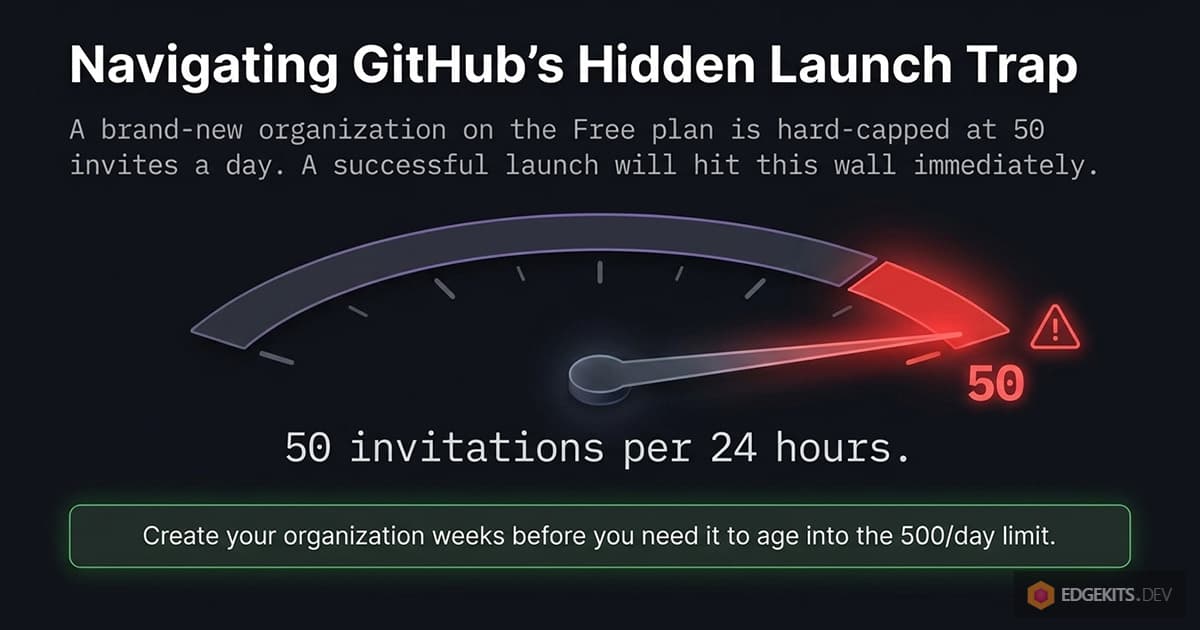
GitHub also becomes part of your checkout. Its organization invitation docs cap invitations at 50 per 24 hours for an organization younger than a month on the Free plan, and at 500 after that. A launch day on a brand-new organization can hit the first number, so create the organization weeks before you need it.
The organization is admin work that does not end at launch. Settings drift when you add a repository or a team, and a fine-grained token lives at most 366 days under the lifetime policy above, so delivery has a date on which it stops unless you rotate the token first.
And none of it protects the code. The licence and the revocation together decide what a buyer may do and what they stop receiving; they cannot recall a clone. If that is a problem for your product, the answer is in pricing and licence terms, not in GitHub settings.
Pick the delivery tool last
By now the requirements for the delivery tool are written down, and they come from your product rather than from a feature list. Tiers need a tool that grants team membership. Time-boxed updates need one that removes access on a schedule or on a lapsed subscription. Refunds and chargebacks need one that revokes on both.
The comparison guide from the introduction walks through every hosted platform, self-hosted tool and script against those requirements, and the cost calculator prices your two favourites for your country, price and volume.
RepoAccess is the tool I build for this: team invites on payment, revocation on refund and chargeback, running on your own Cloudflare account. The Stripe adapter is free in the open-source core, and Pro brings five more providers: Paddle, Lemon Squeezy, Gumroad, Razorpay and Telegram Stars.
Frequently Asked Questions
Should I sell a boilerplate from my personal GitHub account or from an organization?
From an organization on GitHub Free. A personal account can add unlimited collaborators, but it has no teams, so every tier and every product becomes a list of individual invitations you manage repo by repo. An organization lets one team stand for one tier: the buyer joins the team and sees every repository that team can read, including repositories you add later. On the Free plan buyers do not consume paid seats, while on GitHub Team every buyer does. The organization name is also what the buyer reads in the invitation email and in their GitHub sidebar, so name it after the product or the brand, not after yourself.
Which GitHub organization settings should I change before selling repo access?
Every buyer becomes a member of your organization, so set it up for customers, not colleagues. Set base permissions to No permission, otherwise every member can read every private repository and tiers mean nothing. Turn off repository creation and forking for members, and turn off admin repository permissions, especially changing repository visibility, so nobody can make a paid repository public. Give teams read access only. Do not require two-factor authentication for the organization: GitHub blocks members without 2FA from the organization's resources and removes outside collaborators without it, so enable 2FA on your own owner account instead. If your delivery tool uses a fine-grained token, scope it to the organization with the one permission it needs and note when it expires.
How do I offer Starter and Pro tiers of a boilerplate on GitHub?
Make tiers out of GitHub teams. Either one team per tier with overlapping repositories (the Pro team reads the Starter and the Pro repository), or one team per repository with each product granting a list of teams (Starter grants kit-starter, Pro grants kit-starter and kit-pro). The second shape handles upgrades and bundles better: an upgrade is a product that adds one team, and a buyer who is already a member gets no new invitation, only an added-to-team email from GitHub. The refund rule matters most: a refund removes the product that was refunded, not the buyer, so refunding an upgrade keeps the teams the first purchase still pays for. Avoid one repository per buyer, which multiplies every update.
Should I turn on Template repository for a paid boilerplate repo?
Only if you do not sell updates. The Template repository checkbox in the repository settings adds a Use this template button, and GitHub documents that anyone with read access can create a new repository from it, starting with a single commit and none of your history. That is a clean start for the buyer, but the copy shares no history with your repository, so pulling your next release into it makes git refuse the merge as unrelated histories until the buyer forces it and resolves every conflict by hand. The copy is also a new repository rather than a fork, so the rule that deletes forks when you remove someone does not describe it. For a kit sold with updates, leave the box off and document clone plus an upstream remote instead.
What licence should a paid boilerplate repository use?
Not MIT or any other permissive open-source licence. The MIT text grants every recipient the right to use, copy, modify, merge, publish, distribute, sublicense and sell copies, so a buyer could resell your kit the day they receive it. A paid boilerplate needs a commercial licence that answers five questions: who may use it, on how many projects, whether client work is allowed, what may never be redistributed (the source as a kit, template or competing boilerplate), and what remains once the update period ends. Put it in a LICENSE file at the repository root, reference it from every source file header, and have a lawyer in your jurisdiction read the final text.
How do buyers get updates to a boilerplate they bought on GitHub?
By pulling from your repository, so the setup has to make that easy. Tag every release with a semantic version, publish it as a GitHub Release with notes, and keep a CHANGELOG file that says what changed and what breaks. In the README, ask buyers to use Watch, then Custom, then Releases on the repository, which notifies them about releases only. Document the update path for a buyer who started a project from your code: add your repository as an upstream remote, fetch the tags, merge the tag they want. A buyer who cloned can do that; a buyer who used a template copy cannot do it cleanly.
What refund policy works for a boilerplate sold as GitHub repo access?
A short window and plain wording about what a refund can take back. When you remove someone from a private repository, GitHub deletes their forks but not the clones on their machine, so a refund recovers future access (the next release, the issues, the discussions) and never the code already downloaded. That makes a generous no-questions policy expensive and a no-refunds policy hard to defend at checkout. My own policy for RepoAccess Pro is seven days, case by case, and it may decline a request when access has already been granted and extensively used. Whatever the window, the refund must revoke the repository access automatically, and the licence should say that it ends with the refund.
When is a private GitHub repo the wrong way to deliver a boilerplate?
When your buyers do not live on GitHub, or when you need to recall what they received. Delivery through a private repository assumes every buyer has a GitHub account and accepts an invitation, so a buyer without one cannot receive the product unless you add a second path such as a download. GitHub also caps organization invitations at 50 per 24 hours for an organization younger than a month on the Free plan, which a launch day on a new organization can hit. And revocation only stops future updates: local clones stay with the buyer, so a repository cannot protect code the way a licence server or a hosted product can. For a boilerplate that buyers build on and update, those limits rarely bite.
What happens to buyer access when a twelve-month update period ends?
Only what you build. GitHub has no expiry for team membership, so a buyer promised twelve months of updates stays in the team for ever unless something removes them. Selling time-boxed updates needs three pieces: a record of each buyer's start date, a reminder about a week before the end with a renewal offer, and an automatic removal from the team if they do not renew. The reminder is the awkward part, because a payment webhook does not always carry the buyer's email address, so the seller has to read it from the merchant's API. The licence should state what the buyer keeps after the period: the version they have, still usable, without new updates.
Resources & Further Reading
- GitHub Docs - Creating a repository from a template
- GitHub Docs - Configuring notifications (watch releases)
- GitHub Docs - Requiring two-factor authentication in your organization
- GitHub Docs - Inviting users to join your organization (invitation limits)
- GitHub Docs - Removing an outside collaborator (forks and clones)
- Git - git-merge (--allow-unrelated-histories)
- Open Source Initiative - The MIT License
- RepoAccess Core - GitHub repository
- RepoAccess Pro - product page