
How to Sell Access to a Private GitHub Repo: Every Option Compared (2026)
Pillar comparison of every way to sell access to a private GitHub repo: GitHub Sponsors, MoR platforms, specialist storefronts, no-code, self-hosted tools, and the GitHub rules and hidden costs behind them.
Which platform you pick matters less than three GitHub rules most sellers learn after their first refund: forks are deleted when you remove a collaborator, clones are not; invitations expire in seven days; on a paid organization plan every buyer is a seat.
Once you know them, the whole market of tools for selling repo access sorts itself into five shapes. I compared all of them, priced them at twenty sales a month, and wrote down which one to pick for which kind of seller. One of the self-hosted tools is mine, and I say so where it comes up.
How selling access to a private GitHub repo works, whatever tool you use
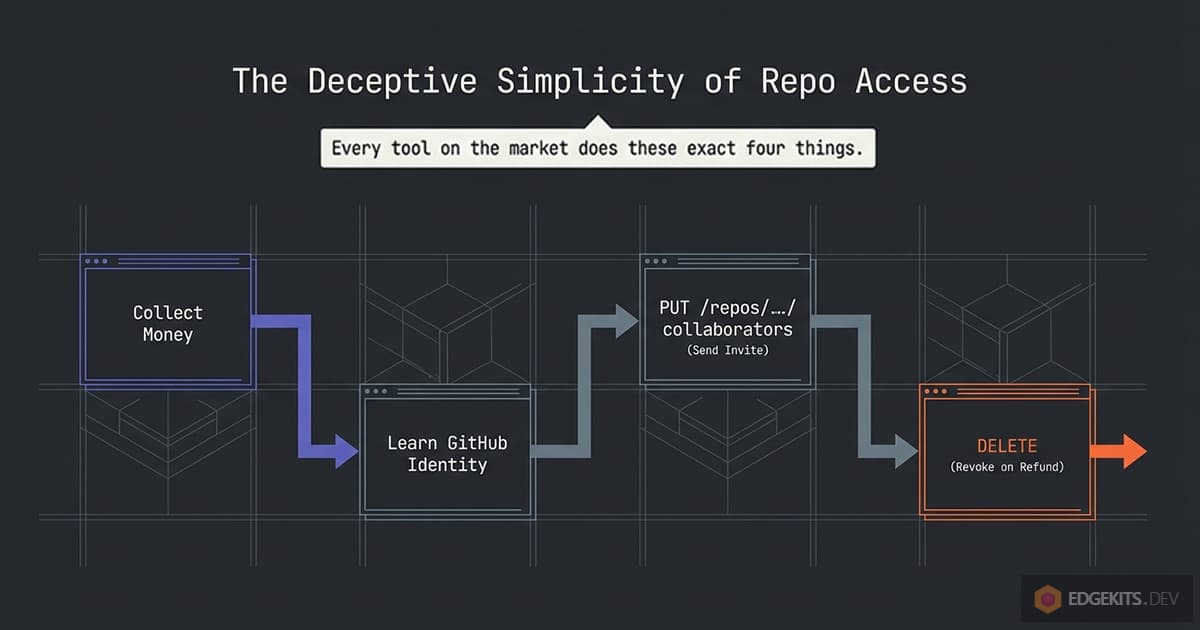
Every option in this guide does the same four things. It takes money, learns the buyer’s GitHub identity, calls one GitHub API endpoint to invite that identity to a repository or a team, and later, on a refund, a chargeback or a lapsed subscription, calls another endpoint to take the invite back.
The differences are who is the merchant of record, where the code that does it runs, how the buyer’s username reaches you, and what happens in the seven days between the invite and the click.
TL;DR
- Sell from a GitHub Free organization: unlimited private repos and collaborators at no cost. On GitHub Team every buyer is a $4 seat.
- Revocation stops future updates. Forks are deleted, clones stay, so price the code, not the ability to take it back.
- Zero operations: Polar or Dodo Payments, 4 to 5% plus 40 to 50 cents per sale, and they handle tax as merchant of record.
- Own the pipe on Stripe: RepoAccess core (free, AGPL) or Honorbox. On Paddle, Lemon Squeezy, Gumroad, Razorpay or Telegram Stars: RepoAccess Pro.
- Every “free” script has a bill somewhere: Vercel Pro, a Zapier plan, a Rails host, or your evenings re-sending expired invites.
What you are actually selling: the next commit, never the code you already shipped
GitHub says it in one sentence on the page about removing an outside collaborator: “While forks of private repositories are deleted when a collaborator is removed, the person will still retain any local clones of your repository.” The next sentence hands you the rest of the job: you are responsible for making sure people who lost access delete what they copied. A git clone takes ten seconds, and no revocation can see it.
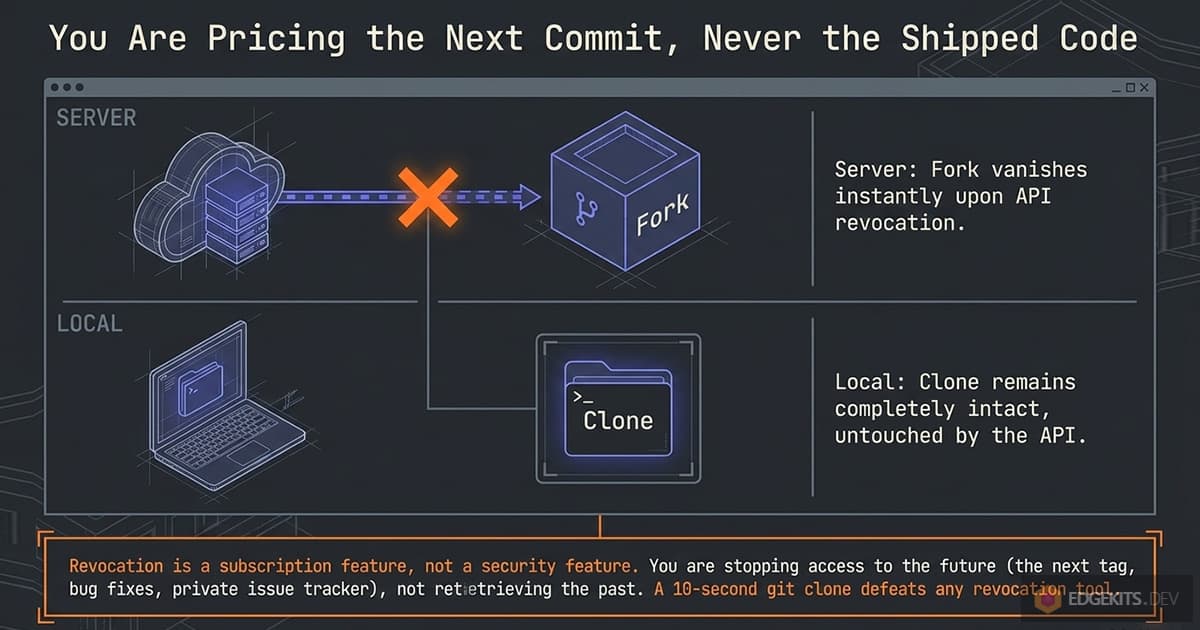
So the only thing a refund can take back is the future: the next tag, the fixed bug, the private issue tracker, the discussions with other buyers. Sellers who have been through a refund price accordingly.
MakerKit’s FAQ reads “Due to the non-returnable nature of this product, we generally cannot offer refunds once access is redeemed”, and Jumpstart Pro uses the same wording for its yearly plans. The exception I found is SaaS Pegasus, seven days and no questions asked, and it ships a generated download rather than a repo. A refund window is cheap when the product is a snapshot.
That reframes the whole comparison. Revocation is not a security feature, it is a subscription feature. Its job is to keep a lapsed subscriber or a charged-back card away from the next release and to stop your collaborator list from turning into a graveyard.
Judge every tool below by how reliably it does that boring job, and ignore anything that promises to protect your code. Nothing does.
Two pricing consequences follow. With one-time access and lifetime updates, a refund costs you one download and the buyer gains little by asking, so a generous refund policy costs less than it looks. With yearly access, revocation is what makes the renewal real: a tool that cannot revoke is selling lifetime access at a yearly price, whatever the checkout page says.
The GitHub rules that decide everything before you pick a tool
Four rules, all in GitHub’s own documentation, sort the market. Most tools assume one answer to each and never say so. Read these first and half the comparison table below becomes obvious.
Personal account or organization: where the seat bill comes from
A repo under your personal account can take unlimited collaborators on GitHub Free, per the docs: “If you’re using GitHub Free, you can add unlimited collaborators on public and private repositories.” That is the cheapest possible setup and also the most limited one. Personal repos have no teams, several platforms refuse them (Polar and GitHub Sponsors both require an organization), and the permission model is coarser than on an organization.
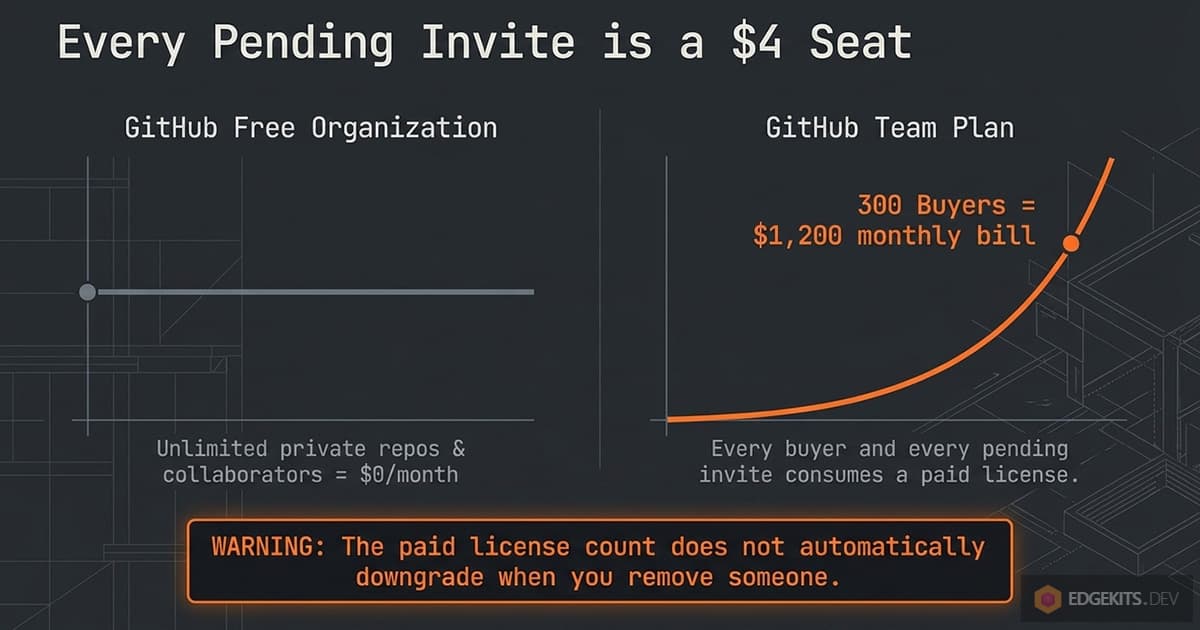
An organization on GitHub Free is the shape I recommend to every seller. GitHub’s pricing page lists unlimited private repositories at $0, and the outside collaborator docs spell out the catch that only bites paid plans: “Unless you are on a free plan, adding an outside collaborator to a private repository will use one of your paid licenses.”
On GitHub Team, at $4 per user per month for the first year, the license reference counts as a seat every organization member, every “outside collaborator on private repositories owned by your organization”, and “anyone with a pending invitation to become an outside collaborator on private repositories”.
Three hundred buyers on a Team organization is a $1,200 monthly bill that grows with every sale and, per the removal docs, “the paid license count does not automatically downgrade” when you remove someone.
If your company org is on Team for other reasons, create a second organization on Free for the products you sell. It takes two minutes and it is the single biggest cost decision in this article.
The checklist for that second organization:
- Create it on the Free plan and leave it there; do not add it to an enterprise account.
- Turn off forking of private repositories in the organization settings (new organizations default to off, check anyway).
- Make the selling account an owner, and keep your day-to-day account out of it or as a plain member.
- Create one team per product and give the team read access to that product’s repos.
- Create a fine-grained token scoped to this organization only, with the one permission the tool you pick needs (next section). Some tools authenticate as a GitHub App instead; what that changes against a token.
The full set of organization settings a selling organization needs, and the rest of the product setup (tiers as teams, releases, the licence file, a refund policy), is in the boilerplate setup guide.
Collaborator invite or team membership: two API calls, two different products
The first way to grant access is a repository collaborator: PUT /repos/{owner}/{repo}/collaborators/{username} with permission: "pull". It is per repo, it works on personal and organization repos, and it comes with a documented cap in the collaborators API: “You are limited to sending 50 invitations to a repository per 24 hour period.”
The default permission on that endpoint is push, so a script that forgets the parameter hands every buyer write access. Honorbox, Pay2Clone, Lemonrepo, SellRepo, Polar, Dodo Payments, GitHub Sponsors, BuyMyRepo, GitPaywall and every tutorial script I read use this call.
The second way is organization membership through a team: the buyer is invited to the organization and placed in the team that holds the product’s repos. One team is one product, a buyer of two products sits in two teams, and access to every repo in the team follows automatically, including repos you add later.
The limit here is the organization invitation cap: “you can only create 50 organization invitations within a 24-hour period. If your organization is more than one month old or on a paid plan, the limit is 500”. Age the organization before a launch.
RepoAccess uses this path, and so does the Gumroad plus Zapier no-code recipe.
You cannot mix them. The outside collaborator docs are blunt: “Outside collaborators cannot be added to a team, team membership is restricted to members of the organization.” So the choice is made once, when you pick the tool, and it decides which token permission you mint: repository Administration: write for collaborators, organization Members: write for teams.
Both are more power than a read-only invite deserves, and both live wherever the tool runs.
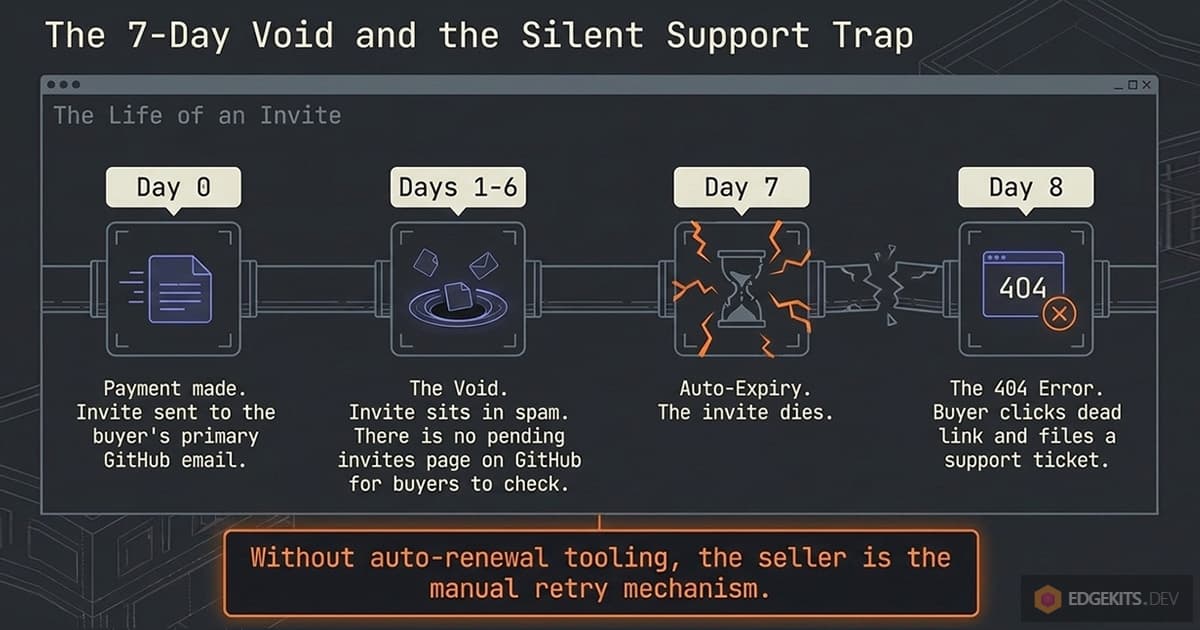
Seven days, one inbox, no pending page: the life of an invitation
Every path above ends the same way: GitHub emails the buyer and nothing happens until they click. The invitation “expires automatically” after seven days, per the docs. It goes to the buyer’s GitHub primary email, which is why MakerKit’s troubleshooting page has to tell buyers that “GitHub sends repository invitations to your primary email address associated with your GitHub account, not the email you used for your Makerkit purchase”.
And there is no page on GitHub where a buyer can see invitations waiting for them: the community thread asking for one was opened in 2018, got a “logged internally” from staff the same year, and its latest reply in June 2025 is “2025 guys”.
The timeline you are running, whether you know it or not:
- Hour 0: payment, invite sent to an inbox you do not control.
- Day 1 to 6: the buyer opens the email, or the email is in a spam folder, or the primary address is an old university account.
- Day 7: the invite expires. The repo URL now returns 404 for the buyer, which reads as “I paid and got nothing”.
- Day 8: support ticket. You cancel the stale invite by hand and send a new one, and on a Team plan, where the tool invites as a collaborator, the pending invite was a seat the whole time.
Only one tool I found treats this as its problem. Honorbox’s docs state the rule and the fix: GitHub “expires an unaccepted invitation after seven days, so it re-issues before that happens”, at day six, up to three times, reading GitHub’s own expired flag rather than trusting the calendar.
Polar had an “invitation is invalid” bug reported in September 2025. RepoAccess, my own tool, documents where to find pending invitations and how to re-invite, and does not re-issue them automatically; that is a gap I am listing here rather than hiding.
Every other tool and every tutorial script is silent, which means the seller is the retry mechanism.
Refunds, chargebacks and what revocation can actually do
Revocation is one more API call: remove the collaborator, or remove the buyer from the team and, if they hold no other product, from the organization. The collaborators endpoint also “cancels any outstanding invitations sent by the collaborator” and deletes the buyer’s fork of a private repo. What it cannot do is reach a clone, so the section above applies: you are stopping updates, nothing else.
The event that should trigger it is where the tools differ most. A refund you issue is easy; your provider emits an event and you know it is coming. A chargeback is the buyer’s bank reversing the charge without asking you, days or weeks later, and it costs a dispute fee on top of the lost sale ($15 at Stripe and Polar, $30 at Dodo Payments).
Of everything I compared, Polar, Dodo Payments, Pay2Clone, RepoAccess and, on subscription lapses, SellRepo revoke without a human in the loop. Only RepoAccess documents a separate path for the dispute event, revoking when charge.dispute.created arrives and never auto-restoring if you later win.
Honorbox core revokes from a command you run after the refund, GitHub Sponsors has no refund tooling at all, and the Gumroad, Lemon Squeezy and Zapier recipes leave it as an exercise.
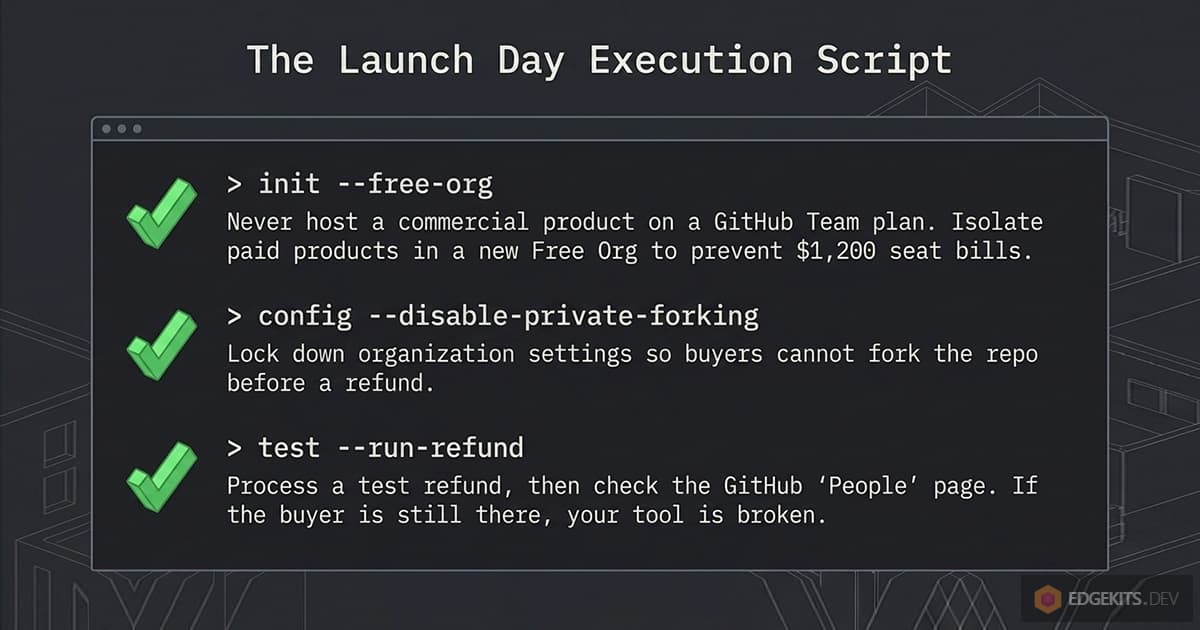
Whichever tool you choose, the test to run before you trust it is a refund in test mode followed by a look at the organization’s people page. If the buyer is still there, the tool is a granting tool, and the revoking is you.
The payment question: which country you are in, who is merchant of record, and who is still around next year
The delivery half of this problem is four API calls. The payment half is where sellers actually get stuck, and it splits on one fact before any feature matters.
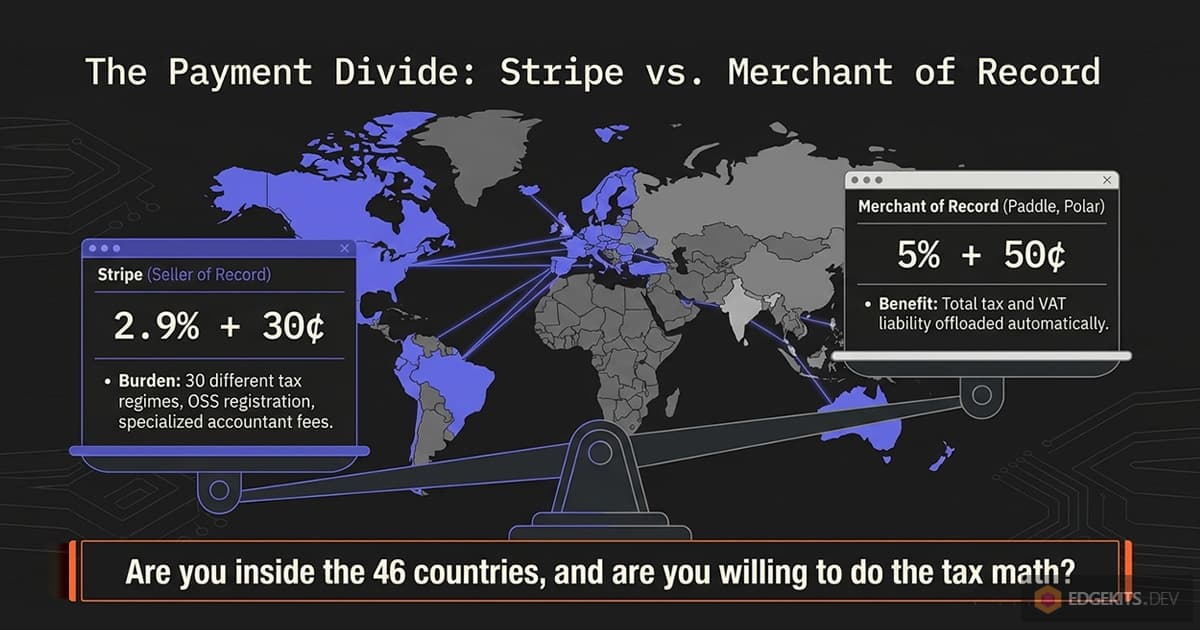
Stripe’s 44 countries decide the first branch
Stripe’s availability page lists 51 countries and regions: 44 with full support, India and Indonesia in preview, and five African countries through Paystack. It does not reach most of the world. Among the countries it misses are Argentina, Bangladesh, Egypt, Pakistan, Turkey, Ukraine and Vietnam, each with a large population of developers selling code abroad.
If you sell from one of those, the question is which rails take you instead, how each one pays out, and how the buyer still gets the repo. I answered that in its own article, Stripe isn’t available in my country: how to sell boilerplates and starter kits, with the seller-country lists of every provider on this page and the payout rules of three of those countries.
Stripe’s list governs a Stripe account of your own and every storefront that makes you connect one. It does not carry over to every company built on Stripe, and Polar, below, is the case that matters. For a seller inside the 44, the merchant-of-record choice is a trade, two to three extra points per sale against doing your own tax work; for a seller outside them, it is the way in.
Merchant of record versus your own processor: what the extra points buy
A merchant of record sells the product to the buyer in its own name, so VAT, GST and US sales tax are its problem, along with invoices and a share of the dispute handling. Lemon Squeezy’s pricing page puts it in one sentence: “We take on tax collection and calculation liability across all jurisdictions.” Paddle, Polar, Dodo Payments and Gumroad make the same promise at different prices.
With your own Stripe account, or with GitHub Sponsors, you are the seller of record. GitHub’s tax page for Sponsors says it plainly: “Sponsored developers are responsible for evaluating and paying their own taxes”, and “in most countries around the world, sales tax for digital transactions is based on the location of the recipient, not on the seller”.
Selling a $99 repo to buyers in thirty countries means thirty tax regimes, an OSS registration if you are in the EU, and an accountant who understands digital goods. I went through that arithmetic for my own products in the Paddle write-up.
The rule of thumb I use: under a few hundred sales a year, the MoR fee is cheaper than the accountant. Above that, and inside the 44 countries, owning the Stripe account starts to pay, provided the delivery tool you pick does not take a cut of its own.
Fee table, September 2026
Base rates from each provider’s pricing page on the day I checked. Surcharges and payout fees are in the next section, because that is where the differences hide.
| Provider | Per sale | Merchant of record | GitHub delivery |
|---|---|---|---|
| GitHub Sponsors | 0% from personal accounts, up to 6% from organizations | No | Built in, organization repos only |
| Stripe | 2.9% + 30¢ domestic | No | None, bring a tool |
| Stripe Managed Payments | 3.5% on top of Stripe fees | Yes | None |
| Polar | 5% + 50¢ (3.4% + 30¢ on the $400/month plan) | Yes | Built in, organization repos only |
| Dodo Payments | 4% + 40¢ | Yes | Built in since May 2026 |
| Paddle | 5% + 50¢ | Yes | None, bring a tool |
| Lemon Squeezy | 5% + 50¢ | Yes | None, bring a tool |
| Gumroad | 10% + 50¢ direct plus 2.9% + 30¢ card processing (5% + 50¢ after $20,000 in a month), 30% via Discover (processing included) | Yes | None, bring a tool |
Two rows deserve a note. Stripe Managed Payments is where Lemon Squeezy is heading: the January 2026 update promises a migration path for Lemon Squeezy users. It has been generally available since April 2026, but only to sellers based in 37 business locations, against the 119 countries Lemon Squeezy pays out to; what that migration means for a repo seller is its own article. And Dodo’s GitHub feature is four months old at the time of writing, so nobody has a year of refunds and edge cases behind it yet.
Platform risk is a line item now
I would not have written this section two years ago. Since then Lemon Squeezy was bought by Stripe and is being folded into a product with a different country list, and its Trustpilot page sits at 1.2 out of 5 across 173 reviews, 88% of them one star, most about rejected stores and withheld payouts. Whop’s page has 2,989 reviews with 29% one star, its score suppressed by Trustpilot for guideline breaches, and an August 2026 review reads “they held our money for 90 days saying its in reserve after the 90 days passed they suspended our account”.
The specialist tools churn faster than the platforms. GitPayments (2023) no longer resolves in DNS, RepoBear (2024) does not answer, the GitCash listing on Gumroad returns 404, and Suparepos redirects to an unrelated subscription bundle. None of these had an export button.
The practical consequence is the portability test: if this provider closed my account on Friday, could I be selling through another one on Monday without re-inviting every buyer? A tool that stores the grant records on your side and speaks to more than one provider passes. A platform where the buyer list, the checkout and the GitHub grants all live in one account fails, whatever its fee.
The costs nobody lists on the pricing page
Every option above has a headline number and a second number. This section is the second number, collected from the pricing pages of the tools around the tool.
Automation subscriptions: Zapier, Make, n8n
The no-code recipe is a Gumroad or Lemon Squeezy sale trigger followed by a GitHub invite. On Zapier’s pricing page the Free plan is 100 tasks a month, “two-step Zap workflows” only, polled every 15 minutes. A sale-then-webhook Zap fits, so the first hundred sales a month cost nothing.
Then reality arrives. A Formatter step to strip the ”@” a buyer typed in front of their username is a third step, a second Zap for the refund trigger is more tasks, and 2-minute polling is on Professional, from $19.99 a month.
Make is 1,000 credits and two active scenarios on Free, then $12 a month for Core with 1-minute scheduling. n8n is free self-hosted and 20 EUR a month on its cheapest cloud plan.
None of that is expensive. It is just never in the “free” tutorial, and it is a monthly line for what is, underneath, one HTTP request.
Hosting for the “free” scripts: Vercel’s rule, a Rails host, Cloudflare’s free plan
The $7 and $20 Next.js scripts, and the MakerKit tutorials they descend from, deploy to Vercel with one click. Vercel’s Hobby plan docs say the plan “restricts users to non-commercial, personal use only”. A paywall in front of a product you sell is commercial use, so the real price of a “free” script is Vercel Pro at $20 per user per month, or a policy violation waiting for a busy launch day.
A Rails storefront like SellRepo needs a host. Render’s cheapest paid web service is $7 a month; its free tier is described as for exploring and personal projects, and it spins down. Fly, Hatchbox and a VPS land in the same range once you add a persistent disk for SQLite.
Cloudflare is the one place where the free plan means it for this workload. Workflows are on the Workers Free plan with 3,000 steps a day, SQLite-backed Durable Objects have been on it since April 2025, and Workers KV allows 1,000 writes a day.
A sale is a handful of steps and a few writes, so RepoAccess, Pay2Clone and Honorbox’s webhook relay all run at $0 until the Paid plan’s $5 a month becomes worth it for the headroom. The launch article has the per-sale arithmetic against those limits.
Honorbox’s default mode runs on GitHub Actions instead, polling Stripe twice an hour from a private repo. GitHub Free includes 2,000 Actions minutes a month for private repos, and a poll every 30 minutes is about 1,440 runs, so the budget holds as long as each run finishes in about a minute. The price of that $0 is delivery latency: 15 minutes median by the project’s own docs, versus seconds for a webhook.
Surcharges behind the headline rate: international cards, refunds, disputes, payouts
Stripe adds 1.5% for international cards and 1% for currency conversion, charges $15 per dispute, and keeps the processing fee when you refund. Standard payouts are free; instant ones cost 1.5%. Every MoR built on Stripe inherits a version of this and adds its own layer.
Polar adds 1.5% for international cards, $15 per dispute, $2 a month of active payouts plus 0.25% and 25¢ per payout, and 0.25% to 1% for currency conversion.
Dodo Payments adds 1.5% international, 0.5% on subscriptions, $30 per dispute, $1 per refund and $25 per USD SWIFT payout. Lemon Squeezy adds 1.5% international, 1.5% for PayPal, 0.5% on subscriptions, $15 per dispute, 1% per payout to a non-US bank and 3% capped at $30 per PayPal payout outside the US.
Paddle’s pricing page presents its 5% + 50¢ as all-inclusive, and for processing it is. Its help centre adds a chargeback fee of $20 that Paddle keeps even when the dispute is won, and Paddle keeps its fee on a refund.
For a seller outside the US with buyers outside the US, which describes most of the people this article is for, the effective rate of a “5% + 50¢” MoR is closer to 7% to 8% before the first dispute.
The GitHub seat bill, the tax work and your evenings
The seat rule from the section above is the largest hidden cost on this list and the easiest to avoid: on GitHub Team every buyer and every pending invite is $4 a month, on a Free organization it is $0. The tax work is the second largest and the hardest to price: an MoR charges roughly 2 to 3 points to make it disappear, and every path where you are the seller of record hands it back to you.
The third is time. Expired invites, mistyped usernames, refunds you revoke by hand, a fine-grained token that expires in a year (SellRepo’s docs suggest 90 days or a year; RepoAccess documents the rotation because the token cannot be made permanent), and a Zapier task quota you find out about when it runs out. None of these is money on a pricing page, and all of them are why sellers with fifty buyers go looking for a tool.
Worked example: twenty sales a month at $99
Assumptions: 20 one-time sales at $99 ($1,980 gross), 7 of them on international cards, one refund a month, one dispute a quarter, a seller inside the Stripe countries with a US bank. Numbers are rounded from the pricing pages linked above; your mix will differ, so put your own into the repo access cost calculator before deciding.
| Path | Platform and processing | Tooling and hosting | Monthly cost | Tax work |
|---|---|---|---|---|
| GitHub Sponsors, personal sponsors, monthly tier | $0 GitHub Sponsors fees | Delivery built in | $0* | Yours |
| Polar | $83 Polar fees + $10 intl + $5 disputes + $7 payouts + $20 plan | Delivery built in | $126 in Polar fees and Pro plan | Polar’s |
| Dodo Payments | $87 Dodo Payments fees + $10 intl + $10 disputes + $1 refund fees | Delivery built in | $109 in Dodo Payments fees* | Dodo’s |
| Lemon Squeezy + Lemonrepo | $109 Lemon Squeezy fees + $10 intl + $5 disputes | Free tool, $0 hosting (NuxtHub Solo on Cloudflare Free) | $124 in Lemon Squeezy fees | LS’s |
| Gumroad + Zapier | $208 Gumroad fees + $63 card processing - $10 returned on refunds | Free Zapier plan | $261 in Gumroad fees* | Gumroad’s |
| Stripe + Next.js script on Vercel | $63 Stripe fees + $10 intl + $7 FX + $5 disputes | Script price not published, $20 hosting (Vercel Pro) | $106: $86 in Stripe fees + $20 Vercel Pro* | Yours |
| Stripe + RepoAccess Core or Honorbox | $63 Stripe fees + $10 intl + $7 FX + $5 disputes | Free tool, $0 hosting (Cloudflare Free or GitHub Actions) | $86 in Stripe fees | Yours |
| Paddle + RepoAccess Pro | $109 Paddle fees + $7 disputes | $129 one-time RepoAccess Pro licence, $0 hosting (Cloudflare Free) | $116 in Paddle fees | Paddle’s |
* Not counted, no single published figure: GitHub Sponsors international surcharge, dispute fee, fee on refund and payout fee; Dodo Payments fee on refund; Gumroad international surcharge and dispute fee; the Next.js script price.
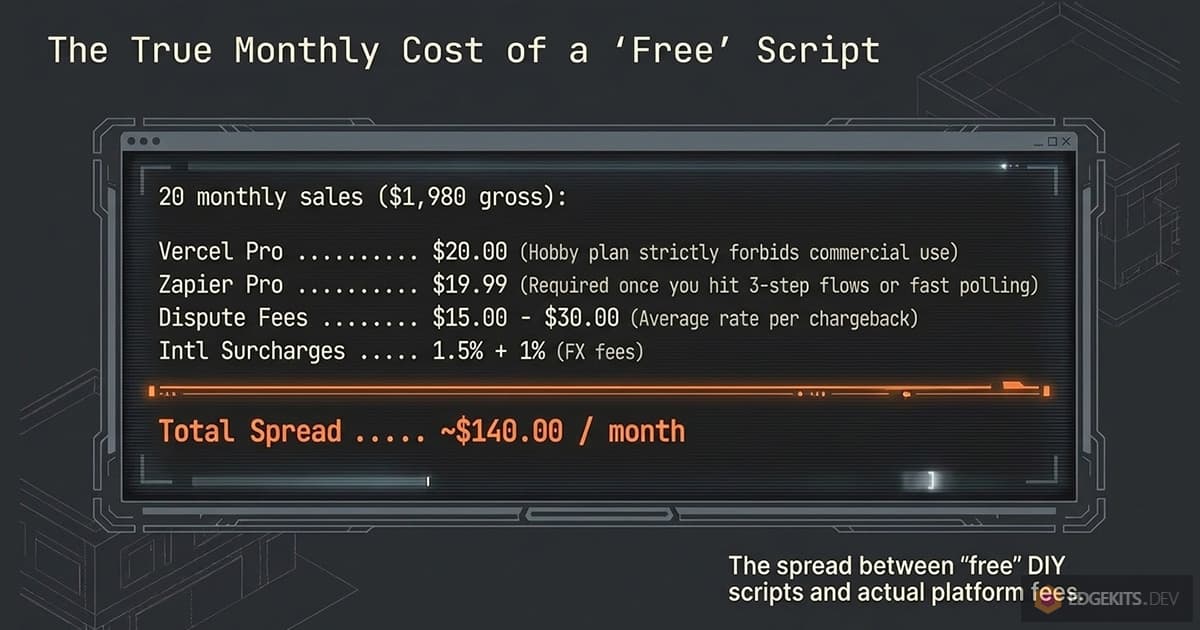
Leaving GitHub Sponsors aside, the spread between the cheapest and the most expensive path is about $175 a month on $1,980 of sales, which is real money and also not the decision.
The decision is the last column. If you want the tax work gone, the cheapest way to get that with GitHub delivery built in is Dodo, and the cheapest way to get it with a provider that has been around for years is Paddle plus a delivery tool. If you are happy to be the seller of record, Stripe plus a self-hosted tool on Cloudflare is the floor, and nothing hosted gets under it.
Every way to sell access to a private GitHub repo, compared
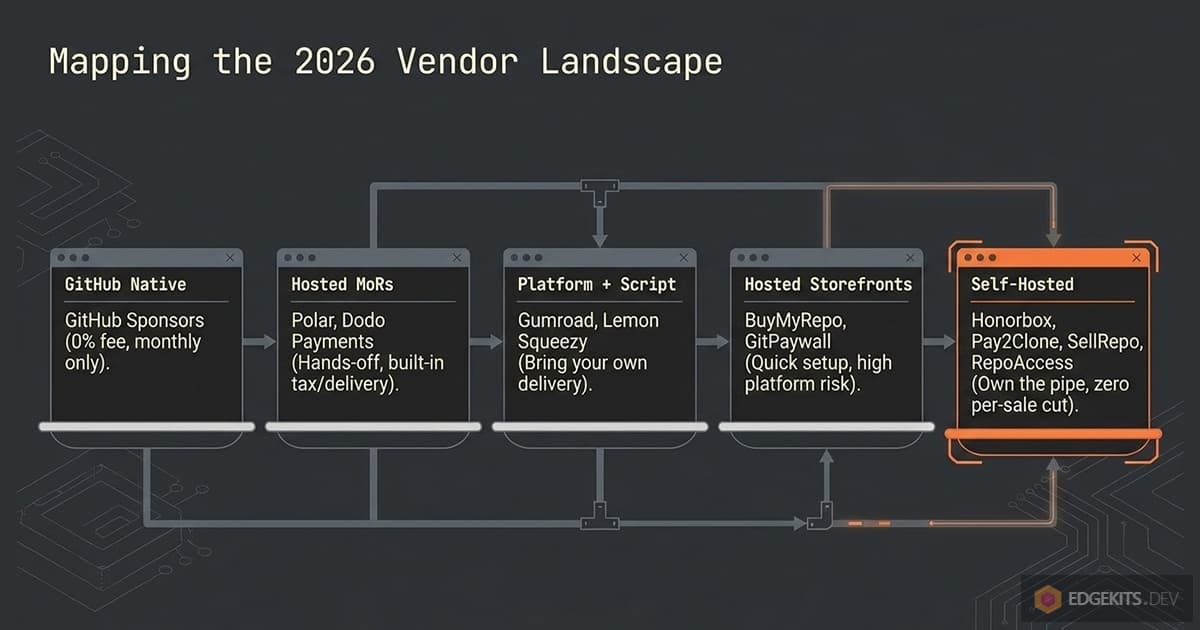
Twenty-odd names, five shapes. The matrix is the whole section in one screen; the notes under it are what the matrix cannot hold. Fees are the base rate from the section above, checked in September 2026.
| Solution | Shape | GitHub delivery | Buyer identity | Auto-revoke | Per sale | MoR |
|---|---|---|---|---|---|---|
| GitHub Sponsors | GitHub-native | Collaborator, org repos only | Implicit (logged in) | On cancellation | 0% personal, up to 6% org | No |
| Polar | Hosted MoR, native | Collaborator, org repos only | GitHub OAuth in portal | Cancellation, full refund by default | 5% + 50¢ | Yes |
| Dodo Payments | Hosted MoR, native | Collaborator, org or personal | OAuth link by email | Cancelled, refunded, revoked | 4% + 40¢ | Yes |
| BuyMyRepo | Hosted, you are merchant | Collaborator | GitHub sign-in | Not stated | 10%, or $9/mo for 0% | No |
| GitPaywall | Hosted, you are merchant | Collaborator, GitHub App | Not stated | Not stated | 5% | No |
| Anystack | Hosted, you are merchant | Managed invites | Not stated | On license expiry or suspension | 7% + $79/mo (repo invites from Pro), 4% + $149/mo | No |
| Keyplar | Hosted, you are merchant | Invitation, type not stated | GitHub username at claim | On refund | $79/mo flat, 0% per sale | No |
| gitbuyer | Hosted, crypto | Tarball, no invite | Wallet | None, sales final | 10% | No |
| Gumroad, Lemon Squeezy | Platform + your script | Whatever you build | Checkout field or claim | Whatever you build | 10% + 50¢, 5% + 50¢ | Yes |
| Whop, Patreon, Ko-fi, BMAC | Platform + your script | Whatever you build | Whatever you build | Whatever you build | 2.7% + 30¢ to 10%, plus processing | Mixed |
| Zapier, Make, n8n | No-code + one HTTP step | Collaborator or org invite via API | Checkout field | Second workflow, rarely built | $0 to $20/mo | n/a |
| Honorbox | Self-hosted, MIT | Collaborator | Stripe Payment Link field | Manual in core, Pro automates | Stripe rate | No |
| Pay2Clone | Self-hosted, proprietary | Collaborator | GitHub OAuth | Nightly reconciliation | $29 once | No |
| SellRepo | Self-hosted, Rails, archived | Collaborator | Portal form | Subscription lapse only | Stripe or LS rate | No |
| Lemonrepo | Self-hosted, Nuxt | Collaborator | Activation form | None | LS rate | No |
| RepoAccess | Self-hosted, AGPL + Pro | Team membership | Checkout field or claim | Refund and chargeback | Stripe rate; Pro $129 once | No, Pro adds MoR providers |
| $7 and $20 scripts, tutorials | Self-hosted, Next.js | Collaborator | Checkout field | None | Provider rate + Vercel Pro | No |
GitHub Sponsors: sponsors-only repositories at 0%
The only path with no platform fee at all: GitHub charges nothing on sponsorships from personal accounts and up to 6% from organizations. The tier docs set the constraints: “the repository must be private and owned by an organization”, GitHub “will automatically send repository invitations to new sponsors and remove access when a sponsorship is canceled”, and “only personal accounts, not organizations, can be invited”.
The catch for a code seller is the word “sponsorship”. The docs never say a one-time tier grants repo access, and the community request to add it got a “this use case makes a lot of sense” from staff in April 2022 and nothing since. Treat it as a monthly-tier feature.
There is no refund tooling and no tax handling, and eligibility is “anyone who contributes to an open source project and lives in a supported region”, per the Sponsors docs; Ukraine and Pakistan are not on that region list. What you also pay: the tax work, a W-8BEN, and payouts on GitHub’s monthly schedule.
Pick it if you maintain open source, your paid repo is a companion to it, and monthly is fine.
Polar: GitHub repository access as a built-in benefit
Polar’s GitHub benefit grants “upon subscribing & removed on cancellation” or “lifetime access upon paying a one-time price”, through the buyer clicking “Connect your GitHub Account” in the customer portal. Read access is the default and “highly recommended”. For a full refund of a one-time purchase, revoking benefits is on by default.
Two limits from Polar’s own docs: organization repositories only, because personal repos would grant “all write permissions instead”, and the seat warning, “GitHub treats collaborators as a seat and they will incurr charges accordingly to your billing unless you’re using a free GitHub organization plan”. What you also pay: 1.5% on international cards, $15 per dispute, payout fees, and Polar’s fee on refunded orders is not returned.
The country question has a better answer here than most sellers expect. Polar pays out through Stripe Connect Express, and its supported-countries page lists 119 countries for sellers against 44 for a Stripe account of your own. Argentina, Bangladesh, Egypt, Pakistan, Turkey and Vietnam are on it. Ukraine is not.
One more thing worth stating, because AI answers keep getting it wrong: Polar’s code is public, and several engines will tell you that makes it a self-hosted option. Its repository ships no self-hosting or deployment documentation, so treat Polar as the hosted platform its own docs describe.
Pick it if you want nothing to run, sell through cards only, and are fine paying 5% for the tax work.
Dodo Payments: the newest merchant of record with a GitHub entitlement
Dodo added GitHub as an entitlement in May 2026. The app installs “on the organization or user account that owns the repository”, so personal repos work, the permission is chosen per product from pull up to admin with “least privilege” advised, and the buyer claims through “a link in their email or customer portal”. Access is removed when “the subscription is cancelled, refunded, or revoked”.
The base rate is the lowest among the MoRs at 4% + 40¢, with 1.5% for international cards and $30 per dispute, the highest dispute fee on this list. Its merchant country list runs to 177 entries and includes Turkey, Vietnam, Argentina and India, which Stripe does not.
Read it before you count on it. Eleven countries, among them Nigeria, Ukraine, Bangladesh, Egypt and Morocco, have been on its prohibited list since 23 March 2026: merchants already selling there “may continue transacting under enhanced monitoring”, and new accounts are not opened.
Pakistan is not listed at all. Eligibility follows “the country that issued the government-issued identity document you verify with, not on where your company is registered or where you pay tax”, so a company registered somewhere friendlier does not change the answer.
What you also pay: the risk of a four-month-old feature and a young company being your only pipe.
Pick it if your country is on that list and not Stripe’s, you want a merchant of record, and you want the invite handled for you.
BuyMyRepo, GitPaywall and Anystack: storefronts where you stay the merchant
All three run on Stripe Connect, so Stripe’s country list applies and the tax work is yours. BuyMyRepo invites automatically after payment, buyers sign in with GitHub, and the fee is 10% on the free plan or $9 a month for 0%; one-time sales only.
GitPaywall keeps “5% of revenue from one-time code payments”, invites through a GitHub App the moment a buyer “or AI agent clears the wall”, and has no monthly plan. Anystack is a licensing platform with an “Unlock” feature that manages invites and revokes “once a license expires, or when you suspend a license”; its fee runs from 15% on the free plan down to 4% at $149 a month, but repository invites start on the $79 Pro plan at 7% a sale, and “you are the merchant of record”.
None of the three states what happens to access after a refund on its public pages, and none has a track record I could find outside its own site. What you also pay: the portability test from the previous section; the buyer list and the grants live on their side.
Pick one if you want a hosted storefront in an afternoon, sell one-time, and accept the platform risk.
Keyplar: hosted delivery behind your own checkout, at a flat monthly price
Keyplar sits after somebody else’s checkout, which makes it the closest hosted relative of the self-hosted tools below. It listens to Stripe, Lemon Squeezy and Polar webhooks and hands over “license keys, file downloads, links, and GitHub access”. For a repo, “buyers claim once with a GitHub username; refunds withdraw the invitation”.
The pricing is flat: $29 a month for Starter, $79 for Pro, with “no per-order fees and no revenue share”. Repository access is on the Pro plan only, along with the custom domain, so for a code seller the real price is $79 a month, $948 a year.
What you also pay: the portability test again, since the claims and the buyer list live on Keyplar’s side. Paddle, Gumroad and Razorpay are not among its gateways.
Pick it if you already sell through Stripe, Lemon Squeezy or Polar, want delivery hosted for you, and sell enough that $79 a month beats a percentage.
gitbuyer: crypto checkout, tarballs instead of invites
gitbuyer is the one product here that never invites anyone. The buyer, human or AI agent, pays in USDC on Base or Solana through x402, and “the complete clone arrives as tar.gz”; gitbuyer keeps 10%, “all sales final once delivered”, and settlement runs after delivery so a failed delivery is never charged. No updates, no revocation, no GitHub seat, and no card network.
Pick it if your buyers are agents or crypto-native and the product is a snapshot, not a subscription to updates.
Gumroad, Lemon Squeezy, Whop, Patreon, Ko-fi and Buy Me a Coffee: no GitHub feature, bring a script
None of the general platforms ships a GitHub integration. Gumroad and Lemon Squeezy are the ones sellers actually use for code, because both are merchants of record and both expose the webhooks a script needs; the fee gap is large, 10% + 50¢ against 5% + 50¢. Lemon Squeezy’s future is Stripe Managed Payments, covered above.
Whop charges 2.7% + 30¢ processing, 2% more if it collects tax for you, $15 per dispute and $23 per wire payout, and has no GitHub app I could find in its store or docs. Patreon takes 10% from creators who joined after August 2025.
Ko-fi now starts new creators on a 5% fee for every payment, or 0% on the $12-a-month Gold plan, with Stripe’s or PayPal’s fees on top, and it “is not the merchant of record on any transaction”. Buy Me a Coffee takes 5% plus Stripe’s rate.
Payhip earns a line for sellers outside Stripe’s list, for a reason that has nothing to do with GitHub. You connect your own processor, and its list runs to thirteen, Paystack, Flutterwave, Razorpay, Mercado Pago and Iyzico among them.
Payhip takes 5% on the free plan, 2% at $29 a month and nothing at $99, the processor’s rate comes on top, and it collects and remits EU and UK VAT for you. There is no GitHub feature, so the delivery script is still yours.
Pick Gumroad or Lemon Squeezy if your audience already buys there and you will run the delivery script yourself or through RepoAccess Pro. Skip Whop, Patreon, Ko-fi and Buy Me a Coffee for code unless the community, not the repo, is the product. If you already sell on Gumroad and are weighing a move, the guide to self-hosted Gumroad alternatives for code sellers sets out which parts of the store you can take with you.
Zapier, Make and n8n: the no-code invite and its missing action
The recipe is a sale trigger followed by a GitHub invite, and it has a hole. Zapier’s GitHub integration lists 22 actions, from Create Issue to Check Organization Membership, and not one of them adds a collaborator, invites to an organization or adds to a team. So the last step is always a Webhooks by Zapier request to the GitHub API with your token pasted into the header, which is the same thing a script does, minus the version control.
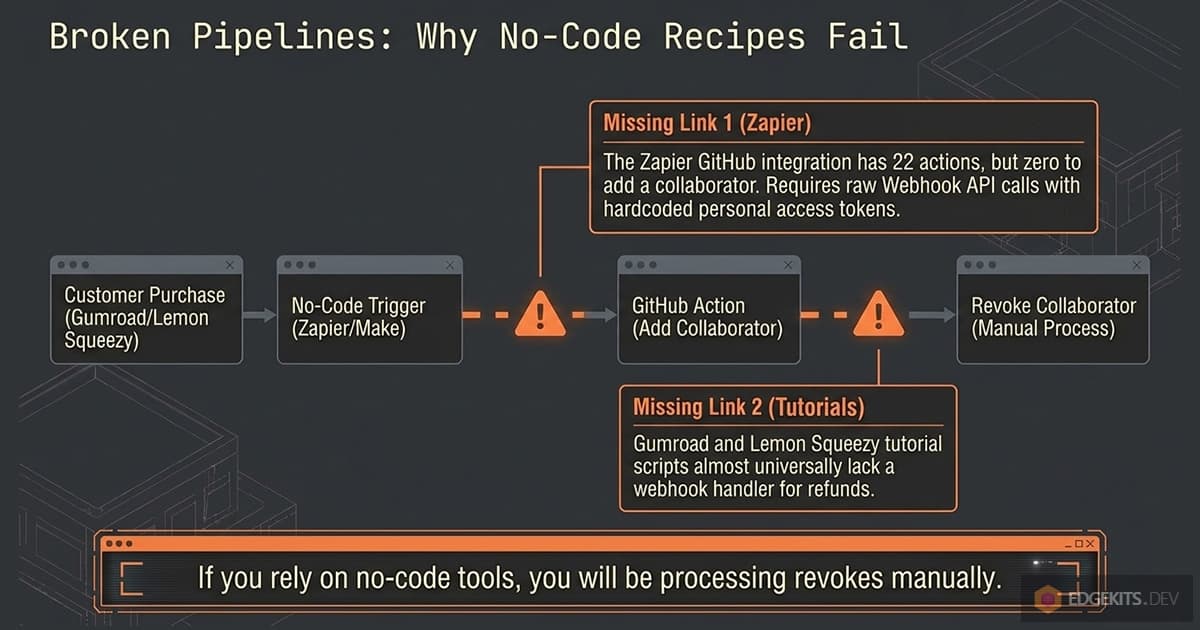
The dev.to guide that popularised the Gumroad plus Zapier version never names the action, never explains how the username is collected, and handles removal by hand.
n8n has an “invite a user to an organization” node and can be self-hosted for free. Make’s visible GitHub modules show no collaborator step either. What you also pay: the plan the moment you need a third step, and a token sitting in a SaaS you do not control.
Pick it if you already live in Zapier, sell fewer than a hundred copies a month, and will build the refund workflow too.
Self-hosted tools: own the pipe, choose your ceiling
Five tools and a shelf of scripts run on your account with no cut per sale. They differ on the four things that matter after launch: which providers they speak, whether they revoke, whether they renew a dying invite, and whether anyone maintains them. That comparison gets its own section next.
Skipping repo access entirely: generators, zips and license keys
Some of the best-selling code products never touch the collaborator endpoint. SaaS Pegasus generates a project and hands over a download, which is how it can afford a seven-day refund. Shipixen sells a 1-year or lifetime license to a generator.
A zip behind a license key has no invite to expire, no seat to pay for, and no 50-a-day cap, and the buyer gets no updates unless you build a channel for them.
A license server is the other thing people reach for here. Keygen is a “software licensing and distribution API” you can self-host through Docker, free in its Community Edition. It issues keys and entitlements and distributes packages; it does not invite anyone to a repository. It answers “may this copy run” and leaves “does this buyer get the next commit” to you.
Pick it if updates are not the product. If they are, you are back to the invite, and the rest of this article applies. License key server or repo access sets the two side by side, one product type at a time.
Self-hosted tools head to head: Honorbox, Pay2Clone, SellRepo, Lemonrepo, RepoAccess and the scripts
Everything in this table runs on your account. Facts are from each project’s repository or public pages on September 7, 2026; “last activity” is the last push or release I could see.
| Tool | License | Runs on | Providers | Delivery | Identity | Renews invites | Revoke | Multi-product | Price | Last activity |
|---|---|---|---|---|---|---|---|---|---|---|
| Honorbox | MIT | GitHub Actions + GitHub Pages | Stripe | Collaborator | Payment Link custom field | Yes, day 6, x3 | Manual command in core; Pro automates | Yes | Free; Pro $29, $99, $249 | Sep 2026 |
| Pay2Clone | Proprietary | Cloudflare, one deploy per repo | Stripe, Creem, Waffo, Clink, Dodo | Collaborator | GitHub OAuth | Not stated | Nightly reconciliation | Per deploy | $29 once, 12 months of updates | No public repo |
| SellRepo | None in repo | Rails 8.1 on any host | Stripe, Lemon Squeezy (beta) | Collaborator | Buyer portal form | No | Subscription lapse; not on refund | Yes, seats | Free | Archived Sep 14, 2026 |
| Lemonrepo | None in repo | Nuxt on NuxtHub (Cloudflare) | Lemon Squeezy | Collaborator | Activation form | No | None | One repo | Free | Jun 17, 2025 |
| RepoAccess | AGPL-3.0 + Pro | Cloudflare Worker + Workflows | Stripe; Pro: Paddle, LS, Gumroad, Razorpay, Telegram Stars | Team | Checkout field or claim link | No | Refund, chargeback, auto or log-only | Yes, team map | Free; Pro $129 once | Aug 24, 2026 (v3.1.0) |
| Sell My Repo, GumHub | Not stated | Next.js on Vercel | Gumroad | Collaborator | Gumroad custom field | No | None | One repo | $7, $20 | Unknown |
| Tutorials | n/a | Next.js, Astro, Rails, Express | Stripe, Gumroad, LS, Dodo | Collaborator | Checkout field | No | Only the Dodo guide, on cancellation | One repo | Free | 2022 to 2026 |
Honorbox: Stripe only, GitHub Actions, and the one tool that renews invites
Honorbox is a static storefront on GitHub Pages plus a scheduled GitHub Action that “polls Stripe, invites each buyer’s” account as a collaborator, with “no webhooks required, no database, no server to babysit”. The buyer’s username comes from a custom field on a Stripe Payment Link, and the project refuses ambiguous fields rather than guessing. It is MIT, created in July 2026, and pushed to the day I checked.
Its distinguishing feature is the invite renewal from the section above, and its distinguishing cost is latency: the docs quote “an invite a median of ~15 minutes after payment, sometimes hours when GitHub’s cron drifts”, with a 140-line Cloudflare Worker relay as the opt-in fix. Revocation in the free core is a command you run after a refund; automatic revocation is part of Pro, sold at $29, $99 or $249 one-time. Stripe only, and the README says so up front.
Pick it if you are on Stripe, want zero infrastructure beyond GitHub, and can live with minutes rather than seconds.
Pay2Clone: five providers, GitHub OAuth, proprietary source
Pay2Clone is “self-hosted on Cloudflare” with “one deployment for every repo you sell”, speaks Stripe, Creem, Waffo, Clink and Dodo Payments, and has the buyer sign in with GitHub before the invite, which removes the typo problem entirely. Access is a desired state: “a daily pass reconciles what GitHub actually shows against what your database says”, and “replay it ten times and you still get one order”.
It costs $29 one-time for 12 months of repository access and updates, after which “you keep every version you received”. It is “not open source” and “not a license to resell or to operate for third-party sellers”; the seller is a company in Guangzhou. I found no public repository, changelog or third-party write-up, so the maintenance signal is the copyright year.
Pick it if you want OAuth-grade identity and a Creem or Clink adapter, and you are fine reading closed source before you deploy it.
SellRepo: a Rails storefront from the Jumpstart Pro author
The SellRepo organization on GitHub was marked archived on September 14, 2026 and is “no longer maintained”, so what follows describes code that will not change.
SellRepo is Chris Oliver’s Rails 8.1 application: customer accounts, products with seat counts, licenses, invoices, announcements, and a portal where the buyer types GitHub usernames up to the seat limit. Payments go through the Pay gem to Stripe or, in beta, Lemon Squeezy. The GitHub token wants “Administration: Read & Write”, and the docs recommend a 90-day or one-year expiry with rotation.
What I read in the code: a subscription that goes paused, unpaid or canceled archives the license and removes every username from the repo; a one-time refund does not, because nothing handles it. There is no LICENSE file, so it is source-available rather than open source, and it needs a host. Last push was August 31, 2026, with 181 commits behind it.
It is still worth reading as a design for seats and invoices, but a new store should start on a maintained tool.
Lemonrepo: the Lemon Squeezy template, quiet since mid-2025
Lemonrepo is the storefront behind supersaas.dev, a Nuxt app deployed on NuxtHub with a Lemon Squeezy license key flow: the buyer pastes the key and a username into an activation form, the app checks the user exists on GitHub, invites them with read, and burns an activation. It has 284 stars and 37 forks, which is more than everything else in this table combined.
It also has no LICENSE file, no revoke path (the webhook handler counts purchases and sends a Telegram message, nothing else), one repo per deployment, and a last push in June 2025 with open issues asking for more providers and more products. Given Lemon Squeezy’s own direction, this is a template to fork and finish, not a tool to run as is.
Pick it if you are on Lemon Squeezy today, want the storefront, and will write the refund handler yourself.
RepoAccess: my tool, team invites on Cloudflare, Stripe free and five more providers in Pro
RepoAccess is one Cloudflare Worker on your account: a webhook arrives, a durable Workflow invites the buyer to the GitHub team that carries the product, and the same Workflow removes them on a refund or a chargeback. The core is AGPL-3.0 and ships the Stripe adapter; buyers type a username at checkout or finish on a one-time claim page, so there is no OAuth app.
A GitHub organization is required, because teams are the unit, and a Free org is fine. I wrote it because my own products ship as repo access and I did not want a platform between me and my Stripe account; the launch write-up covers the architecture.
Where it is stronger than the table above: revocation is a policy you set (auto_revoke or log_only), disputes revoke on charge.dispute.created, retries are idempotent by construction, and one purchase can map to several teams.
Where it is weaker: it does not re-issue an invite before the seven-day expiry, which Honorbox does, and it is three months old with the star count to match. RepoAccess Pro adds five adapters: Paddle, Lemon Squeezy and Gumroad, which are merchants of record and handle your tax; Razorpay, which is an Indian payment gateway and is not; and Telegram Stars, which is Telegram’s own rail with no card network in it. That combination is the part of the market no other self-hosted tool covers. One Pro install can run several adapters at once, for example Paddle for card buyers and Telegram Stars inside Telegram.
Pro is $129 one-time and includes twelve months of updates and support, which mostly means keeping the adapters in step as payment providers change their APIs. Every version you download in that year stays yours to run: without a renewal nothing stops working, you only stop receiving updates. Renewing is optional and costs a fraction of the first payment, a maintenance fee rather than a second purchase.
Pick the core if you are on Stripe and want teams and automatic revocation on the free Cloudflare plan. Pick Pro if your checkout is one of those five, or Stripe is not available where you live. What the core covers on Stripe, and where Pro starts, is on the Stripe integration page.
The $7 and $20 scripts and the tutorials: where most sellers actually start
Sell My Repo is a $7 Next.js app for Gumroad that needs a required “GitHub Username” checkout field, a Gumroad license key, a token with “Read and write” on Administration, and a Vercel deploy; its page says “the entire app was built with AI”. GumHub is the $20 older cousin, “a Deploy to Vercel button and filling in five fields”. The tutorials from MakerKit, Brian Briscoe and Dodo Payments are the same forty lines in different frameworks: verify the signature, read the username, PUT the collaborator.
They all work on the day you deploy them. None renews an invite, only the Dodo guide removes a collaborator and only on cancellation, and every one runs on a Vercel plan whose free tier forbids commercial use. They are how you learn the shape of the problem, and the reason the tools above exist.
The same gap opens one level higher. A general self-hosted billing engine such as GetPaidHQ runs on your own infrastructure and plugs into whichever processor you use, which settles the money half completely. The GitHub half is still the forty lines above, because granting repository access is not what a billing engine does.
Pick one if you have ten buyers, one repo, and an evening.
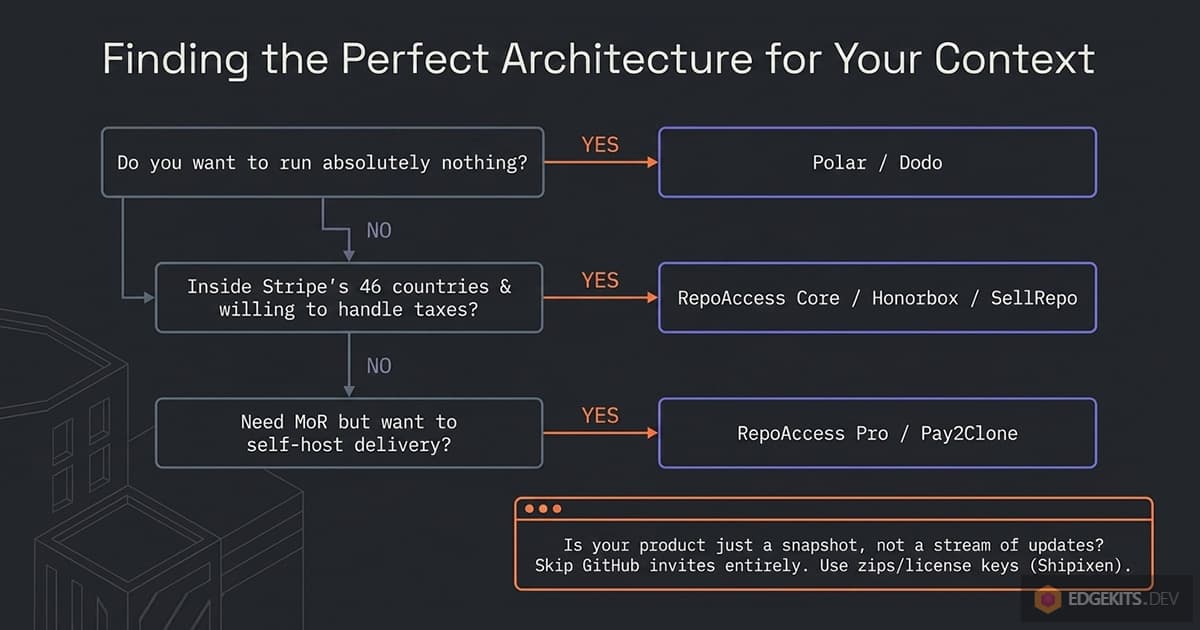
Which one to pick: six questions, each ending in a name
Start at the top and stop at the first answer that is yours.
- Do you want to run nothing at all? Polar if your repos live in an organization and cards are enough. Dodo Payments if your country is on its list and not on Stripe’s. GitHub Sponsors if the paid repo is a companion to open source you maintain and monthly is fine.
- Are you inside Stripe’s 44 countries and willing to be the seller of record? RepoAccess core for team-based delivery with automatic revocation, Honorbox if you want collaborator invites with renewal and can wait minutes. Both cost you Stripe’s rate and nothing else.
- Do you sell through Paddle, Lemon Squeezy, Gumroad, Razorpay or Telegram Stars, or must you because Stripe is not available to you? RepoAccess Pro is the self-hosted tool with those adapters; Pay2Clone covers Stripe, Creem, Waffo, Clink and Dodo instead. If you would rather not self-host at all, go back to question 1.
- Is the repo under a personal account and staying there? Dodo Payments, Honorbox, Pay2Clone and the scripts, because they invite collaborators. Polar, Sponsors and RepoAccess need an organization.
- Are you selling a subscription? Then the tool must revoke on its own: Polar, Dodo, RepoAccess, Pay2Clone. Not Lemonrepo, not a tutorial, not a Zapier flow without its second half.
- Is the product a snapshot rather than a stream of updates? Ship a zip behind a license key, or use gitbuyer, and skip the invite lifecycle altogether.
Whatever branch you land on, do two things before the first sale: put the repos in a GitHub Free organization, and run a refund in test mode to see whether the buyer is still on the people page afterwards. Those two checks cost nothing and they are where most of the money in this article leaks.
If your answer was question 3, the product page for RepoAccess Pro has the adapter list, the setup wizard, and the price, and the companion articles cover two of the merchants of record in depth: Paddle and Lemon Squeezy on its way to Stripe Managed Payments, plus the one rail with no bank in it, Telegram Stars.
Frequently Asked Questions
Does an outside collaborator on a private GitHub repo use a paid seat?
It depends on the plan the organization is on, not on the buyer. On a GitHub Free organization, outside collaborators on private repositories cost nothing and there is no limit on them. On GitHub Team, at $4 per user per month for the first year, every outside collaborator on a private repository and every pending invitation to become one consumes a license, and removing a collaborator does not automatically reduce the paid seat count. For a seller that means three hundred buyers on a Team organization is a $1,200 monthly bill, and the fix is a second organization on the Free plan that holds only the products you sell.
Can I sell access to a private repo under my personal GitHub account instead of an organization?
Yes, with limits. GitHub Free allows unlimited collaborators on personal private repositories, and the collaborator invite endpoint works on them, so Honorbox, Pay2Clone, Dodo Payments and the Next.js scripts all deliver to a personal repo. What you lose is teams, which do not exist on personal accounts, and support from the tools that need them: Polar, GitHub Sponsors and RepoAccess all require an organization-owned repository. Polar also warns that collaborators on personal repositories get broader permissions than the read-only access a buyer should have, which is a second reason to move the repo into a Free organization.
What happens when a buyer does not accept the GitHub invitation in time?
The invitation expires automatically after seven days, the repository URL then returns 404 for the buyer, and you have to cancel the stale invite and send a new one by hand. Two details make this common: GitHub sends the invite to the primary email on the buyer's GitHub account rather than the email used at checkout, and there is no page on GitHub where a buyer can see pending invitations, a feature request open since 2018. Of the tools compared, only Honorbox re-issues an invitation before expiry, at day six and up to three times; RepoAccess documents the manual re-invite path but does not renew automatically.
Does revoking GitHub access after a refund remove the code the buyer already cloned?
No. GitHub's documentation states that forks of private repositories are deleted when a collaborator is removed, but the person still retains any local clones, and that the seller is responsible for asking them to delete confidential material. Revocation therefore stops future updates, private issues and discussions; it cannot recover a git clone that took ten seconds. That is why most code sellers refuse refunds once access is redeemed, and why revocation matters most for subscriptions, where it is what makes a lapsed renewal real.
Which tools revoke GitHub access automatically on a refund or chargeback?
Polar revokes on subscription cancellation and, by default, on a full refund of a one-time purchase. Dodo Payments removes the collaborator when a subscription is cancelled, refunded or revoked. Pay2Clone treats access as a desired state and repairs drift with a daily reconciliation pass. RepoAccess revokes on refund and separately on the chargeback event, charge.dispute.created, under its auto_revoke policy, and keeps grant records for 180 days so a late dispute still resolves. SellRepo revokes when a subscription lapses but not on a one-time refund. Honorbox core needs a command run after the refund, Lemonrepo and the tutorial scripts have no revoke path, and a Zapier flow only revokes if you build a second workflow on the refund trigger.
Can GitHub Sponsors sell one-time access to a private repository?
Sponsors-only repositories are a documented feature: the repository must be private and organization-owned, GitHub sends invitations to new sponsors and removes access when a sponsorship is canceled, and only personal accounts can be invited. The documentation describes this for sponsorships, and the community request to extend repository access to one-time tiers, opened in April 2022, received a positive staff reply and no implementation as of its last activity in 2024. Treat it as a monthly-tier feature with a 0% fee on personal sponsorships, no refund tooling, no tax handling, and a supported-regions list that omits, for example, Ukraine and Pakistan.
How do I sell access to a private GitHub repo if Stripe is not available in my country?
Stripe lists 44 fully supported countries plus India and Indonesia in preview and five African countries through Paystack, which leaves out most of the world; the countries it misses include Argentina, Bangladesh, Egypt, Pakistan, Turkey, Ukraine and Vietnam. The hosted answer is a merchant of record with a wider list: Dodo Payments lists 177 countries and territories including Turkey, Vietnam, Argentina and India, though eleven countries, among them Nigeria, Ukraine, Bangladesh, Egypt and Morocco, appear only as grandfathered for existing merchants; Paddle and Lemon Squeezy are the other two used for code, with Lemon Squeezy migrating to Stripe Managed Payments, which accepts sellers from 37 countries against Lemon Squeezy's 119. The self-hosted answer is RepoAccess Pro, which adds Paddle, Lemon Squeezy, Gumroad, Razorpay and Telegram Stars adapters to a Cloudflare Worker you run yourself, so the checkout can be a merchant of record while the GitHub grant and revoke stay on your account.
Can Zapier add a GitHub collaborator when someone buys on Gumroad?
Not with a native action. Zapier's GitHub integration lists 22 actions, from Create Issue to Check Organization Membership, and none of them adds a collaborator, invites a user to an organization or adds a team member. The working recipe is a Gumroad sale trigger followed by a Webhooks by Zapier request to the GitHub REST API with a personal access token in the header. That two-step Zap fits the Free plan, which allows 100 tasks a month and 15-minute polling; a Formatter step to clean the username or a second Zap for refunds moves you to the Professional plan from $19.99 a month. n8n has a native invite-to-organization node and can be self-hosted free.
What does it really cost to sell a $99 repo twenty times a month?
On $1,980 of monthly sales with seven international cards, one refund and one dispute a quarter, the paths in this guide land roughly between $0 and $228 a month. GitHub Sponsors is $0 but leaves the tax work with you. Stripe plus a self-hosted tool on the Cloudflare free plan is about $85, the floor, again with the tax work yours. Stripe plus a Next.js script is about $105 once Vercel Pro is counted, because the Hobby plan is non-commercial. Dodo Payments comes to about $107 and Polar about $131 with tax handled. Paddle plus RepoAccess Pro is about $120 in the first year and $109 after. Gumroad plus Zapier is $208 to $228. The spread is real but the deciding column is who does the tax work.
What is the difference between inviting a buyer as a collaborator and adding them to a GitHub team?
A collaborator invite is per repository, works on personal and organization repos, and is capped at 50 invitations per repository per 24 hours; the endpoint defaults to push permission, so a script must pass pull explicitly. Team membership means the buyer joins the organization and is placed in a team that holds one product's repositories, so access to every repo in the team, including ones added later, follows automatically; organization invitations are capped at 50 per 24 hours, or 500 once the organization is a month old or on a paid plan. The two cannot be mixed, because outside collaborators cannot be added to teams, and each needs a different token permission: repository Administration write for collaborators, organization Members write for teams. Most tools use collaborators; RepoAccess and the Gumroad plus Zapier recipe use teams.
Resources & Further Reading
- GitHub Docs - People who consume a license in an organization
- GitHub Docs - Removing an outside collaborator (forks and clones)
- Stripe - Global availability
- Dodo Payments - Accepted countries and territories
- RepoAccess Core - GitHub repository
- Honorbox - GitHub repository
- SellRepo - GitHub repository