
Gumroad to GitHub Repo Access: Sell Code With Gumroad as Your Merchant of Record
Integration page for RepoAccess Pro with Gumroad: what Gumroad does and does not do for a code seller, how the buyer types a GitHub username in a Gumroad custom field, why a partial refund revokes, and what Gumroad charges.
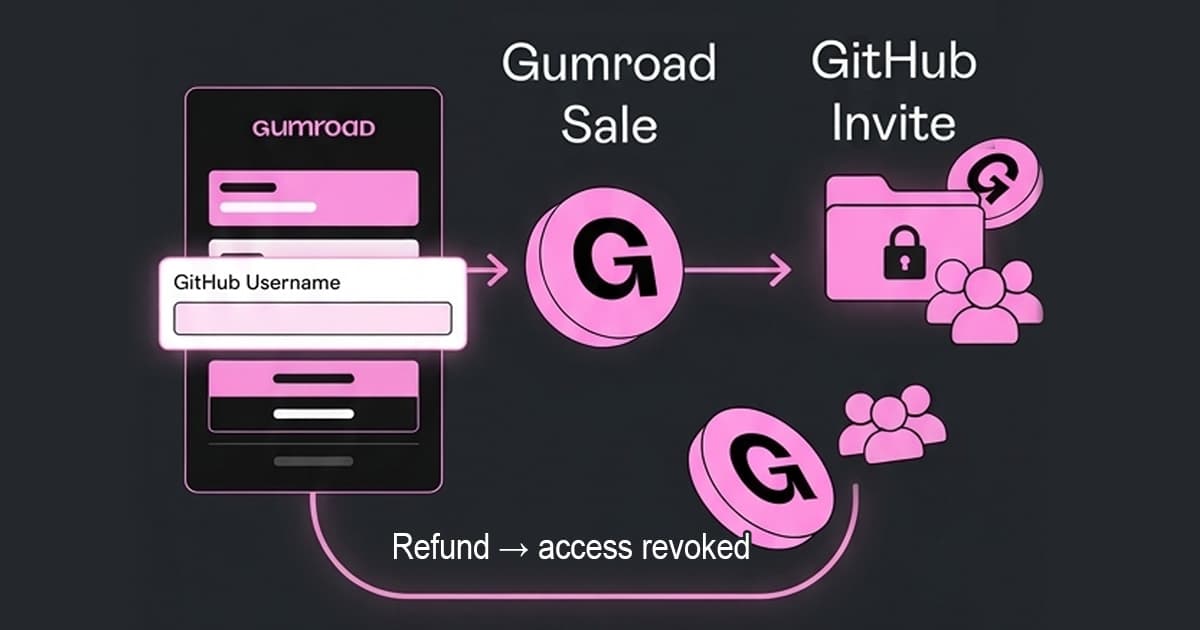
You sell a boilerplate, a starter kit or a course that lives in a private GitHub repository, and Gumroad is where your buyers already pay, or the checkout you are choosing because Stripe is not available where you are. RepoAccess Pro is the delivery half: a Gumroad sale becomes a GitHub team invitation, and a Gumroad refund takes that access away. It is a one-time licence, it runs as one Cloudflare Worker on your own account, and Gumroad stays the merchant of record on every sale.
This page is what you need to know about Gumroad specifically before you buy. The general product, its price and the other adapters are on the RepoAccess page.
What Gumroad does for a code seller, and what it leaves to you
Gumroad is the merchant of record for all sales: it collects and remits sales tax, VAT and GST worldwide, and you have no tax settings to manage. It pays out to bank accounts in 119 countries, in the local currency only, and by PayPal in USD where it has no bank route, which is why it is one of the three checkouts sellers outside Stripe’s list actually use.
The price of that is the fee: 10% plus 50 cents on a direct sale, plus card processing, and 30% on a sale that arrives through Gumroad’s Discover marketplace. Above $20,000 of paid sales in a calendar month the direct rate drops to 5% plus 50 cents. What Gumroad does not do is anything on GitHub: a completed sale ends with a webhook and a receipt, and the buyer is still outside the repository.
How the buyer gives their GitHub username on a Gumroad checkout
Gumroad is the easy case. Its checkout takes custom fields, including a mandatory text box, so you add one labelled for the GitHub username and the buyer types it on Gumroad’s own checkout. The value arrives with the sale, and the worker sends the team invitation without a detour.
If the handle is missing or does not exist on GitHub, the buyer is sent to a claim page served by the worker and enters it there once. There is no “Login with GitHub” and no OAuth in either path: GitHub’s own invitation can only be accepted by the account it was sent to, so a wrong handle produces an invitation nobody can accept, not access for the wrong person.
What a Gumroad refund does to the buyer’s access
A refund revokes the product that was refunded, not the buyer. A customer who owns two of your products and returns one keeps the other, and a pending invitation that has not been accepted yet is cancelled rather than left open. The revoke reconciles against GitHub’s live team membership, not against a stored flag.
On Gumroad a partial refund revokes as well, and that is the setting the setup writes for you, for a reason you will meet on your first real sale. Gumroad takes its fee at the moment of sale, so a fresh seller’s balance rarely covers a full refund, and Gumroad refuses a refund the balance cannot cover. A partial refund of what the balance holds goes through, and the adapter treats it exactly like a full one. Disputes arrive as their own event and revoke the same way, within a 180-day window after the sale.
One thing the adapter cannot undo: a buyer you added to the team by hand is not a grant the worker made, so a later refund of that purchase will not remove them. Let the worker do the adding, or remove them yourself.
What Gumroad asks of you before you sell
Less than the other merchants of record. There is no domain approval and no policy pages to host, and the worker can stay on its workers.dev address: you publish the product, add the custom field to the checkout form, and register three webhooks, one for sales and, because Gumroad has no dashboard page for them, two for refunds and disputes through its API. The custom field’s label is also the key the worker reads the handle from, so it is typed exactly as the guide says.
Two things Gumroad does differently. It does not sign its webhooks at all, so the worker never trusts a delivery’s body: it fetches the sale back from Gumroad’s own API with your access token and grants only from what the API returns, which is why a forged delivery grants nothing. And there is no test mode: buying your own published product while signed in as the seller is free and fires the webhooks, but that purchase is invisible to Gumroad’s dashboard and cannot be refunded, so the refund path is proven with one real purchase and one partial refund.
What an evening of DIY does not buy
Wiring one Gumroad webhook to the GitHub API is an evening’s work, and the free AGPL core exists because that is true. The no-code version, a Zapier zap from a Gumroad sale, does not exist either: Zapier’s GitHub integration has no action that adds a collaborator or a team member, so the recipe ends in a custom webhook step anyway. What the evening does not produce is the part that costs you money later: a partial refund treated as a full one, a webhook delivered twice that invites twice, a revoke that trusts a stored flag instead of GitHub’s live team membership, and a claim link two people can use at once.
Pro is the maintained version of all of that, for Gumroad and for Paddle, Lemon Squeezy, Razorpay and Telegram Stars, with twelve months of updates from the day you buy. Every version you download in that window is yours to run without limit. The price and the full comparison with the free core are on the product page.
Before you start
You need a Gumroad account with a payout method connected, because only a published product can be bought; a GitHub organization with a team per product; a Cloudflare account; and a second GitHub account to play the test buyer. Your own creator purchase tests the sale and the invitation for free, and one real purchase with a partial refund tests the revoke. With those in hand, the guided setup walks a coding agent through the deployment in about an hour.
If your question is whether Gumroad pays out to your country at all, or how its fee compares with Paddle’s and Lemon Squeezy’s, start with the country guide. Every option on the market, including the ones that skip a merchant of record, is in the full comparison.
Frequently Asked Questions
Does RepoAccess take a cut of Gumroad sales?
No. RepoAccess Pro is a one-time licence and never touches the money: the buyer pays Gumroad, Gumroad pays you, and the worker only sees the webhook. Gumroad's own fee, 10% plus 50 cents on direct sales plus card processing, is the only per-sale cost, and it is the same whether you deliver the repository by hand or through RepoAccess. The licence price is on the product page.
Can a buyer type their GitHub username inside Gumroad's checkout?
Yes. Gumroad lets a seller add custom fields to a product's checkout, including a mandatory text box, so the GitHub username is collected on Gumroad's own checkout and arrives with the sale. RepoAccess reads it from the webhook and sends the team invitation without a detour. If the handle is missing or does not exist on GitHub, the buyer is sent to a claim page instead and enters it there once, so a typo costs the buyer one extra step, not the sale.
Does a Gumroad refund revoke GitHub access automatically?
Yes, and on Gumroad a partial refund revokes too, which is deliberate. Gumroad takes its fee at the moment of sale, so a fresh seller's balance often cannot cover a full refund and Gumroad refuses it; a partial refund of what the balance holds goes through, and the adapter treats it exactly like a full one. The revoke is scoped to the product that was refunded, a pending invitation is cancelled, and the check is made against GitHub's live team membership. A dispute triggers the same revoke, inside a 180-day window after the sale.
Is Gumroad a merchant of record for code sales?
Yes, for every sale. Gumroad's own help page says it acts as the merchant of record for all sales and handles sales tax collection and remittance worldwide, with no tax settings for the seller to manage. The trade is the fee: 10% plus 50 cents per direct sale plus card processing, 30% on sales that come through Gumroad's Discover marketplace, and 5% plus 50 cents on direct sales after $20,000 of paid sales in a calendar month. For a seller who cannot use Stripe, Gumroad pays out to bank accounts in 119 countries in local currency and by PayPal in USD elsewhere.