
Build a Multilingual Astro Site on Cloudflare with One Claude Code Prompt
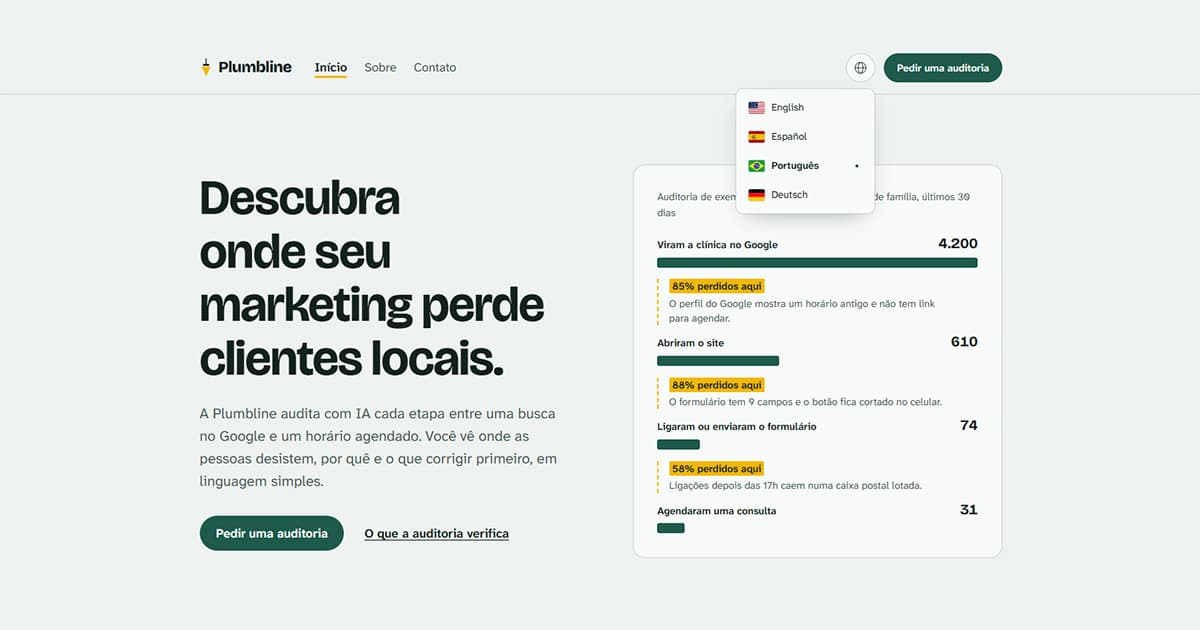
Tutorial: the exact prompt, the four questions the astro-i18n skill asked back, and the edge-native multilingual site Claude Code built from an empty folder.
«Create a simple site on the latest Astro with the Cloudflare adapter. It should be multilingual: en-us, es, pt-br, de. Three pages: home, about, contacts with a contact form, with error handling via react-hook-form, showing just a “Sent successfully” message after submit through Astro Actions, without actually sending anything. It’s a site for a company that offers AI audits of marketing funnels for local businesses.»
That is the entire brief I gave Claude Code, with its sloppiness left in. The folder had nothing in it but a plugin. Sixteen minutes and fifty-one seconds of agent time later I had a four-language Astro site on Cloudflare Workers, with translations in KV, hreflang on every page, and a contact form with multilingual validation that works with JavaScript switched off.
What one prompt to Claude Code builds when the astro-i18n skill is installed
TL;DR
- Two slash commands install the
astro-i18nplugin into an empty folder; one prompt builds the site.- The skill asked four questions before writing a file, and every answer became a line in
edgekits-i18n.config.ts.- Four locales, KV translations, hreflang and a sitemap for search engines, Markdown twins and
llms.txtso AI assistants can read and cite the pages, and a react-hook-form contact form that also works without JavaScript.- The agent refused to create a KV namespace in my account; deploy and
migratestay with you.
The goal of this experiment was never a finished site. The design, the copy and the brand name are whatever the agent came up with, and I did not touch them.
What I wanted to see is whether an agent, given a primitive prompt and an empty folder, builds a multilingual site with the right edge-native architecture when a skill tells it how: translations as data in Workers KV, typed keys generated from the default locale, locale-prefixed routing, a form that returns error codes instead of text, and a no-JS path nobody asked for.
It does. The skill is the one I described in Part 4 of the i18n series, shipped as a Claude Code plugin, and this is the tutorial version of that article: what I typed, what it asked back, what it wrote, and where it stopped and handed the keys to me.
Before the prompt: the plugin, an empty folder, and nothing else
Make an empty folder, open Claude Code in it, and run two commands:
/plugin marketplace add EdgeKits/skills
/plugin install astro-i18n@edgekits
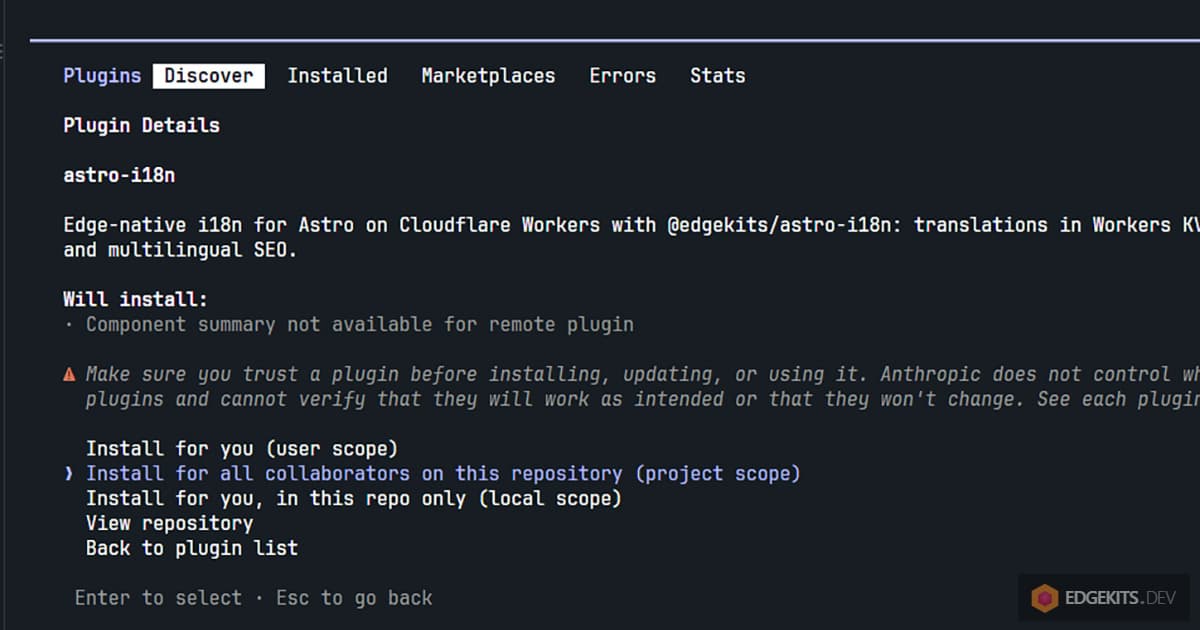
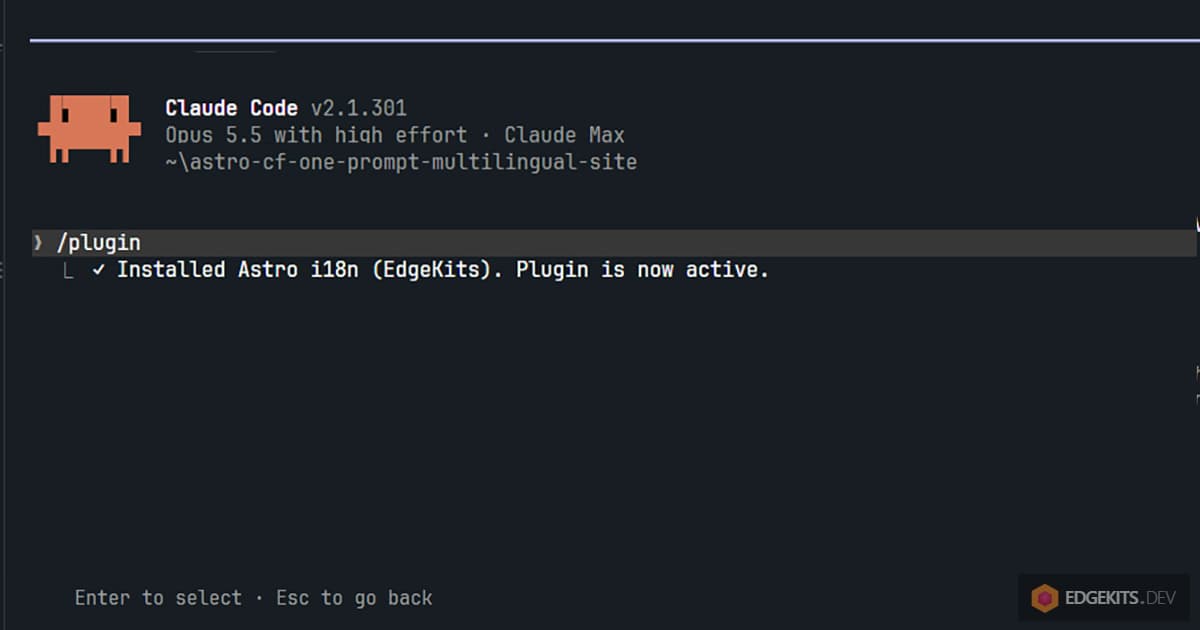
The second one does not install right away. It opens the plugin panel on the plugin’s details, and the panel asks for a scope. Pick Install for all collaborators on this repository, which is project scope. Claude Code writes the plugin into .claude/settings.json and prints Plugin is now active. No restart.
{
  "enabledPlugins": {
    "astro-i18n@edgekits": true
  }
}
Those three lines are the only thing in the folder before the prompt. They matter because the repository now says which skill its agents use, so a clone of it (or a second machine) knows what to install. User scope works fine for a site you build for yourself, but then the repo knows nothing about the skill.
One detail the Claude Code plugin docs make clear: a marketplace added from the panel lands in your user settings, not in the project. A collaborator who clones the repo will be told the plugin is enabled but not installed, and needs the first command before the second. Put both commands in the README, or add the marketplace under extraKnownMarketplaces in the same settings file.
Two things I had switched on globally, for the record, because they are part of what the agent could see. The Astro docs MCP server and the Cloudflare Developer Platform connector from the claude.ai directory. The agent called the Astro docs server four times during the build and the Cloudflare connector not once; I come back to that below.
The prompt I typed, with its sloppiness left in
I typed the prompt at the top of this article in auto mode, as I always do, and did nothing else. It names the locales, the pages and the form library, and it asks for a “Sent successfully” message with nothing actually sent. It says nothing about KV, about SEO, about markdown endpoints, about flags or about what should happen without JavaScript.
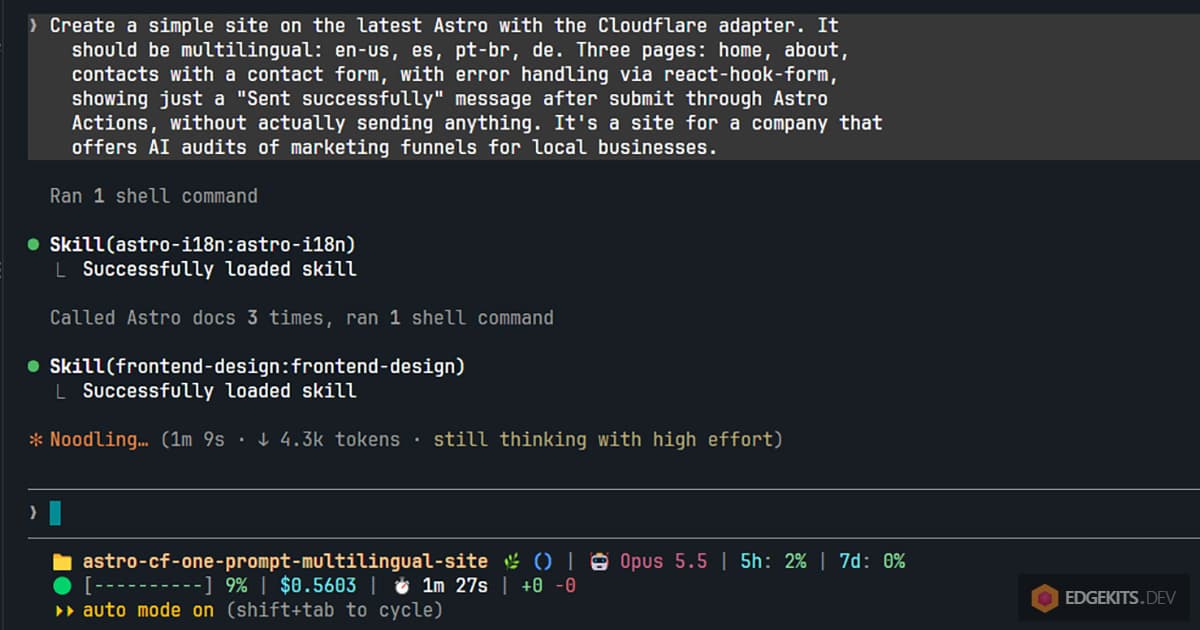
That is deliberate. A prompt that spells out the architecture tests the prompt. A prompt that does not tests the skill.
The four questions the skill asked back, and what I answered
Claude Code loaded the skill on its own, read the prompt, and asked four questions in one round before writing a single file. The skill’s own list has six questions. The prompt had settled the locales and the Cloudflare adapter, an empty project has no middleware to slot into, and the three optional extras were folded into one multi-select. The form question comes from the skill’s forms recipe, and the engine question the agent added on its own.
- Which i18n engine should the site use?
@edgekits/astro-i18n, recommended because the project settings enable its plugin, against Astro’s built-in i18n. I took the package. - Which locale is the default? It is the fallback, and its JSON files are the type schema for every other locale.
en-us. - Which optional i18n features? Flags in the switcher, country-based locale detection when neither the cookie nor
Accept-Languagematches, and Markdown twins of the pages plusllms.txt. I ticked all three. - Which fields should the contact form have? Two presets, an “audit request” set (name, email, business name, optional website, message) and a minimal one. I took the audit request.
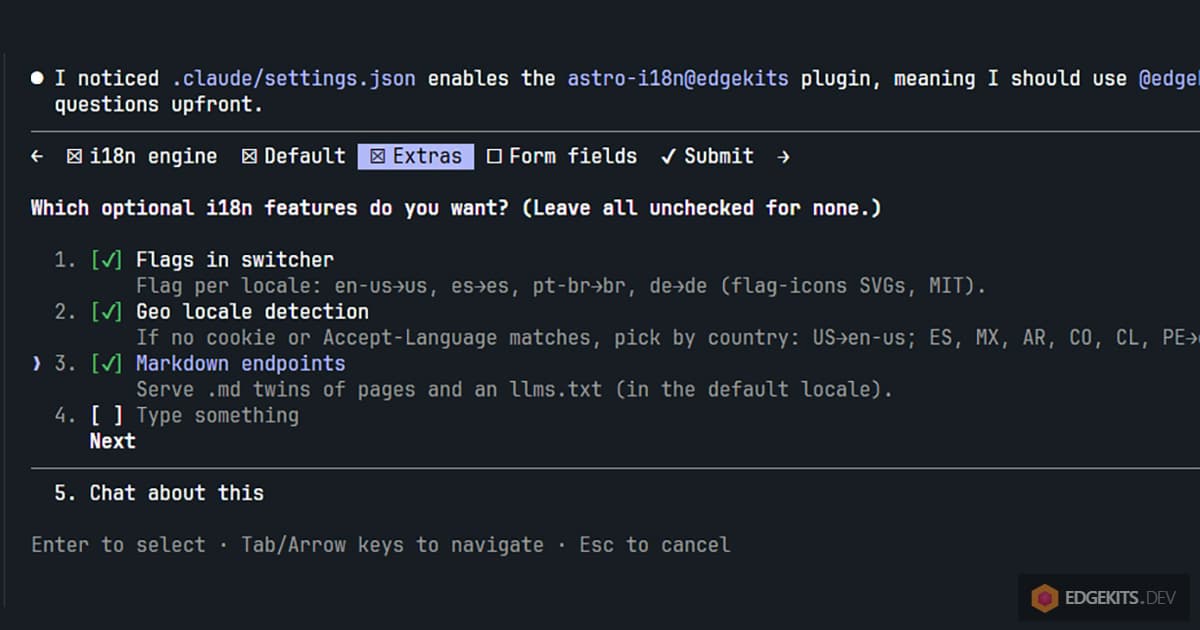
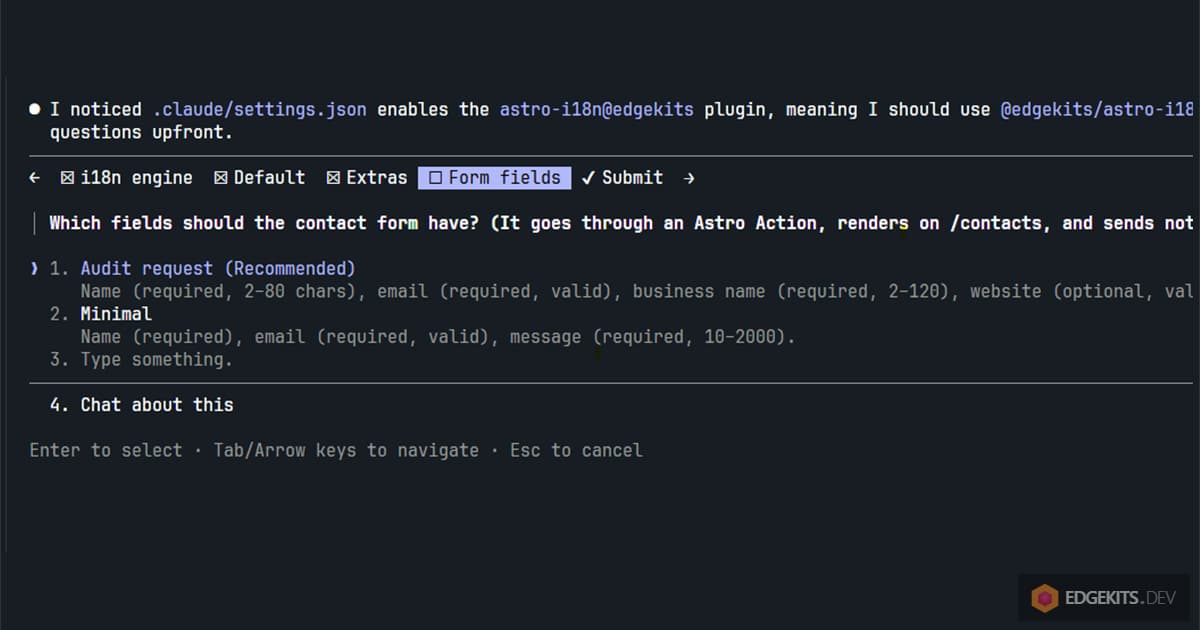
One decision the agent took without asking, and said so: the Markdown twins are served in the default locale, en-us. The rest of the answers became this file, written before any page existed:
// edgekits-i18n.config.ts
import { defineI18nConfig } from '@edgekits/astro-i18n/config'

export default defineI18nConfig({
  languages: {
    'en-us': { countryCode: 'us', name: 'English' },
    es: { countryCode: 'es', name: 'Español' },
    'pt-br': { countryCode: 'br', name: 'Português' },
    de: { countryCode: 'de', name: 'Deutsch' },
  },
  defaultLocale: 'en-us',
  cookie: { name: 'lang', maxAge: 60 * 60 * 24 * 365 },
  // Host of the edge-cache URLs and prefix of the KV keys: set to the production domain.
  keyPrefix: 'plumbline-audits.example',
  missingTranslationBanner: true,
  routing: 'prefix',
  // Used only when neither the cookie nor Accept-Language picks a locale.
  countryToLocale: {
    US: 'en-us',
    ES: 'es', MX: 'es', AR: 'es', CO: 'es', CL: 'es', PE: 'es',
    BR: 'pt-br', PT: 'pt-br',
    DE: 'de', AT: 'de', CH: 'de',
  },
  // .md twins of the pages and llms.txt are served in English only.
  markdownLocale: 'en-us',
})
Read it against the four questions and it is a transcript. defaultLocale is question two, countryToLocale and markdownLocale are question three, the countryCode per language is the flags part of the same question, and the form preset shows up a few files later. The brand, Plumbline, and the .example domain are placeholders the agent invented and labelled as such.
What the agent built, file by file
The scaffold came from npm create astro@latest, which is how “the latest Astro” turned into Astro 7.4 with @astrojs/cloudflare 14.4 without me naming a version. Then @edgekits/astro-i18n 0.1.6, React 19 and react-hook-form 7.90. The agent checked the Astro docs server three times at this point, for the adapter’s wrangler configuration and for React forms with Actions, and once more later. That is the connector earning its place: the skill carries the i18n order of operations, and the docs server carries facts about Astro that change between releases.
Here is what landed in the folder, grouped by who owns it. Every file is in the demo repository linked under Resources below, committed as the agent left it.
Translations, written by hand in four languages. locales/{en-us,es,pt-br,de}/ with five namespaces each: common, home, about, contact and messages. The en-us files are the schema; npm run i18n:seed generates src/i18n.generated.d.ts from them and pushes all twenty files into local KV. messages.json is the one that matters for the form: it maps error codes to sentences.
Pages and layout. src/pages/[lang]/index.astro, about.astro and contacts.astro, a localized 404.astro, and [lang]/[page].md.ts for the Markdown twins. Plus llms.txt.ts, robots.txt.ts and sitemap.xml.ts, the last with hreflang alternates for every page. BaseLayout.astro sets <html lang> (pt-BR, not pt-br), the canonical link and the SeoHreflangs component.
The switcher. Header.astro renders the package’s headless LanguageSwitcher with a Flag.astro component passed in. Four flags, a dot on the current locale, and a click sets the cookie and moves you to the same page in the new language.
The form, split in three. src/domain/contact/rules.ts holds the validation rules as plain functions returning codes. src/domain/contact/schema.ts wraps them in zod for the server. src/components/ContactForm.tsx is the React island, fed already-localized strings as props, and src/middleware.ts adds the no-JS path. More on each of those next.
Config. astro.config.mjs with the integration, wrangler.jsonc with a placeholder KV id, .dev.vars with I18N_CACHE=off so a re-seed shows on the next request, and a README that says where every placeholder is.
Nothing was committed. The agent said so in its report and left the first commit to me.
Running it: four locales, the switcher, and the form with JavaScript off
I checked the site in Chrome on the dev server, and then went through the pieces that distinguish an edge-native i18n setup from a translated template.
A visit to / redirects by cookie first, then Accept-Language, then country, then en-us. My browser sends en-US first, so / landed on /en-us/. After one click on Português in the switcher, the cookie was pt-br and every later visit to / went there, which is the order Part 1 of the series argued for and the package enforces.
Every page carries five hreflang links (en-US, es, pt-BR, de and x-default to the English page) and a canonical. /en-us/about.md answers 200 with text/markdown; /es/about.md redirects to the English twin, because markdownLocale says so. /llms.txt and /sitemap.xml exist. /de/nope/ is a 404 in German.
The form is where the architecture shows. The rules file is the single source of truth:
// src/domain/contact/rules.ts (excerpt)
export const CONTACT_LIMITS = {
  name: { min: 2, max: 80 },
  email: { max: 254 },
  business: { min: 2, max: 120 },
  website: { max: 200 },
  message: { min: 20, max: 2000 },
} as const

const RULES: Record<ContactField, Rule[]> = {
  name: [required, minLength(CONTACT_LIMITS.name.min), maxLength(CONTACT_LIMITS.name.max)],
  email: [required, maxLength(CONTACT_LIMITS.email.max), matches(EMAIL_REGEX, UI_ERROR_CODES.INVALID_EMAIL)],
  business: [required, minLength(CONTACT_LIMITS.business.min), maxLength(CONTACT_LIMITS.business.max)],
  website: [optional(maxLength(CONTACT_LIMITS.website.max), matches(WEBSITE_REGEX, UI_ERROR_CODES.INVALID_WEBSITE))],
  message: [required, minLength(CONTACT_LIMITS.message.min, UI_ERROR_CODES.MESSAGE_TOO_SHORT), maxLength(CONTACT_LIMITS.message.max)],
}

/** The first failing rule's code for a field, or null when the value is valid. Trims first. */
export function checkContactField(field: ContactField, value: unknown): UiErrorCode | null {
  return firstError(RULES[field], typeof value === 'string' ? value.trim() : '')
}
react-hook-form calls checkContactField from its validate option in the browser. The server wraps the same function in zod, and the action accepts only form data, so the native POST and the island’s submit arrive the same way:
// src/actions/contact.ts (excerpt)
export const contact = {
  send: defineAction({
    // FormData on both paths: the no-JS native POST and the React form's submit.
    accept: 'form',
    input: ContactFormSchema.extend({
      locale: LocaleSchema, // the UI locale, for locale-aware work such as a reply email
    }),
    handler: async () => {
      // Deliberately a no-op: the request is validated and acknowledged, nothing is sent
      // or stored. Plug an email provider or a database in here.
      return { ok: true as const }
    },
  }),
}
Codes, never sentences, cross the wire. An empty submit on /de/contacts/ with JavaScript on marked four fields aria-invalid, printed “Dieses Feld ist erforderlich.” under each and moved focus to the first one, with no request made. A filled submit made one RPC call and replaced the form with “Erfolgreich gesendet”.
A form-encoded POST with bad data, which is what a browser without JavaScript sends, came back as a 400 page with the same four German messages rendered on the server. A valid one answered a 303 to ?sent=1, so a reload cannot send it twice.
The middleware that does the no-JS part is five lines in the project, because the helper lives in the skill’s recipe:
// src/middleware.ts
const contactFormPost = defineMiddleware((ctx, next) =>
  redirectAfterNativePost(getActionContext(ctx), 'contact.send', 'contact', ctx, next),
)

export const onRequest = sequence(contactFormPost)
I did not ask for any of this. The prompt said “error handling via react-hook-form” and “Sent successfully”. The no-JS path, the codes, the shared rules and the 303 are the skill’s defaults for a form, the same ones the newsletter form on this site uses, and the agent flagged the no-JS path as something it had added on top of the brief.
Where the agent stopped and what it left for you
The agent’s report ended with a list titled “Before deploying”, and every item on it is something the skill is written to refuse. The reasons are in the refusals section of Part 4; here is what they look like at the end of a run.
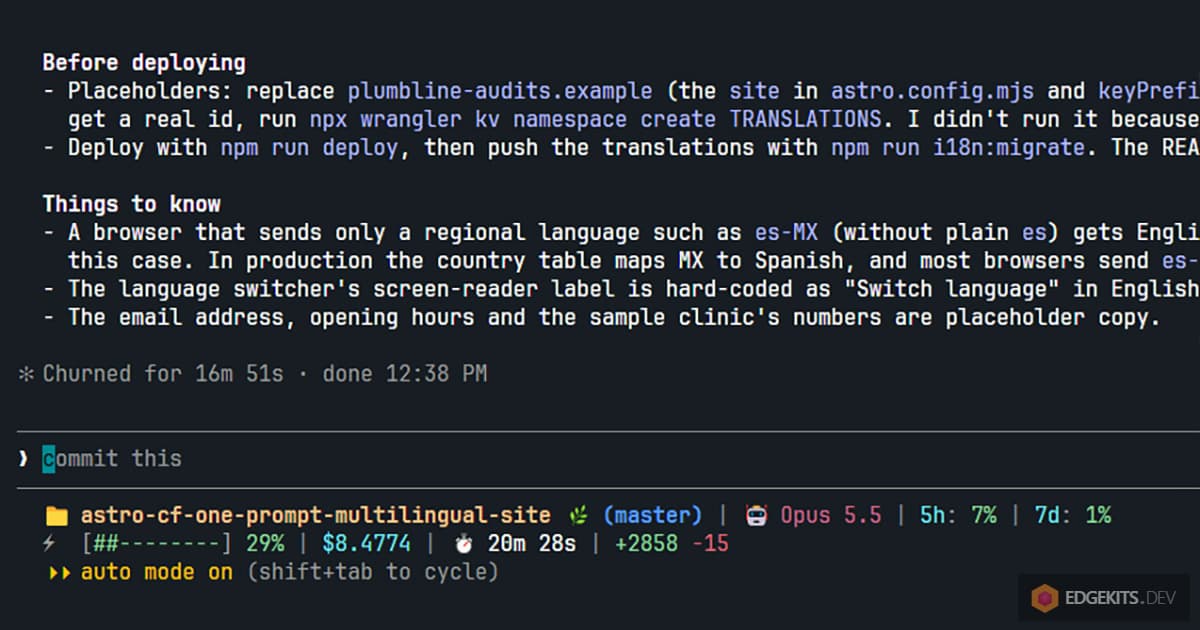
It did not create a KV namespace. wrangler.jsonc carries an id of thirty-two zeros, which wrangler accepts for local work and stores under .wrangler/state/. npx wrangler kv namespace create TRANSLATIONS creates a resource in your Cloudflare account, so the command is yours to run, and the id it prints replaces the zeros.
It did not deploy, and it did not migrate. npm run deploy builds and runs wrangler deploy; npm run i18n:migrate pushes the twenty JSON files into production KV. Until you run migrate, a deployed site renders English in every locale from the fallback dictionaries compiled into the Worker, silently, which is a known property of the engine and the reason migrate is the first command after the first deploy. Later copy changes go through the same command without a redeploy, with a per-namespace cache purge when you give it a zone id and a token.
It did not provision anything else either. The Cloudflare adapter would have added a session KV binding and a Cloudflare Images binding by default. The agent set session: false and imageService: 'passthrough' and said why: the site uses neither.
It left the placeholders visible. plumbline-audits.example in astro.config.mjs and in keyPrefix, the email address and the opening hours in the copy. The README lists each one.
That is the whole hand-off. The architecture is in place and tested on the dev server and in a production build under workerd; the account-side steps are three commands I describe in the series and did not need to repeat here.
What it cost and what you still own
Sixteen minutes and fifty-one seconds of agent time on Claude Code with Opus 5.5, in auto mode, after the four answers. The scaffold, twenty translation files, three pages, the form, the SEO endpoints and the tests the agent ran on its own, including a 390px viewport check for horizontal scroll and a production build in the Workers runtime.
What you own afterwards is a repository with a README, a committed .claude/settings.json that names the skill, generated i18n files that the package expects you to commit, and every translation as a JSON file a human can edit. No service holds your strings, and the only thing the site needs from Cloudflare that it does not have yet is one KV namespace.
What the skill cannot do is design. The pages look the way the agent chose to make them look, and if you want them to look like yours, that is a second prompt about CSS, not about i18n. The skill owns the architecture; the brief owns the rest.
The runs before this one are why the skill asks the way it does now. On an earlier version the agent treated the documented defaults as answers and wrote the config without asking; the fix shipped as 0.1.6 of the package, and this run is the first on it. If you try the same prompt and the agent behaves differently from what I describe, that is a report I want: the package repository is where it goes.
Links, for the record: the marketplace that installs the plugin, the package on npm, and the Claude Code plugin docs for the scope rules.
Frequently Asked Questions
How do I build a multilingual Astro site on Cloudflare with Claude Code?
Install the astro-i18n plugin from the EdgeKits marketplace into an empty folder with two commands in Claude Code (/plugin marketplace add EdgeKits/skills, then /plugin install astro-i18n@edgekits at project scope), and type one prompt that names the locales, the pages and the form. The skill loads, asks the setup questions the prompt did not answer (default locale, optional extras, form fields), and then scaffolds Astro with the Cloudflare adapter, installs @edgekits/astro-i18n, writes one JSON per locale and namespace, seeds local KV, and builds the pages, the switcher, hreflang tags, sitemap and a contact form that works with JavaScript off. In my run it took 16 minutes 51 seconds of agent time for four locales and three pages.
What does the astro-i18n agent skill ask before it writes code?
It asks the questions your prompt left open, in one round, and waits. For my prompt, which already named the locales and the form library, that was four questions: the default locale (the fallback and the source of the typed translation schema), which optional extras to enable (flags in the switcher, country-based locale detection, Markdown twins of the pages plus llms.txt), and which fields the contact form needs. The full list in the skill has six questions; the locales and the Cloudflare adapter check were answered by the prompt itself. Each answer becomes a field in edgekits-i18n.config.ts, so the config file is a transcript of the conversation.
Does a Claude Code plugin installed at project scope work for anyone who clones the repository?
Partly. Project scope records the plugin as enabled in the committed .claude/settings.json, so Claude Code in a fresh clone knows the plugin belongs to the project. The plugin files are not in the repository: each collaborator installs it once on their machine, and if the marketplace was added from the /plugin panel it lives in that person's user settings, not in the repo. A clone therefore needs /plugin marketplace add EdgeKits/skills before the install, or the repository declares the marketplace itself under extraKnownMarketplaces in the same settings file.
How does the contact form built by the skill validate without sending any text to the browser?
The rules live in one file of plain functions, src/domain/contact/rules.ts, and every rule returns an error code such as REQUIRED or INVALID_EMAIL instead of a sentence. react-hook-form calls those functions through its validate option in the browser, and the Astro Action wraps the same functions in a zod schema on the server, so the two sides cannot disagree. Each locale's messages.json maps the codes to text, and the page passes the already-localized strings into the React island as props. The island ships no translation files and no zod; the agent checked the build output to confirm the browser bundle contains none.
Does the form still work when JavaScript is disabled?
Yes, and the skill adds that path on its own. The React island renders a real form element whose action is the Astro Action URL, so without JavaScript the browser posts form data natively. A middleware helper, redirectAfterNativePost, reads the action result: on an error it re-renders the page with the field codes mapped to the locale's messages, and on success it answers a 303 redirect to the same page with ?sent=1, so a reload cannot submit twice. With JavaScript on, the same action is called over RPC and the island swaps the form for the localized success message.
What does the agent refuse to do in your Cloudflare account during the build?
It will not create resources. The site runs locally against a placeholder KV namespace id of thirty-two zeros in wrangler.jsonc, which wrangler treats as a folder under .wrangler/state. Creating the production namespace with npx wrangler kv namespace create TRANSLATIONS changes your Cloudflare account, so the skill leaves that command to you, together with npm run deploy and npm run i18n:migrate, which pushes the translations into production KV. The agent also turned off the adapter's session storage and Cloudflare Images so that nothing else gets provisioned for a site that uses neither.
Why use Workers KV for translations instead of Astro's built-in i18n for a simple site?
Because the architecture is the point of the exercise, not the page count. With @edgekits/astro-i18n the translations are data in Workers KV, read at the edge with a per-namespace cache, typed from the default locale's JSON, and updated with npm run i18n:migrate without rebuilding or redeploying the Worker. Astro's built-in i18n bundles dictionaries into the build, so every copy change is a deploy. For three pages the difference is invisible on day one; it shows the first time someone edits a Spanish heading and expects it live without a release.
Which MCP connectors did Claude Code use while building the site?
I have two connectors turned on globally in Claude Code: the Astro docs MCP server at mcp.docs.astro.build and the Cloudflare Developer Platform connector from the claude.ai directory. During the run the agent called the Astro docs server four times, three before scaffolding to check the Cloudflare adapter's wrangler configuration and React forms with Actions, and once while fixing a type error and turning off the adapter's Images binding. It never called the Cloudflare connector. The skill supplied the i18n order of operations; the docs server supplied current Astro facts.
Resources & Further Reading
- EdgeKits/multilingual-astro-site-cloudflare-one-prompt: the site this run produced
- EdgeKits/skills: the plugin marketplace
- @edgekits/astro-i18n on npm
- EdgeKits/astro-i18n: the package and the skill
- Claude Code docs: install and manage plugins
- Astro docs MCP server
- Edge-Native i18n - Part 4: npm Package and Agent Skill