

Astro i18n in 2026: The Complete Guide From ui.ts to Edge-Native KV
Every practical approach to multilingual Astro sites: native routing, Content Collections, ui.ts, Paraglide JS, Intlayer, forms with Zod 4, and the Edge-Native KV pattern. Real-world trade-offs.
Audio Deep Dive
Too busy to read? Listen to a 24-minute audio on this topic (generated by NotebookLM).
Updated May 31, 2026 - added Intlayer to the library landscape after feedback from its maintainer.
I needed to ship EdgeKits.dev in four languages. The first 40% of the work was easy: configure i18n, sprinkle getRelativeLocaleUrl where needed, organize the folders by locale. The other 60% was a tour through the i18n ecosystem most tutorials politely skip.
I started with bundled ui.ts dictionaries - clean enough until they weren’t. Then Paraglide, whose client-side tree-shaking is brilliant - until you run the server-side math forward and watch every additional locale and every new namespace pile more translation code into the bundle that was supposed to hold your business logic.
The deploy side wasn’t quiet either: every hero-copy iteration was costing a full rebuild, and the lean deploy flow I’d promised myself was no longer lean.
Every layer of this problem has a fix - and every fix has a cost the docs forget to print.
This guide is the map I wish I had then.
We’ll walk seven levels of i18n maturity in Astro, from “I just need a /en/ and /es/ folder” to “translations are runtime data, not build-time code.” At each level we’ll look at what you actually get, what it costs, and the specific symptoms that mean you’ve outgrown it.
We’ll cover Astro 5-6’s native i18n routing, the official ui.ts recipe, Paraglide JS v2, and Intlayer. We’ll look at the state of astro-i18next and astro-i18n-aut in 2026 - one is archived, the other isn’t, but probably should be.
And we’ll work through the form-validation problem with Zod 4 and React Hook Form, the deployment treadmill that hits as soon as a CMS shows up, and the bundle limits that hit if a CMS doesn’t.
By the end you should know exactly which level fits your project today - and which symptom will tell you when it’s time to move up.
Astro i18n Is Two Problems, Not One
Astro i18n is talked about as one topic, but it’s really two - and most resources you’ll find treat them as one.
Organizing blog posts in src/content/blog/en/ and src/content/blog/es/ is one problem.
Defining a dictionary that maps nav.home to "Home" is a different problem.
Both get framed as “translation.” Both are real. They share a feature in astro.config.mjs and almost nothing else.
Mixing them up is how you end up choosing a tool for the wrong layer and not understanding why it doesn’t quite fit.
Content Localization vs UI Localization
The first layer is content: full pages and page-sized chunks. Blog posts, documentation, marketing landing copy, MDX articles. The translation unit is a whole document, typically in Markdown or MDX with frontmatter. Authors are content people. Edits happen at content cadence - once a week, once a month, once when somebody flags a typo.
The second layer is UI: small strings interleaved with code. Button labels, form placeholders, validation errors, toast messages, navigation items, footer microcopy. The translation unit is a key-value pair. Authors are developers. Edits ship every time you ship a feature.
Different translation units, different authors, different cadence, different storage, different runtime. Until you see the split clearly, every i18n tool feels half-right.
A Map of Tools to Layers
![Two-column diagram mapping Astro i18n tools to layers - Content Collections, [locale] dynamic routing, and headless CMS on the content side; ui.ts, Paraglide, astro-i18next, and runtime KV on the UI side; native Astro i18n routing as the foundation underneath both.](/cdn-cgi/image/onerror=redirect,width=1200,height=630,quality=75,fit=cover,format=avif/https://cdn.edgekits.dev/public/blog/2026/astro-i18n-complete-guide/astro-i18n-content-vs-ui-layers.jpg)
Astro Content Collections, the [locale] dynamic-route pattern, and headless CMS integrations all live on the content side. They’re optimized for documents.
ui.ts dictionaries, Paraglide JS, Intlayer, astro-i18next, astro-i18n-aut, and the runtime KV pattern we’ll get to in Level 7 all live on the UI side. They’re optimized for strings.
Native Astro i18n routing - the i18n config in astro.config.mjs, getRelativeLocaleUrl, Astro.currentLocale - sits underneath both layers. It tells the framework which language a request is for. It does not localize anything.
Hold this two-layer model in your head for the rest of the guide. Every tool we discuss solves exactly one of these two problems - most of the confusion in the ecosystem comes from libraries that talk like they solve both.
Level 1 - Astro Native i18n Routing (What You Actually Get for Free)
Astro has had built-in i18n routing since version 4, with default-behavior tweaks in 5 and 6. The first thing to understand about it: it does not localize anything. It tells the framework which language a request is for. That’s a foundational primitive - and it’s also the entire scope of the feature.
What you get is URL routing with locale awareness, helpers to generate locale-aware links, and a fallback policy when content is missing in a given language. What you don’t get is a translation system, a dictionary format, or any opinion on how Hello world becomes Hola mundo on the page.
Native routing is the foundation underneath every other level in this guide. Get it set up correctly and most of what follows builds cleanly on top. Skip it and you’ll spend the next three levels reinventing things Astro already does.
The i18n Config in astro.config.mjs
The starting point is a single block in your Astro config:
// astro.config.mjs

import { defineConfig } from 'astro/config'

export default defineConfig({
  i18n: {
    defaultLocale: 'en',
    locales: ['en', 'es', 'de', 'ja'],
    routing: {
      prefixDefaultLocale: false,
      redirectToDefaultLocale: true,
    },
    fallback: {
      es: 'en',
      de: 'en',
      ja: 'en',
    },
  },
})
The five options that matter:
defaultLocale- the locale used when no other signal is available. Must be one of the entries inlocales.locales- every locale the site supports. Plain strings work for simple cases; you can also pass objects withpathandcodesif you want to group several BCP 47 codes (e.g.,en-USanden-GB) under a single URL path.routing.prefixDefaultLocale- whether the default locale appears in URLs as a prefix. Discussed in detail below.routing.redirectToDefaultLocale- when the default locale has no prefix, whether requests like/en/aboutshould redirect to/about. Also discussed below.fallback- when a locale is missing a route, which other locale’s version Astro should render in its place.
There’s also i18n.domains, which maps locales to fully-qualified domains. That’s its own pattern with its own trade-offs and gets its own section below.
Routing Strategies: Prefix Default vs Prefix Others Only
The two routing options interact with each other. Get them right and your URL structure is exactly what you want. Get them wrong and you can ship infinite-loop redirects to production.
Two combinations make sense in practice:
Default locale at root, others prefixed. prefixDefaultLocale: false with redirectToDefaultLocale: true. English lives at /about, Spanish at /es/about, German at /de/about. Cleanest for sites with a primary-language audience. The redirect setting means anyone hitting /en/about is bounced to /about - which keeps Google from indexing both URLs as duplicate content for the same page.
All locales prefixed. prefixDefaultLocale: true. English at /en/about, Spanish at /es/about. Cleaner for analytics (every URL is locale-tagged), better for sites where no language is “primary.” redirectToDefaultLocale is a no-op in this mode.
A note on Astro 6: the default for redirectToDefaultLocale flipped from true to false to remove a footgun. With the old default, a prefixDefaultLocale: false setup combined with certain custom redirect chains could produce infinite-loop redirects in production.
If you’re upgrading from Astro 5 and your routing suddenly behaves differently, this is the first thing to check. Setting both flags explicitly - as in the snippet above - makes the config behave the same across both versions.
Subdirectories vs Subdomains: A Short Decision Note
There’s an old SEO debate about whether multilingual sites should use subdirectories (/es/about) or subdomains (es.example.com). For most projects, subdirectories win. They share link equity, they simplify deployment, and Astro’s default routing handles them out of the box.
Subdomains make sense when each language is functionally a separate site: different content team, different deployment cadence, different stack underneath. For that case, Astro has i18n.domains (covered below), which lets you map locales to fully-qualified domains while keeping a single codebase.
The third option - country-code TLDs (example.de, example.es) - is a much bigger commitment. It signals to Google that you’re targeting a specific country, not just a language. Use it when you’re a multinational brand with country-specific operations, not when you’re a SaaS that happens to support German.
The astro:i18n Helpers You’ll Actually Use
The astro:i18n module exports a small set of utilities for working with locale-aware URLs. Most of them you’ll touch exactly once - in your language switcher and your <head> - and never think about again.
The ones worth knowing:
getRelativeLocaleUrl(locale, path)- builds an internal link for a specific locale:/es/about. Use it for nav menus, in-content links, and the language switcher.getAbsoluteLocaleUrl(locale, path)- same thing but fully qualified:https://example.com/es/about. Use it for canonical URLs, hreflang tags, and anywhere a string URL leaves your site.getRelativeLocaleUrlList(path)- returns the same path mapped across every configured locale. Built for language switchers.getAbsoluteLocaleUrlList(path)- same, fully qualified. Built for hreflang generation.getPathByLocale(locale)andgetLocaleByPath(path)- convert between locales and their URL paths. Useful when you’ve configuredlocaleswith custompathvalues.
On the request side, Astro exposes two locale values automatically:
Astro.currentLocale- the locale resolved from the current URL, based on youri18nconfig.Astro.preferredLocale- the visitor’s preferred locale, derived from theAccept-Languageheader and matched against your configuredlocales.
A minimal language switcher built on these primitives:
---
// src/components/LanguageSwitcher.astro

import { getRelativeLocaleUrlList } from 'astro:i18n'

const currentLocale = Astro.currentLocale ?? 'en'
const localeUrls = getRelativeLocaleUrlList(Astro.url.pathname)

const labels: Record<string, string> = {
  en: 'English',
  es: 'Español',
  de: 'Deutsch',
  ja: '日本語',
}
---

<nav aria-label="Language">
  <ul>
    {
      localeUrls.map((url) => {
        const locale = url.split('/').filter(Boolean)[0] ?? 'en'
        return (
          <li>
            <a href={url} aria-current={locale === currentLocale ? 'page' : undefined}>
              {labels[locale] ?? locale}
            </a>
          </li>
        )
      })
    }
  </ul>
</nav>
getRelativeLocaleUrl in Practice
The bullet point above makes it sound simple. It mostly is, until prefixDefaultLocale: false is in play - and at that point it does something that looks wrong until you understand why it’s right.
With prefixDefaultLocale: false, your default locale (en) renders at /about, not /en/about. getRelativeLocaleUrl('en', '/about') returns /about. getRelativeLocaleUrl('es', '/about') returns /es/about. That’s correct behavior. The gotcha hits when you’ve been constructing URLs manually with string interpolation like /${locale}/about and then switch to the helper expecting the same output - the default locale drops its prefix, which is exactly what the routing config says to do.
The mismatch becomes a real bug in active-state logic and canonical links. Anything comparing Astro.url.pathname against a manually-built URL for the default locale will fail silently:
---
import { getRelativeLocaleUrl } from 'astro:i18n'

// prefixDefaultLocale: false
// getRelativeLocaleUrl('en', '/about')  → '/about'
// getRelativeLocaleUrl('es', '/about')  → '/es/about'

const locale = Astro.currentLocale ?? 'en'

// ✗ Builds '/en/about' for default locale - won't match Astro.url.pathname
const manualLink = `/${locale}/about`

// ✓ Returns '/about' for 'en', '/es/about' for 'es' - matches correctly
const correctLink = getRelativeLocaleUrl(locale, '/about')
---
Dynamic routes with content slugs are where the helper earns its keep - and where a different gotcha waits. In a content collection with locale folders, entry.id for a post might be en/building-edge-workers.mdx. Pass that directly as the path and you end up with /es/en/building-edge-workers: the locale prefix appears twice. The fix is to strip the locale segment before handing the slug to the helper:
---
import { getRelativeLocaleUrl } from 'astro:i18n'
import { getCollection } from 'astro:content'

const posts = await getCollection('blog')

// entry.id:   'en/building-edge-workers.mdx'
// entry.slug: 'en/building-edge-workers'  ← Astro includes the locale folder

// ✗ Passes locale-prefixed slug → '/es/en/building-edge-workers'
const badUrl = getRelativeLocaleUrl(targetLocale, entry.slug)

// ✓ Strip the locale folder first → '/es/building-edge-workers'
const slug = entry.slug.replace(/^[a-z]{2}\//, '')
const goodUrl = getRelativeLocaleUrl(targetLocale, `/blog/${slug}`)
---
Where it doesn’t reach: inside .mdx body content. The astro:i18n module is importable only in .astro components and Astro API routes - not in Markdown or MDX files. If you need locale-aware links within article body text, the pattern is a thin wrapper component (<LocaleLink href="/about" />) that handles the import and passes the resolved URL as a prop. One component, used everywhere; the locale lookup stays in .astro where it belongs.
Notice what isn’t in this list: there’s no t(), no formatter, no plural rules, no message catalog. The astro:i18n module is a routing utility, not an i18n library. Once you accept that, the rest of the maturity ladder makes sense.
Browser Language Detection (and Why Not to Over-Redirect)
Astro.preferredLocale is the easiest way to detect what language the visitor’s browser is asking for. It’s a server-side value, derived from Accept-Language, matched against your locales. Free signal, no client-side JavaScript.
The temptation is to wire it directly to a redirect: visitor lands on /about, browser sends de, ship them to /de/about. Don’t do this - at least not by default.
The visitor has not asked for German. They’ve followed a link. Maybe a colleague sent them a URL. Maybe they’re verifying a translation. Maybe they’re an English-speaking developer living in Berlin who has their browser set to German for system reasons.
Forcibly redirecting based on browser preference creates a class of UX bugs that are hard to reproduce and harder to debug - the URL the user typed is not the URL they end up on, and the reason lives inside their browser’s locale settings.
The pattern that survives contact with real users: respect URL > cookie > Accept-Language, in that order. If the URL specifies a locale, that wins. If the URL is locale-neutral but the user has a saved cookie from a previous visit, that wins. Only when both are absent does the browser preference get a vote.
And even then, consider showing a banner - “We have this page in German - switch?” - instead of silently redirecting. Users are better at managing their own language preferences than your Accept-Language parser is at guessing them.
Multi-Domain SEO with i18n.domains
For most projects, the subdirectory model - example.com/es/about - is the right answer. But there’s a specific case where you actually want each locale to live on its own fully-qualified domain: when each locale is functionally a separate site. Different country team, different content priorities, different deployment cadence.
For that case, Astro exposes i18n.domains:
// astro.config.mjs

export default defineConfig({
  site: 'https://example.com',
  i18n: {
    defaultLocale: 'en',
    locales: ['en', 'es', 'de'],
    routing: {
      prefixDefaultLocale: false,
    },
    domains: {
      es: 'https://example.es',
      de: 'https://example.de',
    },
  },
})
After this, getAbsoluteLocaleUrl('es', '/about') returns https://example.es/about instead of https://example.com/es/about. Hreflang generators, sitemaps, and canonical link tags all pick up the correct domain automatically.
Two things to know before you reach for this:
- It requires a server-rendered adapter.
@astrojs/nodeand@astrojs/vercelsupportdomains. Static-only output doesn’t, because the cross-domain URL rewriting happens at request time. - You lose subdirectory link equity. Authority and backlinks no longer pool across locales -
example.esis its own SEO entity. For most multilingual sites, that’s a net loss. For brands where each country site really is a different operation, it’s the right structural signal.
Country-code TLDs are a step beyond i18n.domains (covered in the previous subsection on subdirectories vs subdomains) - different country team, different SEO strategy, different infrastructure. They’re out of scope here.
Localized Slugs vs Canonical English Slugs
There’s a recurring debate when designing multilingual URL structures: should the slug - the human-readable part of the URL after the locale prefix - be translated?
/en/blog/apple-crumble/es/blog/apple-crumble(canonical English slug)/es/blog/manzana-crumble(localized slug)
The case for localized slugs is mostly an SEO argument: a Spanish reader searching for “manzana crumble receta” will see /es/blog/manzana-crumble as a more relevant URL than /es/blog/apple-crumble. For long-form content where the slug literally is a search query, that effect is real.
The case against is more practical, and it adds up fast:
- Percent-encoding turns clean URLs into garbage. A Cyrillic slug like
българска-кухняbecomes%D0%B1%D1%8A%D0%BB%D0%B3%D0%B0%D1%80%D1%81%D0%BA%D0%B0-%D0%BA%D1%83%D1%85%D0%BD%D1%8Fthe moment someone copies the link into a chat client. Looks suspicious to anyone reading the URL, breaks the clean aesthetic, and obscures whatever meaningful identifier was supposed to be in the path. - Cross-platform filesystem fragility. Different operating systems normalize Unicode differently (macOS NFD vs Linux/Windows NFC). Filenames like
bulgarska-kuhnya.mdare fine. Filenames likeбългарска-кухня.mdproduce “file not found” errors in CI pipelines on platforms that disagree with your dev machine. - Architectural overhead. Translated slugs need a lookup table -
българска-кухня → bulgarian-cuisine- to resolve language-switcher links. That’s a route map that has to be loaded on every request, and it grows linearly with your content volume.
For EdgeKits.dev I went with canonical English slugs for everything: /en/blog/edge-native-i18n-astro-cloudflare-part-1, /de/blog/edge-native-i18n-astro-cloudflare-part-1, /ja/blog/edge-native-i18n-astro-cloudflare-part-1.
The locale prefix changes; the slug doesn’t. Hreflang generation reduces to a string-replacement operation, language switchers don’t need a lookup, and URLs stay copy-pasteable in any chat client.
The counterargument: for a Spanish-language recipe blog targeting a Spanish-speaking audience, localized slugs probably are worth the operational cost. For an English-first technical blog with translated coverage, they aren’t.
Pick based on whether your slugs are content (where translation helps SEO) or identifiers (where stability helps everything else).
RTL Languages: A Short Note on dir and Logical Properties
Astro’s i18n config is locale-aware but writing-direction-agnostic. If you support Arabic, Hebrew, Farsi, or Urdu, you’ll need to handle the right-to-left direction yourself - and the work is mostly two lines of code plus a CSS habit.
The HTML side: set dir on <html> based on the current locale.
---
// src/layouts/BaseLayout.astro

const currentLocale = Astro.currentLocale ?? 'en'

const RTL_LOCALES = new Set(['ar', 'he', 'fa', 'ur'])
const dir = RTL_LOCALES.has(currentLocale) ? 'rtl' : 'ltr'
---

<html lang={currentLocale} dir={dir}>
  <!-- ... -->
</html>
The CSS side: use logical properties instead of physical ones. padding-inline-start instead of padding-left. margin-inline-end instead of margin-right. text-align: start instead of text-align: left. The browser flips them automatically based on dir.
.card {
  padding-inline-start: 1.5rem; /* "left" in LTR, "right" in RTL */
  border-inline-start: 2px solid var(--accent);
}
Adopt logical properties from day one and RTL support is mostly automatic. Retrofitting them onto a years-old physical-property codebase is the painful version of this work - the only reliable way through it is grinding the codebase one component at a time.
Where Native Routing Stops Helping You
We’ve now covered everything Astro’s native i18n routing actually does: it routes URLs by locale, exposes helpers for generating those URLs, gracefully falls back when a translation is missing, optionally maps locales to separate domains, and tells you what language the current request is for.
What it doesn’t do - and what every remaining level of this guide exists to handle:
- It doesn’t translate any text.
Astro.currentLocalereturns'es'; it doesn’t tell you that the Spanish word for “Subscribe” is “Suscribirse.” - It doesn’t manage your translated content. You still need a folder structure (Level 2), a dictionary (Level 3), or a library (Level 4) to actually map keys or files to localized output.
- It has no opinion on interactivity. React Hook Form validation errors, toast messages, anything that happens after hydration - the routing layer is silent on all of it.
Native routing is necessary and rarely sufficient. Before we climb to Level 2, there’s one transversal concern that affects everything we’ve built so far and everything we’re about to build: i18n SEO - the obligations that come with making a multilingual Astro site indexable correctly.
Multilingual SEO Essentials: hreflang, Sitemap, RSS, and llms.txt

Why i18n SEO Is Its Own Discipline
Astro’s i18n config gets you locale-aware URLs. Native helpers get you locale-aware links. None of that, by itself, tells search engines that /de/about is the German version of /about, that /ja/blog/post-1 should only be served when there actually is a Japanese version of post-1, or that AI agents indexing your site should treat your llms.txt one specific way regardless of how many locales you support.
What’s commonly called i18n SEO sits on top of all of this. It’s the part of multilingual implementation where small mistakes compound silently for months before surfacing in a Search Console report. The next subsections cover the obligations that actually matter.
hreflang Tags: The Non-Negotiable
The single most important multilingual SEO signal. hreflang tells Google which URLs are translations of each other and which language each one is in. Without it, you’re shipping near-duplicate content to the index and asking Google to figure out the relationships on its own - which it does, badly.
The minimum viable implementation, in a layout file:
---
// src/layouts/BaseLayout.astro

import { getAbsoluteLocaleUrl } from 'astro:i18n'

const SUPPORTED_LOCALES = ['en', 'es', 'de', 'ja'] as const
const DEFAULT_LOCALE = 'en'

// Strip the locale prefix to get the underlying path
const localePattern = new RegExp(`^/(${SUPPORTED_LOCALES.join('|')})`)
const cleanPath = Astro.url.pathname.replace(localePattern, '') || '/'
---

<head>
  {SUPPORTED_LOCALES.map((locale) => <link rel="alternate" hreflang={locale} href={getAbsoluteLocaleUrl(locale, cleanPath)} />)}
  <link rel="alternate" hreflang="x-default" href={getAbsoluteLocaleUrl(DEFAULT_LOCALE, cleanPath)} />
</head>
Two things this snippet gets right out of the box: it includes an x-default tag (the locale Google should serve when the user’s language is something you don’t support), and it generates one alternate per configured locale. The pattern works for sites where every page exists in every locale.
It breaks as soon as your site has partial translations.
Don’t Lie About Translations That Don’t Exist
If your site translates UI strings into German but your blog posts are English-only, the naive hreflang implementation tells Google that /de/blog/post-1 is the German version of post-1.
Google crawls that URL, gets back a page that’s mostly in English (with German nav and footer), and starts asking awkward questions in your indexing reports.
The pattern that actually works: emit hreflang tags only for locales that have translated content for the current page, and mark fallback pages as noindex.
---
// src/pages/[lang]/blog/[...slug].astro

import { getCollection } from 'astro:content'
import BaseLayout from '@/layouts/BaseLayout.astro'

const { lang, slug } = Astro.params

// Find which locales actually have a translation for this slug
const allPosts = await getCollection('blog')
const translations = allPosts.filter((p) => {
  const [, ...rest] = p.id.split('/')
  return rest.join('/') === slug
})
const translatedLocales = translations.map((p) => p.id.split('/')[0])

// Are we rendering a fallback (this locale has no translation)?
const isFallback = !translatedLocales.includes(lang!)

// `post` is fetched separately with the fallback chain shown in Level 2.
---

<BaseLayout title={post.data.title} altLocales={translatedLocales} noindex={isFallback}>
  <!-- ... -->
</BaseLayout>
BaseLayout then uses altLocales to emit hreflang only for the translations that exist, and noindex to keep fallback pages out of the index. Google sees a coherent map of what’s actually translated, and stops indexing pages that lie about their language.
Canonical URLs Per Locale
hreflang tags tell search engines about translations. canonical tells them which URL is the source of truth for the current page. Every locale needs its own canonical pointing at itself:
<link rel="canonical" href={new URL(Astro.url.pathname, Astro.site)} />That’s the entire pattern. The Spanish version of a page should canonical to itself, not to the English version. Pointing every locale’s canonical to English is one of the more common multilingual-Astro mistakes I’ve seen in the wild - it quietly deindexes every translation you’ve shipped.
Use 301 (Not 302) for Every Locale Redirect
Native i18n routing - and any custom middleware doing locale fallback - generates redirects on a few predictable paths: a request without a locale prefix gets bounced to /en/, an unsupported locale gets normalized to the default, an old URL shape gets normalized to the canonical one. Every one of these has to be a 301 (permanent), never a 302 (temporary).
Two failure modes follow from getting this wrong:
- Search Console treats 302 as “the original URL is canonical.” A 302 from
/aboutto/en/abouttells Google/aboutis the real page and/en/aboutis a temporary alias. Yourcanonicaltags point one way, your redirects point the other, and the index fragments. 301 is the only status code that consolidates the signal. - Catch-all handlers responding 200 instead of 301-or-404 produce soft 404s and indexable URL spam. If
/asdfsdf(a path nothing maps to) returns200 OKwith a rendered fallback page rather than301to a real page or404to nowhere, Google indexes a flood of nonsense URLs. This is the most common form of indexable URL noise on multilingual sites - usually caused by overly permissive locale-prefix handling that tries to “be helpful” instead of returning a hard signal.
If you’re writing locale-prefix middleware, make every redirect() call pass 301 explicitly. Don’t rely on framework defaults. The middleware in EdgeKits Core uses 301 on every fallback path; the pattern looks like:
// Always 301 - never let the default leak through
return context.redirect(buildLocalizedPath(fallbackLocale, []), 301)
For paths that don’t exist at all, return a real 404 rather than redirecting to a fallback locale’s homepage. Soft 404s look like 200s to Google, and Google believes them.
The Trailing-Slash Trap
Here’s a footgun I personally walked into. Three months in, I’m still negotiating with Google in Search Console about which URL is canonical on a handful of my secondary pages. The trap applies to any Astro site; multilingual ones take the worst of it. Worth covering before we touch sitemaps and RSS.
I had trailingSlash: 'ignore' in my Astro config - deliberately, because my middleware already canonicalizes URLs in a single redirect (locale prefix, trailing slash, normalized structure all in one hop), and trailingSlash: 'always' would have added a redundant second redirect on top.
That part of the setup was correct. The mistake lived elsewhere: I let individual components compose URLs by hand instead of routing every internal link through a single helper. Different components ended up emitting different conventions - some with trailing slashes (/ja/legal/), some without (/ja/legal). Both versions resolved correctly at runtime, so nothing visibly broke during development.
What did break was Google. Both versions got indexed. Then Google started disagreeing with me about which one was canonical, on a per-page basis, in ways I couldn’t predict. Some pages settled on the slash version, some on the no-slash version, some kept flipping. Three months of “URL is not canonical” warnings in Search Console for what was supposed to be a clean multilingual site.
The lesson, applicable to any Astro site:
- One source of truth for URL canonicalization - and don’t let it fight your middleware. Astro’s
trailingSlash: 'always'(or'never') handles canonicalization for you, at the cost of an extra redirect hop. If your middleware is already doing locale-aware redirects (cookie sync, locale resolution, soft-404 handling),'ignore'plus a normalization step in middleware is often the cleaner pick - one redirect, one canonical form. What does not work is anytrailingSlashsetting combined with components that compose URLs by hand without going through a shared helper. - Build every URL through a single helper. Whether that’s
astro:i18n’sgetRelativeLocaleUrl, a thin wrapper around it, or your own utility, a single chokepoint guarantees one canonical form for every link. This is the discipline that saves you, regardless of whichtrailingSlashmode you picked. - Force the slash in your canonical helper. Even if a path comes in without one, append it before emitting the canonical link. Otherwise you re-export the inconsistency at the SEO layer.
A minimal canonical helper that survives this class of bug:
// src/lib/seo.ts

export function buildCanonicalUrl(path: string, siteOrigin: string): string {
  // Strip query parameters
  let cleanPath = path.split('?')[0] ?? ''
  // Force trailing slash
  if (!cleanPath.endsWith('/')) cleanPath += '/'
  // Avoid double slashes if origin has a trailing one
  return `${siteOrigin.replace(/\/$/, '')}${cleanPath}`
}
Three lines of discipline that would have saved me a quarter.
The Multilingual Sitemap
A sitemap tells search engines which URLs exist and how to reach them. For a multilingual site, that means listing every URL in every supported locale - not just the default one - and ideally cross-linking translations via <xhtml:link rel="alternate"> entries.
The minimum-effort option is @astrojs/sitemap with the i18n config:
// astro.config.mjs

import { defineConfig } from 'astro/config'
import sitemap from '@astrojs/sitemap'

export default defineConfig({
  site: 'https://example.com',
  integrations: [
    sitemap({
      i18n: {
        defaultLocale: 'en',
        locales: {
          en: 'en-US',
          es: 'es-ES',
          de: 'de-DE',
          ja: 'ja-JP',
        },
      },
    }),
  ],
})
This generates a sitemap with locale-tagged entries and alternate links between translations. It works well when every page exists in every locale.
For sites where translations are partial - some posts in English only, some translated, some content-fallback - the integration starts producing noisy or incorrect output: alternate links to non-existent pages, sitemap entries for URLs that fall back to a different locale’s content.
At that point the cleanest fix is a custom sitemap endpoint that walks your collections and emits only the URLs that actually exist.
Multilingual RSS: A Briefly Overlooked Detail
RSS gets less attention in 2026 than it deserves - it’s how AI summarizers, podcast players, content aggregators, and a meaningful slice of your power readers actually consume your blog.
The choice for multilingual sites is one feed per locale (/en/rss.xml, /de/rss.xml) versus a single feed with xml:lang tagged on each item. One-feed-per-locale is the more compatible option: every RSS reader handles it cleanly, and subscribers self-select their language by which URL they subscribe to.
A minimal locale-scoped RSS endpoint with @astrojs/rss:
// src/pages/[lang]/rss.xml.ts

import rss from '@astrojs/rss'
import { getCollection } from 'astro:content'
import type { APIContext } from 'astro'

export async function GET(context: APIContext) {
  const lang = context.params.lang!
  const posts = await getCollection('blog', (post) => post.id.startsWith(`${lang}/`))

  return rss({
    title: `My Blog (${lang.toUpperCase()})`,
    description: 'Latest articles in this language',
    site: context.site!,
    items: posts.map((post) => {
      const cleanSlug = post.id.split('/').slice(1).join('/')
      return {
        title: post.data.title,
        pubDate: post.data.pubDate,
        description: post.data.description,
        link: `/${lang}/blog/${cleanSlug}/`,
      }
    }),
  })
}
Then reference each locale’s feed with a <link rel="alternate" type="application/rss+xml"> tag in your layout, scoped to the current locale. Subscribers stay in their language; aggregators get a clean per-locale stream.
llms.txt: The One File Where i18n Doesn’t Belong
To provide LLMs with a concise summary of your site, the llms.txt proposal suggests using a standard /llms.txt path. AI agents fetch it to get a high-level map of what your site is and
where the important content lives.
The interesting question for a multilingual site: do you serve llms.txt per locale (/en/llms.txt, /de/llms.txt), or one file at the root?
The clean answer is one file, English, at the root. There’s no reason to localize llms.txt, and several reasons not to.
- AI agents already translate. A German-language query against an English
llms.txtcosts the agent nothing - modern LLMs handle cross-language summarization natively. There’s no comprehension gap to bridge. - The agent doesn’t follow
Accept-Languagethe way browsers do.llms.txtis a meta-document, not user-facing content. The locale-detection pipeline doesn’t apply to it. - Maintenance cost multiplies for negligible gain. Every product description, every blog post summary, every section header now needs to stay in sync across N locales. The first time a translation lags, the agent’s mental map of your site fragments.
- Your real content is still localized.
llms.txtpoints to your real pages, which can be in whatever locale the agent (or its user) needs. Locale-routing happens at the destination, not at the index.
A minimal llms.txt endpoint generates from your default-locale blog collection plus your project metadata:
// src/pages/llms.txt.ts

import { getCollection } from 'astro:content'
import type { APIContext } from 'astro'

const SITE_NAME = 'My Project'
const SITE_DESCRIPTION = 'Edge-native developer tools'
const DEFAULT_LOCALE = 'en'

export async function GET(context: APIContext) {
  const posts = await getCollection('blog')
  const recent = posts
    .filter((p) => p.id.startsWith(`${DEFAULT_LOCALE}/`))
    .sort((a, b) => b.data.pubDate.valueOf() - a.data.pubDate.valueOf())
    .slice(0, 10)

  let body = `# ${SITE_NAME}\n\n> ${SITE_DESCRIPTION}\n\n## Recent Articles\n\n`
  for (const post of recent) {
    const cleanSlug = post.id.split('/').slice(1).join('/')
    body += `- [${post.data.title}](${context.site}${DEFAULT_LOCALE}/blog/${cleanSlug}/)\n`
    body += `  ${post.data.description}\n`
  }

  return new Response(body, {
    headers: { 'Content-Type': 'text/plain; charset=utf-8' },
  })
}
One file, one language, zero locale-detection logic. The simplest part of your SEO surface in a multilingual setup.
When Standard Plugins Stop Working
Most of what we’ve covered so far works with @astrojs/sitemap, @astrojs/rss, and a layout that emits hreflang for every configured locale. That’s enough for sites where every page exists in every locale and your URL structure is uniform.
As soon as any of those assumptions stops holding - partial translations, content-fallback rendering (the user’s UI is in Spanish, but this specific blog post is only available in English), distinct UI and content locales - the standard integrations start producing wrong output.
They emit alternate URLs for non-existent translations. They list sitemap entries for pages that fall back. They put fallback content into the wrong-language RSS feed.
For EdgeKits.dev I ended up writing custom sitemap, RSS, and llms.txt endpoints that walk the actual content collections, check whether each translation exists, and only emit entries for pages that actually exist in the requested locale.
They sit alongside an altLocales-aware SeoHreflangs component and a NoIndex companion that fires whenever a content fallback kicks in.
The full implementations are open-source in the EdgeKits Core repo, and the architectural reasoning behind the UI/content locale split that necessitates them is covered in Part 1 of the Edge-Native i18n series (linked in Resources & Further Reading below).
The principle generalizes even if my specific implementation is opinionated: as soon as your multilingual setup stops being uniform, your SEO components have to reason about your actual content shape, not about your config file.
Level 2 - Localizing Content with Astro Content Collections
For full-page content - blog posts, documentation, MDX articles, long-form marketing copy - the right answer is Astro Content Collections. They’re the type-safe, build-aware Astro primitive for managing collections of documents, and they have native conventions for handling locale variants.
If You’re Building Documentation, Use Starlight
If your content is documentation, stop reading this section and use Starlight. It’s Astro’s documentation theme, ships with i18n built-in (locale-prefixed routing, sidebar translation, language switcher, fallback handling), and configuration is essentially pasting your locale codes into a config object.
For most projects, there’s no payoff in hand-rolling docs i18n on Content Collections compared to using Starlight directly.
For everything else - blogs, marketing pages, MDX articles outside a docs site - keep going.
Folder Layout
Two conventions, both supported:
Per-locale subdirectories. One folder per locale inside the collection. Easiest to track which posts have which translations at a glance:
src/content/blog/
├── en/
│   ├── post-1.mdx
│   └── post-2.mdx
├── es/
│   └── post-1.mdx
└── de/
    └── post-1.mdx
Flat with a lang field. All posts in one folder, locale lives in the filename or in frontmatter:
src/content/blog/
├── post-1.en.mdx
├── post-1.es.mdx
├── post-1.de.mdx
└── post-2.en.mdx
The subdirectory convention is the default I’d recommend - visually obvious which posts have a German translation and which don’t. The flat convention works for tightly translated sites where every post exists in every locale.
Schema with Zod and the Content Layer
Define the collection in src/content.config.ts. The Content Layer API (Astro 5+) uses a loader plus a Zod schema:
// src/content.config.ts

import { defineCollection, z } from 'astro:content'
import { glob } from 'astro/loaders'

const blog = defineCollection({
  loader: glob({ pattern: '**/*.{md,mdx}', base: './src/content/blog' }),
  schema: z.object({
    title: z.string(),
    description: z.string(),
    pubDate: z.coerce.date(),
    tags: z.array(z.string()).default([]),
    heroImage: z.string().optional(),
  }),
})

export const collections = { blog }
A typo in pubDate fails the build with a precise error pointing at the file. Type-safety is one of those Astro features that doesn’t sound exciting until you’ve debugged a multilingual content tree without it.
Dynamic Routing with getStaticPaths
A single dynamic route handles every (locale, slug) combination:
---
// src/pages/[lang]/blog/[...slug].astro

import { getCollection, render } from 'astro:content'

export async function getStaticPaths() {
  const allPosts = await getCollection('blog')

  return allPosts.map((post) => {
    const [lang, ...slugParts] = post.id.split('/')
    return {
      params: { lang, slug: slugParts.join('/') || undefined },
      props: { post },
    }
  })
}

const { post } = Astro.props
const { Content } = await render(post)
---

<html lang={post.id.split('/')[0]}>
  <h1>{post.data.title}</h1>
  <Content />
</html>
For server-rendered (`output: 'server'`) projects, the equivalent is fetching directly via `getEntry('blog', `${lang}/${slug}`)` inside the page handler.When a reader hits /es/blog/post-3 and no Spanish version exists, the right pattern is graceful fallback - try the requested locale, fall back to the default, mark the rendered fallback page noindex (covered in the SEO section above). The wrong pattern is silently 404-ing.
Plugging Content Collections into a Headless CMS
Content Collections aren’t married to local Markdown files. The Content Layer API supports custom loaders that fetch from Sanity, Contentful, Strapi, or any external CMS:
import { defineCollection, z } from 'astro:content'

const blog = defineCollection({
  loader: async () => {
    const res = await fetch('https://your-cms.example/api/posts')
    const posts = await res.json()
    return posts.map((post: any) => ({
      id: `${post.locale}/${post.slug}`,
      ...post,
    }))
  },
  schema: z.object({
    /* ... */
  }),
})
Your content team edits in a polished CMS UI, your Astro build pulls translations on the fly, and the workflow looks clean from every angle.
There’s a footnote.
The “No-Deploy Updates” Half-Truth
Most CMS-integration tutorials present this setup as “translators can update content without a developer running a deploy.” That’s true for the translator’s experience - they click Save and walk away. It’s not true for your infrastructure.
Content Collections are a build-time primitive. Data is collected, validated, and frozen during astro build. For new content to appear on the live site, the build has to run again. Your CMS integration handles this by firing a webhook on every save, which triggers your CI pipeline to redeploy the entire site.
This works fine when content edits are infrequent. It works less fine when a content team starts iterating: 30 typo fixes during a launch, 50 small copy tweaks for a campaign, every save triggering a 90-second build, builds queueing up, the next deploy landing 8 minutes after the edit. The “no-deploy updates” pitch hides what is in fact a deploy treadmill.
We come back to this in Level 6 - it’s one of the architectural walls that pushes serious multilingual sites toward runtime translation storage.
Level 3 - Localizing the UI: The Official ui.ts Recipe
Astro has an officially-recommended pattern for UI strings - button labels, error messages, navigation copy, microcopy - and it isn’t an npm package. It’s a hand-written TypeScript module: a dictionary plus two utility functions. Most projects can ship a multilingual UI on this pattern and never need anything else.
Why It’s Not From a Library
A recurring confusion when reading Astro i18n tutorials is that examples freely reference useTranslations as if it were imported from somewhere. It isn’t. The official Astro i18n recipe has you write useTranslations yourself, in about ten lines of TypeScript. There’s no @astro/i18n package to install. That’s the whole point - Astro’s position is that for UI strings, you don’t need a runtime library; you need a typed object and a key lookup.
If you’ve been searching npm for useTranslations and finding nothing, this is why.
ui.ts - A Type-Safe Dictionary as a Module
Create the dictionary as a const object. The as const assertion is what gives you autocomplete on translation keys:
// src/i18n/ui.ts

export const defaultLang = 'en'

export const languages = {
  en: 'English',
  es: 'Español',
  de: 'Deutsch',
  ja: '日本語',
} as const

export const ui = {
  en: {
    'nav.home': 'Home',
    'nav.about': 'About',
    'cta.subscribe': 'Subscribe',
    'error.invalid_email': 'Invalid email',
  },
  es: {
    'nav.home': 'Inicio',
    'nav.about': 'Acerca de',
    'cta.subscribe': 'Suscribirse',
    'error.invalid_email': 'Email no válido',
  },
  de: {
    'nav.home': 'Startseite',
    'nav.about': 'Über',
    'cta.subscribe': 'Abonnieren',
    // 'error.invalid_email' intentionally missing - falls back to English at runtime
  },
} as const
The dot-notation key style (nav.home rather than nested objects) is a flat-key convention that simplifies type derivation; deeply nested objects work too if you prefer. The de locale is intentionally missing one key here to demonstrate fallback - the helper below handles it.
useTranslations(lang) and getLangFromUrl(url)
Two helpers, in src/i18n/utils.ts:
// src/i18n/utils.ts

import { ui, defaultLang } from './ui'

export function getLangFromUrl(url: URL): keyof typeof ui {
  const [, lang] = url.pathname.split('/')
  return lang && lang in ui ? (lang as keyof typeof ui) : defaultLang
}

export function useTranslations(lang: keyof typeof ui) {
  return function t(key: keyof (typeof ui)[typeof defaultLang]): string {
    return (ui[lang] as Record<string, string>)[key] ?? ui[defaultLang][key]
  }
}
getLangFromUrl parses the locale from the URL path. useTranslations returns a t() function that looks up a key in the requested locale and falls back to the default if missing. That’s the entire library.
Using It in .astro Pages and Layouts
In any .astro file:
---
import { getLangFromUrl, useTranslations } from '@/i18n/utils'

const lang = getLangFromUrl(Astro.url)
const t = useTranslations(lang)
---

<nav>
  <a href={`/${lang}/`}>{t('nav.home')}</a>
  <a href={`/${lang}/about/`}>{t('nav.about')}</a>
</nav>

<button>{t('cta.subscribe')}</button>
That’s it. SSR-rendered, no client JavaScript, full type safety on the key. Mistype t('nav.hom') and the build fails. Delete nav.home from the dictionary and every callsite turns red in your editor.
You can swap getLangFromUrl for Astro.currentLocale, since the native i18n routing already exposes the resolved locale - they’re equivalent for any URL the routing layer knows about.
Where the Recipe Stops Scaling
The pattern is excellent up to a point. The point looks something like this:
- Interpolation. You want
Welcome back, {name}!with safe variable substitution. Doable as afmt()helper - but it’s more code you write. - Plurals.
1 itemvs5 items, with rules that differ per language.Intl.PluralRulessolves it, with more infrastructure. - Namespaces. A dictionary that started at 50 keys becomes 500. Splitting it into
common.json,landing.json,dashboard.jsonwith per-page loading is doable but means writing a loader. - React Islands. An interactive form needs translations on the client. You either prop-drill the dictionary in (heavy) or refactor toward selective string passing (lighter, more boilerplate).
- Editing without a deploy. The dictionary lives in
src/, so every typo fix is a deploy.
Each of these is solvable with bespoke code. At some volume of solving, you’ve effectively rebuilt a small i18n library - and that’s the moment to look at what already exists.
The next level surveys what already exists.
Level 4 - The Library Landscape: Candid Tour
When the recipe pattern from Level 3 stops covering your needs, you reach for a library. The Astro i18n library ecosystem in 2026 has roughly six names worth knowing - four are alive (with varying maintenance pulses), two have effectively gone quiet, and two of the alive ones - Paraglide and Intlayer - are real choices for most new projects, just optimizing for different things.
How to Read This Section
Each library here answers a version of the same question - “what if ui.ts isn’t enough?” - but the answers vary on dimensions that matter:
- Where the translations end up. In your client bundle? In your server bundle? Loaded dynamically at runtime?
- Whether tree-shaking actually removes unused strings. Some libraries claim it; some deliver it.
- How updates ship. Compiled into code (deploy required) vs loaded as data (no deploy).
- Maintenance pulse. Recent releases, active issues, alignment with current Astro versions.
Each block below covers one library against those dimensions, ends with a short verdict, and a side-by-side table closes the section.
Paraglide JS (Inlang)
Paraglide JS is the i18n library most worth knowing in 2026. It’s compiler-based: at build time, your translation JSON files compile into individual TypeScript message functions, one per key.
Your bundler (Vite, in Astro’s case) then tree-shakes the ones you don’t use out of the client output.
The result is a client bundle that contains exactly the strings the page renders - usually a few KB instead of tens of KB.
Setup on Paraglide v2 (no Astro adapter package required - v2 ships everything in @inlang/paraglide-js):
// astro.config.mjs

import { defineConfig } from 'astro/config'
import { paraglideVitePlugin } from '@inlang/paraglide-js'

export default defineConfig({
  i18n: {
    defaultLocale: 'en',
    locales: ['en', 'es', 'de'],
  },
  vite: {
    plugins: [
      paraglideVitePlugin({
        project: './project.inlang',
        outdir: './src/paraglide',
      }),
    ],
  },
})
Translations live as JSON in the inlang project directory:
// messages/en.json

{
  "greeting": "Hello, {name}!",
  "subscribe_button": "Subscribe"
}
Usage in components:
---
import * as m from '@/paraglide/messages'
---

<h1>{m.greeting({ name: 'Gary' })}</h1>
<button>{m.subscribe_button()}</button>
Each message is a typed function. Mistype m.greting and the build fails. Forget the name parameter and the build fails. Update en.json and the type for m.greeting’s parameter regenerates automatically.
The good. Strongest client tree-shaking of any current Astro i18n library. Type-safe message functions across the whole stack. Native interpolation, native plurals via the JSON message format, namespaces via JSON file organization. Active development, frequent releases, single-package install in v2.
The footnote. Tree-shaking saves the client bundle, not the server bundle. On the server (or the Worker), the compiled code still has to be loaded into memory for SSR to call any message function. With many locales and many namespaces, that cost adds up - your server bundle grows even as your client bundle stays lean. We come back to this in Level 6.
Verdict. If you’ve outgrown the ui.ts recipe, Paraglide is one of two default answers in 2026 - Intlayer (below) is the other. Paraglide is the closest thing to a “use this and don’t think about i18n again” choice when your priority is the leanest possible client bundle from compiler tree-shaken message functions.
Intlayer (aymericzip)
Intlayer is the other actively maintained answer at this layer in 2026. It’s a TypeScript-first content layer with per-component colocation: instead of a central messages/en.json, each concept lives in a .content.* file next to the component that uses it, with all locales bundled into the same declaration via a t({ en, fr, es }) helper.
Setup is two packages - the core library and a dedicated Astro integration that ships a Vite plugin plus middleware for locale detection, cookies, and URL routing:
npm install intlayer astro-intlayer
npx intlayer init
The integration plugs into astro.config.ts as a normal Astro integration:
// astro.config.ts
import { defineConfig } from 'astro/config'
import { intlayer } from 'astro-intlayer'

export default defineConfig({
  integrations: [intlayer()],
})
Content can sit anywhere under ./src as long as the filename matches a .content.* convention - TypeScript, JavaScript, JSON, Markdown, MDX, and YAML are all supported:
// src/app.content.ts
import { t, type Dictionary } from 'intlayer'

const appContent = {
  key: 'app',
  content: {
    title: t({
      en: 'Hello World',
      fr: 'Bonjour le monde',
      es: 'Hola mundo',
    }),
  },
} satisfies Dictionary

export default appContent
And usage in an .astro page goes through getIntlayer, with the current locale resolved from the URL by a built-in helper:
---
import { getIntlayer, getLocaleFromPath, type LocalesValues } from 'intlayer'

const locale = getLocaleFromPath(Astro.url.pathname) as LocalesValues
const { title } = getIntlayer('app', locale)
---

<h1>{title}</h1>
A build step (the integration’s watcher in dev, npx intlayer build in CI) writes generated types into .intlayer/ - added to tsconfig.include, gitignored - so every dictionary key is type-checked and autocompleted at the call site.
The good. The most active release pulse on this list: as of late May 2026, astro-intlayer is shipping multiple versions per week. Per-component colocation is a real ergonomic shift - for a given component you read one file to see the strings in every language, instead of grepping a central JSON.
Content types go beyond plain interpolation: native plurals, gender, conditions, enumerations, markdown, and file/nested fragments are first-class. And the integration ships a generateSitemap helper that emits xhtml:link entries to cross-link all language versions of a page, plus a robots.txt helper that expands Disallow rules across every locale - both undoing a chunk of the boilerplate I wrote by hand in the Multilingual SEO section earlier in this article.
The footnote. Larger conceptual surface than Paraglide: there’s a CLI (intlayer build, extract, fill, test, push, pull), a compiler/extractor mode to retrofit existing components, plus optional hosted services.
Async function fetching is interesting, but it resolves at build time: an async .content.ts lets you await an API while building dictionaries, not at request time. Walls 1 and 2 from Level 6 still apply.
A factual note on the model: the core intlayer and astro-intlayer packages are open source and free. The hosted CMS, the visual editor, and the AI translation tools are the paid pieces - though the CMS itself can be self-hosted from the GitHub repository if you don’t want a hosted dependency.
Verdict. Intlayer is the second real answer in 2026, alongside Paraglide.
Pick Paraglide if you want the smallest conceptual surface and the leanest client bundle from compiler tree-shaken message functions.
Pick Intlayer if you want colocated content next to components and richer content types out of the box - plurals, gender, markdown. It also ships a batteries-included Astro integration: middleware for locale detection, cookie persistence, and URL routing on one side, where Paraglide leaves that wiring to you.
And on the SEO side, an i18n toolkit: a sitemap helper, hreflang generation, and a robots.txt helper that expands Disallow rules across every locale. All of that comes built in, not as boilerplate you write by hand.
Both hit the same Level 6 ceiling. Intlayer offers a hosted CMS that externalizes the editing workflow for translators; the runtime-data architecture in Level 7 is the architectural fix, through bringing your own edge store.
astro-i18next (yassinedoghri)
astro-i18next was the most popular Astro i18n library through 2023. It’s a thin Astro wrapper around the i18next ecosystem - runtime-loaded JSON dictionaries, full i18next plugin compatibility, generated translated routes.
Verdict in 2026: archived in practice. The last published version is 1.0.0-beta.21, released in March 2023 - over three years ago at the time of this writing. The repository has accumulated open issues against newer Astro versions without responses.
Don’t start a new project on it. If you’re maintaining a project that already uses it, the migration paths are either Paraglide (smaller client bundle, fewer dependencies) or hand-rolling the recipe pattern from Level 3 (zero dependencies, full control).
astro-i18next still ranks highly for “Astro i18n” searches, which is part of why it’s worth covering - readers who land on it from old tutorials should know it’s no longer the right answer.
astro-i18n-aut (jlarmstrongiv)
astro-i18n-aut takes a different approach: it auto-generates locale-prefixed routes for static sites without using middleware. You configure your locales and the integration creates /es/about, /de/about, etc. as build artifacts, no [locale] dynamic routes required.
The library is alive but quiet - current version 0.7.3, last released at the start of 2025. Maintained, but not under active feature development.
Use case. Strictly static (SSG-only) sites where you can’t or don’t want to use middleware, and where you want a simpler routing model than Astro’s native dynamic-route pattern.
For sites that already use middleware (locale detection, custom redirects, server-rendered pages), there’s no reason to reach for this - native i18n routing covers what astro-i18n-aut does with more flexibility.
astro-i18n (Alexandre-Fernandez)
A separate, less-known TypeScript-first runtime library by Alexandre Fernandez - astro-i18n, not to be confused with yassinedoghri’s astro-i18next.
Current version 2.2.4, last released in January 2024 - over two years ago at the time of writing. Provides namespaced translations, interpolation, plurals via runtime API, and dedicated CLI tooling.
Verdict. Two-plus years without a release puts this in the same “use at your own risk” bucket as astro-i18next - the API ergonomics are different (TypeScript-first, more elegant runtime), but the maintenance pulse is similarly thin. If you’re already running it on a stable Astro version, fine. For new projects, Paraglide is the cleaner pick.
@astrolicious/i18n
@astrolicious/i18n is a third-party integration that bundles its own routing layer, translated paths (different slugs per locale), and translation utilities. Worth mentioning because it surfaces in some search results.
Caveat. It’s incompatible with Astro’s native i18n routing - you pick one or the other, and most of this article’s foundation work assumes you’re on the native one. Useful in projects where translated slugs are non-negotiable; otherwise not the right starting point in 2026.
Side-by-Side: How They Compare
| Library | Client bundle | Server bundle | Type-safe keys | Interpolation / plurals | Namespaces | Runtime updates | Maintained (2026) |
|---|---|---|---|---|---|---|---|
| Paraglide JS | Tree-shaken (lean) | Compiled in (grows) | ✅ Generated functions | ✅ Native JSON format | ✅ JSON files | ❌ Build required | ✅ Active |
| Intlayer | Compiled, split per dictionary | Compiled in (grows) | ✅ Generated types | ✅ Built-in (plural / gender / markdown) | ✅ Colocated .content.ts | ❌ Build required (async = build-time) | ✅ Very active |
astro-i18next | Runtime JSON | Runtime JSON | ⚠️ Loose (string keys) | ✅ via i18next | ✅ via i18next | ⚠️ Limited | ❌ Archived (2023) |
astro-i18n-aut | Compiled into pages | n/a (SSG) | ⚠️ Loose | ⚠️ Basic | ⚠️ File-based | ❌ Build required | ⚪ Quiet |
astro-i18n (Fernandez) | Runtime JSON | Runtime JSON | ✅ Generated types | ✅ Built-in | ✅ Native | ⚠️ Limited | ❌ Inactive (2024) |
@astrolicious/i18n | Runtime + routing | Runtime + routing | ✅ Generated types | ✅ Built-in | ✅ Native | ⚠️ Limited | ⚪ Maintained |
Hand-rolled ui.ts | Compiled in (grows) | Compiled in (grows) | ✅ via as const | ❌ Roll your own | ⚠️ Roll your own | ❌ Build required | n/a |
The pattern across the table: every library here is fundamentally a build-time solution. Translations end up baked into either the client bundle, the server bundle, or both. None of them resolves translations at request time on its own.
Externalized editing - through Intlayer’s hosted/self-hosted CMS or any headless tool - addresses where translators edit, but the in-codebase libraries here still bake the strings in at build. For “translators edit, no deploy fires” as a runtime property, you need a different architecture entirely.
That’s the bridge to Level 5 (where forms expose another set of bundle-bloat tradeoffs) and Level 6 (where every library on this table hits the same architectural ceiling).
Level 5 - The Form Problem: Zod, RHF, and Why You’re Shipping Your Dictionary
Forms are where every i18n library quietly fails. The moment you wire up Zod + React Hook Form for client-side validation, the temptation is to put translated error messages directly in the schema. That one decision drags your entire dictionary into the client bundle - regardless of which library from Level 4 you picked.
There’s a pattern that survives this, and it works on top of any of the L3/L4 stacks.
The Anti-Pattern
The natural-looking version is the one most tutorials show:
// validation.ts - anti-pattern
import { z } from 'zod'
import { t } from '@/i18n/utils'

export const newsletterSchema = z.object({
  email: z.email({ error: t('error.invalid_email') }),
  name: z.string().min(2, { error: t('error.name_too_short') }),
})
Looks clean. The schema works on the server and on the client; translations are in the right place. The problem is timing: t('error.invalid_email') resolves when the schema is constructed, and for live client-side validation the schema has to be constructed in the browser.
So the entire error portion of your dictionary ships to the client too. Tree-shaking can’t help - every error string is reachable from the validation entry point.
Domain Error Codes - Validation Returns Contracts, Not Prose
The pattern that keeps the dictionary out of the client: have Zod return codes, not prose. The schema speaks in domain terms (INVALID_EMAIL, NAME_TOO_SHORT), and translation happens later, at the rendering boundary.
// src/lib/validation.ts (Zod 4 syntax)

import { z } from 'zod'

export const newsletterSchema = z.object({
  email: z.email({ error: 'INVALID_EMAIL' }),
  name: z.string().min(2, { error: 'NAME_TOO_SHORT' }).max(50, { error: 'NAME_TOO_LONG' }),
})

export type NewsletterInput = z.infer<typeof newsletterSchema>
This schema imports nothing from the i18n layer. It’s reusable on the server, on the client, and in any test runner - and it ships zero translation code to the browser.
Translate at the Render Boundary
The translation happens at the render boundary. The component that displays the error converts the code to a localized string using a small translation map specific to that form’s vocabulary, passed in as a prop.
The form’s render layer is the only place in the entire stack that needs to know what INVALID_EMAIL says in Spanish. (The dedicated Edge-Native i18n series on edgekits.dev - linked in Resources & Further Reading below - calls this same idea Final Mile Localization, and goes deeper into the React Hook Form integration in Part 2.)
Astro Action + React Hook Form
The React island that renders the form:
// src/components/islands/NewsletterForm.tsx

import { useForm } from 'react-hook-form'
import { zodResolver } from '@hookform/resolvers/zod'
import { actions } from 'astro:actions'

import { newsletterSchema, type NewsletterInput } from '@/lib/validation'

interface FormStrings {
  email_label: string
  name_label: string
  submit: string
  errors: Record<string, string> // localized map, keyed by code
}

export function NewsletterForm({ t }: { t: FormStrings }) {
  const {
    register,
    handleSubmit,
    setError,
    formState: { errors },
  } = useForm<NewsletterInput>({
    resolver: zodResolver(newsletterSchema),
    mode: 'onBlur',
  })

  const localize = (code?: string) => (code ? (t.errors[code] ?? code) : '')

  const onSubmit = async (data: NewsletterInput) => {
    const { error } = await actions.newsletter(data)
    if (!error) return

    // Domain errors thrown as ActionError carry the code in error.message.
    // (Zod input-validation errors arrive on `error.fields` - usually
    //  caught client-side by zodResolver before reaching the network.)
    if (error.code === 'BAD_REQUEST') {
      setError('email', { message: error.message })
    }
  }

  return (
    <form onSubmit={handleSubmit(onSubmit)}>
      <label>
        {t.email_label}
        <input {...register('email')} />
        {errors.email && <p>{localize(errors.email.message)}</p>}
      </label>

      <label>
        {t.name_label}
        <input {...register('name')} />
        {errors.name && <p>{localize(errors.name.message)}</p>}
      </label>

      <button type="submit">{t.submit}</button>
    </form>
  )
}
The wrapping .astro component builds t on the server and injects it as a prop:
---
// src/components/forms/NewsletterFormWrapper.astro

import { getLangFromUrl, useTranslations } from '@/i18n/utils'
import { NewsletterForm } from './islands/NewsletterForm'

const lang = getLangFromUrl(Astro.url)
const tr = useTranslations(lang)

const formStrings = {
  email_label: tr('form.email_label'),
  name_label: tr('form.name_label'),
  submit: tr('form.submit'),
  errors: {
    INVALID_EMAIL: tr('error.invalid_email'),
    NAME_TOO_SHORT: tr('error.name_too_short'),
    NAME_TOO_LONG: tr('error.name_too_long'),
    EMAIL_ALREADY_REGISTERED: tr('error.email_already_registered'),
  },
}
---

<NewsletterForm client:load t={formStrings} />
The Astro Action on the server validates with the same schema and returns codes, never prose:
// src/actions/index.ts

import { defineAction, ActionError } from 'astro:actions'
import { newsletterSchema } from '@/lib/validation'

export const server = {
  newsletter: defineAction({
    accept: 'form',
    input: newsletterSchema,
    handler: async ({ email, name }) => {
      if (await emailExists(email)) {
        // Throw, don't return - Astro Actions only routes thrown
        // ActionErrors to `error` on the client; returned values go to `data`.
        throw new ActionError({
          code: 'BAD_REQUEST',
          message: 'EMAIL_ALREADY_REGISTERED',
        })
      }
      // ... persist, send confirmation, etc.
      return { ok: true }
    },
  }),
}
Server errors travel back as codes; the client’s localize() map handles them identically to Zod’s local validation errors. One vocabulary, one translation point, no dictionary in the bundle.
Why This Pattern Is Stack-Agnostic
Nothing in this pattern depends on which translation system you use. The Astro wrapper here builds formStrings from useTranslations (ui.ts), but m.error_invalid_email() from Paraglide, getIntlayer('errors', locale).invalid_email from Intlayer, or await fetchTranslations(...) from a KV runtime (Level 7), would slot into the same place identically.
The schema speaks codes, the wrapper converts codes to strings, the island renders them. Whatever sits behind the wrapper is invisible to the form.
Form i18n is a boundary problem. Once you solve it as a boundary problem, the choice of underlying library stops mattering.
Level 6 - The Glass Ceiling: Where Bundled Approaches Eventually Break
We’ve spent five levels treating translations as code. That choice has a ceiling. Every library on the table in Level 4 hits the same ceiling at scale; the only differences are which side of the ceiling you hit first, and how loudly.

Four walls separate “this scales” from “this doesn’t.” If your project is going to hit any of them within the next 12 months, the rest of this guide is the exit.
Wall 1 - Build-Time Updates as a Deployment Treadmill
We touched this in Level 2’s CMS half-truth. The full picture: every translation update - typo fix, A/B copy test, marketing tweak - fires a webhook, queues a CI build, runs the full pipeline, and ships a deploy.
A 90-second build per save sounds fine until a content team starts iterating, at which point you’re blocking real-feature deploys behind the next round of “could you add a comma?” rebuilds.
The pleasant “translators ship without developers” pitch is, in infrastructure terms, a rebuild treadmill.
Wall 2 - The Server Bundle Trap
Every library in Level 4 - including Paraglide with its compiler tree-shaking - bakes the full translation set into the server bundle.
Tree-shaking saves the client; the server still has to load every message function for SSR.
Every serverless platform sets a hard ceiling on the size of the deployed function - typically a few megabytes after compression - and translations end up competing with your business logic for that budget.
Eight locales × three namespaces × 60 KB of translations is roughly 1.4 MB of pure text inside your function.
As the locale count grows, the cost shows up first as longer cold starts, then as deploy failures when the platform ceiling is reached.
Wall 3 - The Dynamic Content Gap
Static-time tools localize what’s in your repository. They don’t localize what’s in your database. User-generated content, dynamic product descriptions, customer-submitted reviews - none of it goes through the i18n compiler.
If you build a SaaS that has both a marketing site and a UGC layer, you end up maintaining two i18n systems: one for the UI (compiled code) and one for the data (database columns or a translation service). The two share nothing and drift over time.
Wall 4 - The HTML Payload Trade-Off
Flagging this in advance because it’s the cost of the architecture we’re about to recommend, not the one we’re leaving.
If you move translations off the JavaScript bundle and inject them into the HTML at SSR time (which is what Level 7 does), the HTML response grows to hold what the JS used to hold.
That’s a real trade-off - mitigated by namespace splitting (load only what each page needs), not eliminated. We’re explicit about it when we get there.
Self-Diagnosis Checklist
Pick the level that fits your current shape. Climb only when one of these symptoms applies:
- Translation edits cost you a deploy more often than once a week
- Your server bundle is over 1 MB and a non-trivial fraction is translation text
- Adding a locale measurably slows your cold start
- You support more than ~5 locales and namespace count is still growing
- User-generated content needs to be localized as well
Zero symptoms: stay where you are. One or two: start watching the metric. Three or more: the next level is the right level.
Level 7 - Edge-Native i18n: Translations as Runtime Data
The exit from the four walls is to stop treating translations as something you ship inside your code. Translations are data: edited like data, stored like data, served like data, on a release cadence that has nothing to do with code deployments.
The umbrella term I use for this pattern is edge-native i18n - translations stored at the edge, fetched at request time, injected into the rendered HTML.
One disclosure before we go deeper. The implementation below is built on Cloudflare specifically (Workers + KV + Cache API), because that’s my production stack and the platform I’ve shipped this on.
Equivalent primitives exist on Vercel (Edge Config, KV), Deno (Deno KV), Netlify (Blobs), and elsewhere - the architectural pattern translates, the specific bindings don’t. If you’re not on Cloudflare, read the rest of this section as the shape of the solution rather than a copy-paste blueprint.
The full code - middleware, KV fetcher, build-time scripts, the React Islands handoff - and the architectural reasoning behind every choice are documented in a separate three-part Edge-Native i18n series on edgekits.dev. All links live in the Resources & Further Reading block at the bottom of this article. The summary that follows is enough to decide whether to read further.

Where Translations Actually Live
Translations live in Cloudflare KV (or any equivalent edge KV store), not in your repository. Astro middleware fetches the namespaces a page needs at request time, with the Cloudflare Cache API in front of KV to keep latency near zero.
Translations are injected into Astro props during SSR - the client receives plain HTML with strings already rendered. No client-side i18n library, no JSON download, no hydration mismatch.
High-Level Architecture
Request → Worker → Middleware → Cache API check
                                  │
                                  ├── Hit  → cached translations (sub-1ms)
                                  └── Miss → fetch from KV (1–5ms) → fill cache
                                                                       │
                                  Inject translations into Astro props ┘
                                                                       │
                                  Render HTML with strings baked in    ┘
                                                                       │
                                  Respond                              ┘
No JSON ships to the browser. No client-side t() lookup. No hydration mismatch.
What It Buys You
- Zero-deploy translation updates. A translator edits, KV updates, the next request sees the new text. No webhooks, no build queue, no CI minutes.
- Lifted server-bundle limits. Translations don’t live in the Worker. Locale count stops affecting cold-start time.
- Render-boundary translation, built in. The Level 5 pattern (codes-not-prose) snaps in cleanly - translations arrive at the right boundary already.
- Resilient fallbacks. A small
DEFAULT_LOCALEdictionary compiled into the Worker keeps the site rendering even if KV goes offline. - Granular cache invalidation. Only the namespaces whose JSON content changed get purged from the edge cache (covered in Part 3 of the series).
Latency Numbers

- Cache hit (95-99% of requests): sub-1 ms added per request.
- Cache miss, hot KV: 1-5 ms. First request in a region after a deploy.
- Cache miss, cold region: up to 10-15 ms, rare. Region warms after the first hit.
For most requests the i18n round-trip is statistically indistinguishable from bundled translations. The remaining few pay a few milliseconds for dynamic-update capability - a trade you make explicitly, not one a library makes for you.
What It Costs
- Cloudflare alignment. The pattern as shipped is Cloudflare-specific (Workers + KV + Cache API). Equivalents exist on other platforms (Vercel KV, Deno KV, Upstash) but require porting.
- Tooling overhead. Scripts to bundle, seed, and migrate translations. EdgeKits Core ships these out of the box; rolling your own is real work.
- HTML payload growth. Wall 4 from Level 6 - weight that left the JS now lives in the HTML. Mitigated by namespace splitting, not eliminated.
Where the Full Implementation Lives
The complete code - middleware, KV fetcher, type-generation pipeline, fallback dictionaries, migration scripts - is open-source as Astro EdgeKits Core (MIT, drop-in for any Astro project on Cloudflare).
The architectural reasoning behind it is split across the three-part Edge-Native i18n series mentioned above:
- Part 1 covers the middleware, the KV fetch + cache layer, and the
uiLocale/translationLocalesplit. - Part 2 covers Zod + React Hook Form + Astro Actions in this pattern, plus D1 for translating user-generated content.
- Part 3 covers content-hash cache invalidation and granular purging via the Cloudflare Purge API.
All three article links are in the Resources & Further Reading block below.
If you’ve read this far and one of the walls from Level 6 applies, that’s where the implementation lives.
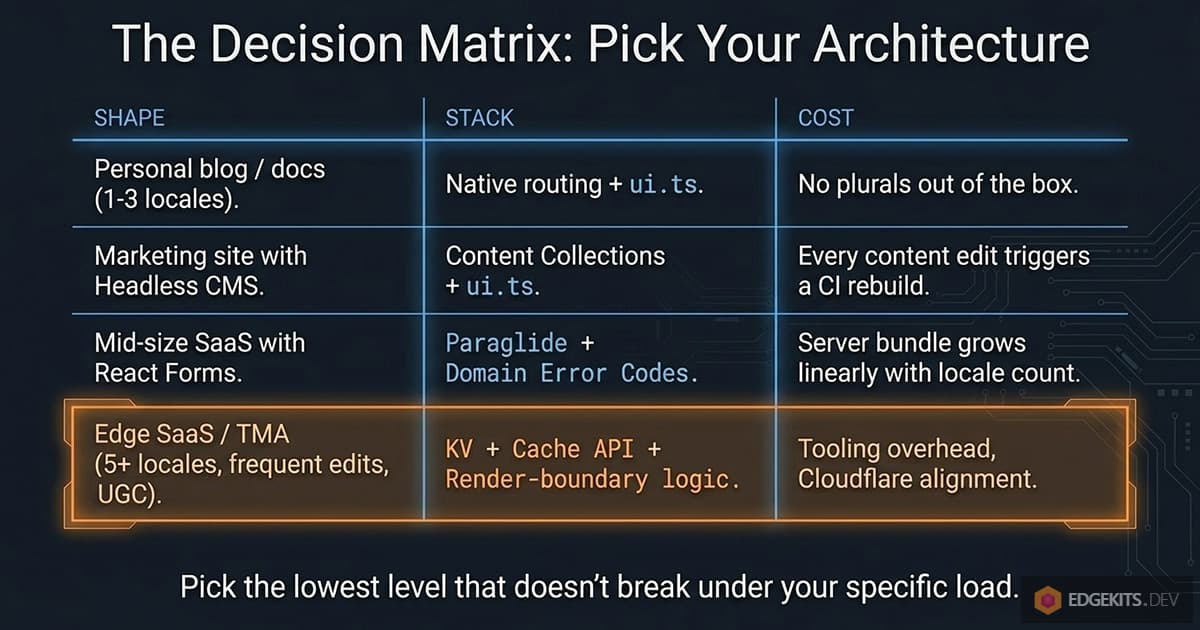
The Decision Matrix: Pick the Lowest Level That Doesn’t Break
Seven levels, four shapes of project. The matrix below is opinionated - these are the picks I’d make for each archetype, not an exhaustive map of valid options.
The Closing Principle
Pick the lowest level that doesn’t break under your specific load. Resist the temptation to over-engineer for problems you don’t have yet - the ui.ts recipe is a perfectly good answer for plenty of production sites.
Resist the temptation to under-engineer once you’re hitting one of the walls in Level 6 - patches accumulate, the pipeline grows, and one of those walls eventually tips over.
The right answer isn’t the most architecturally interesting one. It’s the one that matches the problem you actually have today, with a clear migration path to the next level when you outgrow it.
For the architectural deep-dive on the Cloudflare-specific implementation behind it, the three-part Edge-Native i18n series referenced throughout this guide is linked in Resources & Further Reading below.
And if you’re building something larger - a commercial SaaS or a Telegram Mini App that needs authentication, multi-tenancy, billing, and D1 layered on top of this i18n engine - the production-ready EdgeKits Pro starters are in active development. Join the Early Birds list below to get launch updates and the early-bird discount.
You're in.
Early access, launch updates, and release notes will be sent to your inbox.
Optional - help us tailor updates for you:
You’re on the Early Birds list.
We'll email you when the first kits are ready.
Frequently Asked Questions
What is the difference between content localization and UI localization in Astro?
Content localization covers full-page documents - blog posts, MDX articles, landing copy - managed through Astro Content Collections with per-locale subdirectories or frontmatter fields. UI localization covers individual key-value strings - button labels, form error messages, navigation items - handled by the ui.ts recipe, Paraglide JS, or a runtime KV store. These are different problems with different tools, different authors (content editors vs developers), and different edit cadence. Native Astro i18n routing sits underneath both layers and handles neither: it resolves which locale a request is for, but does not translate any text. Most Astro i18n tutorials conflate these two layers; understanding the split is the prerequisite to picking the right tool for each one.
Does Astro have built-in i18n support, and what exactly does it include?
Yes, since Astro 4. The i18n block in astro.config.mjs gives you locale-aware URL routing, a routing strategy (prefixDefaultLocale, redirectToDefaultLocale), a fallback policy for missing content, and a set of URL helpers - getRelativeLocaleUrl(), getAbsoluteLocaleUrl(), getRelativeLocaleUrlList(), plus Astro.currentLocale and Astro.preferredLocale on every request. What it does not include is a translation system: it tells the framework which locale a request is for, but it does not translate any text. Every layer above URL routing - dictionaries, string libraries, runtime KV stores - is built on top of these primitives, not inside them.
What is the best Astro i18n library in 2026?
Paraglide JS and Intlayer are the two actively maintained default recommendations for most projects that have outgrown the official ui.ts recipe. Paraglide optimizes for the leanest possible client bundle through compiler tree-shaken message functions; Intlayer optimizes for per-component colocation, richer content types (plurals, gender, markdown), and a built-in i18n SEO toolkit. For projects with modest string counts, the ui.ts recipe - a hand-written TypeScript dictionary with a t() lookup - requires zero npm installs and covers the majority of production use cases. Of the older libraries: astro-i18next published its last release in March 2023 and is effectively archived; astro-i18n (Alexandre-Fernandez) has been inactive since early 2024. For Cloudflare Workers deployments with high locale counts or content teams that update copy without developer involvement, the Edge-Native KV pattern removes translations from the build entirely, serving them at runtime from Cloudflare KV without triggering a CI redeploy.
Is Paraglide JS good for Astro i18n, and what are its limitations?
Paraglide JS v2 is the strongest build-time i18n library for Astro in 2026. Setup uses the paraglideVitePlugin in astro.config.mjs - no separate Astro adapter package required in v2. Translations in JSON files compile to typed TypeScript message functions: m.greeting({ name: 'Gary' }) rather than t('greeting', { name: 'Gary' }), with full autocomplete and build-time type checking. Client-side tree-shaking keeps browser bundles lean. The key limitation: tree-shaking applies to the client bundle, not the server bundle. On Cloudflare Workers or any serverless runtime, compiled message functions for all locales load into memory for SSR, and that bundle grows with every locale and namespace added. Past roughly five locales with multiple namespaces, this becomes measurable in cold-start times - and that is the threshold where the Edge-Native KV pattern becomes the right architectural step.
What is the difference between Paraglide JS and Intlayer for Astro i18n?
Paraglide JS and Intlayer are the two actively maintained build-time i18n libraries for Astro in 2026, optimizing for different things. Paraglide compiles translation JSON into individual typed message functions and tree-shakes unused ones from the client bundle, so the browser ships only the strings the page renders. Intlayer keeps content colocated with components in .content.ts files, with all locales bundled into one declaration per concept via a t({ en, fr, es }) helper, generated types, native plurals, gender, conditions, and markdown out of the box, plus sitemap and robots.txt helpers that expand routes and Disallow rules across every locale. Paraglide wins on minimum conceptual surface and leanest client bundle. Intlayer wins on per-component colocation, richer content types, and a built-in i18n SEO toolkit. Both hit the same server-bundle ceiling and require a build to publish translation changes.
How does Intlayer work in an Astro project, and how is it different from a hand-rolled ui.ts?
Intlayer is a TypeScript-first content layer with per-component colocation. You install intlayer and astro-intlayer, add intlayer() to the Astro integrations array, and put one .content.ts file next to each component containing a key plus a t({ en, fr, es }) declaration for every string. A watcher writes generated types into .intlayer/ (added to tsconfig.include, gitignored), so every dictionary key is type-checked at the call site. In .astro pages, getLocaleFromPath(Astro.url.pathname) resolves the current locale and getIntlayer("app", locale) returns the typed dictionary. The hand-rolled ui.ts recipe is a single central TypeScript object with as const literal types and a t() lookup function - zero dependencies, simpler mental model, but no built-in plurals, no built-in sitemap, no extractor CLI, and no per-component colocation. Use ui.ts for small string counts; reach for Intlayer when colocation or richer content types start to matter.
How do I set up Astro Content Collections for a multilingual blog?
Organize content in per-locale subdirectories inside the collection folder (src/content/blog/en/, src/content/blog/es/), define the collection in src/content.config.ts with a Zod schema and the glob loader, then create a single dynamic route at src/pages/[lang]/blog/[...slug].astro. In getStaticPaths(), call getCollection('blog') and map every entry to its (lang, slug) param pair by splitting the entry ID on the first slash. For entries where a locale has no translated version, render the default-locale content as a fallback and add noindex to that page - otherwise Google indexes a near-duplicate page in the wrong language and starts issuing 'content not canonical' warnings. For output: 'server' projects, replace getStaticPaths() with a direct getEntry('blog', `${lang}/${slug}`) call inside the page handler.
How do I implement hreflang tags correctly in an Astro multilingual site?
Use getAbsoluteLocaleUrl() in your base layout to generate one hreflang link per supported locale, and always include an x-default tag pointing to your primary locale. The most common mistake: emitting hreflang for locales where a translated page does not actually exist. If a blog post only exists in English but Astro renders a content-fallback at the German URL, emit hreflang only for English and mark the German page noindex - otherwise Google indexes near-duplicate content that contradicts your hreflang signal. Use 301 (permanent) redirects for every locale URL normalization, never 302. A 302 tells Google the source URL is canonical and the destination is a temporary alias, which fragments the index and produces 'URL is not canonical' warnings in Search Console that can persist for months.
Should I use localized URL slugs in a multilingual Astro site?
For most sites, no. Canonical English slugs (/es/blog/astro-i18n-guide, /de/blog/astro-i18n-guide) are the better default: hreflang generation becomes a string-replacement operation, the language switcher needs no route lookup table, and URLs stay copy-pasteable in any chat client. The case for localized slugs is strongest when the slug is literally a search query and the audience searches primarily in that language - a Spanish-language recipe blog, for example. The practical costs against: non-ASCII characters percent-encode into unreadable garbage in shared links, Unicode filenames cause 'file not found' errors in CI on platforms with different normalization (macOS NFD vs Linux NFC), and translated slugs require a route map that grows linearly with content. Use localized slugs when the slug is content and translation measurably helps SEO; use canonical English slugs when the slug is an identifier and URL stability matters more.
Why is it a mistake to put translated error messages directly inside Zod validation schemas?
Zod schemas run in the browser for live client-side validation, which means every module the schema imports ships to the client bundle. Calling t('error.invalid_email') inside a Zod schema makes your entire translation dictionary a client-side dependency - tree-shaking cannot remove it because every error string is reachable from the validation entry point. The correct pattern is called Domain Error Codes: schemas return string codes (INVALID_EMAIL, NAME_TOO_SHORT), not prose. Translation happens at the render boundary in the wrapping .astro component, which builds a localized error map on the server and passes it as a prop to the React island. The schema imports nothing from the i18n layer and is identical on server, client, and in tests regardless of which translation system sits behind the wrapper.
What is the Edge-Native KV pattern for Astro i18n on Cloudflare Workers?
Instead of compiling translations into the deployed Worker at build time, translations live in Cloudflare KV. Astro middleware fetches the namespaces a page needs at request time, with the Cloudflare Cache API in front of KV: cache hits are sub-millisecond, cache misses against KV take 1-5 ms on the first request in a region and warm quickly. Translations inject into Astro props during SSR - the browser receives HTML with strings already rendered, no client-side JSON download and no hydration mismatch. Core benefits: translation updates go live on the next request with no CI build, the Worker bundle does not grow with locale count, and locale-related cold-start slowdowns disappear. The trade-off is that HTML responses grow slightly, since translation payload moves from the JS bundle into the HTML. The open-source EdgeKits Core ships the middleware, KV fetcher, type-generation pipeline, and migration scripts for this pattern on Cloudflare Workers.
When does bundled Astro i18n - ui.ts or Paraglide - stop scaling, and what should I do instead?
Five signals indicate a build-time translation approach has hit its ceiling: (1) translation edits trigger a full CI deploy more than once per week - content teams are blocked behind a build queue for copy changes; (2) the deployed server bundle exceeds 1 MB and a measurable fraction is translation text; (3) adding a new locale visibly increases cold-start time on the serverless platform; (4) you support five or more locales and namespace count is still growing; (5) user-generated content also needs localization, forcing a second parallel i18n system for the data layer. Zero of these symptoms - stay on the current level. Three or more - the Edge-Native KV pattern (translations stored in Cloudflare KV, fetched at request time, cached at the edge) is the appropriate next step. The goal is picking the lowest level that does not break under your project's actual load, not adopting the most sophisticated architecture available.
Resources & Further Reading
- Astro Internationalization (i18n) Routing - Official Docs
- Astro Recipe: Add i18n Features
- Astro `astro:i18n` API Reference
- Astro Content Collections - Official Docs
- Paraglide JS - Inlang
- Paraglide JS - Astro Setup
- Paraglide JS v2 Release Notes
- Intlayer - Astro Setup Guide
- Intlayer - Content Declaration
- Intlayer (aymericzip) - GitHub
- astro-i18next (yassinedoghri) - GitHub
- astro-i18n-aut - GitHub
- astro-i18n (Alexandre-Fernandez) - GitHub
- @astrolicious/i18n - GitHub
- Zod 4 - String Format Functions
- React Hook Form - Zod Resolver
- @astrojs/sitemap - Multilingual Sitemap Generation
- @astrojs/rss - RSS Feeds in Astro
- llms.txt - Specification
- Cloudflare Workers KV Documentation
- EdgeKits Core - Open-Source Astro i18n Starter for Cloudflare Workers
- Edge-Native i18n with Astro & Cloudflare - Part 1
- Edge-Native i18n with Astro & Cloudflare - Part 2
- Edge-Native i18n with Astro & Cloudflare - Part 3 (Granular Cache Purge)