
Stop Shipping Translations to the Client: Edge-Native i18n with Astro & Cloudflare (Part 1)

Implementing Edge-native i18n using Astro Middleware and Cloudflare Workers KV.
Audio Deep Dive
Too busy to read? Listen to a 15-minute debate on this Architecture Deep Dive (generated by NotebookLM).
When I started building EdgeKits.dev, the stack felt like a cheat code for 2026.
Astro on the frontend. Cloudflare Workers on the backend. All-in on the Edge. It promised and delivered incredible TTFB, out-of-the-box SEO, and cheap scalability.
Then the magic broke.
I hit the wall of Astro Internationalization (i18n).
It should have been trivial: take a set of JSON files (en.json, de.json) and show the user the right text. But when I surveyed the standard ecosystem - from established tools like astro-i18next to modern solutions like Paraglide JS - I realized they all carried architectural baggage that I couldn’t justify shipping in an environment where every byte and every millisecond counts.
In this deep dive, we’ll build a completely Zero-JS, Edge-Native i18n architecture. I will show you how to move your routing logic to Astro Middleware, store translation dictionaries in Cloudflare KV, and render localized React Islands without shipping a single byte of JSON to the client.
Why the “Perfect Stack” Cracked
In the SPA world, we accept a lazy pattern: the client loads, detects the browser language, fetches a 50KB translation file, and then the interface makes sense. But in the world of Astro and Island Architecture, this approach starts to feel like an architectural atavism.
I tried fitting standard solutions into the constraints of Cloudflare Workers and hit three fundamental walls.
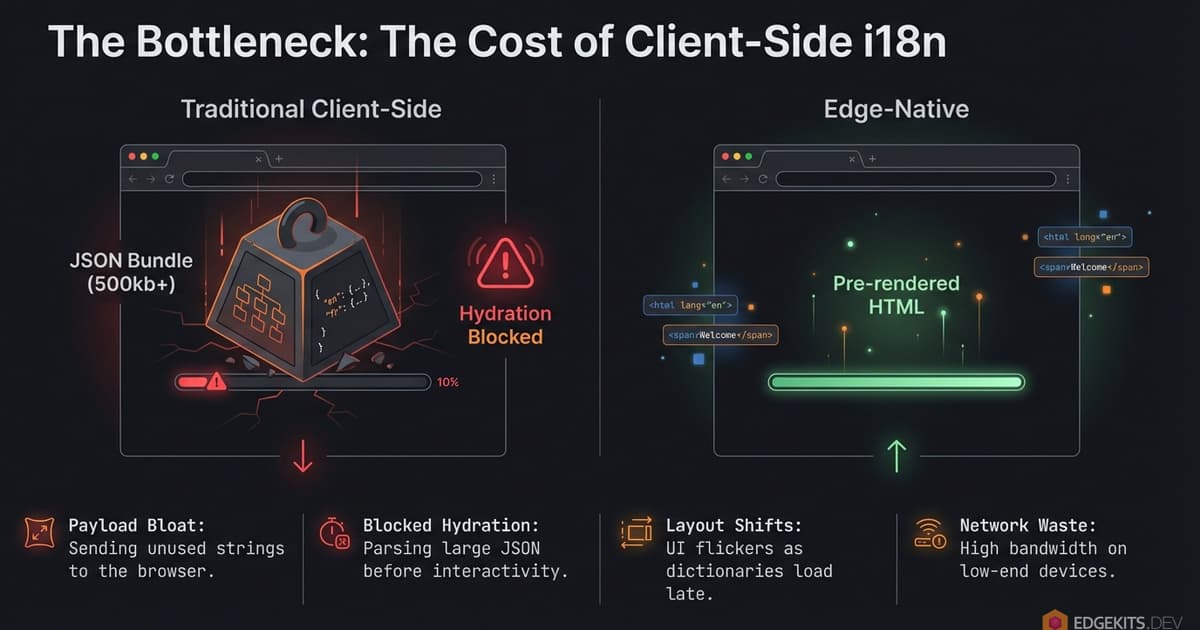
1. The “Fat Worker” Problem (Bundle Bloat)
Most libraries want you to import JSON files directly into your code. Fine for a static site. May be critical for a Worker.
On Cloudflare, every byte of text becomes part of your JavaScript bundle. With a strict 3MB limit on the free tier (and 10MB on paid), “baking” translations into the Worker means stealing space from business logic. It increases cold start times.
I didn’t want adding a new language to slow down my entire API.
2. Hydration Hell (Client-Side JS Overhead)
This is the classic Astro + React conflict.
The Server (SSR) renders English because the URL says so. The Client (React Island) wakes up, checks localStorage, sees “German,” and panic-renders.
The result: A flickering UI, a console screaming about hydration mismatches, and a “broken app” feel. Trying to sync state via third-party stores (like Nano Stores) worked, but required writing boilerplate for every single button.
3. Cumulative Layout Shift (CLS) and the “Jump” from Client-Side Translation Loading
If we decide not to bundle JSON but fetch it client-side (the old SPA way), we kill our Web Vitals. Users see empty space or raw translation keys while the JSON flies over the wire. For a project obsessed with performance, this was unacceptable.
The Paradigm Shift: Translations are Data, Not Code
Take Paraglide JS, for example. Its compiler and tree-shaking are brilliant. It solves the client-side bloat perfectly. But as I mapped out the architecture for a growing SaaS, I realized it introduced a set of invisible taxes I wasn’t willing to pay.
1. The “Fat Worker” Paradox Tree-shaking is great for the browser, but it simply moves the weight to the Server. Paraglide compiles translations into code. To render SSR, the Worker must load all that code into memory. This is the trap.
On Cloudflare, you have a hard limit on script size (3MB Free / 10MB Paid). “Baking” encyclopedias of text into your executable binary is an anti-pattern. I didn’t want my deployment to fail - or my cold starts to spike - just because I added a German translation.
2. The Dynamic Content Gap Static tools only solve half the problem. Paraglide handles your “Save” button, but it ignores your database. My SaaS runs on Cloudflare D1. How do I translate user-generated content? How do I run SQL LIKE queries on compiled functions?
I was staring at a future where I had to maintain two separate i18n stacks: one for the UI (compiled code) and one for the Data (DB).
3. High-Complexity Maintenance Finally, it trades Latency for Fragility. By adopting a compiler-based approach, you marry your build pipeline to a specific tool. If the workerd runtime updates and the compiler lags, your build breaks.
And despite the tooling, it doesn’t actually prevent hydration mismatches - if you forget to pass a prop or initialize a store correctly on the client, the UI still flickers.
I needed something else. I wanted i18n to behave like a Content Delivery Service:
- The Edge is the Source of Truth: It decides the language based on URL, cookies, and headers.
- The Client is “Dumb”: It receives ready-to-render data. No guessing.
- Zero-JS Payload: Translations are injected into HTML or component props during SSR.
I needed a system that keeps translations close to the user (Cloudflare KV), caches them at the edge (Cache API), and feeds them to Astro components without bloating the Worker bundle.
I couldn’t find a solution that met these requirements while maintaining full Type-Safety. That left me with only one option: build a bespoke architecture from scratch.
Edge-Native i18n Architecture: Inverting Control
In a traditional SPA, the client is the boss. It loads, checks navigator.language, and issues a network request for a translation file. This is a “Pull” architecture.
I flipped this model. In EdgeKits, the Client is dumb. It doesn’t guess the language - and it certainly doesn’t fetch it over the network. It receives the language as a constraint from the Server.
This is a “Push” architecture.
The Edge-Native Request Flow
Everything happens before the first byte of HTML is flushed to the browser. We moved the “Router” logic entirely into Cloudflare Workers via Astro Middleware.
Here is the lifecycle of a request:
- Interception: The request hits the Cloudflare Worker.
- Resolution: Our Middleware analyzes the request immediately - checking URL paths (
/de/), cookies, and headers. - Data Fetch: The Worker checks the Edge Cache. If it’s a miss, it fetches from KV and hydrates the cache.
- Injection: Translations are injected directly into Astro props.
- Rendering: Astro generates HTML with strings baked in.
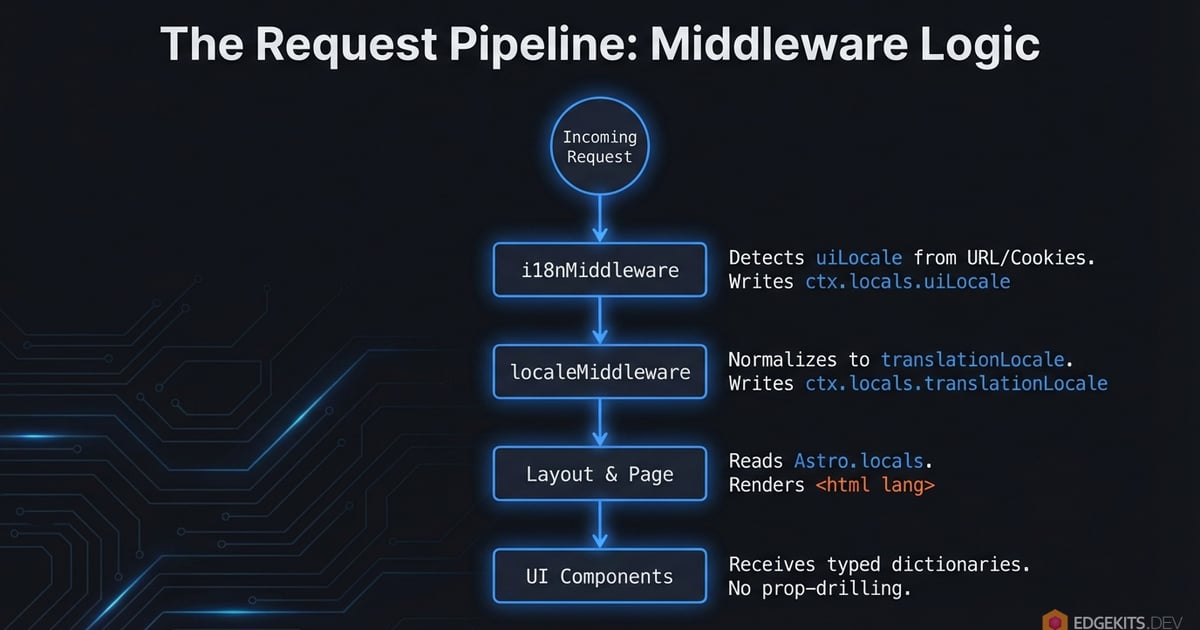
By the time the React Island wakes up on the client, the text is already there. No useEffect. No loading spinners. The component hydrates over HTML that matches its props exactly.
The Core Logic: Decoupling Intent from Data
The critical architectural decision here was to split the concept of “Current Locale” into two distinct variables.
Most i18n frameworks tightly couple the URL to the Data.
If a user visits /ja/ (Japanese) but you haven’t deployed the translation files yet, standard adapters usually force a 302 Redirect back to English. This changes the URL and disrupts the user’s intent.
Worse, if the server falls back to English but the client-side router initializes with locale='ja' (derived from the URL), you trigger a Hydration Mismatch. The server sends English HTML, but the client expects Japanese logic, causing the UI to flicker or reset.
I introduced a “Split Brain” model in the request context to prevent this:
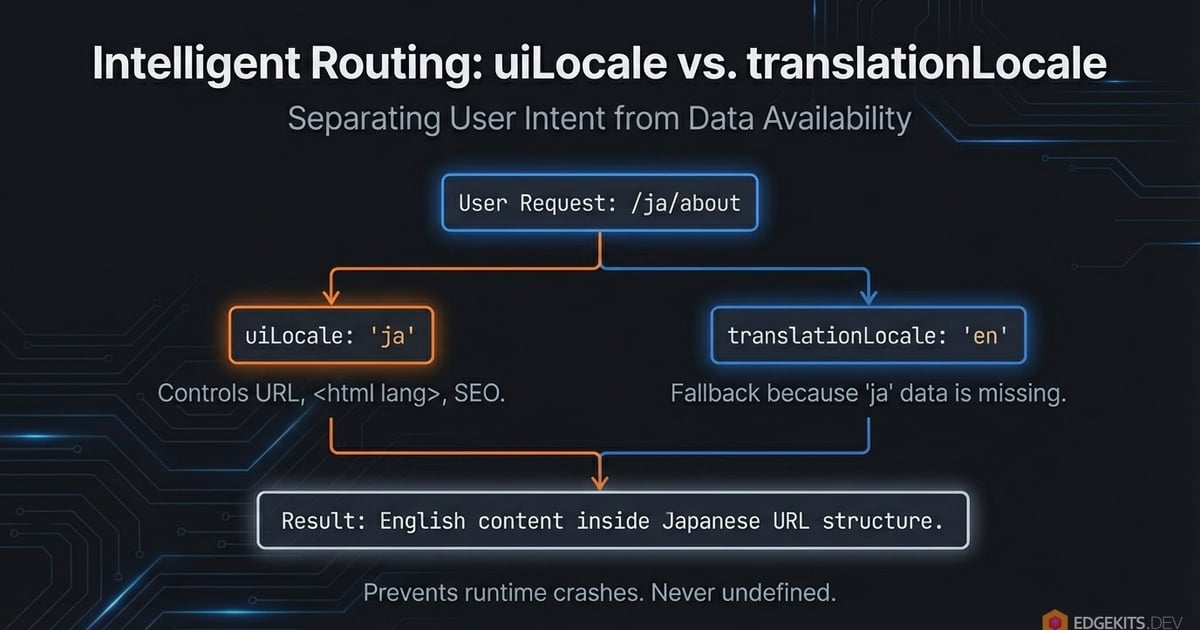
uiLocale(The Intent): What the user wants to see. This controls the URL (/ja/about), the<html lang="ja">tag, and SEO metadata.translationLocale(The Data): What we can actually show. This controls the dictionary loaded from KV.
Why this matters:
If a user visits /ja/about but we haven’t translated the marketing page into Japanese yet, the system doesn’t redirect.
uiLocaleremains"ja"(preserving the URL and user preference).translationLocalegracefully falls back to"en".
The site never breaks with undefined is not a function. The user sees the interface in English, but the app structure remains stable. This is Graceful Degradation baked into the core.
Cloudflare KV Data Layer: Solving the “Fat Worker”
The standard advice for i18n is simple: “Just import your JSON files.”
For a static site, that works. For a Serverless application, it is an architectural trap.
On Cloudflare, your code and your assets compete for the same resources. The Worker script size limit is strict - 3MB on the Free plan and 10MB on Paid.
If you “bake” your translations into the JavaScript bundle, you are stealing space from your business logic. Every time you add a new language or a new blog post translation, your Worker gets fatter. Your cold starts get slower. And eventually, you hit the wall.
I refused to ship text as code.
The Solution: KV as the Source of Truth
I moved the translation dictionaries out of the _worker.js bundle and into Cloudflare KV.
In this architecture, translations are treated strictly as external data. They are stored with keys like: edgekits:landing:en, edgekits:common:de.
This decouples the deployment of code from the deployment of content. You can fix a typo in the German pricing page without redeploying the entire application backend.
Edge Caching with the Cloudflare Cache API “Secret Sauce”
KV is fast, but it is not instant. It requires a sub-request. It also costs money - the Free tier caps you at 100,000 reads per day. For a high-traffic application, hitting KV on every single request is a non-starter.
To solve this, the architecture places the Cache API (caches.default) in front of KV.
When a request comes in:
- The Worker checks the Edge Cache for
edgekits:landing:en. - Hit: It serves instantly (sub-millisecond latency).
- Miss: It fetches from KV, constructs the response, and puts it into the Cache with a
stale-while-revalidatedirective.

The Economic Logic: I accept the latency cost (and the KV bill) on the 1st request to buy 0ms latency and zero KV read costs for the next 10,000 requests.
This allows the system to serve millions of users while staying comfortably within the limits of the Free tier.
The Trade-off: HTML Payload Size
There is no free lunch in engineering. By removing the translations from the JavaScript bundle (Zero-JS), I effectively moved that weight into the HTML document.
Since the Client is “dumb” and doesn’t fetch JSON, the server must inject the translation data directly into the DOM (usually via props or a script tag) so the React components can hydrate.
The Risk: If you load a massive 50KB JSON file for a page that only displays “Hello World”, your initial HTML download size bloats. This can hurt your Time to First Byte (TTFB).
Namespace Splitting for Scale
To mitigate the payload risk, adoption of Namespace Splitting is mandatory.
Do not dump every string into a single global common.json. That is a lazy pattern inherited from the SPA era.
Instead, break your translations into granular domains:
buttons.json(Global UI elements)landing.json(Landing page only)pricing.json(Pricing page only)dashboard.json(App only)
In EdgeKits, the fetchTranslations function accepts an array of namespaces. On the Landing Page, I only load ['common', 'hero']. The heavy dashboard strings are never fetched from KV and never injected into the HTML.
This keeps the initial document lightweight while ensuring the client has exactly - and only - what it needs to render.
Astro Middleware: The i18n Routing Controller
In a standard Astro app, you might be tempted to check the locale inside your .astro pages or layout files.
Don’t.
If you calculate the locale in a Layout, you have already executed too much code. You need to know the language before you render a single component.
I moved this logic entirely into src/domain/i18n/middleware/i18n.ts. This file acts as the “Air Traffic Controller” for the application. It runs on the Edge, intercepts every request, and determines the uiLocale before Astro even boots up the page rendering process.
Locale Detection Hierarchy (Cookie → Header → Geo-IP)
Here, a hierarchy of authority for determining the user’s language naturally presents itself, where the user’s explicit intent always takes precedence over implicit signals.

-
URL (The King): If the path is
/es/about, the user wants Spanish. Period. This is the primary source of truth. -
Cookie (The Override): If the user is at the root
/(where no language is specified) but has alocalecookie, I respect that preference. -
Browser Header (Astro Native): If no URL prefix and no cookie exist, I leverage Astro’s built-in
context.preferredLocaleto handle the standardAccept-Languagenegotiation automatically. -
Geo-IP (The Safety Net): If all else fails, I use the Cloudflare
request.cf.countryproperty to make a best-guess based on location.
Middleware Implementation
Here is the middleware that orchestrates this. It handles the “Soft 404” problem, keeps the Cookie in sync with the URL, and does all the heavy lifting required for seamless i18n routing (you can find the full code in the repo, but here I’ll just highlight the key parts):
// src/domain/i18n/middleware/i18n.ts

import type { MiddlewareHandler } from 'astro'
import { LocaleSchema } from '@/domain/i18n/schema'
import { DEFAULT_LOCALE, type Locale } from '@/domain/i18n/constants'
import { getCookieLang, setCookieLang } from '@/domain/i18n/cookie-storage'
import { mapCountryToLocale } from '@/domain/i18n/country-to-locale-map'
import { resolveLocaleForTranslations } from '@/domain/i18n/resolve-locale'

// Regex to identify public static assets (images, fonts, scripts, etc.)
// These files should bypass i18n routing and locale detection.
const PUBLIC_FILE_REGEX =
  /\.(ico|png|jpg|jpeg|svg|webp|gif|css|js|map|txt|xml|json|woff2?|avif)$/i

// List of URL prefixes that should be ignored by the i18n middleware.
// Includes API endpoints, internal Astro paths, and standard static routes.
const IGNORED_PREFIXES = [
  '/api',
  '/assets',
  '/_astro',
  '/_image',
  '/_actions',
  '/favicon',
]

// Extracts the context type from Astro's MiddlewareHandler for cleaner function signatures.
type I18nMiddlewareContext = Parameters<MiddlewareHandler>[0]

// Determines if the current request path matches static assets or ignored prefixes.
// Returns true to skip i18n processing for this request.
function shouldBypassI18n(pathname: string): boolean {
  if (PUBLIC_FILE_REGEX.test(pathname)) return true
  if (IGNORED_PREFIXES.some((p) => pathname.startsWith(p))) return true
  return false
}

// Applies strict Content Security Policy (CSP) and other security headers to the response.
// Wrap outgoing responses with this function to ensure consistent security posture.
function applySecurityHeaders(response: Response): Response {
  // Tip: You can apply your security headers (CSP, HSTS, X-Frame-Options, etc.) here.
  // Check the GitHub repository for the example of implementation.
  return response
}

// Constructs a standardized localized URL path ensuring a trailing slash.
// Example: buildLocalizedPath('en', ['about', 'team']) -> '/en/about/team/'
function buildLocalizedPath(locale: Locale, rest: string[]): string {
  const suffix = rest.join('/')
  return suffix ? `/${locale}/${suffix}/` : `/${locale}/`
}

// Resolves the most appropriate locale for the user based on a fallback cascade:
// 1. User's saved cookie preference.
// 2. Browser's Accept-Language header (matching 2-char code).
// 3. Cloudflare Geo-IP country mapping.
// 4. Finally, falls back to the application's DEFAULT_LOCALE.
function resolveFallbackLocale(context: I18nMiddlewareContext): Locale {
  const cookieLocale = getCookieLang(context.cookies)
  if (cookieLocale) return cookieLocale

  const browserRaw = context.preferredLocale
  if (browserRaw) {
    // Currently we support 2-chars locales only.
    let parsed = LocaleSchema.safeParse(browserRaw)
    if (parsed.success) return parsed.data

    // Fallback: language part only, e.g. 'pt-br' -> 'pt'
    const short = browserRaw.split('-')[0]
    parsed = LocaleSchema.safeParse(short)
    if (parsed.success) return parsed.data
  } else {
    // Cloudflare Geo-IP Strategy
    const country = context.locals.runtime?.cf?.country
    const geoLocale = mapCountryToLocale(country)
    let parsed = LocaleSchema.safeParse(geoLocale)
    if (parsed.success) return parsed.data
  }

  return DEFAULT_LOCALE
}

// Main i18n middleware handler. Intercepts incoming requests, manages routing,
// sets locale context, and handles soft 404 protections for edge environments.
export const i18nMiddleware: MiddlewareHandler = async (context, next) => {
  const url = new URL(context.request.url)
  const pathname = url.pathname

  // 1. Split the URL early to access its segments
  const segments = pathname.split('/').filter(Boolean) // "/es/about/" -> ["es", "about"]
  const firstSegment = segments[0] ?? null

  // 2. SAFETY NET (For static file 404 pages)
  // Attempt to infer the locale from the URL, or fallback to the default.
  let safeLocale = DEFAULT_LOCALE
  if (firstSegment) {
    const parsed = LocaleSchema.safeParse(firstSegment)
    if (parsed.success) {
      safeLocale = parsed.data
    }
  }

  // Inject the locale into the context BEFORE the bypass check!
  context.locals.uiLocale = safeLocale
  context.locals.translationLocale = resolveLocaleForTranslations(safeLocale)

  // 3. Bypass static files and system paths (with Soft 404 protection)
  if (shouldBypassI18n(pathname)) {
    const response = await next()

    const contentType = response.headers.get('content-type') || ''
    const isHtml = contentType.includes('text/html')
    const isRedirect = response.status >= 300 && response.status < 400

    // If Astro attempts to return HTML for a static/API request (and it's not a redirect),
    // it means the file wasn't found and Astro rendered a fallback page (404.astro or catch-all).
    // We strictly intercept this and return a lightweight text-based 404 instead.
    // Why? To mitigate Directory Bruteforcing / Fuzzing attacks and save resources.
    if (isHtml && !isRedirect) {
      // Aggressively save Worker CPU cycles for missing static files
      return new Response('Not found', {
        status: 404,
        headers: { 'Content-Type': 'text/plain; charset=utf-8' },
      })
    }

    return response
  }

  const fallbackLocale = resolveFallbackLocale(context)

  // 1. No locale in URL - redirect to fallback locale root
  if (!firstSegment) {
    const target = buildLocalizedPath(fallbackLocale, [])
    if (pathname !== target) {
      // Apply headers to the redirect response
      return applySecurityHeaders(context.redirect(target, 301))
    }
    return applySecurityHeaders(await next())
  }

  // 2. URL has first segment - validate as locale
  const parsed = LocaleSchema.safeParse(firstSegment)
  const urlLocale: Locale | null = parsed.success ? parsed.data : null

  if (urlLocale) {
    // Keep cookie in sync with URL locale
    setCookieLang(context.cookies, urlLocale)
    // Set uiLocale to Astro locals
    context.locals.uiLocale = urlLocale
    // Define and set translationLocale to Astro locals
    const translationLocale = resolveLocaleForTranslations(urlLocale)
    context.locals.translationLocale = translationLocale

    // Normalize trailing slash and structure
    const normalized = buildLocalizedPath(urlLocale, segments.slice(1))
    if (pathname !== normalized) {
      return applySecurityHeaders(context.redirect(normalized, 301))
    }

    return applySecurityHeaders(await next())
  }

  // 3. Invalid locale in URL -> treat the whole path as content missing the locale prefix.
  const target = buildLocalizedPath(fallbackLocale, segments)

  if (pathname !== target) {
    return applySecurityHeaders(context.redirect(target, 301))
  }

  return applySecurityHeaders(await next())
}
This function resolves the actual locale we need to request from KV. It gracefully falls back to a default if a translation bundle for the current UI locale is missing:
// src/domain/i18n/resolve-locale.ts

// ...

export function resolveLocaleForTranslations(locale: Locale): Locale {
  return hasTranslations(locale) ? locale : DEFAULT_LOCALE
}
The Edge Capability: Geo-IP Fallback
You might notice the mapCountryToLocale helper in the fallback logic. This is where we leverage the Edge platform.
Cloudflare exposes the visitor’s country code in every request. Here is a simple, O(1) lookup map to convert codes like DE (Germany) or BR (Brazil) into supported locales.
// src/domain/i18n/country-to-locale-map.ts

import type { Locale } from './schema.ts'

const GEO_MAP: Record<string, Locale> = {
  // --- ANGLOSPHERE (Explicitly set to EN) ---
  US: 'en', // United States
  GB: 'en', // United Kingdom
  AU: 'en', // Australia
  NZ: 'en', // New Zealand
  IE: 'en', // Ireland
  CA: 'en', // Canada (Majority EN, fallbacks handle FR better via Accept-Language headers)

  // --- DACH (German) ---
  DE: 'de',
  // ...

  // --- LATAM + SPAIN ---
  ES: 'es',
  // ...

  // Asia
  JP: 'ja',
  // ...

  // etc...
}

export function mapCountryToLocale(country: unknown): string | undefined {
  if (typeof country !== 'string') return undefined
  return GEO_MAP[country.toUpperCase()]
}
This ensures that a user visiting from Tokyo gets Japanese automatically, even if their browser headers are ambiguous, but only if they haven’t explicitly chosen a different language via URL or Cookie.
Why This Locale Detection Design?
This middleware establishes context.locals.uiLocale as the single source of truth.
The React components don’t check localStorage. The Layout doesn’t parse the URL. They simply read uiLocale from the context.
By treating the URL as the strict authority for state, we eliminate the possibility of a “Split Brain” scenario where the URL says English but the Interface renders German.
The “Dumb” Client: Type-Safe i18n for Astro Islands
Astro is famous for shipping “Zero JS” by default. But in the real world, you eventually need interactivity: a Newsletter form, a Pricing toggle, or a User Dashboard. In Astro, these isolated bits of interactivity are called “Islands” (usually written in React, Vue, or Svelte).
This is where performance usually dies.
When a React Island wakes up (hydrates), it often realizes: “Wait, I need text!”. The standard SPA reflex is to fire a hook like useTranslation, which triggers a network request for a JSON file, shows a loading spinner, and finally causes a Layout Shift (CLS) when the text arrives.
The “Standard” React Way (Anti-Pattern for Edge):
// ❌ Bad: Triggers network fetch + Re-render
const { t, ready } = useTranslation()
if (!ready) return <Spinner />
return <div>{t('welcome_message')}</div> // 'welcome_message' is often an untyped string
In EdgeKits, we treat the Client as “dumb”. It does not know how to fetch translations. It does not know which language is active. It simply receives data via props from the Astro Page Controller.
Strict Prop Drilling for Type-Safe Islands
We moved the complexity from the Components to the Server (the .astro file).
The page fetches the specific namespaces it needs from the Edge Cache and passes them down to the Island as a simple JSON object.
The EdgeKits Way:
// src/components/layout/Hero.tsx

// The I18n namespace is globally available via src/i18n.generated.d.ts (auto-generated by "npm run i18n:bundle")

interface HeroProps {
  // 1. Strict Type Safety: We know EXACTLY what 'hero' contains
  t: I18n.Schema['landing']['hero']
}

export function Hero({ t }: HeroProps) {
  // 2. No hooks. No generic strings. Just data.
  // 3. Renders instantly. Zero CLS.
  return <h1>{t.headline}</h1>
}
This results in Zero CLS. The HTML arrives at the browser with the text already inside the tags.
Type-Safety: “It compiles, therefore it works”
One of the biggest risks in i18n is “key drift” - when your code asks for t.description but the JSON file has t.desc.
I refused to use any.
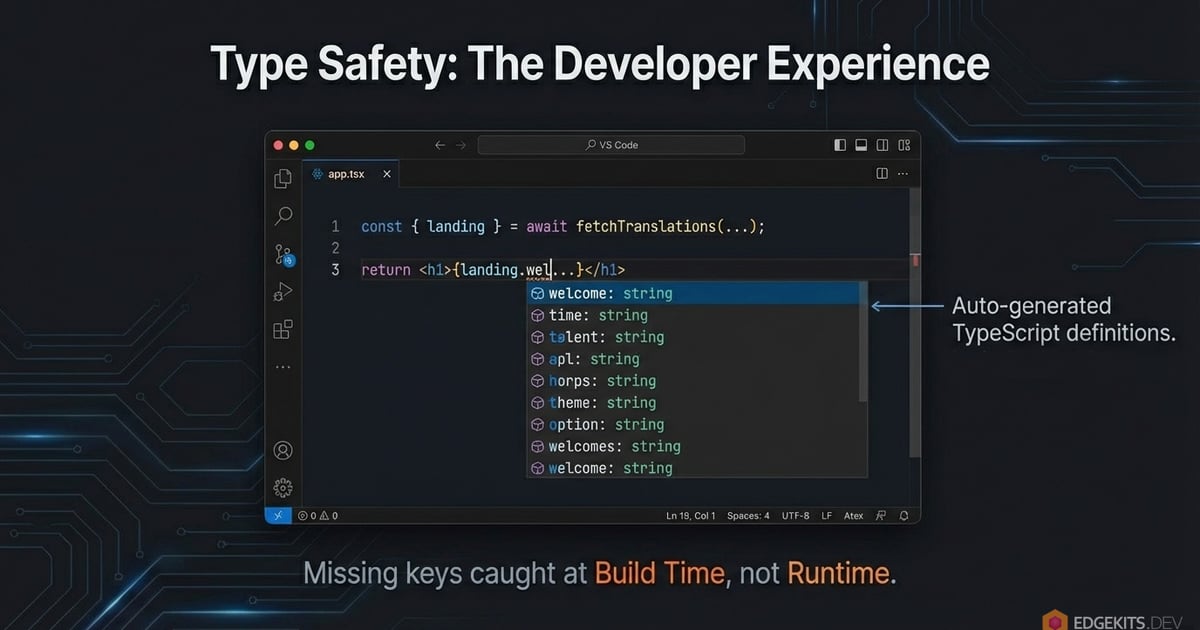
EdgeKits includes a generator script (npm run i18n:bundle) that scans your src/locales directory and generates a strict TypeScript definition file (I18n.Schema).
- If you delete a key in
en/common.json, the build fails. - If you mistype a prop name, the build fails.
- You get autocomplete for every single string in your project.
This turns internationalization from a runtime guessing game into a compile-time guarantee.
Safe Interpolation: The fmt() Helper
Raw JSON is static, but UI is dynamic. We often need to inject variables like "Hello, {name}!".
Shipping a heavy interpolation engine like intl-messageformat to the client defeats the purpose of keeping the bundle small. Instead, I wrote a lightweight, runtime-agnostic helper called fmt().
It handles two critical jobs:
- Variable Injection: Replaces
{name}with values. - XSS Protection: It automatically escapes injected values while preserving HTML tags defined in your translation files.
The Pattern: Keep the HTML structure in the JSON, but inject safe data.
locales/en/common.json:
{
  "welcome": "Welcome back, <strong>{name}</strong>!"
}src/components/common/Welcome.tsx:
import { fmt } from '@/domain/i18n/format'

export function Welcome({ t, userName }) {
  // 'fmt' escapes 'userName' to prevent XSS,
  // but preserves the <strong> tag from the JSON.
  const html = fmt(t.welcome, { name: userName })

  return <span dangerouslySetInnerHTML={{ __html: html }} />
}
This gives us the flexibility of rich-text translations without the security nightmares of unescaped HTML.
Usage in Astro Components
While React forces us to use the verbose dangerouslySetInnerHTML, Astro provides a much cleaner native directive: set:html.
Because our fmt() helper has already neutralized any malicious input in the variables, passing the resulting string directly to Astro’s set:html is completely safe.
---
// Example.astro

import { fmt } from '@/domain/i18n/format'

const { common } = Astro.props

// JSON pattern: "emphasis": "Please check the <em>{content}</em> file."
const msg1 = fmt(common.ui.emphasis, { content: 'wrangler.jsonc' })

// JSON pattern: "codeSnippet": "Run <code>{code}</code> to start the server."
const msg2 = fmt(common.ui.codeSnippet, { code: 'npm run dev' })
---

<p class="font-semibold" set:html={msg1} />

<div class="bg-muted p-4 rounded-md" set:html={msg2} />
Localizing React Islands in Astro MDX (The “Final Boss”)
Using React components inside Markdown (MDX) is easy. Using internationalized components inside Markdown is a nightmare.
Why? Because MDX is static content. It doesn’t have access to the request context, cookies, or the Astro.locals object we set up in our middleware.
If you try to use a standard useTranslation hook inside an Island embedded in MDX, it will fail because the component renders in isolation.
The Wrapper Pattern: SSR Prop Injection in Astro
We solve this by treating the Astro component as a “Data Controller” and the React component as a “Pure View”.
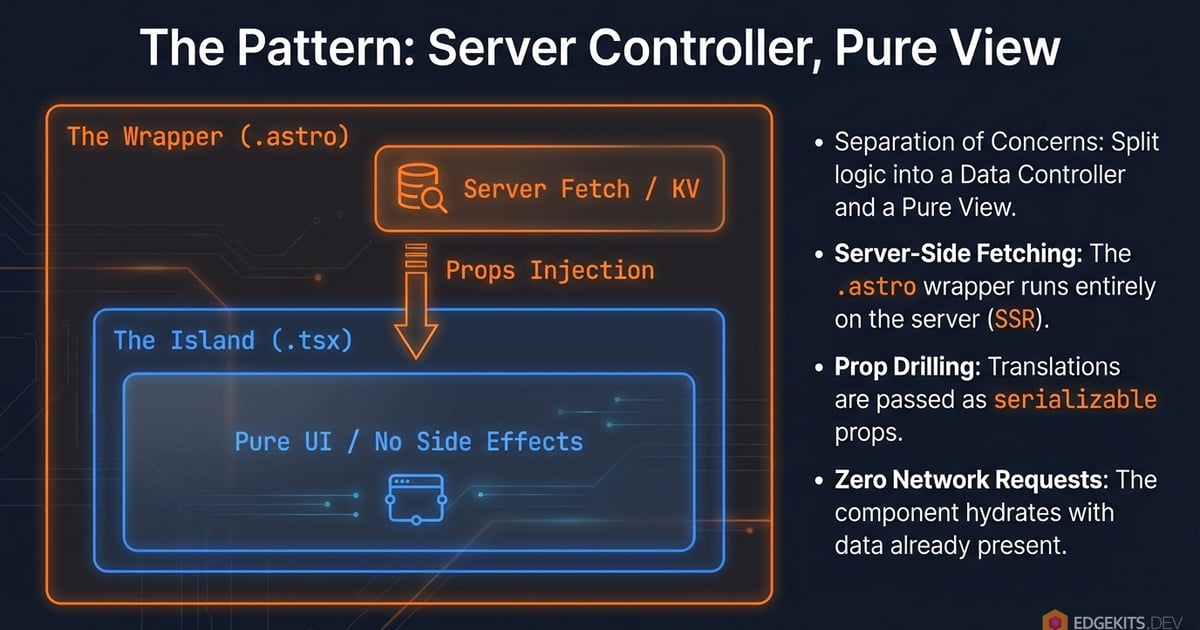
Instead of making the React component fetch its own translations, we create a thin .astro wrapper that:
- Runs on the server.
- Accesses
Astro.locals.translationLocale. - Fetches the specific translation namespace from KV (or Cache).
- Passes the data as typed props to the React component.
1. The React Component (Pure & Dumb)
Notice that this component has zero dependencies on any third-party i18n library.
// src/components/blog/islands/LocalizedCounter.tsx

import { useState } from 'react'

import { cn } from '@/shadcn/utils'
import { pluralIcu } from '@/domain/i18n/format'

interface LocalizedCounterProps {
  t: I18n.Schema['counter']
  initial?: number
  locale: string
}

export const LocalizedCounter = ({
  t,
  initial = 0,
  locale,
}: LocalizedCounterProps) => {
  const [count, setCount] = useState(initial)

  const formattedLabel = pluralIcu(count, locale, t.patterns)
  const max = 999

  const handleIncrement = () => {
    setCount((prev) => (prev < max ? prev + 1 : prev))
  }

  const handleReset = () => {
    setCount(initial)
  }

  return (
    <div className="bg-card flex flex-col items-start gap-4 rounded-xl border p-4 shadow-sm sm:flex-row sm:items-center sm:justify-between sm:p-5">
      <div className="space-y-5">
        <div className="text-muted-foreground text-xs font-semibold tracking-widest uppercase">
          {t.title}
        </div>

        <div className="flex w-24 flex-col items-center gap-2">
          <div className="bg-input w-full rounded-md text-center">
            <span
              className={cn(
                'text-4xl font-semibold tabular-nums',
                count === max && 'text-primary',
              )}
            >
              {count}
            </span>
          </div>

          <div className="text-muted-foreground text-sm">{formattedLabel}</div>
        </div>
      </div>

      <div className="mt-2 flex gap-2">
        <button
          type="button"
          onClick={handleIncrement}
          disabled={count === max}
          className={cn(
            'text-primary-foreground inline-flex items-center justify-center rounded-lg px-3 py-1.5 text-sm font-semibold shadow-sm transition',
            count === max
              ? 'bg-primary/50 cursor-not-allowed'
              : 'bg-primary hover:bg-primary/90',
          )}
        >
          {t.increment}
        </button>

        <button
          type="button"
          onClick={handleReset}
          className="text-muted-foreground hover:bg-muted inline-flex items-center justify-center rounded-lg border px-3 py-1.5 text-sm font-medium transition"
        >
          {t.reset}
        </button>
      </div>
    </div>
  )
}
2. The Astro Wrapper (The Bridge)
This file lives in your components folder but acts as the glue between your MDX content and your Edge data.
---
// src/components/blog/LocalizedCounterWrapper.astro

import { LocalizedCounter } from '@/components/blog/islands/LocalizedCounter'
import { fetchTranslations } from '@/domain/i18n/fetcher'

const { translationLocale, runtime } = Astro.locals
const { blog } = await fetchTranslations(runtime, translationLocale, ['blog'])
const t = blog.counter
---

<LocalizedCounter
  client:visible
  t={t}
  locale={translationLocale}
  labels={blog.counter}
/>
3. Usage in MDX
Now we simply inject our island component wrapper into the components prop in /pages/[lang]/blog/[...slug].astro
---
// pages/[lang]/blog/[...slug].astro

import { getEntry } from 'astro:content'

import { DEFAULT_LOCALE } from '@/domain/i18n/constants'
import { fetchTranslations } from '@/domain/i18n/fetcher'
import BaseLayout from '@/layouts/BaseLayout.astro'
import LocalizedCounterWrapper from '@/components/blog/LocalizedCounterWrapper.astro'

// 1. Get parameters from URL
const { lang, slug } = Astro.params

if (!slug) {
  // No slug? We return 404 status without changing the URL.
  return Astro.rewrite(`/${lang}/404/`)
}

// 2. Take uiLocale and translationLocale from locals
// uiLocale - the language the user requested (from the URL or cookies)
// translationLocale - a language for which there are dictionaries in KV
const { uiLocale, translationLocale, runtime } = Astro.locals

// 3. Graceful Fallback Logic for Content
// Step A: Try to find an article in the requested language
let post = await getEntry('blog', `${uiLocale}/${slug}`)

// Step B: If there is no translation, roll back to the default locale (English)
if (!post) {
  post = await getEntry('blog', `${DEFAULT_LOCALE}/${slug}`)

  // We can also trigger the MissingTranslationBanner here
  // (see the explanation below in the Graceful Degradation & The “Honest UX” chapter)
  Astro.locals.isMissingContent = true
}

// Step C: If the article isn't even in English, it's a fair 404.
if (!post) {
  // Turns off the MissingTranslationBanner if it was triggered above
  Astro.locals.isMissingContent = false
  // We return 404 status without changing the URL.
  return Astro.rewrite(`/${uiLocale}/404/`)
}

// 4. Render Content
const { Content, headings } = await post.render()

// 5. Fetch UI Translations (KV)
// We load dictionaries via translationLocale. Even if the article text is in English,
// the entire blog layout will remain localized!
const { blog } = await fetchTranslations(runtime, translationLocale, ['blog'])
---

<BaseLayout title={post.data.title} description={post.data.metaDescription}>
  <article class="max-w-3xl mx-auto mb-12 pt-6 pb-12 px-6 bg-background">
    <header class="mb-8 flex flex-col items-start">
      <h1 class="text-3xl font-bold mb-4 text-primary">
        {post.data.title}
      </h1>
    </header>

    {/* Markdown/MDX Content Body */}
    <div class="prose">
      <Content
        components={{
          // Map the MDX tag to the Astro Wrapper, not the React component
          LocalizedCounter: LocalizedCounterWrapper,
        }}
      />
    </div>
  </article>
</BaseLayout>
And then we can use it directly in MDX:
//interactive-mdx-demo-with-edge-i18n.mdx

---

## title: 'Interactive i18n Demo'

This is a standard paragraph in Markdown. The text you are reading now lives in the filesystem.

## The "Hybrid" Astro + React i18n Component

Below is a React Island. Its structure is defined in code, but **the text labels come from Cloudflare KV**.

<LocalizedCounter />

This allows content creators to use complex UI widgets without worrying about localization files.
Why the Hybrid Pattern Wins
This architecture allows us to have rich, interactive, localized widgets embedded deep within static content (like documentation or blog posts) without shipping a single byte of translation JSON to the client for the rest of the page. The specific strings needed for the counter are “baked” into the component props during the server render.
From live demo to case study
When this article first went up, there was a live proof of concept here: not a screenshot, but a fully hydrated React island running inside this MDX page, using the exact Wrapper Pattern described above to inject localized labels and handle server actions without layout shift.
I have since rebuilt this site without React islands. The newsletter form, the nav, and the toaster are now pure Astro with a vanilla TypeScript form controller, so the live embed is gone. The i18n architecture in this article still stands as the case study for how the Wrapper Pattern worked when that form was an island. For why I moved off islands, and how I reproduced the react-hook-form UX without React, see From React Islands to Zero-JS Astro.
Resilience & Tooling: Fallbacks, Cache Invalidation, and DX
Building a system that works on localhost is easy. Building a system that survives a partial cloud outage or a bad deployment is hard.
Since we removed the client-side fetch, the Server (Worker) becomes the single point of failure. If Cloudflare KV is slow or returns an error, we cannot show a blank page.
Compiled Fallbacks as a Runtime Safety Net
We implemented a “Belt and Suspenders” approach.
- The Belt (Cloudflare KV): Stores all translations for all languages. It is dynamic and can be updated instantly.
- The Suspenders (Compiled Fallbacks): We compile the Default Locale (e.g., English) directly into the Worker bundle as a JavaScript object.
How it works:
When the middleware requests translations, it performs a deepMerge operation:
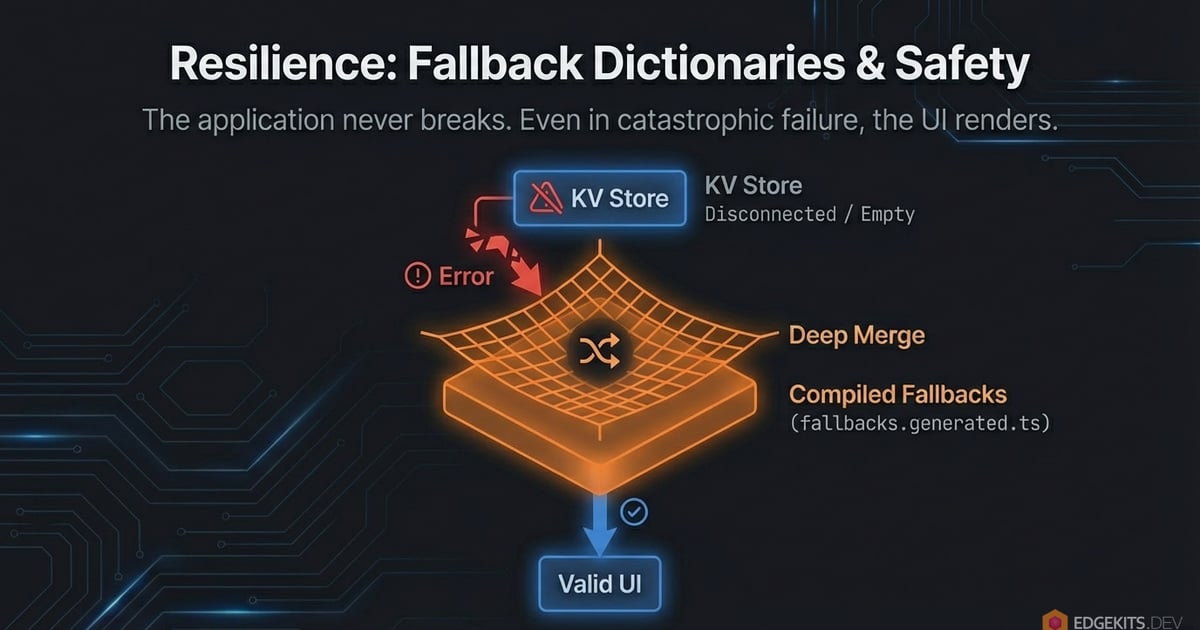
// Logic inside fetchTranslations()
const kvResult = await fetchFromKV(namespace) // Might fail or be partial
const fallback = FALLBACK_DICTIONARIES[namespace] // Always exists in memory

// If KV fails, we still render the page in English (Default Locale).
// If KV is partial, we fill in the missing keys from the fallback.
const finalData = deepMerge(fallback, kvResult)
This guarantees 100% Uptime for your base language. Even if the KV database goes offline completely, your site will still render perfectly in English. No white screens, no “undefined” labels.
Content-Hash Cache Invalidation Strategy
Earlier, when discussing The Cache API “Secret Sauce”, we placed the Edge Cache in front of our KV store to avoid excessive reads. But how do you invalidate that cache when you fix a typo? Waiting for a TTL (Time To Live) to expire is annoying during deployments.
We solved this with Content-Based Hashing.
Every time you run the build script (npm run i18n:bundle), we calculate a SHA-hash of your translation files. This hash is injected into the code as a constant: TRANSLATIONS_VERSION.
The Cache Key structure looks like this:
project_id:i18n:v<HASH>::<locale>:<namespace>
- Scenario A (No changes): You redeploy the code, but didn’t touch locales. The Hash stays the same. The Cache HIT rate remains 100%.
- Scenario B (Typo fix): You change a string in
common.json. The Hash changes. The Worker immediately starts using a new Cache Key.
The result? Instant updates for users, with zero manual cache purging required.
Developer Experience (DX): The i18n Scripts
Working with Edge KV stores can be tedious. I didn’t want to manually use wrangler kv:key put for every single JSON file.
We automated the entire workflow with three scripts:
npm run i18n:bundle: Scanssrc/locales, generates the TypeScript Schema, calculates the Version Hash, and prepares a single JSON payload.npm run i18n:seed: Uploads this payload to your Local KV (Miniflare) sonpm run devworks offline.npm run i18n:migrate: Uploads the payload to your Production Cloudflare KV.
This makes the Edge feel just like Localhost. You change a JSON file, the types update instantly, and the data is one command away from global replication.
i18n URL Strategy: Why We Don’t Translate Slugs
When building a multilingual site, the instinct is often to translate everything, including the URL path.
- English:
/blog/architecture - German:
/de/blog/architektur - Ukrainian:
/uk/blog/архітектура
In EdgeKits, I deliberately chose not to do this. We use English Slugs across all locales.
The Problem with Localized Slugs
At first glance, localized URLs seem better for SEO. In reality, they introduce significant technical debt and UX issues, especially for non-Latin alphabets.
1. The “Percent-Encoding” Nightmare
Browsers and messengers encode non-ASCII characters. A clean Ukrainian URL turns into an unreadable mess when you copy-paste it into Slack, WhatsApp, or Jira:
/uk/blog/%D0%B0%D1%80%D1%85%D1%96%D1%82%D0%B5%D0%BA%D1%82%D1%83%D1%80%D0%B0This looks suspicious to users (like spam/phishing) and breaks the clean aesthetic of the link.
2. The Git/Filesystem Conflict
Different operating systems (macOS vs. Windows/Linux) handle Unicode normalization differently (NFC vs. NFD).
Having filenames like архітектура.md in your git repository is a recipe for cross-platform merge conflicts and “file not found” errors in CI/CD pipelines.
3. Architectural Complexity
If you translate slugs, you need a “Lookup Table” (or a massive switch statement) to know that architektur corresponds to architecture.
This forces you to load a map of every single blog post into memory just to resolve a route or generate language links.
The EdgeKits Approach: Canonical English Slugs
We keep the structure identical across languages. The locale prefix changes, but the slug remains the canonical identifier.
- ✅
/en/blog/architecture - ✅
/de/blog/architecture - ✅
/uk/blog/architecture
Why this wins:
-
Stable Sharing: The URL is clean, readable, and short in any chat app, regardless of the user’s language.
-
Simple Code: We don’t need reverse-lookup maps. To fetch the Ukrainian post, we just look for
src/content/blog/uk/architecture.mdx. The file system is the source of truth. -
Automated SEO (Hreflangs): Because the slug never changes, generating
hreflangtags becomes a simple string replacement operation ($O(n)$ complexity).
Canonical Slug Implementation
Here is the helper component that generates the tags automatically:
---
// src/domain/seo/components/SeoHreflangs.astro

const { currentLang } = Astro.props
const currentPath = Astro.url.pathname

// Since slugs are identical, we just swap the prefix
// Input: /en/blog/architecture, Target: uk -> Output: /uk/blog/architecture
function getPathForLang(targetLang) {
  return currentPath.replace(`/${currentLang}/`, `/${targetLang}/`)
}
---

{
  Object.keys(LANGUAGES).map((lang) => (
    <link
      rel="alternate"
      hreflang={lang}
      href={new URL(getPathForLang(lang), Astro.site).toString()}
    />
  ))
}
And here is how we drop it into the global layout. You write this once, and every page on your site instantly has perfect SEO linkage:
---
// src/layouts/BaseLayout.astro

import SeoHreflangs from '@/domain/seo/components/SeoHreflangs.astro'

const { uiLocale } = Astro.locals // Provided by Middleware
---

<!doctype html>
<html lang={uiLocale}>
  <head>
    <link rel="canonical" href={Astro.url} />

    <SeoHreflangs currentLang={uiLocale} />
  </head>
  <body>
    <slot />
  </body>
</html>
By accepting this trade-off, we eliminate an entire class of bugs related to encoding and routing, while ensuring Google always knows which version of the page to serve.
Graceful Degradation & The “Honest UX” for Missing Translations
By keeping the English slugs canonical, we solved the routing problem. But what happens at the file-system level?
If a user visits /es/blog/architecture, Astro will look for src/content/blog/es/architecture.mdx. If you haven’t written the Spanish translation yet, the standard behavior is to throw a 404 Error. Some developers solve this by copying the English .mdx file into the /es/ folder just to prevent the crash. That is a maintenance nightmare.
Because we decoupled the user’s intent (uiLocale) from the available data, we can handle this gracefully at the data-fetching layer. Inside our dynamic route ([...slug].astro), we implemented a dual-fetch fallback:
---
// pages/[lang]/blog/[...slug].astro

// ...

// 1. Try to fetch the requested translation
let post = await getEntry('blog', `${uiLocale}/${slug}`)

// 2. The Graceful Fallback: If missing, load the English original
if (!post) {
  post = await getEntry('blog', `${DEFAULT_LOCALE}/${slug}`)

  // Flag the missing content for the UI
  Astro.locals.isMissingContent = true
}

// 3. If it doesn't exist in English either, then it's a real 404
if (!post) {
  // Turns off the MissingTranslationBanner if it was triggered above
  Astro.locals.isMissingContent = false

  return Astro.rewrite(`/${uiLocale}/404/`)
}

// ...
---
The result is pure magic for the User Experience:
The user visits /es/blog/architecture. The article text renders in English, but because uiLocale is still "es", the entire surrounding interface - the navigation menu, the footer, and the formatted Publish Date - remains perfectly localized in Spanish. No 404s. No duplicated files.
The Missing Translation Banner (Dual-Mode)
However, silently swapping content languages can confuse users. To solve this, I introduced the “Honest UX” pattern via a MissingTranslationBanner component.
Instead of a generic warning, the system differentiates between two distinct failure modes: Missing Content (Markdown) and Missing UI (JSON dictionaries).
-
Content is missing: If
Astro.locals.isMissingContentwas flagged by our router, the banner tells the user specifically about the text: “Sorry, this article is not yet available in your selected language.” -
UI is missing: What if the Markdown content exists, but a translator forgot to add
blog.jsonto the Spanish directory? During the build phase (npm run i18n:bundle), our script statically analyzes the filesystem and generates an array ofFULLY_TRANSLATED_LOCALES. If the current locale isn’t in that list, the banner warns: “Sorry, this page is not yet fully available in your selected language.”
Because this banner is isolated, it reads the context directly from Astro.locals and fetches its own localized strings from the messages namespace. I also added a final layer of armor: explicit hardcoded fallbacks right inside the component, just in case the messages.json dictionary itself is the one missing.
---
// src/domain/i18n/components/MissingTranslationBanner.astro

import { checkMissingTranslation } from '@/domain/i18n/resolve-locale'
import { fetchTranslations } from '@/domain/i18n/fetcher'

const missingType = checkMissingTranslation(
  Astro.locals.uiLocale,
  Astro.locals.isMissingContent,
)

let bannerText: string | null = null

if (missingType) {
  const { messages } = await fetchTranslations(
    Astro.locals.runtime,
    Astro.locals.translationLocale,
    ['messages'],
  )

  bannerText =
    missingType === 'content'
      ? messages.errors.ui.MISSING_TRANSLATED_CONTENT ||
        'Sorry, this article is not yet available in your selected language.'
      : messages.errors.ui.MISSING_TRANSLATED_UI ||
        'Sorry, this page is not yet fully available in your selected language.'
}
---
And the function that triggers the banner:
// src/domain/i18n/resolve-locale.ts

// ...

// Checking the completeness of translations
function isFullyTranslated(locale: Locale): boolean {
  return (FULLY_TRANSLATED_LOCALES as readonly string[]).includes(locale)
}

type MissingTranslationType = 'ui' | 'content' | null

export function checkMissingTranslation(
  uiLocale: Locale,
  isMissingContent: boolean | undefined,
): MissingTranslationType {
  if (!ENABLE_MISSING_TRANSLATION_BANNER) return null

  if (isFullyTranslated(uiLocale) && !isMissingContent) return null

  return isMissingContent ? 'content' : 'ui'
}
This is a robust, Zero-JS fallback mechanism that prioritizes transparency and stability above all else. Even if your localization files are completely fragmented, the app structure holds together, and the user is always informed.
Adding Regional Locale Support (pt-BR, en-US, zh-TW …)
When I first designed the architecture, the decision to support only two-character locale codes - en, de, ja, es - was deliberate.
Simplicity is a feature. The first version of the system needed to prove that the core idea was sound: that edge-native, Zero-JS i18n could work at all, with full type safety, at production scale. Adding regional complexity before validating the foundation would have been engineering for the sake of engineering.
But regional support was always the next step. The architecture had to support pt-br (Brazilian Portuguese), en-us, zh-tw, and everything in between. The only question was how cleanly the existing structure would absorb it.
The answer turned out to be: almost perfectly. But with one genuine architectural catch worth explaining.
BCP 47 vs Folder-Name Conventions
The URL /pt-br/about/ is correct. Lowercase, clean, predictable. Browsers, routers, and filesystems all handle it without friction.
But HTML has a different opinion:
<!-- ❌ What a naïve approach ships -->
<html lang="pt-br">
  <!-- ✅ What BCP 47 and Google actually require -->
  <html lang="pt-BR"></html>
</html>
The region subtag must be uppercase. The IETF BCP 47 standard is explicit about this. Browsers and screen readers use it to select the right voice engine. Search engines use it to match hreflang tags to the correct regional index. pt-br and pt-BR are not interchangeable in HTML, even if your router treats them as the same path.
So we have a genuine tension. The same locale - one string - needs to be formatted two different ways depending on where it appears. This is the kind of thing that quietly ships wrong for months before someone notices in an SEO audit.
The wrong instinct is to pick one convention and normalize everything to it. If you uppercase SUPPORTED_LOCALES to match HTML, your URL paths look wrong and your KV keys become inconsistent. If you add conditional formatting at every callsite, you scatter the logic across the codebase and guarantee drift.
The right instinct is to normalize at the output layer only.
toIetfTag(): One Function, Two Callsites
Locales stay lowercase throughout the entire system. SUPPORTED_LOCALES, KV keys, cookie values, URL paths, middleware comparisons - all lowercase, exactly as defined. The single source of truth doesn’t change:
// src/domain/i18n/constants.ts

export const SUPPORTED_LOCALES = ['en', 'ja', 'de', 'es', 'pt-br'] as const
The normalization lives in a single utility in the format module - the same file that already holds fmt() and pluralIcu():
// src/domain/i18n/format.ts

// Converts an internal locale code to a proper IETF BCP 47 language tag.
// Used exclusively at HTML output boundaries - not in routing or KV logic.
// 'pt-br' -> 'pt-BR', 'en' -> 'en' (no-op for simple two-character codes)
export function toIetfTag(locale: string): string {
  const [lang, region] = locale.split('-')
  return region ? `${lang}-${region.toUpperCase()}` : locale
}
And it’s called in exactly two places. The <html> tag:
---
// src/layouts/BaseLayout.astro
import { toIetfTag } from '@/domain/i18n/format'
const { uiLocale } = Astro.locals
---
<html lang={toIetfTag(uiLocale)}>
And the SEO hreflang generator:
---
// src/domain/seo/components/SeoHreflangs.astro

import { toIetfTag } from '@/domain/i18n/format'
---
{Object.keys(LANGUAGES).map((code) => (
  <link rel="alternate" hreflang={toIetfTag(code)} href={...} />
))}
Two callsites. That’s the entire surface area of the change at the output layer. Everywhere else in the system, the locale stays exactly as declared in SUPPORTED_LOCALES.
Why Regional Locale Support Is Non-Invasive
Before writing a single line, I audited every file that referenced locale values directly. Five files needed changes. Four of the five were pure data additions - no structural modifications:
| File | Change |
|---|---|
constants.ts | Add 'pt-br' to SUPPORTED_LOCALES, add display label to LANGUAGES |
flags.ts | Add 'pt-br': 'br' to FLAG_CODES for the icon component |
country-to-locale-map.ts | Activate BR and PT entries for Geo-IP routing |
format.ts | Add toIetfTag() |
BaseLayout.astro + SeoHreflangs.astro | Call toIetfTag() at the two HTML output boundaries |
The schema, the middleware routing logic, the KV fetcher, the cache layer, the resolveLocaleForTranslations fallback - none of it changed. The LocaleSchema Zod validator is derived directly from SUPPORTED_LOCALES as a const enum, so adding 'pt-br' there automatically makes it valid everywhere in the type system with zero manual updates.
This is what a clean single source of truth actually delivers in practice.
Changes in the i18n Middleware
Just removing unnesesseries:
// src/domain/i18n/middleware/i18n.ts

  function resolveFallbackLocale(context: I18nMiddlewareContext): Locale {
    const cookieLocale = getCookieLang(context.cookies)
    if (cookieLocale) return cookieLocale

    const browserRaw = context.preferredLocale
    if (browserRaw) {
      let parsed = LocaleSchema.safeParse(browserRaw)
      if (parsed.success) return parsed.data

-     // Fallback: language part only, e.g. 'pt-br' -> 'pt'
-     // const short = browserRaw.split('-')[0]
-     // parsed = LocaleSchema.safeParse(short)
-     // if (parsed.success) return parsed.data
    } else {
      // ...
    }
  }
That split('-')[0] fallback was designed for a world where SUPPORTED_LOCALES contained only 'en', 'de', 'ja' - and a browser might send Accept-Language: de-AT. The idea was to strip the region and try matching the base language.
Thanks to the work done above, it’s no longer necessary, so we can simply delete this part of code.
The Result: Routes, URLs, and HTML Output
/pt-br/ routes correctly. The HTML ships as <html lang="pt-BR">. The hreflang SEO tags are properly formatted. The Brazilian flag loads from KV. The language switcher displays “Português (Br)”.
And the architecture didn’t bend at all. No refactoring. No migration scripts. No touch to the cache layer or the fetcher or the middleware routing logic.
Adding a regional locale was a data change. That’s the correct answer to “is this architecture sound?”
Conclusion: This Is Just the Beginning
We started this journey with a heavy, client-side approach that forced the user’s browser to do the heavy lifting. We ended up with an architecture that is:
-
Fast: Zero client-side JS for translations. 0ms CLS.
-
Safe: Fully typed via generated TypeScript schemas.
-
Resilient: Protected by Edge Caching and compiled Fallbacks.
-
Clean: No “prop-drilling” hell, thanks to Middleware and Astro Islands injection.
But a real-world application is more than just static pages and blog posts.
What About Dynamic Content Like Forms and APIs?
You might be asking:
“Okay, but what happens when I submit a form via Astro Actions? How do I translate the server error?”
“How do I localize Zod validation errors inside React Hook Form without shipping a massive dictionary?”
“How do I handle system messages returned from bound workers via wrangler.jsonc?”
These are complex, “Level 2” challenges that require their own deep dive.
Read Next: Part 2 (The Localizing Forms & Actions on the Edge)
The second part of this series is now live! We move beyond static pages and tackle the complex Interactive Layer, showing you how to handle forms and databases without ruining your Web Vitals:
- Zod & React Hook Form: A Zero-JS pattern for localized validation that keeps the client bundle tiny using strict Domain Error Codes.
- Astro Actions & DomainContext: Passing context to server-side procedures while keeping Cloudflare
Envbindings out of your business logic. - Microservices & Webhooks: The “Localization at the Boundary” pattern for handling system errors from internal services and Telegram bots.
- Dynamic Content & Cloudflare D1: How to design database schemas (JSON columns vs. Translation tables) for User-Generated Content on the Edge.
Link in the “Resources & Further Reading” block below. 👇
Get the Code
You don’t have to build this from scratch. The entire architecture discussed today is available as an open-source starter kit.
Because the “Split Brain” architecture fundamentally changes how URLs and locales interact, standard Astro plugins for SEO won’t work out of the box. To save you time, the repository already includes custom, Edge-native implementations for:
- 🗺️ Dynamic
sitemap.xml: Automatically maps canonical slugs to all translated locales. - 📡 Multilingual
rss.xml: Feeds that respect your fallback logic. - 🤖
llms.txt: Ready for the AI-search era.
👉 Star the Repo & Start Building: https://github.com/EdgeKits/astro-edgekits-core.
Frequently Asked Questions
Why does standard Astro i18n cause hydration mismatches and Cumulative Layout Shift?
Standard client-side i18n creates a 'Pull' architecture where the client is responsible for its own language state after the server has already rendered. In practice this means two failure modes. First: the server renders HTML in one language based on the URL, then the React Island hydrates, checks localStorage for a different preference, and re-renders - producing a hydration mismatch and a visible text flicker. Second: if translations are fetched after hydration rather than bundled, the UI shows blank space or raw translation keys during the network round-trip, directly inflating CLS. In an Astro + Cloudflare Workers stack where Core Web Vitals directly affect ad spend ROI and TTFB is measured in single-digit milliseconds, neither failure mode is acceptable.
What is the uiLocale and translationLocale split, and why does it matter?
Most i18n frameworks couple the URL directly to the translation data - if Japanese translations haven't shipped yet, the only option is to redirect from /ja/ to /en/, changing the user's URL and destroying their intent. The Edge-Native architecture introduced in EdgeKits uses a 'Split Brain' model with two distinct variables. uiLocale represents the user's intent: the locale prefix in the URL, the lang attribute on the html element, the cookie value, and the basis for hreflang SEO tags. translationLocale represents the available data: the locale whose dictionary is actually loaded from Cloudflare KV. If a user visits /ja/about but no Japanese dictionary exists, uiLocale stays 'ja' (URL and structure remain stable) while translationLocale falls back to 'en' (English strings load from KV). No redirect fires, no hydration mismatch occurs, and the SEO index sees a stable URL with the correct language signal.
How do I stop translation files from bloating my Cloudflare Worker bundle?
On Cloudflare Workers, the deployed JavaScript bundle has a hard size limit: 3 MB on the Free tier, 10 MB on Paid. Importing JSON translation files directly into Worker code makes them part of the executable binary - every new language and namespace consumes budget that belongs to business logic, increases cold-start times, and eventually hits the ceiling. Compiler-based libraries like Paraglide JS reduce client-side bundle size through tree-shaking, but tree-shaking only applies to the browser bundle; the Worker must still load all compiled message functions into memory to handle any SSR request. The solution is to move translations out of the bundle entirely: store them in Cloudflare KV as external data, fetch only the namespaces a page needs at request time, and cache fetched payloads with the Cloudflare Cache API so subsequent requests are served sub-millisecond with zero additional KV reads.
How does locale detection work in Astro middleware on Cloudflare Workers?
Locale resolution follows a strict four-level priority chain, enforced in Astro middleware before any component renders. First, the URL path: if the request begins with a valid locale prefix (/es/, /de/), that locale wins - no further detection runs. Second, a saved cookie from a previous visit: if the root / is requested without a prefix, the middleware checks for a locale cookie. Third, the Accept-Language header: Astro's context.preferredLocale matches the browser's header against the list of supported locales automatically. Fourth, Cloudflare Geo-IP: if all previous signals fail, request.cf.country maps the visitor's country code (DE, JP, BR) to a supported locale via an O(1) lookup map. The resolved locale is written to context.locals.uiLocale before a single Astro component executes, making it the single source of truth for the entire render tree.
How do I localize React Islands in Astro without causing layout shift?
The standard useTranslation hook approach causes layout shift because the island renders without text, then re-renders with text after the hook resolves. The Wrapper Pattern treats the React Island as a 'Dumb Client': it accepts translations as typed props and has no awareness of the i18n system. A thin .astro wrapper component runs on the server, reads Astro.locals.translationLocale, calls fetchTranslations() for the specific namespaces the island needs from Cloudflare KV or the Cache API, and passes the result as typed props (t: I18n.Schema['namespace']). By the time the island hydrates in the browser, the strings are already present in the SSR-rendered DOM. No network request fires, no loading state exists, no layout shift occurs. TypeScript enforces the prop shape at compile time - delete a key from the JSON dictionary and the build fails on the first reference to it.
How does Cloudflare KV and Cache API work together for i18n translation delivery?
Cloudflare KV stores translation namespaces as external data (keys like edgekits:landing:en, edgekits:common:de), decoupling translation deploys from code deploys. A single KV read takes 1-5 ms and counts against the Free tier's 100,000 reads per day limit - making direct per-request KV reads impractical at scale. The Cache API (caches.default) sits in front of KV: on a cache hit, the Worker retrieves the translation payload in sub-millisecond time with zero KV cost; on a cache miss, it fetches from KV, stores the result in Cache with stale-while-revalidate directives, and all subsequent requests for that locale and namespace are served from cache. The economics: pay the KV latency cost once to buy 0 ms latency and zero KV read cost for the next several thousand requests - the system stays within Free tier limits even at meaningful traffic volumes.
How do I handle missing translations gracefully in Astro without returning 404 errors?
The Edge-Native architecture handles missing translations through a three-step fallback in the dynamic blog route. Step one: try to load the content for the requested uiLocale. Step two: if not found, load the English original and set Astro.locals.isMissingContent = true. Step three: if English doesn't exist either, return a real 404. When isMissingContent is flagged, the MissingTranslationBanner component renders at the top of the page - but because uiLocale is still the requested language, the navigation, footer, and formatted dates all remain localized. The system distinguishes between two failure modes via an 'Honest UX' pattern: missing content (the MDX article isn't translated) shows one message, missing UI (the JSON dictionary for a namespace is incomplete) shows another. This is determined at build time by the i18n:bundle script, which statically analyzes the filesystem to generate a FULLY_TRANSLATED_LOCALES constant used at runtime to trigger the correct banner variant.
How do I localize interactive React components embedded inside Astro MDX files?
MDX files don't have access to Astro's request context - Astro.locals, cookies, and middleware data are all unavailable inside components rendered from Markdown. Any i18n hook that relies on runtime context will fail silently or throw. The Wrapper Pattern solves this by separating the data layer from the view layer. You create a .astro wrapper component that runs on the server: it reads Astro.locals.translationLocale, fetches the required translation namespaces from KV or Cache, and passes the result as typed props to the React Island. In the dynamic blog route, this wrapper is registered as the MDX component override under the Island's tag name. Authors write the tag directly in MDX like any other element - the framework resolves locale, fetches translations, and injects props transparently. The React Island itself contains no i18n library dependencies, no hooks, and no runtime locale logic - only typed props and render output.
What is content-hash cache invalidation and how does it work for Astro i18n on Cloudflare?
Waiting for a cache TTL to expire after a translation update is unusable in production - a typo fix that takes hours to propagate is not a fix. The solution is content-based cache key versioning. At build time, the i18n:bundle script calculates a SHA hash of all translation files and injects it into the Worker as a TRANSLATIONS_VERSION constant. Every cache key includes this hash: project_id:i18n:v{HASH}:{locale}:{namespace}. When translations don't change between deploys, the hash is identical and cache hit rates stay at 100% with zero extra KV reads. When any translation file changes, the hash changes, cache keys rotate, and all Workers immediately start fetching fresh data from KV on their next request - no call to Cloudflare's Purge API and no manual intervention. The tradeoff: orphaned cache entries from the previous hash persist until their TTL expires, temporarily consuming edge cache storage after each translation-only deploy.
How do I support regional locales like pt-BR in Astro i18n without breaking routing or HTML output?
The same locale code needs two different formats depending on where it appears. URL paths and KV keys use lowercase (pt-br) for filesystem safety and router consistency. The HTML lang attribute and hreflang tags require the IETF BCP 47 format with an uppercase region subtag (lang='pt-BR', hreflang='pt-BR') - browsers use this to select the correct speech synthesis voice, and search engines use it to match the regional search index. Normalizing everything to one convention breaks one layer or the other. The correct approach is to keep all internal representations lowercase throughout - in SUPPORTED_LOCALES, KV keys, cookies, middleware comparisons - and normalize to BCP 47 only at the output layer, in a single toIetfTag() utility function: 'pt-br' becomes 'pt-BR', 'en' is returned unchanged. This function is called in exactly two places: the html element in the base layout and the hreflang tag generator. Adding a new regional locale is then a data change only - update SUPPORTED_LOCALES, add the Geo-IP country mapping, add the display label - with zero changes to routing, middleware, the KV fetcher, or the cache layer.
Resources & Further Reading
- Zero-JS Astro i18n Architecture (PDF Slides)
- Localizing Astro Islands in MDX (PDF Slides)
- Cloudflare Workers Documentation
- Cloudflare KV Documentation
- Astro Middleware Documentation
- Astro Internationalization (i18n) Routing
- Edge-Native i18n - Part 2: Localizing Forms on the Edge
- Edge-Native i18n - Part 3: Granular Edge Cache Purging
- Astro i18n in 2026: The Complete Guide
- Edge-Native i18n - Part 4: npm Package and Agent Skill