
Stop Redeploying to Update Translations: Granular Edge Cache Invalidation with Cloudflare Purge API

Edge-Native i18n with Astro & Cloudflare Workers - Part 3: fully decouple translations from code deployments on Cloudflare Workers.
Audio Deep Dive
Too busy to read? Listen to a 20-minute debate on this Architecture Deep Dive (generated by NotebookLM).
In Part 1, I made a bold promise. Translations, I argued, are not code - they are data. Your Worker shouldn’t care whether you support two languages or fifty. Adding a typo fix to a German translation shouldn’t feel like shipping a software release.
I genuinely believed I had delivered on that promise. The architecture stored translations in Cloudflare KV, cached them at the edge, and invalidated stale entries via content-based hashing. TRANSLATIONS_VERSION - a SHA hash of the translation bundle - was baked into the Worker as a build-time constant and embedded into every cache key. Change a string, regenerate the hash, and all old cache entries became invisible. Clean, deterministic, content-driven.
Then I deployed the EdgeKits website to production and noticed something uncomfortable.
I wanted to tweak the hero heading on the Spanish landing page. But the only way to push that change was to run npm run i18n:migrate and redeploy the Worker. Because the hash constant lived inside the Worker bundle, updating the hash meant rebuilding the entire application - every time, for every translation change.
The architecture shipped translations as data. But it invalidated them as code.
This is the kind of coupling you only notice after you start living with a system. It’s subtle. It works. It even works well. But it quietly contradicts the very philosophy the architecture was designed to embody.
Untangling Translations from Deployments: What We’ll Build
In this article, I’ll walk through how I untangled that coupling. We’ll visit three intermediate architectures, each of which solved one problem while revealing the next.
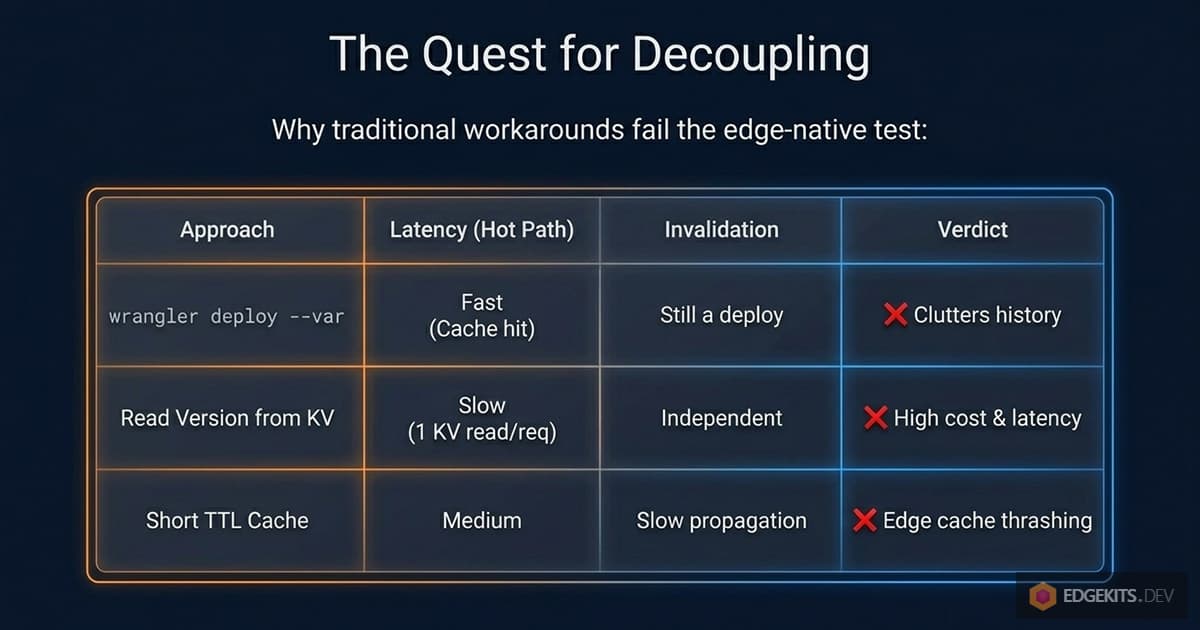
We’ll talk about why wrangler deploy --var isn’t actually separate from a deployment. Why storing the version in KV creates a mandatory read on every request. Why caching that version with a short TTL scales poorly across Cloudflare’s global edge.
And finally, why the right answer was to stop trying to be clever about cache keys - and start being explicit about cache invalidation.
By the end of this piece, we’ll have an architecture where:
- Updating a translation requires exactly one command:
npm run i18n:migrate. - No Worker redeployment is triggered, ever.
- The edge cache is invalidated surgically - only the namespaces that actually changed are purged, while the rest stay warm.
- The hot path performs zero KV reads and a single cache lookup.
We’ll get there by using a part of the Cloudflare platform that most developers associate with static assets, not with i18n: the Cache Purge API.
A note on the original architecture before we proceed. Part 1 and Part 2 describe a real, working system. If you’ve already built on it, you haven’t built on a broken foundation - you’ve built on a simpler one with a narrower valid use case.
I kept the original implementation available as a separate branch (v1-version-based-cache) because it’s still the right choice for certain projects: sites deployed on *.workers.dev subdomains (where Purge API isn’t available), projects that don’t want to manage API tokens, or solo builds where translation changes are rare. We’ll revisit this trade-off explicitly at the end.
But for anything that ships to a custom domain through Cloudflare - and especially for any project where translations will be updated independently from code - the architecture in this article is what you actually want.
Let’s start by looking at exactly where the original approach quietly breaks its own promise.
Anatomy of Translation-Deploy Coupling
Before we fix something, we need to look at it closely enough to see why it’s broken. And the tricky part about the original TRANSLATIONS_VERSION approach is that on the surface, it looks like it solves exactly the problem we wanted to solve.
Let me walk through what the architecture actually does, step by step.
When you run npm run i18n:bundle, the build script reads every JSON file under ./locales/, computes a SHA hash of the entire collected payload, and writes that hash into a generated TypeScript file:
// src/domain/i18n/runtime-constants.ts

export const TRANSLATIONS_VERSION = '01b7fd54fe04'
The fetchTranslations function then imports this constant at build time and embeds it into every cache key:
const cacheId = `${PROJECT.id}:i18n:v${TRANSLATIONS_VERSION}:${lang}:${namespaces.join(',')}`So a cached entry might look like site.com:i18n:v01b7fd54fe04:en:common,landing. The theory is clean: change a translation, regenerate the hash, and all old cache entries become addressed by a stale key that nothing will ever ask for again. Orphaned, sure - but invisible. Cloudflare’s LRU (Least Recently Used - a cache management algorithm) eviction will clean them up eventually.
How TRANSLATIONS_VERSION Behaves in Production
TRANSLATIONS_VERSION is a constant compiled into the Worker bundle. It lives in JavaScript that gets shipped during wrangler deploy. Which means: the only way to change its value at runtime is to rebuild the Worker and deploy it again.
So the promised workflow of “edit JSON → push to KV → users see the update” doesn’t actually work. What actually happens is this:
- You edit
en/landing.json. - You run
npm run i18n:migrate. - The script pushes new translations to KV.
- The script regenerates
runtime-constants.tswith a new hash. - … but the deployed Worker is still running with the old hash in memory.
- So all edge requests continue building cache keys with
v01b7fd54fe04. - And all existing cache entries continue being served - with the old content.
Until you redeploy the Worker, the hash in production doesn’t change. Period.
The translation update and the cache invalidation are two physically separate events. One is a KV write. The other is a code deployment. And the architecture, despite its elegance, silently requires both.
The Mental Model Mismatch
This is the gap between what the architecture looks like it does and what it actually does.
It looks like this:
edit JSON → i18n:migrate → users see updateIn reality, it’s this:
edit JSON  →  i18n:migrate  →  npm run deploy  →  users see update
                                       ↑
                            this step is not optional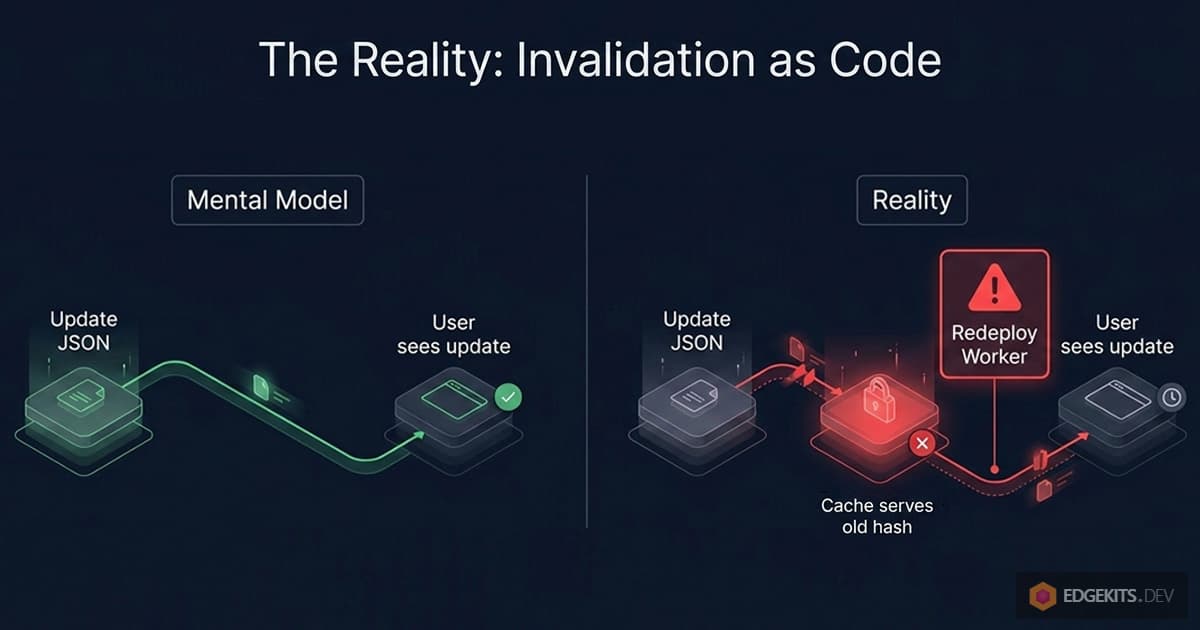
For solo projects where a developer is the only person touching both code and translations, that second step is easy to forget about. It happens naturally during the normal development loop.
But the moment translations become something a non-developer should be able to update - a content editor, a marketing teammate, a translator working in another timezone - the coupling becomes a real problem. You can’t hand someone a command that requires a full application redeploy and call it a content workflow.
And this isn’t a matter of “just automate the deploy step.” Even if we automated it, we’d still be redeploying the entire Worker every time someone fixes a German typo. That’s not decoupling translations from code. That’s just hiding the coupling behind automation.
What Decoupling Translations Actually Requires
What we actually want is a system where:
- Translation updates are a pure data operation - never a code operation.
- The mechanism that tells the Worker “this content is stale” lives outside the Worker bundle.
- That mechanism can be triggered from a local script or a CI job with no Wrangler involvement beyond authenticated API calls.
The rest of this article is a walk through the architectural dead-ends I hit while trying to satisfy these three requirements, and the eventual solution that made all three possible at once. Each dead-end taught me something specific about the Cloudflare platform - and, honestly, about my own assumptions about where state should live on the edge.
Let’s start with the most obvious fix.
First Attempt - Version Variable via wrangler deploy --var
The obvious first move was to get TRANSLATIONS_VERSION out of the compiled bundle and into something the Worker reads dynamically. Cloudflare has a feature that looks like exactly that: environment variables configurable per deployment. And Wrangler has a CLI flag for it:
wrangler deploy --var TRANSLATIONS_VERSION:01b7fd54fe04The idea writes itself. The Worker reads the version from env.TRANSLATIONS_VERSION instead of importing a constant. The i18n:migrate script computes the new hash, pushes translations to KV, and then invokes wrangler deploy --var to update just the variable. No code changes, no bundle rebuild - just a configuration update.
Clean. Minimal. Lets me keep nearly all of the existing cache key logic. Let’s try it.
Why wrangler deploy —var Isn’t a Real Decoupling
First red flag came before I even ran the command. wrangler deploy --var is still called deploy. And it’s not a marketing choice - it genuinely creates a new entry in your Worker’s Deployments history. Every time you run it, Cloudflare logs a new deployment record, complete with a version ID and a timestamp.
So even though no JavaScript has changed, the platform thinks you’ve just shipped new code. Open your Workers dashboard a few days after a handful of translation updates and you’ll see something like this in the Deployments list:
Version 47   Deployed 2 minutes ago    TRANSLATIONS_VERSION updated
Version 46   Deployed 10 minutes ago   TRANSLATIONS_VERSION updated
Version 45   Deployed 1 hour ago       TRANSLATIONS_VERSION updated
Version 44   Deployed 3 hours ago      TRANSLATIONS_VERSION updated
This is not decoupling translations from deployments. This is renaming a deployment as a translation update and hoping nobody notices.
And there’s a practical problem underneath the conceptual one: your actual code deployments - the real ones, with bug fixes and features - are now buried in a sea of translation-update deployments. If something breaks in production and you need to roll back, your rollback history is polluted with entries that have nothing to do with code changes.
How wrangler.jsonc Overwrites CLI Variables
Even setting aside the dashboard noise, there’s a more serious issue waiting.
Variables set via wrangler deploy --var are transient with respect to your repository. On the next regular deployment - the one where you’re actually shipping code - Wrangler reads wrangler.jsonc, sees the vars block that defines your environment variables, and overwrites whatever was set by the CLI flag.
So the flow becomes:
- You run
npm run i18n:migrate→wrangler deploy --var TRANSLATIONS_VERSION:abc123. Hash is nowabc123in production. - Later that day, you fix a bug and run
npm run deploy. - Wrangler reads
wrangler.jsonc, which still has the old hash in itsvarsblock. - Your bug fix ships. And your translation version silently reverts to the old hash.
- Edge caches that had the new content addressed under
abc123become unreachable. The old version starts serving again.
You could, in theory, keep wrangler.jsonc in sync by rewriting it from the i18n:migrate script. But now you have a build script that modifies a committed config file, which means every translation update produces a git diff that your developers have to either commit or discard. Congratulations, translations are now polluting your version control too.
Why This Approach Can’t Work
The root issue is this: Cloudflare environment variables are bound to the lifecycle of the Worker, not to the lifecycle of the translations. wrangler.jsonc is the source of truth for Worker configuration. Anything you push via --var is a temporary override that gets washed away on the next real deploy.
This makes complete sense from a platform design perspective. Environment variables are meant to describe how the Worker is configured, not what data the Worker is currently serving. Stuffing content versioning into that slot is fighting the abstraction.
What I actually wanted was the opposite: a piece of state that belongs to the translations, not to the Worker. State that survives code deployments, gets updated by the i18n:migrate script, and is readable at the edge without requiring a Wrangler command to modify it.
Which brings us to the next obvious question. Cloudflare already has a perfect place to store translation-adjacent state. It’s called KV. It’s where the translations themselves already live. Why not just put the version there?
Translations as First-Class KV Citizens
If the problem with wrangler deploy --var is that Cloudflare environment variables are tied to the Worker’s lifecycle rather than the translations’ lifecycle, the fix seems obvious: stop using environment variables. Use KV instead.
KV is where the translations already live. Adding one more key to hold the version - something like <project>:meta:version - keeps everything in the same storage layer, updatable by the same script, readable by the same runtime. No Wrangler involvement. No dashboard noise. No wrangler.jsonc to keep in sync.
The flow becomes:
i18n:migratepushes translations to KV.- In the same batch write, it updates
<project>:meta:versionwith the new hash. - The Worker reads the version from KV at request time and uses it to construct cache keys.
Let me actually try this and see where it breaks.
The First Implementation
Here’s the simplest version. The fetcher reads the version as its first KV operation:
const versionKey = `${PROJECT.id}:meta:version`
const version = await env.TRANSLATIONS.get(versionKey)
const cacheId = `${PROJECT.id}:i18n:v${version}:${lang}:${namespaces.join(',')}`

const cached = await cache.match(cacheRequest)
if (cached) return cached

const kvResults = await env.TRANSLATIONS.get(namespaceKeys, { type: 'json' })
// ...
Compile it, deploy it, run i18n:migrate to push a change. Open the site. Updates appear immediately, exactly as promised before. No redeployment needed. The content lives its own life.
Job done?
The Hot Path Regression
Look at what we just did to the hot path.
Previously - with TRANSLATIONS_VERSION compiled into the bundle - a cached request looked like this:
cache.match(request) → HIT → returnOne cache lookup. Zero KV reads. This was the whole point of caching in the first place.
Now it looks like this:
KV.get('meta:version')    →  version       // KV read #1
cache.match(request)      →  HIT           // cache lookup
return
Every single request - even ones that would have been served entirely from the edge cache - now performs a mandatory KV read just to discover what version number to put in the cache key. We traded “no cache invalidation without redeploying” for “every request costs a KV read.”
For a site with real traffic, this is not a minor regression. KV reads are billable. And more importantly, they add latency. An edge cache hit on Cloudflare is sub-millisecond. A KV read, even when it’s fast, is a round-trip to the nearest replica. We just inserted that round-trip into every page load, for no user-facing benefit - the user would have gotten the cached response anyway.
So the naive KV approach traded one problem (coupling to code deploys) for another (coupling cache lookup to a mandatory KV read).
Attempting to Cache the Version Too
The obvious next move: if the problem is reading the version from KV on every request, cache the version. Store it in the Cache API with a short TTL, and only fall back to KV when the cache expires:
const versionCacheRequest = new Request(`https://${PROJECT.id}/meta:version`)
let versionResponse = await cache.match(versionCacheRequest)
let version: string

if (versionResponse) {
  version = await versionResponse.text()
} else {
  version = await env.TRANSLATIONS.get(versionKey)
  const response = new Response(version, {
    headers: { 'Cache-Control': 'public, s-maxage=60' },
  })
  await cache.put(versionCacheRequest, response)
}
Short TTL so that translation updates propagate within about a minute. Cache API handles the edge distribution. KV reads happen at most once per minute per edge node. This seems to solve it - the hot path is back to a single cache lookup for the version, plus the existing cache lookup for the translations.
But pause and think about what “once per minute per edge node” actually means at global scale.
The Free Tier Math
Cloudflare operates a global network of data centers. Each one maintains its own cache. With a 60-second TTL, each data center will perform one KV read per minute, per cache key, for as long as there’s traffic hitting it.
A back-of-the-envelope calculation: 60 seconds in a minute × 60 minutes in an hour × 24 hours = 86,400 seconds in a day. At a 60-second TTL, that’s 1,440 revalidations per edge node per day. Multiply that by the number of edge nodes that actually see traffic for your site, which for a moderately popular site could be dozens or more.
Free tier on Workers KV allows 100,000 reads per day. You can blow through that surprisingly quickly with only the version key - and that’s before you’ve counted the actual translation reads. For a content-heavy site with traffic spread across many regions, even a paid plan starts to look expensive when every namespace load requires a mandatory version-check KV read.
You could lengthen the TTL - five minutes, ten minutes - but now translation updates propagate slowly and unpredictably. You could shorten it - five seconds - and now you’re hammering KV constantly. There’s no sweet spot that’s actually good. You’re just picking which trade-off hurts less.
The Double Cache Lookup Problem
There’s also a subtler issue that’s less about cost and more about architectural smell.
Every request now does two cache lookups in sequence:
cache.match(version)         →  HIT       // lookup #1
cache.match(translations)    →  HIT       // lookup #2
return
These can’t be parallelized. The second lookup depends on the result of the first, because the version is used to construct the cache key for the translations. And while a cache lookup is fast, two sequential cache lookups is twice as slow as one - and we just doubled the hot-path latency for the explicit purpose of enabling cache invalidation.
At this point, it started to feel like I was fighting the platform. Each layer of caching I added to work around the previous layer’s limitations introduced its own limitations, each requiring another layer. The system was getting more complex, not less.
That’s usually a sign I’m approaching the problem wrong.
Stepping Back
Let me restate the original problem from scratch.
I want translation updates to propagate immediately, without redeploying code. I want the hot path to have zero KV reads. I want the cache key to be stable - so I don’t pollute the cache with orphaned entries every time content changes.
The approaches we’ve tried all operate on the same assumption: the cache key encodes information about content versions. Embed the hash, and invalidation happens automatically when the hash changes. But automatic invalidation via key rotation has a cost, and that cost is either a redeploy, a mandatory KV read, or a double cache lookup.
What if I flip the assumption? What if the cache key doesn’t encode version at all? What if cache entries are never orphaned by content changes - because the key is static - and I invalidate them some other way?
That’s when I started reading the Cloudflare Cache docs for something I’d been ignoring the whole time: not how to build cache keys, but how to destroy cache entries.
The Breakthrough - Static Keys + Explicit Invalidation
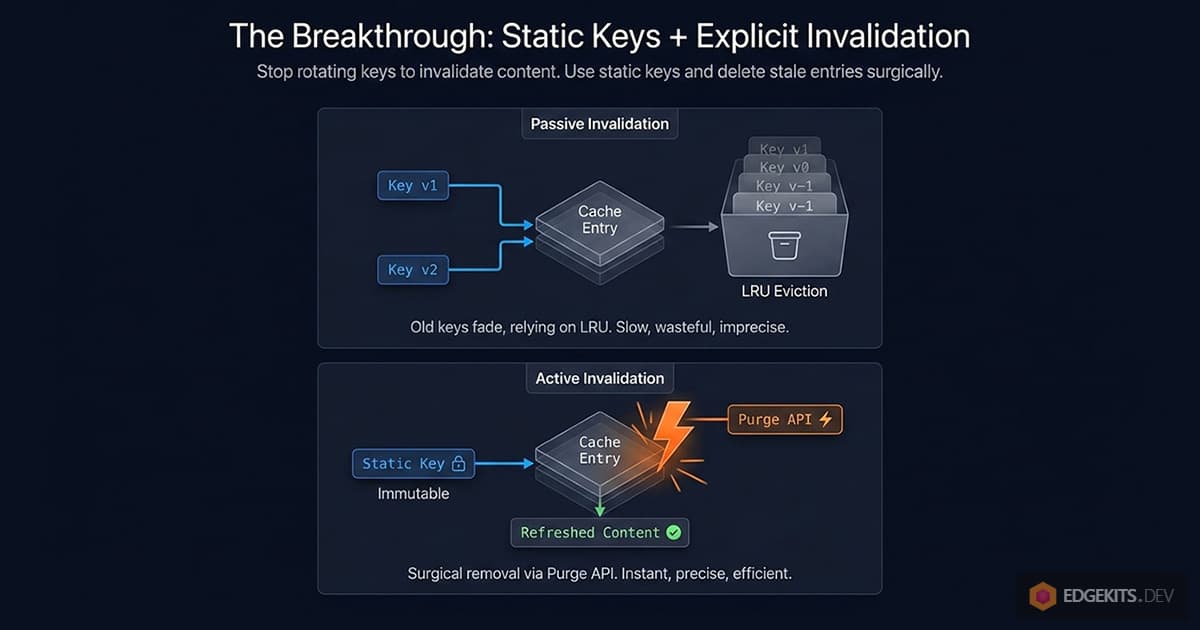
Every approach we’ve tried so far shares the same underlying pattern: the cache key contains a version marker, and we invalidate by rotating that marker. Content changes → hash changes → cache key changes → old entries become orphaned → new entries get created under a new key.
This is a passive invalidation strategy. Nothing actively removes stale entries; we just stop addressing them. They sit around until Cloudflare’s LRU policy decides to evict them. The cache fills up with ghosts.
The alternative is active invalidation: the cache key stays stable across content changes, and when translations update, we explicitly tell Cloudflare to delete the affected entries.
Once I stated it that way, it became obvious that I’d been solving the wrong problem. I’d been trying to make cache keys carry versioning information. But cache keys are identifiers, not metadata. Their job is to answer “which piece of content is this?” - not “when was it last modified?” Versioning information belongs somewhere else.
The New Cache Key Shape
If the key doesn’t need to carry a version, it becomes simpler:
i18n:<locale>:<namespace>That’s the logical identifier. Wrapped into the URL shape that Cloudflare’s Cache API expects, it becomes:
https://<PROJECT.id>/<encoded-identifier>One key per locale:namespace pair. Stable forever. The same key that stores the Spanish landing translations today will store them in a year - whatever version “today” happens to be.
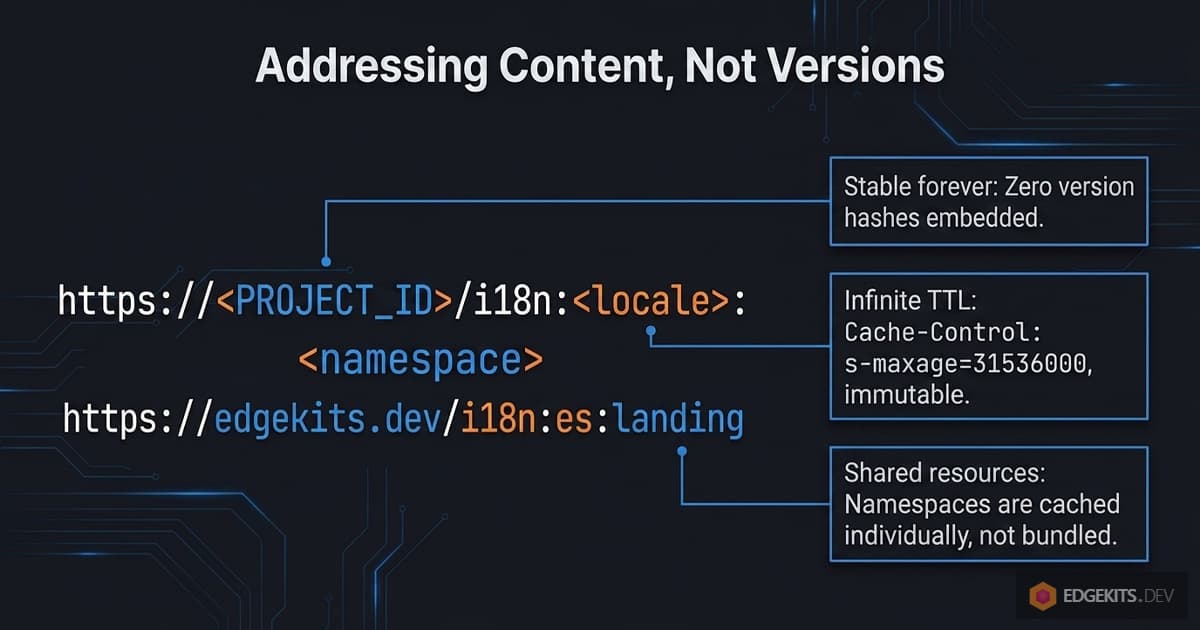
There’s another change baked into this shape that I glossed over in the earlier examples. Previously, the cache key encoded a comma-joined list of namespaces:
i18n:v<hash>:<locale>:<ns1,ns2,ns3>Every unique combination of namespaces requested by a page produced a unique cache entry. A page asking for common,landing created one entry; a page asking for common,landing,newsletter created a completely separate entry, even though two-thirds of the content overlapped. Same translations, cached three times under three different keys.
With static per-namespace keys, each namespace is its own cache entry. A page that needs common,landing,newsletter does three parallel cache lookups, assembles the result, and any other page requesting common,landing gets cache hits on both - the namespaces are shared across requests.
What the Hot Path Looks Like Now
Let me walk through a realistic request with this architecture.
A user hits /es/blog/some-article. The page needs common, blog, and newsletter namespaces. The fetcher issues three cache lookups in parallel:
const cacheResults = await Promise.all(
  namespaces.map(async (ns) => {
    const req = buildTranslationCacheRequest(locale, ns)
    const cached = await cache.match(req)
    return { ns, data: cached ? await cached.json() : null, hit: !!cached }
  }),
)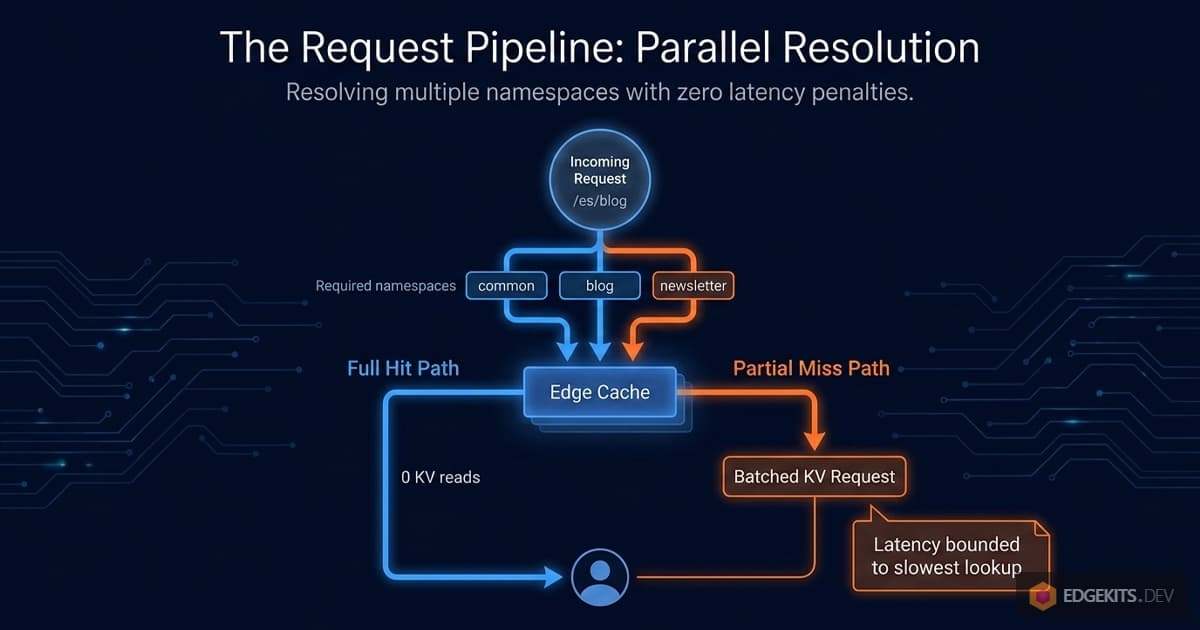
If all three are in the cache - FULL HIT - the function returns immediately. Zero KV reads. One round of parallel cache lookups, not a sequential chain. The total latency is bounded by the slowest of the three parallel lookups, not their sum.
If one namespace is missing - say blog was recently invalidated - the fetcher filters down to just the missing ones and issues a single KV batch call:
const missing = cacheResults.filter((r) => !r.hit).map((r) => r.ns)
const kvKeys = missing.map((ns) => buildTranslationKvKey(locale, ns))
const kvBatch = await env.TRANSLATIONS.get(kvKeys, { type: 'json' })
One KV batch. One call regardless of how many namespaces are missing. Results get merged with the cache hits, written back to the cache, and returned.
This is genuinely better than both previous architectures on every metric I care about:
- Hot path: zero KV reads, one parallel cache roundtrip.
- Partial miss: exactly the missing namespaces fetched, in one batch.
- Cache bloat: none - each
locale:namespaceis exactly one cache entry, period. - Version tracking overhead: zero - there’s no version to track at the request layer.
How Do Translation Updates Reach Users Without Key Rotation?
But I haven’t addressed the elephant in the room. If cache keys are stable and never change, how does a translation update ever reach users?
The cache entry for edgekits.dev:i18n:es:landing stores the Spanish landing translations as of the last time that entry was written. If I edit that translation in KV and the cache entry is still present, the user keeps seeing the old content. Forever, in principle - we removed the cache TTL because we didn’t want arbitrary expiry windows. An entry written once will be served until Cloudflare evicts it for space reasons, which on an active site could be weeks or months.
So we need a way to, after i18n:migrate pushes a change to KV, explicitly remove the affected cache entries. Not rotate keys. Not change cache TTLs. Actually delete specific entries from the Cloudflare edge cache.
The thing is, I’d been vaguely aware this capability existed. Every developer who’s used Cloudflare has seen the “Purge Cache” button in the dashboard. It purges static assets. It’s what you use when you’ve just pushed a new version of your CSS and you want everyone to see it immediately. I’d categorized it mentally as “a CDN tool, for static file deploys” - something orthogonal to how I think about Workers and application state.
What I hadn’t registered is that the purge system works on any URL that’s in the Cloudflare cache - including URLs that were put there by the Workers Cache API. cache.put(cacheRequest, response) inside a Worker uses the same underlying storage that serves static assets. And the same API that purges styles.css can purge an application-level cache entry.
So the architecture becomes:
- Cache keys are stable.
<PROJECT.id>:i18n:<locale>:<namespace>. - Cache entries have effectively infinite TTL.
Cache-Control: s-maxage=31536000, immutable. - Invalidation is explicit. When
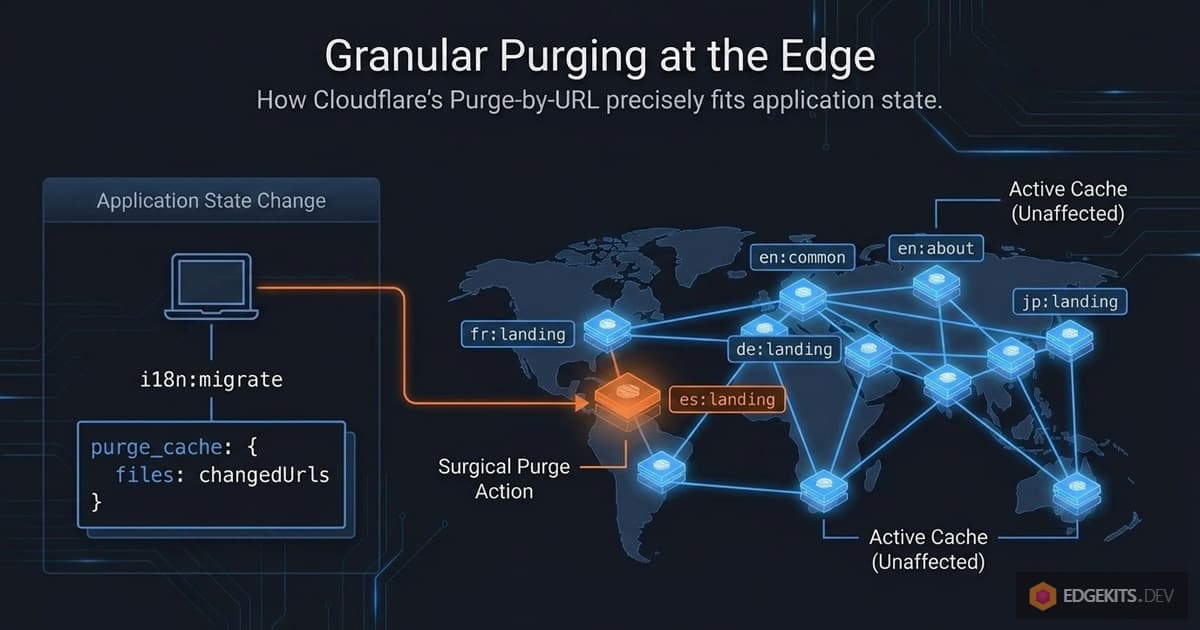
i18n:migrateruns, it calls the Cloudflare Purge API and hands it the list of URLs to invalidate. - Invalidation is granular. Only the cache entries for the namespaces that actually changed get purged. Everything else stays warm.
This is the architecture I ended up shipping. The rest of the article is about how to make it actually work - the Purge API mechanics, how to detect which namespaces changed, how to deploy and configure the whole thing, and the trade-offs you should know before adopting it.
Let’s look at the Purge API first.
Cloudflare Purge API - The Missing Piece
The Cloudflare Purge API is one of those platform features that most developers know exists but have never actually used from code. It’s the mechanism behind the “Purge Cache” button in the dashboard. It’s what gets mentioned in passing when someone asks “how do I force a cache refresh.” And it’s rarely discussed in the context of Workers application architecture, even though it slots in perfectly.
Let’s look at what it actually does and what constraints it imposes.
How Purge-by-URL Works
The Purge API has several modes - purge everything, purge by hostname, purge by tag, purge by prefix, and purge by single file. The one we care about is purge by single file (also called purge by URL), which takes a list of specific URLs and invalidates them immediately across Cloudflare’s entire edge network.
The request shape is straightforward:
POST https://api.cloudflare.com/client/v4/zones/<ZONE_ID>/purge_cache
Authorization: Bearer <API_TOKEN>
Content-Type: application/json

{
  "files": [
    "https://edgekits.dev/i18n%3Aen%3Alanding",
    "https://edgekits.dev/i18n%3Aes%3Alanding"
  ]
}
You hand it a list of URLs. It returns success and deletes those exact entries from the edge cache, globally. The next request to each of those URLs results in a cache miss, the Worker falls through to KV, and the fresh content is re-cached under the same key. One API call, global invalidation, takes about a second to propagate.
There’s something worth noticing here: the URLs in the purge request are the same URLs we used as cache keys in the previous section. The https://<PROJECT.id>/<encoded-key> shape isn’t just a convention for cache.put - it becomes the exact addressing scheme for purge_cache.
This is the part that ties the whole architecture together. The fetcher writes cache entries under a URL; the migration script deletes cache entries under the same URL. One formula, shared between two files.
This is why translations-keys.ts exists as a dedicated module in the implementation. Cache URLs need to be computed identically in two contexts - at request time inside the Worker, and at deploy time in the Node.js migration script. Any drift between the two, and the purge silently misses. Centralizing the formula in one file eliminates that class of bug by construction.
Rate Limits and How They Affect Us
Free-tier Cloudflare accounts get 5 purge requests per minute, with a token bucket capacity of 25. Each purge request can include up to 30 URLs for the free tier (paid tiers get higher numbers of URLs per request, but the request rate limits are similar or more relaxed).
Let me put those limits in context for an i18n workload. A typical project has, say, 5 locales and 10 namespaces - that’s 50 possible locale:namespace cache entries total. Even if every single one of them changed simultaneously, that’s 50 URLs to purge, which splits into two API calls of 30 + 20. Well within the per-minute request budget.
In practice, translation updates almost never touch every namespace at once. A typical update changes one or two namespaces in one locale - maybe a typo fix in the Spanish landing page, or a new key added to the German pricing copy. That’s one or two URLs per migration, and the rate limit is effectively infinite for that workload.
The only scenario where rate limits could matter is the first migration on a fresh setup, where no hash file exists yet and every namespace is treated as “changed.” We’ll come back to this in the next section - the solution is just chunking the purge into batches of 30 URLs with a brief pause between batches.
The Proxied-Domain Requirement
There’s one architectural constraint that trips people up, and it’s worth calling out clearly before you spend an evening debugging it.
The Purge API operates on Cloudflare’s CDN layer. It requires that your domain is proxied through Cloudflare - the orange cloud icon next to your DNS records. If your Worker is only deployed to a *.workers.dev subdomain, or if your custom domain has the grey cloud (DNS-only mode), neither the Cache API nor the Purge API actually do anything.

On *.workers.dev in particular, cache.put() silently returns without storing, cache.match() always returns undefined, and every request falls straight through to KV - because the Workers Cache API is tied to zone-level caching that doesn’t exist for the shared workers.dev subdomain.
I noticed this while testing the implementation: wrangler tail showed no cache hits at all on the *.workers.dev deployment - every single request went to KV. Meanwhile the migration script reported successful purges.
It took me a while to realize the two observations were related: there was no cache to purge, because there was no cache to begin with. The Purge API was returning success because the request was syntactically valid, but there was nothing in front of the Worker on that URL to invalidate.
The moment I pointed the same test at the proxied custom domain, everything fell into place. Cache hits started appearing in tail logs. Purge requests actually removed entries. New content propagated within seconds globally.
This requirement is worth respecting when you decide whether to adopt this architecture. If your project is deployed exclusively on workers.dev - say, it’s an internal tool, or you’re in early development and haven’t bought a domain yet - this whole approach doesn’t apply.
You have two reasonable alternatives: stick with the content-hash architecture from Part 1 (we’ll revisit this in the trade-offs section at the end), or simply disable edge caching entirely by setting I18N_CACHE=off and read translations directly from KV on every request.
For a preview deployment with modest traffic, the KV free tier gives you plenty of headroom - 100,000 reads per day is more than enough for most pre-launch projects, and you get perfectly up-to-date content without any invalidation machinery at all.
API Token and Zone ID Setup
The Purge API requires an API token with the Cache Purge permission, scoped to your specific zone. This is a different token than the one Wrangler uses for deployment - and that’s actually a good thing. The purge token has minimal permissions: it can only delete cache entries on one zone. Even if it leaks, the blast radius is “an attacker can make your translations briefly uncached,” which is annoying but not catastrophic.
You create the token at dash.cloudflare.com/profile/api-tokens either via the Cache Purge template or manually with Zone → Cache Purge → Purge permissions scoped to your domain. The token then goes into .dev.vars for local execution of the migration script, and into Worker Secrets for any production-side code that might need it.
Importantly, the Zone ID is a separate piece of information - it identifies which zone you’re purging, not who is authorized to purge. Zone IDs are not secrets. You can find yours on the overview page of your Cloudflare domain dashboard, and it’s safe to commit to wrangler.jsonc as a plain vars entry.
This distinction matters when you’re setting up the project in a public repository: the token stays out of git, but the zone ID can live alongside the rest of your config.
Why Purge API Fits Edge Cache Invalidation
If I’d known how perfectly Purge API’s semantics matched what I needed, I would have gone straight here from the start. The API does exactly one thing: delete specific URLs from the edge cache, immediately, globally, at the zone level. That’s the whole feature. And “delete specific URLs, immediately, globally” is the exact primitive that was missing from every previous architecture.
What remains is one detail - a small but important one. When i18n:migrate runs, we don’t want to naively purge every possible translation URL. That would work, but it would cause a cache stampede - every edge node would simultaneously cold-fetch every namespace from KV on the next request to each locale.
For a project with dozens of namespaces across multiple locales, that’s a lot of unnecessary KV reads for no benefit.
What we want is to purge only the entries that actually changed. And to do that, we need a way to track what “actually changed” means between one run of i18n:migrate and the next.
Incremental Purging - The Hash File Strategy
We have two pieces of the architecture in place: static cache keys that never change, and a Purge API that can delete specific URLs on demand. What’s missing is the part that decides which URLs to delete when i18n:migrate runs.
The naive version is easy: purge every possible locale:namespace URL every time. It would work, and for a small project with a handful of namespaces it might even be fine. But at any real scale, this approach has a cost.
Why “Purge Everything” Causes a Cache Stampede
Imagine a project with 5 locales and 12 namespaces - that’s 60 cache entries total. You fix a typo in en/landing.json. One file changed. With naive invalidation, all 60 entries get purged.
The next time users hit your site:
- Every edge node that had warm cache entries now has cold cache entries.
- Every page load triggers a parallel cache miss.
- Every miss triggers a KV read.
- Multiplied across every edge node globally.
This is a cache stampede - a sudden burst of origin reads triggered by simultaneously invalidating content that was previously hot. For a busy site, that burst can be significant. Across hundreds of edge nodes, a single “fix a typo” operation produces thousands of redundant KV reads to re-populate cache entries that didn’t need to change in the first place.
The cost isn’t catastrophic - KV is fast, and this isn’t a database hitting its connection limit. But it’s wasteful in the exact way that caching was supposed to prevent. We already know that 59 of those 60 namespace-locale pairs are identical to what they were before. Why would we tell every edge node in the world to forget them?
What we want is: en/landing.json changed, purge exactly edgekits.dev/i18n:en:landing, leave the other 59 entries alone. Surgical invalidation. Zero wasted cache evictions. The other locales keep serving warm cache forever - or at least until someone changes them.
What “Changed” Actually Means
To purge selectively, we need to know which namespaces actually changed between two runs of i18n:migrate. Python developers might reach for mtimes. Database folks might reach for updated_at columns. But we have something simpler available: the content of the files themselves.
The idea is this: after every successful migration, we compute a SHA hash of each locale-namespace JSON and store the hashes in a local file. On the next migration, we compute the hashes again and compare. Any pair whose hash differs between the two runs is a pair that changed. Any pair whose hash matches is untouched.
// After reading all locale JSON files:
const currentHashes: Record<string, string> = {}
for (const locale of locales) {
  for (const ns of namespaces) {
    const content = JSON.stringify(translations[locale][ns])
    currentHashes[`${locale}:${ns}`] = sha256(content)
  }
}

// Compare against previous run:
const previousHashes = readHashFile() ?? {}
const changedKeys: string[] = []
for (const key of Object.keys(currentHashes)) {
  if (currentHashes[key] !== previousHashes[key]) {
    changedKeys.push(key)
  }
}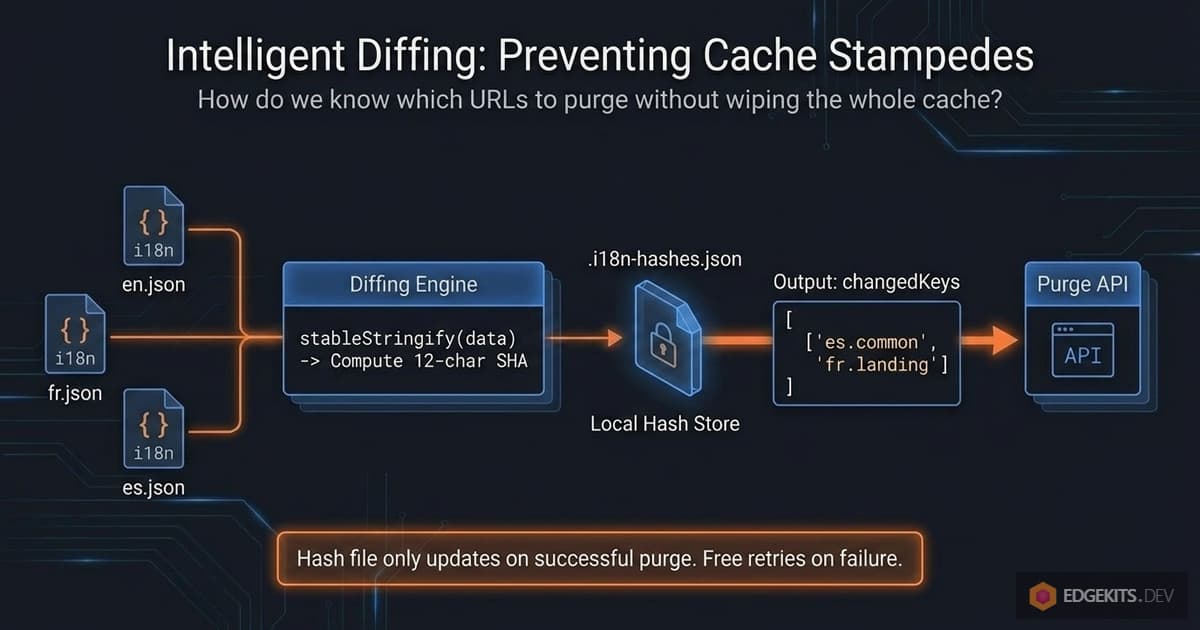
changedKeys is now the exact list of locale:namespace pairs whose content differs from the last migration. Feed those into buildTranslationCacheUrl and you’ve got the precise list of URLs to purge.
Where the Hash File Lives
The hash file is .i18n-hashes.json in the project root. Two important properties:
It’s local state, not shared state. The file records what was last successfully pushed from your machine. If a teammate runs i18n:migrate from their machine without having your hash file, their first run will see no previous hashes, treat everything as changed, and purge all URLs - which is the correct safe default for a first run.
It’s gitignored. Committing it would be wrong for two reasons. First, it’s a representation of state held on a specific machine at a specific time, not something that belongs in a repo. Second, if two developers with different hash files both committed, you’d get merge conflicts on a file nobody should be manually editing. The file is a cache - treat it like any other local cache (the .wrangler/ directory, dist/, etc.).
The trade-off is that a fresh clone on a different machine always produces a “purge everything” outcome on its first run. For most projects, this is fine - the worst case is a single cache stampede right after setup, which self-heals within the first few minutes of traffic.
If you care about avoiding even that, there are options (storing the hash file in your R2 bucket, committing it with a merge-driver-style strategy, etc.), but for the reference implementation I chose the simpler path.
The Full i18n:migrate Invalidation Pipeline
Putting everything from this section together, the complete flow of i18n:migrate looks like this:
 1. Read all JSON files under ./locales/**.
 2. Compute SHA hashes per locale:namespace pair.
 3. Write i18n-data.json (the KV bulk payload).
 4. Push translations to remote KV via wrangler kv bulk put.
 5. Read .i18n-hashes.json (previous state). Missing file = first run.
 6. Diff against current hashes → produce list of changed keys.
 7. If changedKeys is empty → skip purge. Log "no cache entries to purge."
 8. Otherwise → build Purge URLs via buildTranslationCacheUrl.
 9. Call Cloudflare Purge API, chunking if needed to stay under rate limits.
10. On success → write updated hashes to .i18n-hashes.json.
11. On purge failure → log warning, do not update hash file (retry next time).
Step 11 is worth pausing on. If KV was updated but the purge call failed - say the API token expired, or we hit a rate limit - we deliberately do not write the updated hash file.
The reasoning: on the next migration, we want the changed namespaces to still look “changed” relative to the last known good state, so the retry happens automatically.
This gives us graceful recovery without manual intervention. If i18n:migrate reports a purge failure, you just run it again - the hash diff will include everything that was supposed to be purged last time.
Rate Limit Arithmetic (Revisited)
Back in the Purge API section, I noted that free tier allows 5 purge requests per minute with up to 30 URLs per request. Let me put this in the context of the incremental strategy.
In normal operation, a single i18n:migrate run purges somewhere between 1 and 3 URLs - a content editor fixing copy in one or two namespaces. That’s one API call, well inside limits. The rate limit is effectively irrelevant.
The only situation where you might approach the rate limit is a fresh setup with a large project: no hash file, 10 locales × 20 namespaces = 200 URLs to purge on the first migration. 200 URLs ÷ 30 URLs per request = 7 API calls. Free tier allows 5 per minute, so two of those calls would be queued for the second minute. Still finishes in under two minutes total.
For practical usage, the implementation handles this with a simple chunking loop: split URLs into groups of 30, send each chunk, and pause between chunks if a rate limit is hit. We’ll see the specific code in the Implementation Walkthrough.
But the headline is: rate limits matter only for the very first run on a large project, and even then they’re a mild speed bump, not a real constraint.
What This Gives Us
With the hash-file strategy layered on top of static keys and Purge API, the architecture now satisfies every requirement we set out in the first section:
- Translation updates are a pure data operation. No deploys, no version constants, no Wrangler variables. Just
i18n:migrate. - Cache invalidation is explicit and external to the Worker bundle. The Worker doesn’t know or care about versions; it just reads from a stable URL.
- Invalidation is granular. Only the URLs that correspond to actually-changed content get purged. Everything else stays warm.
- The hot path is one parallel cache lookup with zero KV reads. Unchanged by the complexity of invalidation machinery - because invalidation happens out-of-band at deploy time, not in-band at request time.
The conceptual work is done. What remains is making this work in actual code - how fetcher.ts, bundle-translations.ts, and translations-keys.ts fit together, and the concrete patterns that make the whole thing maintainable.
Let’s walk through the implementation.
Implementation Walkthrough
The architecture we’ve built splits naturally across three files, each with a distinct responsibility. Let’s look at how they fit together.
translations-keys.ts is the single source of truth for addressing cache entries. It’s imported by both the runtime fetcher and the migration script, so both sides of the invalidation contract speak the same URL format.
fetcher.ts is the hot-path code that runs inside the Worker. It reads translations from the cache, falls back to KV when cache is cold, and writes results back to the cache for next time.
bundle-translations.ts is the Node.js script that runs on your machine. It generates TypeScript artifacts, pushes translations to KV, detects which namespaces changed, and calls the Cloudflare Purge API with the exact URLs to invalidate.
Three files. Each one has exactly one job. Most of the complexity of the whole invalidation system lives in the third file; the first two stay lean.
The Keys Module
src/domain/i18n/translations-keys.ts exports three functions that together cover every way we need to address a translation entry:
// src/domain/i18n/translations-keys.ts

// KV key - used by env.TRANSLATIONS.get() inside the Worker
export function buildTranslationKvKey(locale: Locale, ns: Namespace): string {
  return `${PROJECT.id}:${ns}:${locale}`
}

// Cache URL - used as the key for the Workers Cache API
export function buildTranslationCacheUrl(locale: Locale, ns: Namespace): string {
  const cacheId = `i18n:${locale}:${ns}`
  return `https://${PROJECT.id}/${encodeURIComponent(cacheId)}`
}

// Cache Request - what cache.match() and cache.put() actually take
export function buildTranslationCacheRequest(locale: Locale, ns: Namespace): Request {
  return new Request(buildTranslationCacheUrl(locale, ns))
}
These three functions are the glue that holds the whole architecture together. The fetcher uses buildTranslationCacheRequest to look up and write entries. The migration script uses buildTranslationCacheUrl to construct purge URLs. The KV access layer uses buildTranslationKvKey to read from and write to KV. If any one of them drifted in format from the others, things would silently break - purge URLs would miss their targets, or cache reads would look for the wrong keys.
Centralizing all three into one module enforces consistency at the type level. You can’t accidentally build a cache URL one way in fetcher.ts and another way in bundle-translations.ts. There’s only one place that knows the format.
The Fetcher
src/domain/i18n/fetcher.ts is where the hot-path logic lives. The function takes a locale and a list of namespaces, and returns the merged translation dictionaries. Under the hood, it does four things in sequence - though the first step runs in parallel across namespaces.
1. Check the cache for each namespace in parallel.
// src/domain/i18n/fetcher.ts

const cacheResults = await Promise.all(
  namespaces.map(async (ns) => {
    const cacheRequest = buildTranslationCacheRequest(locale, ns)
    try {
      const cached = await cache.match(cacheRequest)
      if (cached) {
        return { ns, data: await cached.json(), hit: true }
      }
    } catch (error) {
      debug(env, `i18n cache READ error for ${ns}`, error)
    }
    return { ns, data: null, hit: false }
  }),
)
Every namespace is checked independently. If you requested common, landing, and newsletter, all three cache lookups happen at the same time. The Promise.all wait is bounded by the slowest of the three - not their sum. Any individual lookup that throws (say the cache returned a malformed response) is caught per-namespace and demoted to a cache miss rather than failing the whole request.
2. Separate hits from misses in a single pass.
// src/domain/i18n/fetcher.ts

const finalData: Partial<PickSchema<N>> = {}
const missingNamespaces: N[] = []

for (const { ns, data, hit } of cacheResults) {
  if (hit) {
    finalData[ns] = data as PickSchema<N>[typeof ns]
  } else {
    missingNamespaces.push(ns)
  }
}

if (missingNamespaces.length === 0) {
  // All namespaces served from cache - zero KV reads.
  return finalData as PickSchema<N>
}
This is the fast path. If every namespace was a cache hit, the function returns immediately with the merged result - we never touch KV, never allocate anything further. For a busy site with warm caches, the vast majority of requests take this path.
3. Fetch missing namespaces from KV in a single batch.
// src/domain/i18n/fetcher.ts

const missingKvKeys = missingNamespaces.map((ns) => buildTranslationKvKey(locale, ns))

let kvResults = new Map<string, unknown | null>()
let kvFailed = false

try {
  kvResults = (await env.TRANSLATIONS.get(missingKvKeys, {
    type: 'json' as const,
  })) as Map<string, unknown | null>
} catch (error) {
  kvFailed = true
}
Cloudflare’s KV batch get() accepts up to 100 keys per call and returns a Map keyed by the KV keys. One network round-trip, regardless of how many namespaces are missing. If KV is entirely unavailable - service outage, misconfigured binding, transient network issue - we catch the error into a kvFailed flag instead of propagating it. The flag becomes the signal for the next step to use fallbacks only.
4. Merge with fallbacks and schedule cache writes.
// src/domain/i18n/fetcher.ts

const putPromises: Promise<void>[] = []

for (let i = 0; i < missingNamespaces.length; i++) {
  const ns = missingNamespaces[i] as N
  const kvKey = missingKvKeys[i] as string

  const kvValue = kvFailed ? {} : ((kvResults.get(kvKey) as object) ?? {})

  const fallbackConstName = `FALLBACK_${String(ns).toUpperCase()}`
  const fallback = FALLBACKS?.[fallbackConstName]

  const nsData = fallback ? deepMerge(fallback, kvValue) : kvValue
  finalData[ns] = nsData as PickSchema<N>[typeof ns]

  const cacheRequest = buildTranslationCacheRequest(locale, ns)
  const response = new Response(JSON.stringify(nsData), {
    headers: {
      'Content-Type': 'application/json; charset=utf-8',
      'Cache-Control': 'public, s-maxage=31536000, immutable',
    },
  })

  putPromises.push(
    cache.put(cacheRequest, response.clone()).catch((error: unknown) => {
      debug(env, `i18n cache WRITE error for ${ns}`, error)
    }),
  )
}
For each missing namespace we construct the final value (KV result merged over the compiled fallback, or just the fallback if KV failed), write it into finalData for the return value, and also enqueue a cache write for next time. The cache put is wrapped in .catch() - a failed write is logged and discarded, it doesn’t break the request.
Two things about the cache write itself. First, Cache-Control: public, s-maxage=31536000, immutable - we tell the cache this entry lives for a year and never revalidates. Its only exit path is explicit purging. Second, response.clone() is necessary because cache.put takes ownership of the response body stream, and the stream can only be consumed once.
5. Run the cache writes as background work.
// src/domain/i18n/fetcher.ts

if (putPromises.length > 0) {
  const allPuts = Promise.all(putPromises)

  if (context?.waitUntil) {
    context.waitUntil(allPuts)
  } else {
    await allPuts
  }
}

return finalData as PickSchema<N>
In production, all cache writes are batched into one waitUntil call so they happen in the background after the response has already been sent. The user doesn’t wait for the cache write - the page renders immediately, and the cache entry lands shortly after.
The waitUntil-or-await fallback matters for local development. Astro’s dev server runs the fetcher in Node.js rather than inside a Cloudflare Worker, and there’s no waitUntil there. If we blindly scheduled the writes via waitUntil?.() and it was undefined, the writes would never run, and the cache would stay empty. Falling back to await keeps the code testable locally - cache writes are synchronous in dev but non-blocking in prod.
The Migration Script
scripts/bundle-translations.ts is the longer and more interesting file. It does a lot:
- Parses command-line flags (
--fallbacks,--local,--deploy-version). - Reads every JSON file under
./locales/**. - Computes per-namespace content hashes and detects changes against
.i18n-hashes.json. - Generates four artifacts:
i18n-data.json,i18n.generated.d.ts,runtime-constants.ts, and optionallyfallbacks.generated.ts. - Pushes translations to KV (local or remote depending on the
--localflag). - Builds Purge URLs for changed namespaces only.
- Calls the Cloudflare Purge API with those URLs, chunking as needed.
- Updates
.i18n-hashes.json- but only if the purge step actually succeeded.
I’ll walk through the parts that matter for this article’s architecture - hash comparison, purge call, and the graceful recovery logic. The other parts (JSON reading, TS codegen) are mechanical and already described in Part 1.
Loading .dev.vars Manually
One small but important detail: the script needs access to CLOUDFLARE_CACHEPURGE_API_TOKEN, which lives in .dev.vars. wrangler dev reads that file automatically at runtime, but tsx (which is what runs the migration script) doesn’t. So we parse it ourselves, once, right before the purge step:
// scripts/bundle-translations.ts

const devVarsPath = path.join(ROOT, '.dev.vars')
if (fs.existsSync(devVarsPath)) {
  const lines = fs.readFileSync(devVarsPath, 'utf8').split('\n')
  for (const line of lines) {
    const trimmed = line.trim()
    if (!trimmed || trimmed.startsWith('#')) continue
    const eqIndex = trimmed.indexOf('=')
    if (eqIndex === -1) continue
    const key = trimmed.slice(0, eqIndex).trim()
    const value = trimmed.slice(eqIndex + 1).trim()
    if (key && !(key in process.env)) {
      process.env[key] = value
    }
  }
}
The !(key in process.env) guard is important - if a variable is already set in the real environment (say by an explicit shell export), we don’t overwrite it. Real environment wins; .dev.vars fills the gaps.
This is the kind of detail that’s easy to miss until you spend an hour debugging why your script can’t find a token that’s definitely in the right file.
Computing Hashes and Diffing
After reading all JSON files, the script computes current hashes and compares against the previous run in a single pass:
// scripts/bundle-translations.ts

const previousHashes: HashMap = fs.existsSync(HASHES_FILE) ? (JSON.parse(fs.readFileSync(HASHES_FILE, 'utf8')) as HashMap) : {}

const currentHashes: HashMap = {}
const changedKeys: string[] = [] // "<locale>:<namespace>" pairs that changed

for (const [locale, namespaces] of Object.entries(collected)) {
  for (const [ns, json] of Object.entries(namespaces)) {
    const hashKey = `${locale}:${ns}`
    const hash = computeHash(json)
    currentHashes[hashKey] = hash

    if (previousHashes[hashKey] !== hash) {
      changedKeys.push(hashKey)
    }
  }
}
changedKeys is a flat array of strings in the form "<locale>:<namespace>". Missing file on disk → empty previousHashes → every current key is “changed” → all URLs get purged on first run. This is the correct safe default I described in the last section.
Two implementation details worth calling out.
stableStringify instead of JSON.stringify. Regular JSON.stringify preserves key order from the source object. That’s fine if your JSON files never have their keys reordered, but it’s fragile - a prettier version bump or a text editor that alphabetizes keys on save would produce different hashes for identical content. stableStringify sorts keys deterministically before serializing, so the hash reflects content, not key order.
Truncated hash (12 chars). SHA-256 produces 64 hex characters. We only need enough bits to detect collisions between a few hundred namespace contents, and 12 hex chars is plenty - that’s 48 bits of entropy, far more than needed for this use case. Shorter hashes make logs and debugging output more readable.
The Purge API Call
Once we have changedKeys, we build the full list of URLs to purge:
// scripts/bundle-translations.ts

const purgeUrls = changedKeys.map((hashKey) => {
  const [locale, ns] = hashKey.split(':') as [string, string]
  return buildTranslationCacheUrl(locale as any, ns as any)
})
This is where translations-keys.ts pays off most visibly. The same function that the fetcher uses to construct cache keys for cache.put and cache.match is now producing the list of URLs to delete. There’s no second “how to construct a purge URL” function anywhere - just one formula, used in three different places.
Now the chunking and rate-limit handling. Cloudflare’s Purge API accepts up to 100 URLs per single request (this is the same limit across all plans), and the Free plan allows 800 URLs per second total. So we chunk into groups of 100 and throttle to 8 chunks per second at most:
// scripts/bundle-translations.ts

const CHUNK_SIZE = 100
const MAX_CHUNKS_PER_SEC = 8

for (let i = 0; i < urls.length; i += CHUNK_SIZE) {
  const chunk = urls.slice(i, i + CHUNK_SIZE)
  const currentChunkIndex = Math.floor(i / CHUNK_SIZE) + 1

  const response = await fetch(`https://api.cloudflare.com/client/v4/zones/${zoneId}/purge_cache`, {
    method: 'POST',
    headers: {
      Authorization: `Bearer ${apiToken}`,
      'Content-Type': 'application/json',
    },
    body: JSON.stringify({ files: chunk }),
  })

  if (response.status === 429) {
    // Rate limit hit - wait and retry the same chunk.
    await sleep(1000)
    i -= CHUNK_SIZE
    continue
  }

  if (!response.ok) {
    return false // propagate failure to caller
  }

  // After 8 chunks (= 800 URLs), pause a second to stay under the cap.
  if (currentChunkIndex % MAX_CHUNKS_PER_SEC === 0 && i + CHUNK_SIZE < urls.length) {
    await sleep(1000)
  }
}

return true
For the vast majority of real-world uses - a handful of URLs per migration - this loop runs once and exits. The retry logic and the pacing pause only matter on a fresh setup where hundreds of URLs need purging at once.
Updating the Hash File (Carefully)
Here’s the part that makes the system recover gracefully from partial failures. The hash file is updated only in outcomes where invalidation was either successful or not needed:
// scripts/bundle-translations.ts

let shouldWriteHashes = false

if (IS_LOCAL) {
  // Local: no edge cache exists, purge is not applicable.
  shouldWriteHashes = true
} else if (changedKeys.length === 0) {
  // Remote with no changes: nothing needed purging.
  shouldWriteHashes = true
} else {
  // Remote with changes: purge must succeed to commit the new state.
  if (!zoneId || !apiToken) {
    console.warn('[i18n] Skipping purge - credentials missing.')
    // shouldWriteHashes stays false
  } else {
    const purgeSuccess = await purgeTranslationsCache(zoneId, apiToken, purgeUrls)
    if (purgeSuccess) {
      shouldWriteHashes = true
    } else {
      console.error('[i18n] Purge failed - hash file NOT updated.')
    }
  }
}

if (shouldWriteHashes) {
  fs.writeFileSync(HASHES_FILE, JSON.stringify(currentHashes, null, 2) + '\n', 'utf8')
}
Four outcomes, only three of which commit the new state to disk. The fourth outcome - remote run with changes and a failed purge - deliberately leaves the hash file untouched. The next migration will see the same diff as this one and re-attempt the invalidation automatically. No manual intervention, no silent staleness, no wedged state.
This is the “graceful recovery” pattern from the previous section made concrete. A successful migration updates the ledger. A failed migration leaves the ledger where it was, so the next attempt gets a free retry on exactly the same set of URLs.
End-to-End Flow: From Migration to Edge Cache
Here’s the full picture of how the three files cooperate during a translation update:
You:   edit en/landing.json
       run npm run i18n:migrate
              │
              ▼
bundle-translations.ts:
   │
   ├── read locales, codegen artifacts
   ├── stableStringify + sha256 → currentHashes
   ├── read .i18n-hashes.json → previousHashes
   ├── diff → changedKeys = ["en:landing"]
   ├── push to KV: wrangler kv bulk put i18n-data.json --remote
   ├── load .dev.vars → process.env
   ├── imports translations-keys.ts
   ├── buildTranslationCacheUrl('en', 'landing')
   │     → "https://edgekits.dev/i18n%3Aen%3Alanding"
   ├── POST to Cloudflare Purge API with [purgeUrl]
   ├── purge succeeded → write currentHashes to .i18n-hashes.json
   └── done. 1 URL purged, other namespaces remain warm.

Next request from a user for /en/:
       │
       ▼
fetcher.ts (inside the Worker):
   │
   ├── imports translations-keys.ts
   ├── buildTranslationCacheRequest('en', 'landing')
   │     → same URL as above, as a Request object
   ├── cache.match(req) → MISS (we just purged it)
   ├── KV batch read for locale=en, ns=['landing']
   │     → returns fresh content
   ├── merge with FALLBACK_LANDING, write to finalData
   ├── cache.put(req, freshResponse) via waitUntil
   └── return merged translations to page

Every request after that:
       │
       ▼
fetcher.ts:
   ├── cache.match(req) → HIT
   ├── return cached translations
   └── zero KV reads
The invalidation happens at migration time, out of band. Requests are never slowed down by the invalidation machinery - they only benefit from the cache it produces. And because translations-keys.ts is shared between the Worker and the migration script, the URLs that get purged are guaranteed to be the same URLs the fetcher writes and reads. No drift. No silently-missed invalidations.
This is the design in its entirety. Everything else is configuration.
Production Setup & DX Considerations
The code is the easy part. The awkward part, which I ended up rewriting notes about three times, is the order in which you have to set up the pieces on the Cloudflare side to make the first migration actually work.
The pieces that need to exist before npm run i18n:migrate runs are:
- A real Cloudflare KV namespace with a real ID in
wrangler.jsonc. - A deployed Worker attached to your custom domain (proxied through Cloudflare).
- An API token with
Cache Purgepermission, accessible to the script via.dev.vars. - The zone ID of your Cloudflare-managed domain, readable from
wrangler.jsonc. - That same API token registered as a Worker Secret on Cloudflare, for any production runtime code that might want it.
None of this is complicated individually. But the ordering matters, because several of the steps depend on outputs from earlier steps. Here’s the sequence that works, in the order I wish someone had handed me.
1. Create the KV Namespace
npx wrangler kv namespace create TRANSLATIONSWrangler prints the new namespace’s ID. Copy it into wrangler.jsonc:
"kv_namespaces": [
  {
    "binding": "TRANSLATIONS",
    "id": "<your-real-kv-id>"
  }
]
Note the absence of preview_id. The Cloudflare docs are clear that preview_id is only required when using wrangler dev --remote to develop against remote resources - which this project doesn’t. For local development, Wrangler uses id as a folder name inside .wrangler/state/v3/kv/ and never validates the format. So the same field works for both local dev (where the value is just a folder name) and remote deploys (where it resolves to an actual KV namespace).
Incidentally, this means that before you’ve created a real namespace, wrangler.jsonc can contain a placeholder like "id": "your_kv_id_here" and local dev still works. npm run dev in this starter runs Astro’s Node.js dev server - it doesn’t call Wrangler at all, so there’s no authentication step involved there. npm run i18n:seed does invoke wrangler kv bulk put --local, which writes to a local folder under .wrangler/state/ without hitting any remote API, but depending on your Wrangler version and any previously-cached credentials, it may still try to verify your account. If that prompt appears on a first-time setup, wrangler logout or clearing ~/.config/.wrangler/ is usually enough to reset it into a true no-account state.
2. Add the Zone ID to wrangler.jsonc
"vars": {
  "CLOUDFLARE_ZONE_ID": "<your-zone-id>",
  "I18N_CACHE": "on",
  "DEBUG_I18N": "off",
  "DEMO_MODE": "off"
}
The zone ID is visible on the Overview page of your Cloudflare domain dashboard, in the right sidebar. It’s not a secret - it’s just an identifier for your zone, similar to an account number. Committing it to a public repository is fine.
Types for the Env interface regenerate automatically the next time you run npm run dev (the starter’s dev script runs wrangler types before Astro starts). If you want to pick up the new variable immediately in your IDE without restarting the dev server - say you’re editing runtime code that references env.CLOUDFLARE_ZONE_ID - run npm run typegen explicitly.
3. Create the API Token
Go to Cloudflare API Tokens and click Create Token. Either use the Cache Purge template directly, or create a custom token with the permission: Zone → Cache Purge → Purge. Scope the token to your specific zone, not “all zones.”
Once the token is created, paste it into .dev.vars in your project root:
CLOUDFLARE_CACHEPURGE_API_TOKEN=<your-token>.dev.vars is gitignored by default in this starter - verify it is in yours before pasting anything. A leaked Cache Purge token has a narrow blast radius (worst case: an attacker can briefly invalidate your cache), but leaking any token is still bad hygiene.
4. Deploy the Worker
npm run deployThe Worker has to exist in Cloudflare’s infrastructure before the first i18n:migrate can run. The migration script doesn’t deploy the Worker itself - it only pushes data and purges cache. If there’s no Worker there, there’s nothing to purge from.
If your custom domain is already configured as a Worker route or custom domain binding, verify it’s proxied (orange cloud in DNS). Without proxying there’s no Cloudflare CDN layer in front of your Worker - the Cache API won’t have anywhere to store entries, and the Purge API won’t have anywhere to purge from. The migration script will still run, reporting successful KV updates and successful purge requests, but none of the caching behavior this architecture relies on will actually happen.
5. Register the Token as a Worker Secret
Even though the migration script doesn’t need this, registering the same token as a Worker Secret means production runtime code can access it if you ever add a feature that needs to purge cache from inside a Worker:
npx wrangler secret put CLOUDFLARE_CACHEPURGE_API_TOKENOr, equivalently, through the Cloudflare dashboard: Worker → Settings → Variables and Secrets → Add.
This step is optional if you’re sure you’ll only ever purge cache from the migration script. But adding it now is free, and it means future-you has one less thing to debug when a webhook handler wants to invalidate a specific translation on content-change events from a CMS.
6. Run Your First Migration
npm run i18n:migrateOn the very first run, .i18n-hashes.json doesn’t exist yet. The script treats every namespace as changed, pushes all translations to KV, and issues purge requests for every URL. The next request to your site populates the cache fresh. From this point on, every subsequent migration purges only the namespaces that actually changed.
If something goes wrong - missing credentials, network error, rate limit - the graceful recovery logic from the last section kicks in. KV will be updated (that part succeeds first), but the hash file will stay in its old state, so the next migration re-attempts the invalidation automatically. You just re-run i18n:migrate after fixing whatever was wrong.
DX Considerations for Translation Workflows
Beyond the setup checklist, there are a few ergonomic decisions baked into the implementation worth mentioning. None of them are architectural, but they add up to the difference between a starter you want to use and one that feels like homework.
Placeholder KV IDs work out of the box. A new developer cloning the repo can start working without creating a Cloudflare account first. wrangler.jsonc ships with "id": "your_kv_id_here", which Wrangler treats as a local folder name under .wrangler/state/. npm run dev uses Astro’s Node.js dev server and doesn’t touch Wrangler at all; npm run i18n:seed writes to that local folder via wrangler kv bulk put --local. Neither command needs a real KV namespace ID.
Three commands, each doing one thing. The package.json exposes:
"i18n:bundle":  "tsx scripts/bundle-translations.ts",
"i18n:seed":    "tsx scripts/bundle-translations.ts --deploy-version --local",
"i18n:migrate": "tsx scripts/bundle-translations.ts --deploy-version"
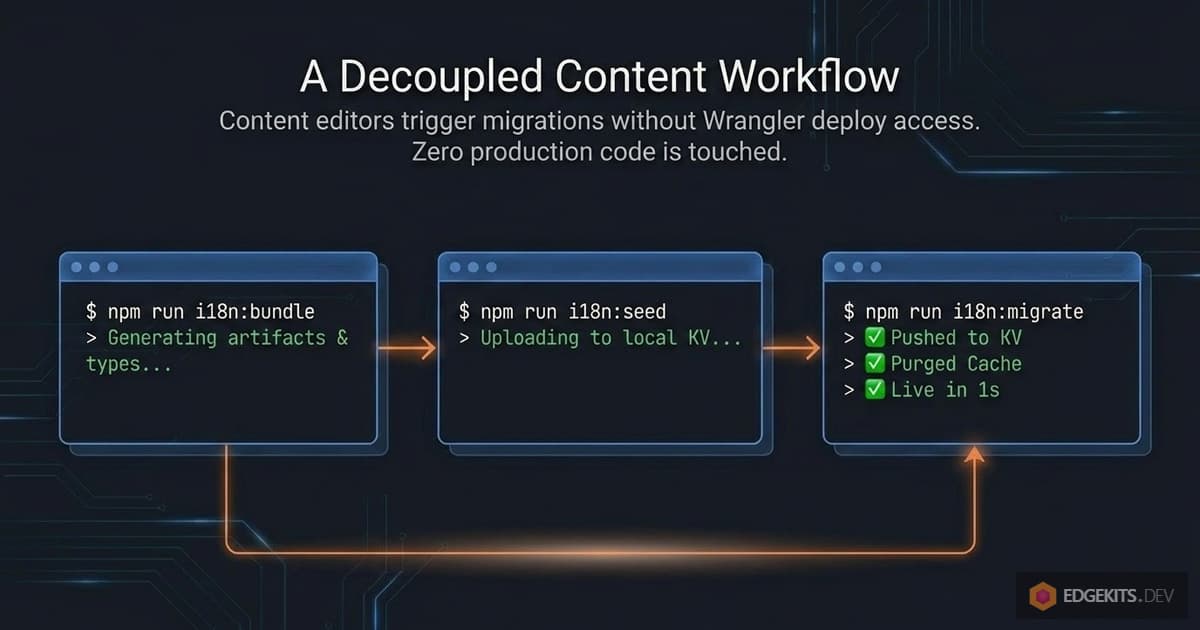
Same script, three different modes via flags. bundle generates artifacts only (useful for CI type checking). seed pushes to local KV. migrate pushes to remote KV and purges cache. No one has to remember which flag does what - the command names tell you.
--fallbacks as an opt-in. The compiled fallback dictionaries aren’t generated by default because they add build time and bundle size, and most projects don’t need the extra runtime safety net if KV is reliable. Append --fallbacks to any of the three commands to enable them, or set I18N_GENERATE_FALLBACKS=true in .dev.vars to always generate them. The fetcher checks for the generated file at runtime and uses it if present, so switching fallbacks on or off doesn’t require any code changes.
Gitignore discipline. The starter’s .gitignore excludes .dev.vars, i18n-data.json, src/i18n.generated.d.ts, and .i18n-hashes.json. All four are machine-local state or generated artifacts - committing them causes merge conflicts, accidental secret leaks, or stale type definitions in CI. The README documents this explicitly so new contributors don’t “fix” it by removing entries they think are missing.
Non-fatal missing credentials. If CLOUDFLARE_ZONE_ID or CLOUDFLARE_CACHEPURGE_API_TOKEN are missing, the script logs a warning and continues without attempting the purge step. This is deliberate - sometimes you want to push translations without also invalidating (say, seeding a fresh namespace that doesn’t have cache entries yet). The graceful recovery pattern means skipping purge doesn’t corrupt state; it just means the hash file stays where it was and the next migration retries.
What the Full Setup Gives You
If you’ve followed the sequence above, you now have an operational setup where:
- A non-developer on your team can update any JSON file in
./locales/**and trigger a migration themselves, without going near the deploy pipeline. - That migration pushes new content globally in about a second - the time it takes Cloudflare’s Purge API to propagate.
- Only the namespaces that actually changed get invalidated; everything else stays warm in cache.
- The Worker itself never gets redeployed. It just keeps running, serving increasingly well-cached translations, and reading from KV only when content genuinely changes.
This is what decoupling translations from code deployments actually looks like in practice. It’s not a single clever trick - it’s a small constellation of platform features (KV, Cache API, Purge API, Worker Secrets, wrangler.jsonc vars) composed in a specific order so that each one carries exactly the weight it’s designed for.
What I want to show next is what this costs and what it returns, in concrete numbers. It’s one thing to say “zero KV reads on the hot path”; it’s another to look at an actual production log and watch the arithmetic hold up.
Performance in Production: Real wrangler tail Logs
A good architecture survives contact with a production log. It’s one thing to claim “zero KV reads on the hot path”; it’s another to watch it happen, line by line, on a real deployment serving real traffic.
Let me walk through actual wrangler tail output from edgekits.dev - not cherry-picked best cases, just consecutive requests captured during normal use - and trace what each one cost in KV reads, cache lookups, and purge operations.
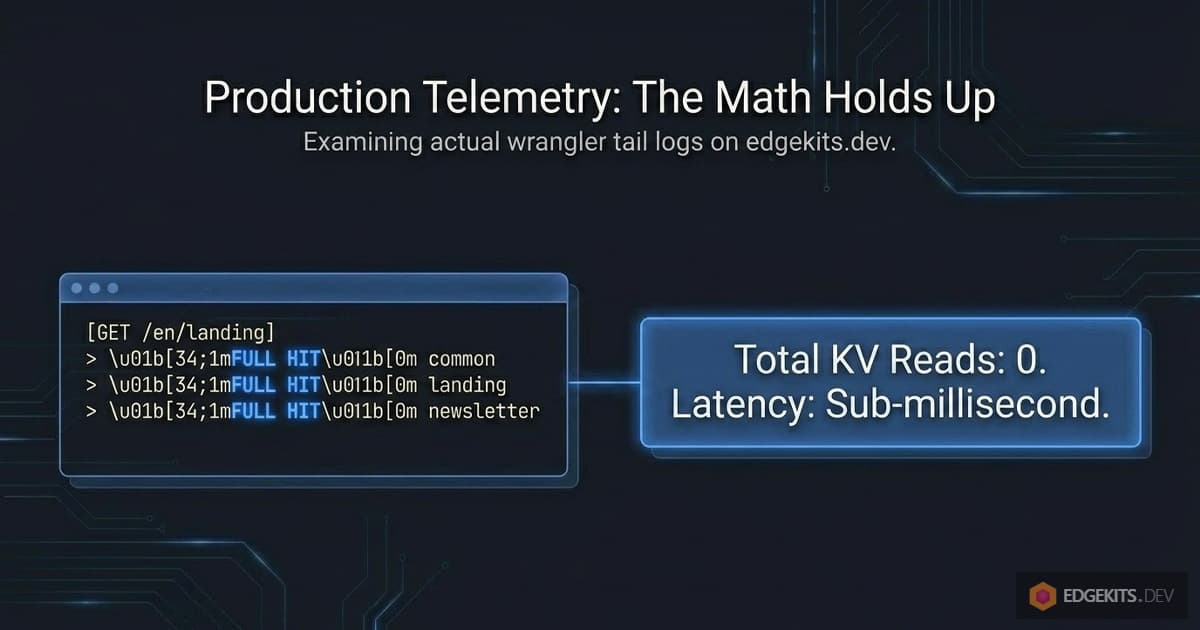
Steady-State Hot Path: Zero KV Reads
Here’s what a warm cache looks like. Multiple users hitting different pages, all locales, all namespaces already populated:
GET https://edgekits.dev/en/legal/refund-policy/ - Ok @ 18:42:04
  (log) i18n cache FULL HIT { locale: 'en', namespaces: [ 'legal' ] }
  (log) i18n cache FULL HIT { locale: 'en', namespaces: [ 'landing' ] }
  (log) i18n cache FULL HIT { locale: 'en', namespaces: [ 'landing' ] }

GET https://edgekits.dev/de/legal/refund-policy/ - Ok @ 18:42:12
  (log) i18n cache FULL HIT { locale: 'de', namespaces: [ 'legal' ] }
  (log) i18n cache FULL HIT { locale: 'de', namespaces: [ 'landing' ] }
  (log) i18n cache FULL HIT { locale: 'de', namespaces: [ 'landing' ] }

GET https://edgekits.dev/de/legal/terms/ - Ok @ 18:42:16
  (log) i18n cache FULL HIT { locale: 'de', namespaces: [ 'legal' ] }
  (log) i18n cache FULL HIT { locale: 'de', namespaces: [ 'landing' ] }
  (log) i18n cache FULL HIT { locale: 'de', namespaces: [ 'landing' ] }
Every line starts with FULL HIT. No KV batch, no cache PUT. Three fetchTranslations calls per page - one in the layout for legal (legal pages pull a shared legal-copy namespace), two in subcomponents for landing (header and footer use landing namespace) - and every single one of them is served directly from the edge cache.
Total KV reads for this entire three-request sequence: zero. Each page is assembled from cache entries that were warmed minutes or hours earlier and haven’t been invalidated since. This is the default cost of serving a request in steady state.
First-Touch Cache Warming Per Edge Node
When a request hits an edge node that hasn’t served the requested locale before, the cache is cold for that locale. Here’s what that looks like:
GET https://edgekits.dev/es/legal/refund-policy/ - Ok @ 18:42:31
  (log) i18n cache PARTIAL/FULL MISS { locale: 'es', hit: 0, miss: 1 }
  (log) i18n KV batch OK { locale: 'es', missingNamespaces: [ 'legal' ] }
  (log) i18n cache PUT scheduled { locale: 'es', missingNamespaces: [ 'legal' ] }
  (log) i18n cache PARTIAL/FULL MISS { locale: 'es', hit: 0, miss: 1 }
  (log) i18n cache PARTIAL/FULL MISS { locale: 'es', hit: 0, miss: 1 }
  (log) i18n KV batch OK { locale: 'es', missingNamespaces: [ 'landing' ] }
  (log) i18n cache PUT scheduled { locale: 'es', missingNamespaces: [ 'landing' ] }
  (log) i18n KV batch OK { locale: 'es', missingNamespaces: [ 'landing' ] }
  (log) i18n cache PUT scheduled { locale: 'es', missingNamespaces: [ 'landing' ] }
This is the first Spanish request on this edge node, and there’s a detail worth noticing. The landing namespace shows three PARTIAL MISS and three KV batch OK entries - not one. Why?
Because this particular page has three components that independently call fetchTranslations(runtime, 'es', ['landing']): the header, a featured content block, and the footer. They all execute in parallel inside the same Astro SSR pass. All three check the cache simultaneously and all three miss simultaneously - because the cache hasn’t been populated yet. All three then fetch from KV in parallel.
This is a one-time cost. Look at the very next Spanish request:
GET https://edgekits.dev/es/legal/delivery-policy/ - Ok @ 18:43:01
  (log) i18n cache FULL HIT { locale: 'es', namespaces: [ 'legal' ] }
  (log) i18n cache FULL HIT { locale: 'es', namespaces: [ 'landing' ] }
  (log) i18n cache FULL HIT { locale: 'es', namespaces: [ 'landing' ] }
All three FULL HIT. The parallel misses warmed the cache with three concurrent cache.put calls - the last one wins, they all wrote the same content anyway. From this request onward, every Spanish-locale page gets a free ride from cache until an explicit purge invalidates an entry.
Could we eliminate that parallel-miss cost? In principle, yes - a request-scoped memoization layer in Astro.locals would ensure only one component out of the three actually hits KV, and the others wait on its promise. But in practice this optimization doesn’t earn its complexity.
The parallel miss happens once per locale per edge node, ever, until the cache is explicitly invalidated. Three KV reads at warmup time, in exchange for no request-scoped state to maintain, no additional abstraction between components and the fetcher. I chose to leave it as-is.
Mixed Traffic: Partial Cache Hits + KV Batch Fallback
Real traffic rarely hits the extremes of “all cold” or “all warm.” Here’s a more realistic mix - users bouncing between locales, where some namespaces are cached and others aren’t:
GET https://edgekits.dev/es/ - Ok @ 18:45:13
  (log) i18n cache PARTIAL/FULL MISS { locale: 'es', hit: 1, miss: 3 }
  (log) i18n KV batch OK {
  locale: 'es',
  missingNamespaces: [ 'common', 'newsletter', 'messages' ]
}
  (log) i18n cache PUT scheduled {
  locale: 'es',
  missingNamespaces: [ 'common', 'newsletter', 'messages' ]
}
  (log) i18n cache FULL HIT { locale: 'es', namespaces: [ 'landing' ] }
  (log) i18n cache FULL HIT { locale: 'es', namespaces: [ 'landing' ] }
The homepage requested common, landing, newsletter, messages - four namespaces total. One of them (landing) is already cached from that earlier legal-page request; three aren’t. The fetcher does exactly what you’d hope: PARTIAL MISS { hit: 1, miss: 3 }, one KV batch call for the three missing ones, one combined cache PUT for all three.
Note the KV batch. missingNamespaces: [ 'common', 'newsletter', 'messages' ] - three keys, one round-trip. This is why step 3 of the fetcher uses env.TRANSLATIONS.get(missingKvKeys, ...) with an array argument instead of calling .get() individually. Even with four namespaces, we never do more than one KV round-trip per page.
Granular Invalidation in Action: One URL Purged
Now the payoff. What happens when translations actually change?
This is from the migration script’s console output after editing a single string in en/landing.json:
$ npm run i18n:migrate
[i18n] Changed namespaces (1):
  - en:landing
[i18n] Pushing translations to remote KV...
[i18n] ✅ KV updated (remote).
[i18n] Purging 1 cache entries via Cloudflare API...
[i18n] Purging cache for 1 URL(s)...
[i18n] [Chunk 1] Purged 1 URL(s).
[i18n] ✅ Cache purge completed.
[i18n] ✅ .i18n-hashes.json updated.
One URL. That’s it. en:landing was the only pair whose content hash differed from the previous run, so only https://edgekits.dev/i18n%3Aen%3Alanding got invalidated. Every other locale:namespace combination - en:common, en:blog, de:landing, es:landing, ja:landing, and so on - remained warm in the cache everywhere in the world.
Immediately after that, the first user to hit the English landing page triggered a cold-cache response for exactly one namespace:
GET https://edgekits.dev/en/ - Ok @ 18:56:53
  (log) i18n cache PARTIAL/FULL MISS { locale: 'en', hit: 3, miss: 1 }
  (log) i18n KV batch OK { locale: 'en', missingNamespaces: [ 'landing' ] }
  (log) i18n cache PUT scheduled { locale: 'en', missingNamespaces: [ 'landing' ] }
hit: 3, miss: 1. Three of the four namespaces on this page - common, newsletter, messages - were still in cache, untouched by the migration. Only landing was missing, and only landing was re-fetched from KV. The re-fetch pulled the updated content, wrote it back to cache, and the next request saw the new text.
From the second request onward, everything was warm again:
GET https://edgekits.dev/en/ - Ok @ 18:57:51
  (log) i18n cache FULL HIT {
  locale: 'en',
  namespaces: [ 'common', 'landing', 'newsletter', 'messages' ]
}
The user who fixed the Spanish typo doesn’t trigger cache invalidation for German users. Fixing German doesn’t touch English. Fixing landing doesn’t touch blog. This is what “granular” means in practice.
KV Reads and Purge Costs, by Operation
Let me total up the operational costs for a realistic workload. Assume a project with 5 locales and 10 namespaces (50 total locale:namespace pairs), traffic spread across a few dozen edge nodes, and translation updates happening a few times a week.
Serving requests (per edge node, steady state):
- Zero KV reads per request. Bounded only by parallel cache lookups per namespace.
- Per page: typically 3-4 parallel
cache.matchcalls, all hitting local edge cache.
First request per locale per edge node (after a deploy or eviction):
- One KV batch call with up to N keys, where N = number of missing namespaces (typically 3-5).
- Parallel
cache.putcalls viawaitUntil- doesn’t block the response.
Translation migration (per i18n:migrate run):
- One
wrangler kv bulk putpushing all 50 key/value pairs to remote KV. - One Cloudflare Purge API call with 1-5 URLs (matching the number of namespaces that actually changed).
- One local disk write for
.i18n-hashes.json.
First request per locale per edge node after a migration that touched that namespace:
- Same as first-touch warming, but scoped only to the invalidated namespace. Other namespaces stay cached.
Across a month of this workload, the KV read budget spent on actually-used data is dominated by first-touch warming - a few thousand reads total, depending on how many distinct edge nodes see traffic. Purge API calls total maybe 20-40 for the entire month. Nothing even approaches the free-tier ceiling on either metric.
What Changed Versus Part 1
For completeness, here’s what the same workload cost under the old architecture:
- Serving requests: same, zero KV reads on cache hit. No change.
- First request per locale: one KV read, but for the combined namespace bundle under a versioned key. Any overlap between pages was cached separately (one cache entry for
common,landing, another forcommon,landing,newsletter, another for justcommon). Cache footprint was larger than strictly necessary. - Translation update: required
npm run i18n:migrateANDnpm run deploy. The migrate step pushed to KV; the deploy step updatedTRANSLATIONS_VERSION. Without both steps, users saw stale content. - Cache after update: every versioned cache entry for every locale-namespace combination became orphaned all at once. LRU eventually cleaned them up. Cache stampede on the first request to any page in any locale that hadn’t been warmed under the new version.
The new architecture eliminates the deploy requirement, eliminates cache bundle duplication, and reduces the cache stampede from “every entry” to “only changed entries.” Performance on the hot path is identical to the old one - both architectures deliver zero KV reads when the cache is warm. The improvement is entirely in the invalidation path, which happens at deploy time rather than at request time.
Which is, finally, what Part 1 promised.
Trade-offs & When to Use Which Approach
Software architecture writing has a bad habit of pretending there’s one right answer. There rarely is. Part 1’s content-hash approach and Part 3’s explicit-purge approach are both valid - they just solve the same problem under different constraints, for different project shapes.
Rather than steer you toward one, let me describe the actual decision criteria I’d use myself. The two architectures live in two separate branches of the repo, and picking between them is a legitimate choice you should make consciously.
The Short Version
Use v1-version-based-cache when your situation has any of these properties:
- You don’t want to manage an additional Cloudflare API token.
- Your translations rarely change - maybe once a month, or only at release time.
- It’s a solo project or a small team where “run two commands instead of one” isn’t a real concern.
- You’re still in early development and just want something that works without additional configuration.
Use main (the Part 3 architecture) when:
- You’ve got a custom domain proxied through Cloudflare (orange cloud DNS).
- Translations change independently from code - content editors, translators, or a CMS pushing updates.
- You want a non-developer to be able to deploy content changes without any help.
- Translation update velocity matters enough that “seconds to propagate” is better than “wait for a deploy.”
- You plan to grow into a workload where avoiding redundant cache stampedes actually matters.
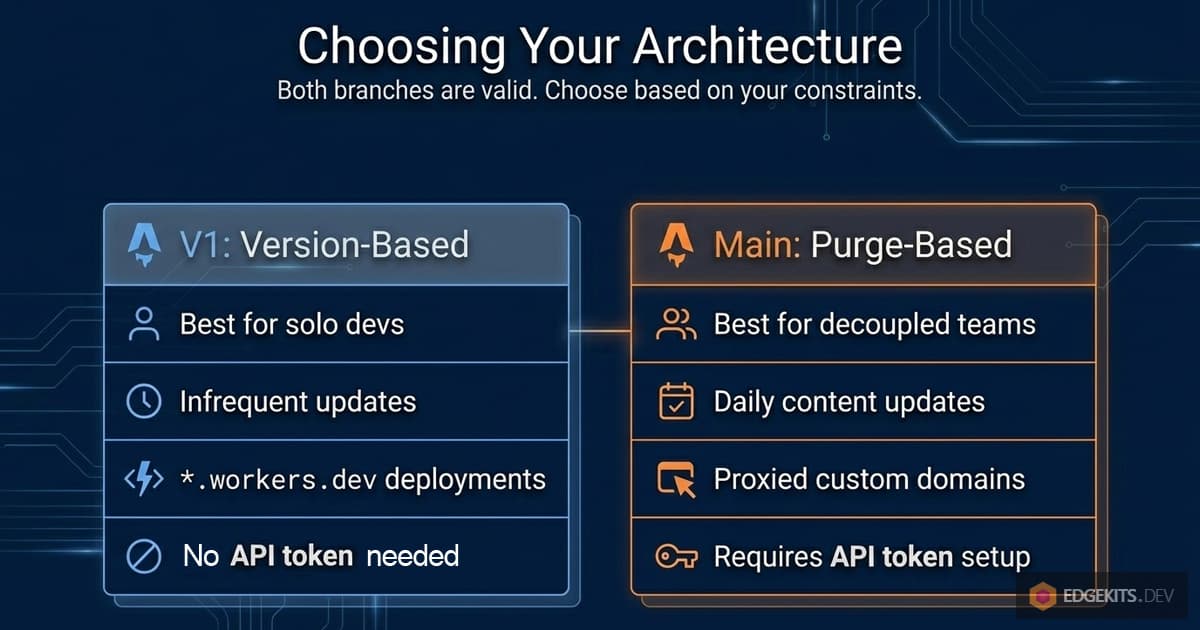
Axis 1 - Proxied Domain Requirement
Before we get to the axis that differentiates the two approaches, it’s worth being clear about what they share. Both architectures need an orange-clouded (proxied) custom domain to perform any edge caching at all.
Cloudflare’s Workers Cache API is tied to zone-level caching, which simply doesn’t exist on *.workers.dev subdomains or on custom domains with grey-cloud DNS-only mode. In either of those configurations, cache.put silently discards, cache.match always returns undefined, and every request falls through to KV. This is true regardless of which branch you’re on.
Where the two architectures diverge is what happens when you don’t have that proxied domain.
For Part 1, it’s mostly fine - the version-keyed caching doesn’t fail, it just doesn’t do anything. Translations are read from KV on every request, which is slower than a cache hit but correct. For a low-traffic preview or a pre-launch build, the KV free tier (100k reads/day) is generously more than you’ll ever need.
For Part 3, the same is true for the Cache API, but the Purge API is an additional piece that also requires the proxied setup. Without it, i18n:migrate will happily run - it pushes to KV, reports a successful purge API call, updates the hash file - but none of that actually does anything to invalidate cache, because there’s no cache in front of the Worker to begin with. The script doesn’t know this. It just quietly produces a no-op where you expected surgical invalidation.
So if you know your domain won’t be proxied any time soon, Part 3 isn’t broken per se, but its signature feature is inactive. Either stick with the Part 1 branch (which doesn’t depend on Purge API at all), or set I18N_CACHE=off and accept the slightly higher KV read volume in exchange for guaranteed freshness.
Axis 2 - Operational Complexity Tolerance
Part 3 requires more moving parts than Part 1 does. That’s just true, and pretending otherwise would be dishonest.
Specifically, to adopt Part 3 you need:
- A Cloudflare API token with
Cache Purgepermission on your zone. - That token stored in
.dev.vars(which must be gitignored). - The zone ID in
wrangler.jsoncas a Wrangler variable. - Awareness of what
.i18n-hashes.jsonis and why it’s gitignored. - Basic understanding of what the graceful-recovery pattern means, so that “purge failed, rerun migrate” doesn’t panic you.
None of this is individually hard, but the sum is “about half an hour of additional setup, done once” on top of the baseline shared with Part 1. Both branches still need a KV namespace, a Worker deploy, and a proxied domain - Part 3 just adds a purge token, zone ID, and hash-file awareness on top.
For a solo project where you’re both the developer and the content editor, that additional half-hour is real. It might be more than the entire translation-update time you’ll spend all year. Part 1 is strictly simpler, and simpler is a valid choice when complexity doesn’t earn its keep.
Axis 3 - Content Update Frequency
This is where the decision actually lives for most projects.
If translations change once a month on release day, the redeploy requirement of the Part 1 architecture is close to invisible - you’re deploying anyway, whether for content or for code. Nobody on the team will notice the coupling because it mirrors their natural cadence.
If translations change weekly, the redeploy requirement starts feeling heavy. Not fatal, but it means every German typo fix requires running two commands and watching a deploy pipeline. Part 3 makes this one command.
If translations change daily - say, a marketing team adjusting hero copy, or a CMS with real content authors pushing updates - the Part 1 approach becomes actively painful. Every content tweak blocks on a deploy. Part 3 reduces this to a single command that takes seconds and affects zero production code.
There’s also a second-order effect. When translation updates are cheap and decoupled, you start using them more. Small copy fixes that weren’t worth a deploy become casual - a typo caught in a screenshot, a better phrasing proposed by a reviewer, an A/B test variant, a hero headline being retuned to match a new ranking keyword, a meta description being rewritten after a Search Console report.
The cost structure shapes behavior. Part 3 makes translation iteration cheap enough that you actually iterate - including the kind of continuous SEO-driven copy refinement that most projects silently abandon because “it’s not worth redeploying for.”
Axis 4 - Team Composition
Part 1’s architecture has a hidden assumption baked into it: translations and code changes flow through the same deploy pipeline, which implies they flow through the same person or team. A content editor who can’t deploy a Worker can’t deploy a translation update either, because the Worker embeds the translation version.
For solo projects, this is fine. You wear both hats.
For two-person teams where both are developers, still fine.
For teams where content is owned by a non-developer - a copywriter, a translator, a product manager - Part 1’s architecture doesn’t scale. Either the non-developer needs deploy access they shouldn’t have, or every translation change creates a deploy bottleneck for whoever does.
Part 3 solves this cleanly: the migration script is a command-line tool, and wrangler kv bulk put plus i18n:migrate can be triggered by anyone who has the tokens, independent of whether they ever touch the code.
If you plan to let a non-developer update translations, Part 3 is not an optimization - it’s a prerequisite.
Axis 5 - Scale and Cache Bloat
At small scale this axis doesn’t matter. At larger scale it starts to.
Part 1 caches translations under combined keys: every unique set of namespaces that any page requests becomes its own cache entry. A page pulling common,landing creates one entry. A page pulling common,landing,newsletter creates another. A page pulling just common creates a third. Same underlying translation data, three cache entries.
For a small site with a handful of page types, this duplication is invisible. For a site with many page types and many locales, the multiplicative effect starts to add up - you might have 5 locales × 20 distinct namespace-set combinations = 100 cache entries for content that fundamentally represents 5 × 10 = 50 unique namespace loads.
Part 3’s per-namespace keys eliminate this duplication entirely. One cache entry per locale:namespace pair. Full stop. Cache footprint is predictable and scales linearly with locales × namespaces, not with page-template count.
This probably doesn’t matter until you’re running a content-heavy multilingual site with dozens of page templates. But when it does matter, Part 1 requires a painful retrofit to fix. Part 3 gets it right by construction.
Axis 6 - Recovery from Partial Failures
Both architectures handle KV failures gracefully via fallback dictionaries. Where they diverge is what happens when the invalidation step itself fails.
In Part 1, invalidation is implicit - change the content, the hash changes, old cache keys orphan. There’s nothing to fail. If your i18n:migrate script errors out mid-run after pushing to KV, users start seeing new content on the next request via the new hash. No manual recovery needed.
In Part 3, invalidation is explicit via a Purge API call. That call can fail - rate limits, network errors, invalid token, zone misconfiguration. We built the graceful recovery pattern specifically to handle this: KV gets pushed first, hash file only updates if purge succeeds, so retrying i18n:migrate replays the same invalidation automatically. But it’s still an extra failure mode to reason about, and an extra thing to check in your operational runbook.
If your project has strict uptime and observability requirements and you’re running this at scale, Part 1 is simpler to operate. Fewer moving pieces means fewer things to page you in the middle of the night.
Choosing Between Content-Hash and Purge API Architectures
Honestly, for a solo indie project just getting started, I’d probably still reach for the Part 1 architecture first. It’s ~20 lines of additional setup to eliminate, and it lets you ignore an entire category of operational concerns.
Later, when the project has scale and a content workflow that justifies the complexity, you can migrate to Part 3 - the branches exist in the same repo and the migration is small and localized.
Start with the simpler one. Upgrade when you actually need to.
The reason I ended up shipping Part 3 for edgekits.dev is that I knew the content workflow I wanted - non-developer updates, fast iteration, a path toward real content management - was incompatible with the redeploy requirement. For that specific project, Part 3 wasn’t optional.
For your project, the answer depends on which of the six axes above dominate your constraints. The nice thing about having both branches is that you don’t have to commit to the answer before building anything. Pick the simpler one, build, and switch later if the axes shift.
Conclusion
Three articles in, let me step back and look at what the whole arc has actually been about.
Part 1 argued that translations are data, not code, and proposed an architecture that moved them into KV and cached them at the edge.
Part 2 extended that philosophy to user-facing forms and their server-side error paths - translated content flowing through validation, through API responses, through locale-aware error codes, all without client-side i18n bundles.
And Part 3, as it turned out, was about finishing what Part 1 started.
Because I had moved translations into KV, I genuinely believed I had separated them from code. But the cache invalidation layer - a small, technical-looking detail I didn’t think much about at the time - kept them coupled.
Every content edit still required a code deploy, because the thing that told the cache “this content is stale” lived inside the code. The philosophy was right. The implementation didn’t fully live up to it.
The resolution, once I found it, came from a small reframing. Not “how do I make the cache key reflect content changes?” - which led me through three architectures that each had their own regression. But “how do I delete specific cache entries when content changes?”
That framing pointed directly at a Cloudflare primitive I’d been ignoring: the Purge API. And once I started treating invalidation as an explicit operation on data rather than an implicit consequence of cache-key rotation, the coupling dissolved. Not moved. Dissolved.
The Pattern Underneath: State Lifecycles on the Edge
I think there’s a generalizable insight here, and it’s less about i18n and more about how we reason about state at the edge.
When you first start building on Workers, you tend to think of caches and KV and env vars as interchangeable places where state can live. You pick whichever one “feels right” for a particular piece of data. But each of these layers has a specific purpose that matches a specific lifecycle, and fighting that alignment produces subtle couplings you don’t notice until you try to evolve the system.
Environment variables are for how the Worker is configured. They live with the Worker. They change when the Worker changes.
KV is for durable data that the Worker reads. It lives independently of the Worker. It can change without the Worker knowing.
The Cache API is for transient acceleration. It’s downstream of KV. It gets populated by the Worker and exists to save network round-trips.
If you store versioning information in an env var, you’re saying “this version is part of the Worker’s identity” - and you’ll pay for that every time the version should change without the Worker’s identity changing. If you store content in an env var, you’re saying “this content changes at the same rate as my code” - which is true for feature flags, maybe, but wrong for translations.
The refactor in this article was, underneath the surface detail, really an exercise in putting each piece of state in the right layer and letting the platform’s natural lifecycles handle propagation. Content goes in KV. Configuration stays in env vars. Cache entries are downstream of both. Invalidation is an explicit operation between them, not a byproduct of key naming.
Once the pieces sit in their right layers, the whole system composes cleanly.
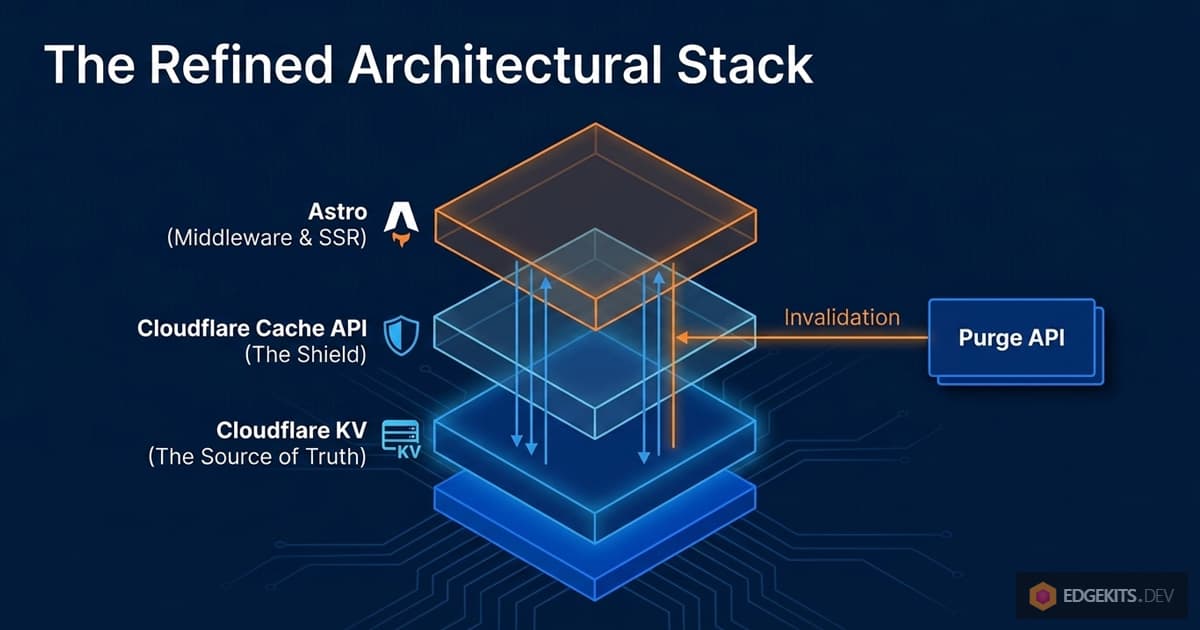
What “Data, Not Code” Actually Means
The original claim from Part 1 was that translations should be data, not code. That’s a slogan. Part 3 made me articulate what it actually means operationally:
- The format in which content is stored doesn’t require recompilation to update. (KV stores JSON. Editing JSON isn’t “changing the code.”)
- The pathway through which content propagates doesn’t intersect the code deploy pipeline. (A translation update calls
wrangler kv bulk put, notwrangler deploy.) - The invalidation signal that tells downstream caches to refresh is itself data, not code. (A Purge API call triggered by a script, not a new hash baked into a bundle.)
- The lifecycle of the content is independent of the lifecycle of the Worker. (The Worker runs for weeks while translations update daily beneath it.)
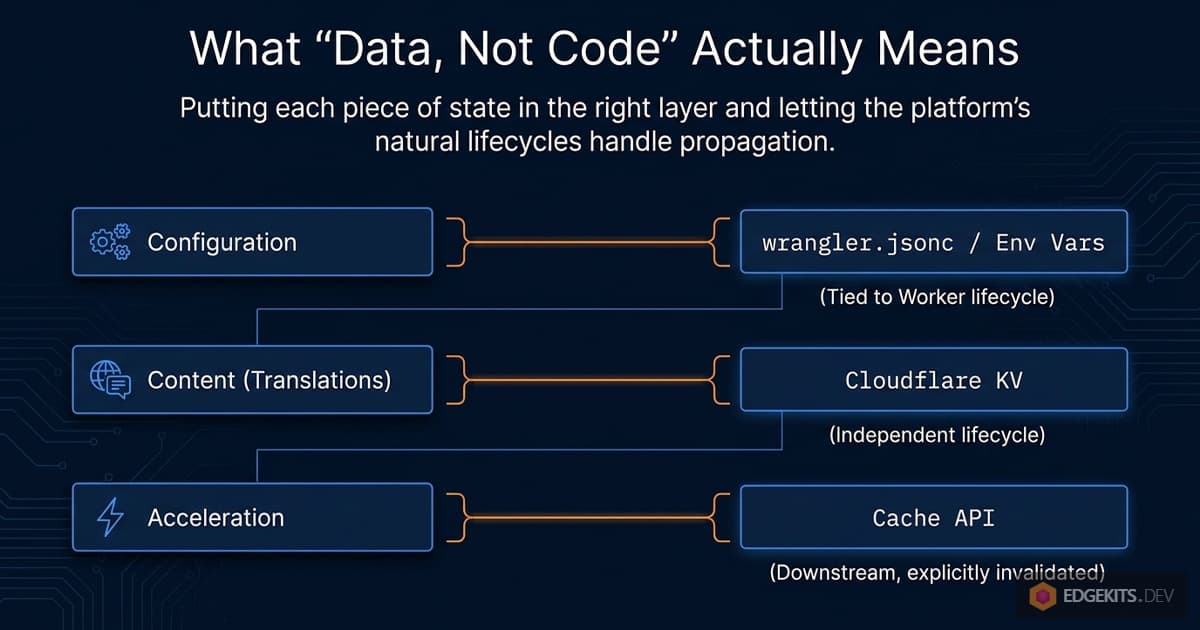
All four bullets have to be true simultaneously for “data, not code” to be more than an aspiration. Part 1 delivered the first two. Part 3 delivered the other two. You need all four before non-developer teammates can actually own translations without needing a developer.
What Comes Next
There’s a larger question humming underneath this article, and I’m going to name it rather than hide it: what else in a typical SaaS is quietly shipped as code when it should be shipped as data?
Feature flags. A/B test variants. UI copy outside the i18n system. Pricing configurations. Error message templates. Marketing banners. Onboarding step sequences. Email templates.
All of these routinely live in code repositories, get deployed alongside features, and create the same kind of subtle coupling between product changes and engineering cycles that I just spent 8,000 words untangling for translations.
I don’t have a general solution to offer here - different types of data have different invalidation patterns, different consistency requirements, different audiences. But the framework I arrived at for i18n - static cache keys, explicit invalidation, graceful recovery, per-item granularity - seems to generalize.
A future post might walk through how the same patterns apply to feature flags, or to lightweight CMS-backed content. We’ll see.
For now, what I can offer is this: if you’ve been accumulating that vague sense of “deploys are weirdly tangled up with content operations on our project,” you’re probably not imagining it.
The tangle is usually real. And it’s usually fixable by asking a simple question for each piece of data in your system - “what’s its natural lifecycle, and which part of my platform is designed for exactly that?” - and then storing it there, directly, instead of cramming it into whichever place was convenient at the time.
Read Next: Part 4 (The Engine Becomes an npm Package, the Docs Become an Agent Skill)
The engine this article refined is now @edgekits/astro-i18n on npm, and its installation guide
is no longer a README but an agent skill. Part 4
covers what moved into the package and what stays project code, the six questions the skill asks
before it writes a line, the two bugs that coding agents found in the first two days, and the
demo repo rebuilt by the skill in one session.
Thank You For Reading
This has been a long series. Thank you for sticking with it.
If you build something on this stack, I’d love to hear about it. And if you found these articles useful, a star on the repo is always appreciated - it’s not something I chase, but it genuinely feels good to see one land. The code from both architectures is open source:
-
The v2-purging-cache branch of astro-edgekits-core
contains the Part 3 architecture described here. It wasmainuntil October 2026, when the engine moved into the@edgekits/astro-i18npackage. -
The v1-version-based-cache branch
preserves the Part 1 architecture, which remains a legitimate choice for the use cases outlined in the trade-offs section.
More deep dives are already brewing - this stack has a lot of surface area and I want to keep covering it properly rather than hand-waving at the interesting parts. What comes next will depend on where the starter kits land and what the most common friction points turn out to be in practice.
For now, go ship a German typo fix without redeploying ;)
Update (August 2026): Fallback Merges on Cache Hits
Since publishing, I moved namespace assembly into a single pure function that every path shares - cache hit, cache miss, and the KV bulk read. The compiled default-locale fallback dictionaries now merge on hits too, where previously the merge ran only on the miss path and a cached namespace was passed through untouched.
The practical difference shows up after a schema change. An entry written before new keys existed no longer hands the page undefined for those keys; it degrades to default-locale text until the purge lands.
That does not replace anything in this article. Explicit invalidation keeps the cache correct, and tolerant assembly keeps a page rendering in the window before invalidation reaches every edge node.
Frequently Asked Questions
How do I update Cloudflare Workers translations without redeploying the Worker?
The solution is the Static Keys + Explicit Invalidation pattern: store translations in Cloudflare KV under version-free cache keys (e.g., `i18n:<locale>:<namespace>`), set `Cache-Control: s-maxage=31536000, immutable` on cache entries, and call the Cloudflare Purge API when content changes. The migration script pushes updated JSON to KV with `wrangler kv bulk put`, then issues a POST to `/zones/<ZONE_ID>/purge_cache` with only the URLs that actually changed. The Worker itself never redeploys - it keeps running while translations update beneath it. This fully decouples translation lifecycle from code deployment lifecycle.
What is the hidden coupling problem with TRANSLATIONS_VERSION in Cloudflare Workers i18n?
When a content-hash (`TRANSLATIONS_VERSION`) is compiled into the Worker bundle as an environment variable, every translation change requires a full `wrangler deploy` - even though the translations live in KV and should be independent of the code. This is the hidden coupling problem: the cache key encodes a version that only changes when the Worker redeploys, not when KV content changes. Three workarounds all fail: `wrangler deploy --var` gets overwritten by `wrangler.jsonc` on the next normal deploy; storing the version in KV adds a mandatory KV read on every request, eliminating the cache benefit; and short-TTL version caching requires double sequential cache lookups and exceeds KV free-tier limits at scale. The correct fix is to abandon version-keyed caching entirely in favor of static keys with explicit Purge API invalidation.
What is the difference between passive and active cache invalidation on Cloudflare Workers?
Passive cache invalidation relies on natural expiry mechanisms: key rotation (adding a version suffix so old entries become unreachable orphans), LRU eviction, or short TTLs. Passive invalidation is simple to implement but causes cache stampedes - when all entries orphan at once, every edge node must re-warm simultaneously, spiking KV reads. Active cache invalidation uses the Cloudflare Purge API to explicitly delete specific cache entries by URL, independent of TTLs or key names. Active invalidation is surgical: only changed namespaces are purged, all other entries remain warm. The trade-off is operational complexity - you need an API token, a zone ID, and a purge step in your migration pipeline.
What causes a cache stampede in Cloudflare Workers i18n and how can it be prevented?
A cache stampede occurs when a translation update invalidates all cached locale/namespace combinations simultaneously, causing every edge node worldwide to miss cache and fall through to KV on the next request. Under a version-keyed architecture, every entry that was cached under the old version key becomes stale at once - with 5 locales and 10 namespaces, that is 50 simultaneous KV reads across dozens of edge nodes. The prevention is per-namespace granular invalidation via the Cloudflare Purge API: only the `locale:namespace` pairs whose content actually changed get purged. If you edit one string in `en/landing.json`, only the single URL for `i18n:en:landing` is purged; all other namespace cache entries across all locales remain warm and untouched.
How does the Cloudflare Purge API work for granular i18n cache invalidation?
The Cloudflare Purge API accepts a POST to `https://api.cloudflare.com/client/v4/zones/<ZONE_ID>/purge_cache` with a JSON body of `{ "files": ["<url1>", "<url2>"] }`. The URLs must match exactly the URLs used as cache keys by the Workers Cache API - the same `buildTranslationCacheUrl(locale, ns)` function that generates keys for `cache.put` also generates the list of URLs to purge. Rate limits: up to 100 URLs per request, 800 URLs per second on all plans. For a typical setup with 5 locales and 12 namespaces (60 total pairs), a migration that changes 3 namespaces issues a single API call with 3-15 URLs (3 namespaces × 5 locales). The Purge API requires a proxied (orange-cloud) domain - it does not function on `workers.dev` subdomains.
Does the Cloudflare Workers Cache API work on workers.dev subdomains?
No. The Workers Cache API is tied to zone-level caching, which does not exist on `*.workers.dev` subdomains or on domains configured with grey-cloud (DNS-only) mode in Cloudflare. On workers.dev, `cache.put` silently discards the entry and `cache.match` always returns `undefined`, causing every request to fall through to KV. Both the Cache API and the Purge API require an orange-cloud (proxied) custom domain. This is true regardless of whether you use version-keyed caching or the Static Keys + Explicit Invalidation architecture. If you cannot proxy a custom domain, set `I18N_CACHE=off` and accept higher KV read volume in exchange for guaranteed content freshness.
What is the translations-keys.ts single source of truth pattern for Cloudflare Workers i18n?
The `translations-keys.ts` module exports three functions used in both the runtime Worker fetcher and the Node.js migration script: `buildTranslationKvKey(locale, ns)` constructs the KV storage key, `buildTranslationCacheUrl(locale, ns)` constructs the cache key URL used with the Cache API, and `buildTranslationCacheRequest(locale, ns)` wraps that URL as a `Request` object for `cache.match` and `cache.put`. Because both the Worker and the migration script import the same module, the URL the fetcher writes to cache is guaranteed to be the same URL the Purge API call deletes. There is no second "how to build a cache key" formula anywhere in the codebase - type-level enforcement prevents the URL drift that would cause silently-missed invalidations.
How do non-blocking cache writes work in Cloudflare Workers with waitUntil?
In a Cloudflare Worker, `cache.put` must not block the response - users should not wait for a cache write to complete before receiving the page. The fetcher schedules all cache writes via `ctx.waitUntil(Promise.all(putPromises))`, which runs the writes as a background task after the response has already been sent. In local development under Astro`s Node.js dev server, there is no `ctx.waitUntil`, so the code falls back to `await Promise.all(putPromises)` to ensure writes actually execute. Each individual `cache.put` call is wrapped in `.catch()` so a failed write is logged and discarded without breaking the request. The cache entries are stored with `Cache-Control: public, s-maxage=31536000, immutable` - they never revalidate automatically; only an explicit Purge API call can remove them.
How does incremental translation cache purging work with .i18n-hashes.json?
The migration script maintains a local `.i18n-hashes.json` file that stores a SHA-256 content hash (truncated to 12 hex characters) for each `locale:namespace` pair. On each run, it computes current hashes using `stableStringify` (which sorts keys deterministically before serializing, unlike `JSON.stringify` which preserves source key order) and diffs them against the previous run. Only pairs whose hash changed appear in `changedKeys`, and only their corresponding cache URLs get sent to the Purge API. Critically, the hash file is updated on disk only if the Purge API call succeeds. If purge fails (rate limit, network error, invalid token), the hash file stays at its previous state, so the next `i18n:migrate` run sees the same diff and retries the same invalidation automatically - no manual intervention needed.
When should I use content-hash cache invalidation versus Cloudflare Purge API for Astro i18n?
Use content-hash invalidation (the v1-version-based-cache branch) when: you do not want to manage an additional API token, translations change infrequently (monthly or at release time), it is a solo project, or you are in early development. Use Purge API architecture when: you have a custom domain proxied through Cloudflare (orange cloud), translations change independently from code (content editors, translators, a CMS), you need non-developers to deploy content without touching the deploy pipeline, or translation updates happen daily. A key structural difference: content-hash caching creates combined cache entries per unique namespace-set (5 locales × 20 page-template combinations = 100 entries for 50 pairs of actual data), while per-namespace Purge API architecture creates exactly one entry per `locale:namespace` pair, scaling linearly rather than multiplicatively with page-template count.
Resources & Further Reading
- Cloudflare Workers Cache API docs
- Cloudflare Purge Cache overview
- Cache plans, features and rate limits by tier
- Purge cache by single-file (by URL)
- How the Workers Cache works
- Edge-Native i18n - Part 1: Zero-JS Architecture
- Edge-Native i18n - Part 2: Localizing Forms on the Edge
- Astro i18n in 2026: The Complete Guide
- Edge-Native i18n - Part 4: npm Package and Agent Skill