
Edge-Native Feature Flags Without LaunchDarkly: Cloudflare Flagship for Indie SaaS

Feature flags as an ownership problem: a D1 baseline you fully control, the Flagship binding when it outgrows you, plan gating, kill switches, and the OpenFeature escape hatch.
Ask five developers what feature flags are and you will get one answer: a switch that flips a code path on or off without a redeploy. Ask where the flags should live and the agreement ends - a hardcoded boolean, an env var, a database table, or a vendor dashboard billed monthly.
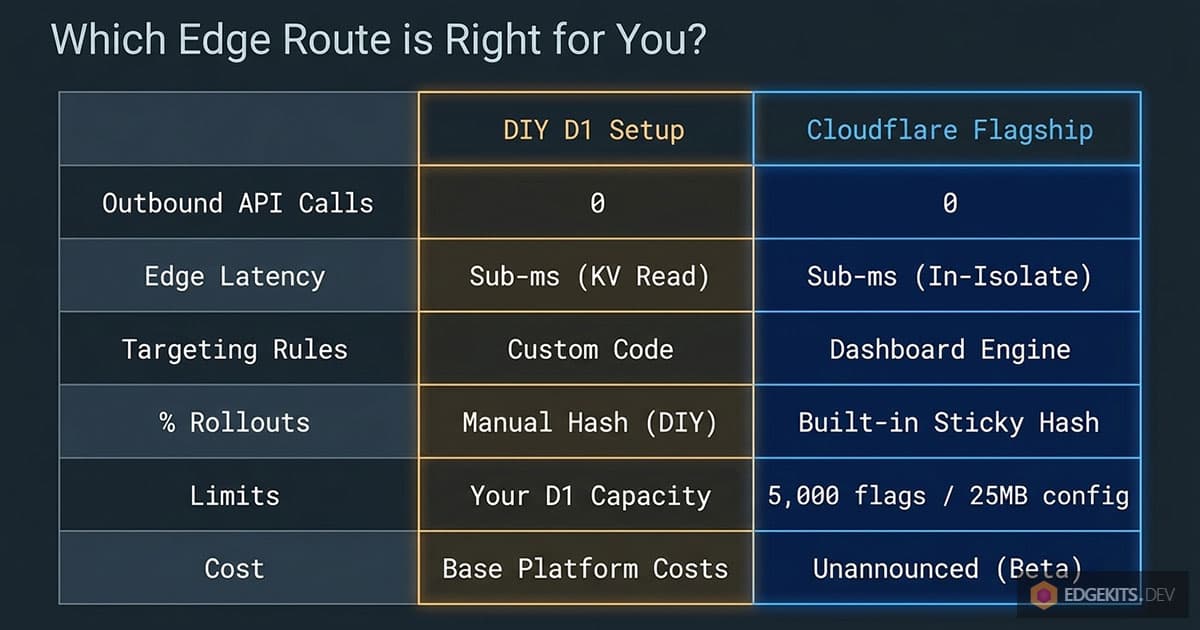
Strip the marketing off any feature flag service and what remains is small: a config row, a lookup, and a hash that buckets users. That is why my default has always been to own the mechanism. And it is why Cloudflare’s new entry, Flagship, in public beta since May 2026, is the first managed option I bothered to test against the table I can build myself.
Cloudflare feature flags now come in two shapes: a D1 table or the Flagship binding
Cloudflare announced Flagship in April 2026 and moved it to public beta on May 26, 2026. It is a native feature flag service: flags, targeting rules, and percentage rollouts defined in the dashboard, evaluated by your Worker through a binding.
No outbound HTTP call on the request path. No vendor SDK phoning home.
That gives an edge-native app two credible paths, and this article walks both in order. Path one: a flags table in D1 plus a stable hash, which you own end to end and which covers most indie apps. Path two: Flagship, for the day the DIY version starts billing you in maintenance hours instead of dollars.
And yes, Flagship is a managed service too. It gets a different verdict because it is a binding on the platform my stack already runs on - the same account that holds my D1 databases, KV namespaces, and Workers.
Its OpenFeature interface also keeps the exit door open. The trade-off section holds both claims to account.
TL;DR
- Flagship evaluates flags inside your Worker via a binding. No round-trip to a flag vendor’s API.
- A D1 table plus a consistent hash is the right default for most indie SaaS. Start there.
- Flagship adds targeting rules, sticky percentage rollouts, four value types, and a dashboard toggle.
- OpenFeature compatibility keeps evaluation code portable: swapping providers is a one-line change.
- It is Beta: pricing is unannounced and the browser provider is not production-safe yet.
Build it yourself first: a D1 table and a hash
Before any managed service earns a place in the stack, the self-hosted feature flag setup has to be priced out, and on Cloudflare it is cheap. The best from-scratch walkthrough I know is Kyle’s 20-minute feature flag build, and his storage analysis translates to Workers almost one to one.
Hardcoded flags and env vars fail the same test: changing them means a redeploy, which defeats the reason the flag exists. The case that matters most is the kill switch - a checkout or an external API call you need to turn off in seconds, not after a rebuild.
That pushes you to storage your running code can re-read: a database with a cache in front. On this stack that is a D1 table fronted by KV.
-- migrations/0007_feature_flags.sql
CREATE TABLE feature_flags (
  key TEXT PRIMARY KEY,
  enabled INTEGER NOT NULL DEFAULT 0,
  rollout_percent INTEGER NOT NULL DEFAULT 100,
  value TEXT NOT NULL DEFAULT 'true' -- JSON: boolean, string, number, or object
);
The standard objection arrives immediately: a cache breaks the whole idea, because a stale flag is exactly what you cannot afford during an incident.
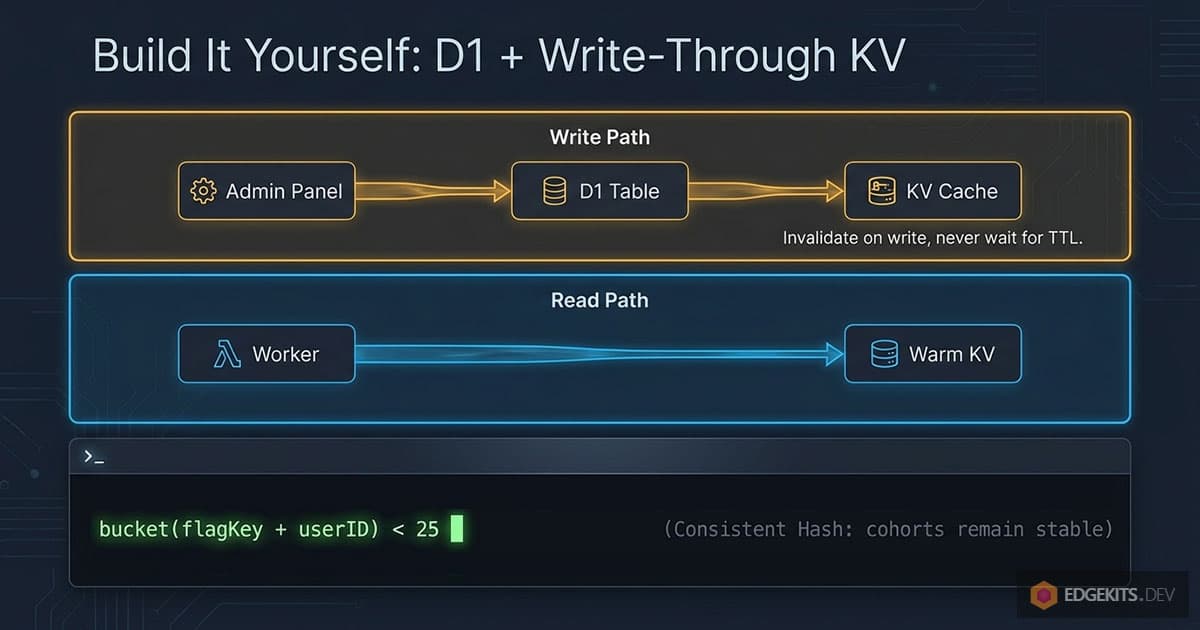
The answer is to cache the flag values, never the code paths behind them, and invalidate on every write - the same explicit-invalidation discipline behind my granular edge-cache purges, applied to config rows instead of HTML. The admin handler writes to D1 and then puts the fresh row into KV in the same request, so the cache never waits for a TTL to expire:
// admin/flags.ts - write-through: D1 is the source of truth, KV is the edge copy
export async function setFlag(env: Env, key: string, patch: Partial<FlagRow>) {
  await env.DB.prepare('UPDATE feature_flags SET enabled = ?2, rollout_percent = ?3, value = ?4 WHERE key = ?1')
    .bind(key, patch.enabled ? 1 : 0, patch.rollout_percent ?? 100, JSON.stringify(patch.value ?? true))
    .run()
  await env.FLAGS_KV.put(`flag:${key}`, JSON.stringify(await readFlag(env, key)))
}
One caveat is built into the platform: KV writes can take up to 60 seconds to propagate to edge locations that already hold a cached copy.
For a truly global kill switch that window matters, so set a short cacheTtl on reads of critical flags and accept the extra D1 hits. The more critical the flag, the shorter its cache life should be - the same rule my KV-backed i18n engine lives by for translations.
Percentage rollouts are where most homegrown implementations go wrong. Math.random() < 0.25 re-rolls the dice on every request, so a user sees the feature, refreshes, and loses it.
Deriving the cohort from the live user count is no better: the same user falls out of the rollout when the denominator grows.
The fix is a deterministic hash over the flag key plus the user ID, mapped to a 0-100 bucket:
// Same user + same flag = same bucket, on every request, on every edge node.
// Including the flag key means one user is NOT in the first 25% of every experiment.
function bucket(flagKey: string, userId: string): number {
  const s = `${flagKey}:${userId}`
  let h = 0
  for (let i = 0; i < s.length; i++) {
    h = Math.imul(h ^ s.charCodeAt(i), 2654435761)
  }
  return (h >>> 0) % 100
}

const inRollout = bucket('new-checkout', userId) < flag.rollout_percent
The bucket does not care how many users you have. Ramping from 10% to 25% only widens the range, so everyone who already had the feature keeps it.
This is the same consistent-hashing idea every commercial flag service runs internally, in nine lines you own.
A bonus use case this table covers for free: safer refactors. Wrap a rewritten D1 query in a flag, run old and new side by side, log mismatches, and flip the flag when the diff stays empty for a week.
So when is this enough? For a single product with a handful of long-lived flags - kill switches, a beta toggle, one rollout at a time - it is, and you should stop reading after building it.
The cost shows up later and it is never the compute bill: flags nobody removed two quarters in, an admin UI that keeps growing fields, no audit trail beyond git log on a table, and a test matrix that doubles with every toggle.
When tending the table costs more evenings than the table saves, that is the line. Everything past it is what the next sections are about.
How Flagship evaluates flags at the edge with no round-trip
A flag service has two jobs that pull in opposite directions: changes must propagate fast, and reads must cost nothing. The DIY setup above solves it with write-through KV. Flagship runs the same shape as a managed control plane, one level deeper in the platform.
Every flag change is written atomically to a Durable Object, a SQLite-backed instance that acts as the source of truth for the app’s flag configuration and its change history. From there the config syncs into Workers KV and replicates across Cloudflare’s network, with changes taking effect globally within seconds.
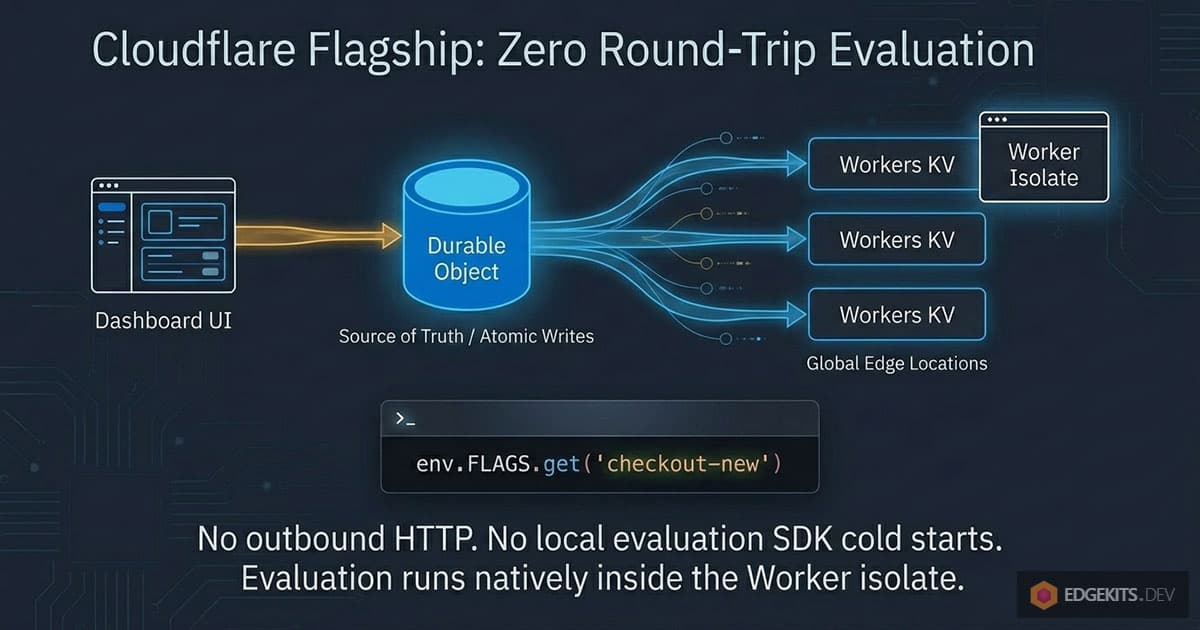
When a request evaluates a flag, the Worker reads that config from KV at the same edge location already serving the request. The evaluation engine runs right in the isolate: match the context against targeting rules, resolve the rollout, return a variation.
Notice what is missing: an outbound HTTP call. The classic flag-vendor integration puts a network request on the critical path of every user request, which is absurd for an app that runs milliseconds from the user.
The conventional fix, a “local evaluation” SDK that downloads all rules into memory, assumes a long-lived process - and Workers do not have one. An isolate can be created, serve a single request, and be evicted, so that SDK pays its initialization again on the next cold invocation.
Keeping the rules in KV sidesteps both failure modes, because KV is already warm at every location.
That is why Flagship ships as a binding rather than an SDK: you declare it in your Wrangler config, it appears as env.FLAGS with typed methods, and those methods never throw. On any failure - missing flag, type mismatch, trouble inside the platform - they return the default value you passed.
Two operational consequences follow. If the dashboard becomes unavailable, evaluation continues on the last propagated configuration.
And during the brief propagation window after a change, some regions can still serve the previous value - the same eventual consistency you accepted with your own KV cache, except now minimizing it is Cloudflare’s job, not yours.
Add the binding and build your evaluation context
Two pieces of config connect a Worker to a Flagship app. Create the app in the dashboard under Compute > Flagship, copy its ID, and declare the binding:
// wrangler.jsonc
{
  "flagship": [
    {
      "binding": "FLAGS",
      "app_id": "<APP_ID>",
    },
  ],
}
Run npx wrangler types afterwards. The generated Env interface types the binding as Flagship, so flag calls are checked end to end.
Evaluation needs one more ingredient: the context. It is a flat record of attributes - who is asking, on what plan, from where - that targeting rules match against.
Build it in one place and reuse it. Scattering ad-hoc context objects across handlers is how two call sites end up in different cohorts for the same user.
// src/lib/flag-context.ts - one context builder for every evaluation
import type { Context } from 'hono'

export function flagContext(c: Context<{ Bindings: Env }>) {
  const user = c.get('user') // your session middleware
  return {
    targetingKey: user?.id ?? c.get('sessionId') ?? 'anonymous',
    plan: user?.plan ?? 'free',
    country: (c.req.raw.cf?.country as string) ?? 'unknown',
  }
}
// anywhere in a handler
const showNewOnboarding = await c.env.FLAGS.getBooleanValue('new-onboarding', false, flagContext(c))The non-obvious rule: targetingKey must be stable. It is the attribute Flagship hashes for percentage rollouts by default, and without it the bucket is assigned randomly on every evaluation - the refresh-and-lose-the-feature bug from the DIY section, reborn inside a managed service.
A logged-in user’s ID is the ideal key. For anonymous traffic a session cookie beats an IP, which mobile networks rotate under the user mid-session.
Note what country costs here: nothing. On Workers the request already carries request.cf.country, so geo targeting needs no lookup service - one more place where running at the edge quietly replaces a paid dependency.
And keep the defaults conservative. The second argument is the exact value your app degrades to when evaluation fails, so it should always be the safe path - false for a risky new flow, the old variant for a checkout experiment.
Gate a feature on the billing plan, without making the flag your billing truth
Feature flags in a SaaS gravitate toward one job: plan gating. The new module ships to pro first while free sees the upsell.
The shortcut everyone reaches for is encoding the entitlement itself into the flag service. That is the mistake to refuse early.
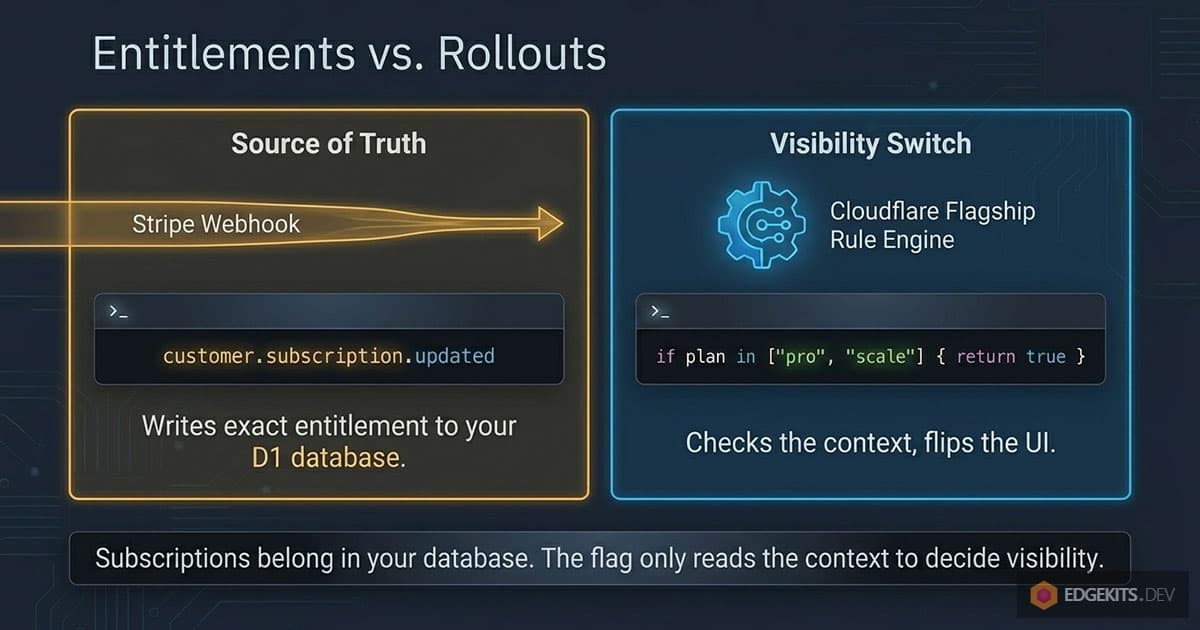
The moment a flag answers “what did this customer pay for”, your billing truth lives in a flag dashboard. Subscriptions belong in your own D1 table, written by payment webhooks. The flag only reads the plan attribute already sitting in the evaluation context, and decides whether a feature is visible to that plan today.
The test is brutal and simple: if Flagship disappeared tomorrow, every customer must keep exactly what they paid for. Rollout state is allowed to vanish. Entitlements are not.
interface AiReportLimits {
  enabled: boolean
  dailyReports: number
}

const limits = await c.env.FLAGS.getObjectValue<AiReportLimits>(
  'ai-reports',
  { enabled: false, dailyReports: 0 }, // safe default: feature off
  flagContext(c), // carries plan read from D1
)

if (!limits.enabled) {
  return c.json({ error: 'AI reports are not available on your plan' }, 403)
}
In the dashboard the rule reads plan in ["pro", "scale"] and serves the object variation, optionally behind a percentage rollout within those plans. The handler never changes while you adjust who sees what.
One more leak to seal: hiding the button is not gating. If the UI checks the flag but the API route does not, anyone who finds the endpoint has the feature. The server-side check above is the real gate; the frontend only reflects it.
The webhook handler is the only piece that varies across payment providers. The Flagship call stays identical:
| Provider | Sync the plan into D1 on… | Note |
|---|---|---|
| Paddle | subscription.updated webhook | merchant of record, handles EU VAT for you |
| Stripe | customer.subscription.updated | you are the merchant of record yourself |
| Lemon Squeezy | subscription_updated webhook | merchant of record |
| Polar.sh | subscription.updated webhook | merchant of record, dev-focused |
Whichever provider wins, the shape is one webhook handler, one UPDATE on the entitlements table, and a context builder that reads the result. Billing stays yours; the flag stays a visibility switch.
Flip a kill-switch and run a percentage rollout
The kill switch is the flag that pays for the whole setup. One boolean in front of every path that can hurt you - checkout, an external AI call that bills per token, a webhook that mutates data:
const checkoutOpen = await c.env.FLAGS.getBooleanValue(
  'checkout-enabled',
  true, // if evaluation fails, checkout stays up
  flagContext(c),
)

if (!checkoutOpen) {
  return c.json({ error: 'Checkout is paused for a few minutes' }, 503)
}
Note the default flipped to true. “Conservative” means the value you want during an outage of the flag system itself, not reflexively false - an unreachable evaluation should never take your checkout down. The switch exists for the emergencies you declare, and a disabled flag always returns its default variation no matter what rules say.
When something does break, the toggle is in the dashboard and the change reaches every edge location within seconds. No revert, no redeploy, no waiting on CI while the bug charges customers.
Rollouts are the same flag with a rule on it. Set 5% on new-onboarding, watch logs for a day, raise to 25%, then 100%. Flagship buckets by consistent hashing on targetingKey - the exact mechanism behind the nine-line bucket() from the DIY section - so ramping only widens the range and nobody who has the feature loses it mid-rollout.
How do you know the rollout is doing what the dashboard claims? Ask for the details variant instead of the bare value:
const details = await c.env.FLAGS.getBooleanDetails('new-onboarding', false, flagContext(c))
// details.reason: "SPLIT" | "TARGETING_MATCH" | "DEFAULT" | "DISABLED"
// details.errorCode: "FLAG_NOT_FOUND" | "TYPE_MISMATCH" | "GENERAL"
console.log(`flag=new-onboarding reason=${details.reason} variant=${details.variant}`)
The reason field turns flags from a black box into something you can debug. Expecting a 25% split but every log line says DEFAULT? Your context lost its targetingKey. Seeing FLAG_NOT_FOUND? A handler still references a flag someone deleted last sprint.
Cheap to log, and the first place to look before blaming the platform.
Why OpenFeature means Flagship never locks you in
The strongest argument against a homegrown flag table is that it becomes private technical debt: an interface only you maintain, only you document, and only you can migrate away from. The strongest argument against a flag vendor is the mirror image - their SDK’s interface fused into every call site.
OpenFeature, the CNCF standard for feature flag evaluation, dissolves both. You write evaluation code once against a vendor-neutral client, and the engine behind it becomes a configuration detail.
Flagship is built on it. The @cloudflare/flagship package is an OpenFeature provider, and inside a Worker you hand it the binding directly, so the standard interface costs you no extra HTTP:
import { OpenFeature } from '@openfeature/server-sdk'
import { FlagshipServerProvider } from '@cloudflare/flagship'

await OpenFeature.setProviderAndWait(new FlagshipServerProvider({ binding: env.FLAGS }))

const client = OpenFeature.getClient()
const showNewCheckout = await client.getBooleanValue('new-checkout', false, {
  targetingKey: user.id,
  plan: user.plan,
})
Migrating from LaunchDarkly, Flagsmith, or any other OpenFeature-compatible provider is the same move in reverse: swap the provider line, keep every call site.
// the exit door, both directions:
await OpenFeature.setProviderAndWait(new LaunchDarklyProvider({ sdkKey: '...' }))
// becomes
await OpenFeature.setProviderAndWait(new FlagshipServerProvider({ binding: env.FLAGS }))
// or, the full ownership endgame:
await OpenFeature.setProviderAndWait(new MyD1FlagProvider({ db: env.DB }))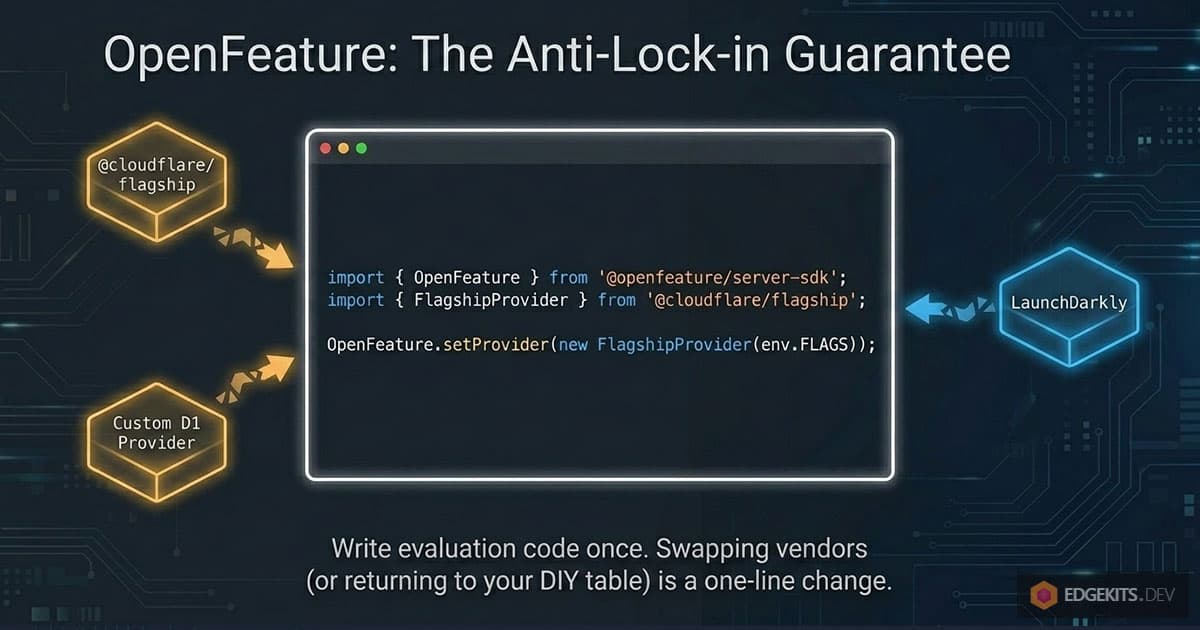
That last line is the one that matters for this article. The D1 table from the DIY section can sit behind a small custom provider, which means adopting Flagship is reversible by design: if pricing lands wrong at GA, the fallback is the table you already know how to build, and zero call sites change.
One nuance worth stating plainly: if your code will only ever run on Workers, calling env.FLAGS directly is simpler than carrying the OpenFeature layer. The standard earns its keep the moment a second runtime appears - a Node cron job, a script, a browser - or the day you actually walk through the exit.
What this setup gives up, and when to just build it on D1
Start with the bill, because my “no new vendor bill” argument from the intro is provisional. Pricing is unannounced; the announcement promises details only “as we approach general availability”. If GA pricing lands steep and per-evaluation, the OpenFeature exit above exists for exactly that day.
The client side is not ready either. The browser provider needs a Cloudflare API token shipped in client code, and Cloudflare itself warns against using it in public-facing apps until a safer mechanism exists.
On an SSR stack this costs nothing - Astro rendering on Workers with Hono behind it, flags resolve server-side anyway. If your product is a SPA that needs client-side evaluation today, it is a real gap.
Flagship also flips flags without measuring them. There is no built-in experiment analytics: it can tell you who got a variant, never what the variant did to conversion. The A/B verdict still comes from your own events pipeline, which is also the layer the classic vendors charge the most for.
The platform limits will not be the problem: 5,000 flags per app, 25 MB of flag configuration, conditions nested six levels deep, all soft limits. An indie product retires before reaching any of them.
So the line I draw for myself: stay on the D1 table while you are solo, the flag count fits on one screen, and nobody non-technical needs the toggle. The table is nine lines of hash and one migration; it does not deserve a vendor.
Move to Flagship when the dashboard starts mattering: a co-founder who must flip a kill switch without deploy rights, audit history you stop maintaining by hand, targeting rules that would otherwise grow into a homemade rule engine. That is the point where the maintenance hours outgrow the table, and the binding is waiting on the platform you already pay.
The flags turned out to be one slice of a bigger decision: how much of your SaaS plumbing you own. The D1 entitlements table, the payment webhooks that feed it, the Hono handlers that read it - that wiring is what the EdgeKits SaaS Starter is being built around, on the same rules this article applied to flags: pay once, own the code, keep the exit. If you would rather start from that wiring than rebuild it, the Early Birds list below gets launch updates first.
Frequently Asked Questions
What is Cloudflare Flagship and how is it different from other feature flag services?
Flagship is the native feature flag service from Cloudflare, in public beta since May 26, 2026. Flags, targeting rules, and percentage rollouts are defined in the Cloudflare dashboard, and Workers evaluate them locally through a native binding (env.FLAGS) instead of calling a vendor API over HTTP. Configuration lives in a SQLite-backed Durable Object as the source of truth and syncs to Workers KV across the global network within seconds, so evaluation happens at the same edge location already serving the request. Flagship is OpenFeature-compatible, supports boolean, string, number, and JSON object variations, and its evaluation methods never throw: on any failure they return the default value you passed. Pricing is unannounced; Cloudflare promises details closer to general availability.
How do I evaluate a feature flag inside a Cloudflare Worker with the Flagship binding?
Add a flagship block to wrangler.jsonc with a binding name and your app ID, run npx wrangler types, then call typed methods like env.FLAGS.getBooleanValue("new-checkout", false, context). The third argument is the evaluation context: a flat record of attributes such as targetingKey, plan, or country that targeting rules match against. The second argument is the default returned whenever evaluation fails (missing flag, type mismatch, platform trouble), so it should encode the value you want during an outage. For debugging, the Details variants like getBooleanDetails expose reason (TARGETING_MATCH, SPLIT, DEFAULT, DISABLED) and errorCode (FLAG_NOT_FOUND, TYPE_MISMATCH, GENERAL) fields you can attach to request logs.
Do I need a feature flag service, or is a self-hosted D1 table enough for an indie SaaS?
For most indie SaaS the self-hosted setup is enough: a feature_flags table in D1 with a KV cache in front, write-through invalidation on every change, and a deterministic hash for percentage rollouts. That covers kill switches, beta toggles, and one rollout at a time in well under a hundred lines. The cost that eventually justifies a managed service is maintenance, never compute: stale flags nobody removes, an admin UI that keeps growing, no audit history, and a test matrix that doubles with every toggle. Move to Flagship when a non-technical teammate needs the toggle, you want field-level audit history, or targeting rules outgrow a homemade rule parser.
How do percentage rollouts stay consistent so a user does not lose the feature between requests?
Sticky bucketing. Flagship applies consistent hashing to a context attribute, targetingKey by default, mapping each user to a stable 0-100 bucket, so the same user receives the same variant on every request at every edge location. Ramping a rollout from 5% to 25% to 100% only widens the accepted range, so users already in the rollout stay in it. The two classic homegrown mistakes are Math.random() per request, which re-rolls on every refresh, and deriving the cohort from the live user count, which evicts users as the denominator grows. One gotcha: if the context carries no targetingKey and no alternative bucketing attribute is configured, Flagship assigns the bucket randomly on each evaluation, so always pass a stable key.
Is Cloudflare Flagship a LaunchDarkly alternative for an indie SaaS on Workers?
For server-side flags on Cloudflare Workers, yes. Both cover targeting rules, percentage rollouts, and multi-type variations, and both speak OpenFeature, so migrating means swapping one provider initialization line while every call site stays unchanged. What Flagship lacks today: built-in experiment analytics (variant performance still comes from your own events pipeline) and a production-safe browser provider (the current client provider requires exposing a Cloudflare API token, which Cloudflare warns against in public apps). What it removes: a separate vendor bill and contract, and the HTTP round-trip on the request path, because flags evaluate inside the Worker through a binding.
What happens to Flagship flags during a Cloudflare dashboard outage or evaluation failure?
Evaluation continues on the last propagated configuration. Flag config is replicated into Workers KV across edge locations, so a dashboard outage does not stop flags from resolving; you just cannot change them until it recovers. If an individual evaluation fails, methods return the default value you passed instead of throwing, which is why defaults should encode the safe path: true for a kill switch guarding checkout (an unreachable flag system should never take checkout down), false for a risky new feature. Failures stay visible through the Details methods, which set errorCode to FLAG_NOT_FOUND, TYPE_MISMATCH, or GENERAL.
How should feature flags interact with billing plans in a SaaS?
The flag may read the plan, never define it. Keep subscriptions in your own database, for example a D1 entitlements table updated by payment webhooks (subscription.updated for Paddle and Polar.sh, customer.subscription.updated for Stripe, subscription_updated for Lemon Squeezy), and pass plan as an evaluation-context attribute that targeting rules match, like plan in ["pro", "scale"]. The test: if the flag service disappeared tomorrow, every customer keeps exactly what they paid for; rollout state may vanish, entitlements may not. And gate on the server: hiding a button in the UI is not a gate, because anyone who finds the endpoint gets the feature unless the API route checks the same flag.
Why do local-evaluation feature flag SDKs work poorly on Cloudflare Workers?
Local-evaluation SDKs download the full set of flag rules into process memory, which assumes a long-lived process. Workers run in isolates that can be created for a single request and evicted right after, so the SDK pays its initialization again on cold invocations and the latency advantage evaporates. The platform-shaped answer is keeping flag configuration in Workers KV, already replicated and warm at every edge location, with the evaluation engine running inside the isolate, which is exactly what the Flagship binding does. The other classic pattern, calling a flag vendor HTTP API per request, is worse still: it parks a cross-internet round-trip on the critical path of an app that otherwise responds from milliseconds away.