
Cloudflare Zaraz Cookie Consent on Astro: a Zero-JS, Free-Tier Banner

A custom cookie consent banner on Cloudflare Zaraz and Astro, server-rendered on first visit only. Returning visitors get zero banner HTML and zero banner JavaScript, while Google Consent Mode v2 stays wired correctly.
A recent performance audit I ran on a US mid-market e-commerce site landed at Lighthouse mobile Performance 32: LCP 6.8 s, Total Blocking Time 4,630 ms, CLS 0.479, Time to Interactive 29.2 s. In a Playwright run with all third-party scripts firing, real-world LCP was 12.6 seconds and the page weight reached 4.9 MB.
How does Cloudflare Zaraz change the cost of cookie consent?
The site already ran on Cloudflare CDN, but the consent layer was a third-party CMP (Osano) sitting on top of GTM, Klaviyo, Microsoft Clarity, FullStory, Facebook Pixel, LinkedIn Insight, Twitter Pixel, TikTok, Reddit, Bing, Google Ads and GA - 14 third-party tools, each waiting to fire behind the consent decision.
The CMP is the gate; the gate is the slow part. Independent measurement matches this pattern: a RUMVision case study found a cookie banner became the LCP element on 50% of mobile pageviews on a real site, pushing LCP past 4.7 seconds on those visits.
The banner on edgekits.dev avoids that pattern. It renders server-side, and only when the consent_status cookie is empty. Cloudflare Zaraz handles tool gating and Google Consent Mode v2 signals; the banner itself is a small Astro component.
Pricing makes the path worth taking even before the performance argument. Every Cloudflare account gets 1 million Zaraz events per month on the Free plan with every feature unlocked, per the Zaraz pricing page.
The paid alternatives climb fast. Cookiebot starts at €7/mo for a 50-subpage domain and bumped its base Premium tier from €15 to roughly €30/mo per domain in August 2025, scaling to €90/mo at the high end (per the Cookiebot pricing page and Enzuzo’s 2026 Cookiebot pricing analysis).
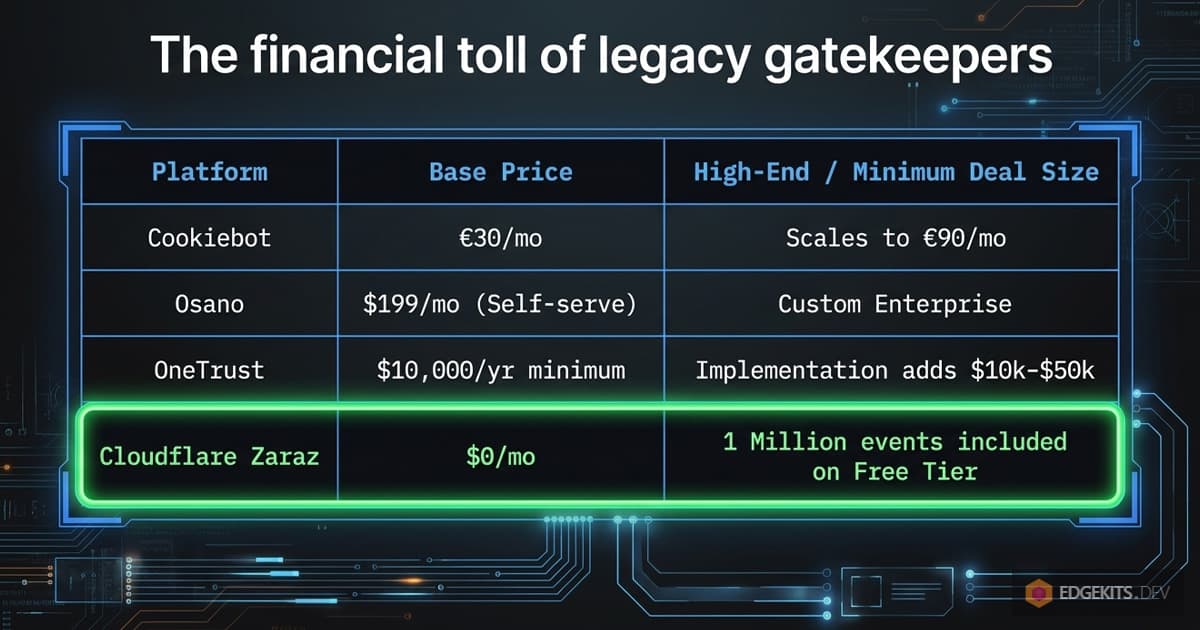
Osano’s self-service cookie consent starts at $199/mo, with enterprise plans custom-quoted by DAUs (per Enzuzo’s 2026 Osano pricing analysis).
OneTrust is the steepest: a $10,000 annual minimum from Q2 2026, median deal size around $10,514/year across 278 Vendr transactions, with implementation fees adding another $10K-$50K in year one (per Enzuzo’s OneTrust pricing analysis and Vendr’s OneTrust marketplace data).
TL;DR
- The banner we make here renders server-side only when the consent cookie is empty - returning visitors get no HTML and no JS for it.
- A Web Component handles two button clicks, no React island, no hydration step.
- Accept fires two signals:
zaraz.consent.setAll(true)andzaraz.set('google_consent_update', {...}).- Pageviews fire unconditionally - Google Consent Mode v2 default-denied turns pre-consent hits into cookieless pings.
- Cost: $0/mo on the Cloudflare Free plan. Coverage: GDPR + GCMv2. Not for: IAB TCF v2.2 publishers.
The scope: one button accept/decline, and what Zaraz can do beyond it
What I built is the minimum form: one Accept button, one Decline button, no per-category checkboxes, no preferences modal. That is a deliberate scope choice, not a platform limit.
Cloudflare Zaraz Consent Management can do per-purpose checkboxes (Analytics, Marketing, whatever purposes are defined), auto-display on first visit, re-open on demand via zaraz.consent.modal = true, accept Custom CSS, and ship 30+ language strings matched against the browser Accept-Language header. All of this is in the Cloudflare Zaraz Consent Management docs.
One consent shape the default CMP does not cover: IAB TCF v2.2 for publishers integrating ad-tech vendor lists. Cloudflare documents TCF separately, but it requires extra setup and is the wrong tool for most SaaS sites. For a SaaS marketing page with three or four third-party tools, the one-button pattern is the smallest correct implementation.
Why does a third-party CMP tank LCP and conversion?
A CMP loads early enough to block any cookie-setting script. It ships its full UI bundle on every request because it does not know the visitor’s state until it parses its own cookie. None of that is fixable with caching - the cost is the bundle, and the bundle is on every page.
The audit numbers above show what that costs in practice. JavaScript bootup time was 8.0 seconds, main-thread work was 11.9 seconds, 872 KiB of JavaScript was unused, and render-blocking requests alone accounted for an estimated 2,390 ms of LCP delay. The CMP is one block in that stack, but it is the first one - everything else is gated behind it.
LCP suffers when the modal becomes the largest contentful element on mobile, which RUMVision documented on a real site at over 4.7 seconds. INP and CLS also commonly degrade - cookie notices are a recurring source of layout shifts and slow interaction-to-next-paint events on Accept, per DebugBear’s analysis of CMP performance.
The bill matters too. Cookiebot lands around €30/mo per domain post-August-2025 and €90/mo at the high end. Osano starts at $199/mo for self-service. OneTrust pulls a $10,000/year minimum from Q2 2026 with implementation fees on top. Cloudflare Zaraz gives every account 1 million events per month on the Free plan with the Consent Management API included.
Cloudflare Zaraz moves the tracking layer to the edge. Your tools run server-side on Cloudflare Workers; the client gets a small dispatcher that issues track and set calls. The consent banner, in this pattern, is not Zaraz’s responsibility - it is an Astro component the server renders conditionally.
Read the consent cookie on the edge with Astro middleware
The architecture pivots on one cookie: consent_status. Set, read, and gated entirely server-side. The middleware is 11 lines:
// src/domain/analytics/middleware/consent.ts
import type { MiddlewareHandler } from 'astro'
import { getCookieConsent } from '../cookie-storage'

export const consentMiddleware: MiddlewareHandler = async (ctx, next) => {
  const consentStatus = getCookieConsent(ctx.cookies)

  if (consentStatus) {
    ctx.locals.consentStatus = consentStatus
  }
  return await next()
}
The cookie itself uses a generic server-side helper that defaults to safe options:
const DEFAULT_OPTIONS: AstroCookieOptions = {
  path: '/',
  httpOnly: true,
  secure: import.meta.env.PROD,
  sameSite: 'lax',
  maxAge: COOKIE_TTL.oneYear,
}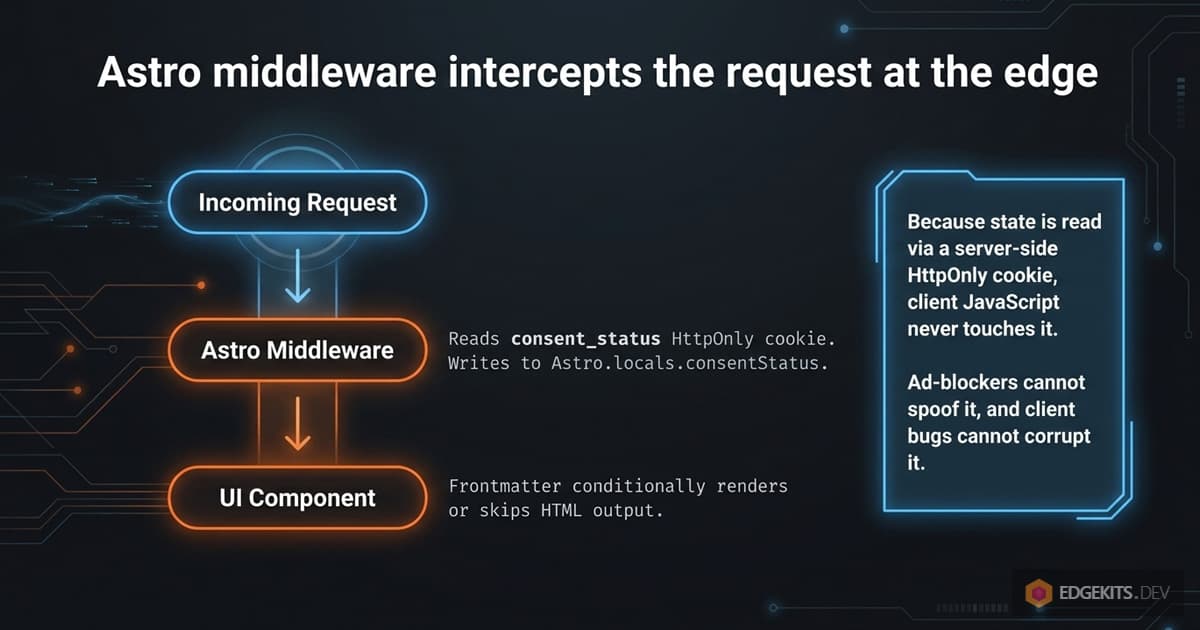
HttpOnly is the important flag. The consent state is set by an Astro Action server-side and read by the middleware server-side. Client JavaScript never touches the cookie, so an ad-blocker cannot spoof it and a client-side bug cannot corrupt it.
The 1-year maxAge keeps a returning visitor on the lightweight render path until they clear cookies. Astro.locals.consentStatus is available to every component for the rest of the request.
SSR the banner only when the consent cookie is empty
The banner component reads consentStatus from locals and only fetches translations when it needs to render:
---
// src/domain/analytics/components/ConsentBanner.astro
import { fetchTranslations } from '@/domain/i18n/fetcher'

const { consentStatus, translationLocale, cfContext } = Astro.locals

const { consent } = !consentStatus ? await fetchTranslations(cfContext, translationLocale, ['consent']) : { consent: null }
---

{
  consent && (
    <consent-banner ...>
      <p>{consent.bannerText}</p>
      <button id="ek-decline-btn">{consent.decline}</button>
      <button id="ek-accept-btn">{consent.acceptAll}</button>
    </consent-banner>
  )
}
Three things matter here. The translation fetch is gated behind !consentStatus, so a returning visitor never triggers the KV/cache read for the consent strings (the i18n layer this hooks into is documented in the Astro i18n complete guide). When consent is null, the entire <consent-banner> element is omitted from the HTML - not hidden with CSS, not display: none, just absent from the response.
There is no early return in the frontmatter, and that is deliberate. I found out the hard way during my Astro 5 to 6 migration: Astro compiles a top-level return in frontmatter into a throw, and the esbuild dependency scanner aborts dep pre-bundling for the whole project when it hits one. The fix is a variable plus a template conditional - same behaviour, no compiler trap.
A Web Component beats a React island for a one-shot banner
The banner has two interactive jobs: handle two button clicks, then tell Zaraz and the server about the choice. Wrapping that in a React island would ship the React runtime (around 45 KB min+gzip for the React core library per Bundlephobia, plus react-dom) and pay a hydration cost on the main thread.
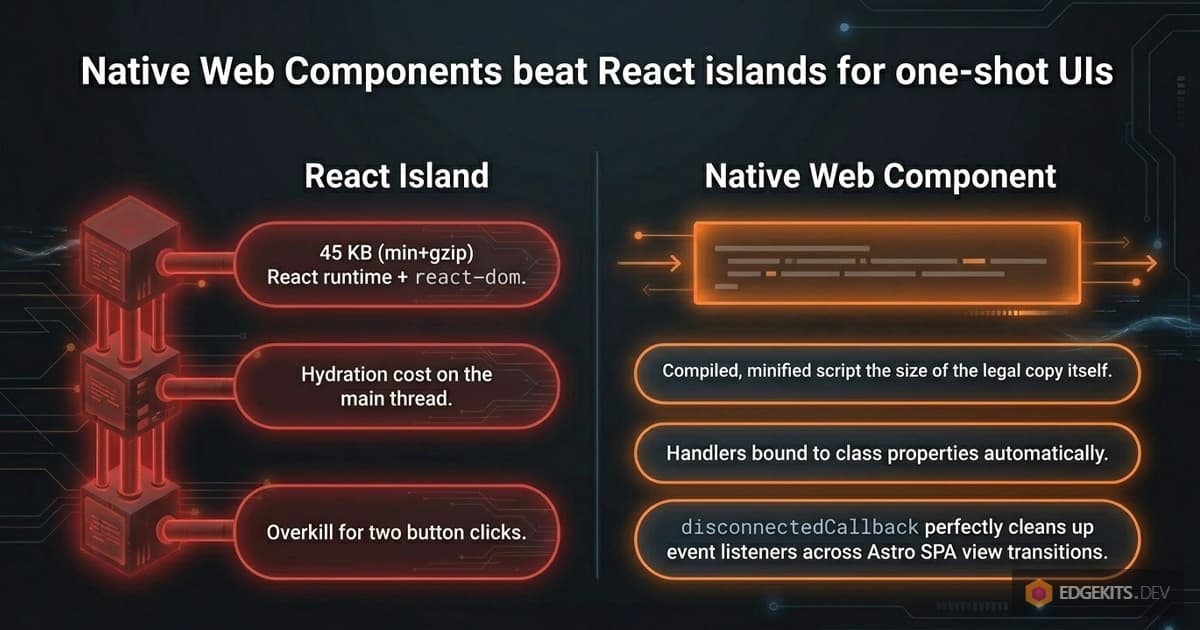
A Web Component does the same job in a compiled-and-minified script around the size of the legal copy itself:
class ConsentBanner extends HTMLElement {
  private acceptBtn: HTMLButtonElement | null = null
  private declineBtn: HTMLButtonElement | null = null

  private handleAccept = async () => {
    this.closeBanner()
    if (typeof zaraz !== 'undefined') {
      zaraz.consent?.setAll(true)
      zaraz.set('google_consent_update', {
        analytics_storage: 'granted',
        ad_storage: 'granted',
        ad_user_data: 'granted',
        ad_personalization: 'granted',
      })
    }
    await fetch('/_actions/consent.setConsentStatus', {
      method: 'POST',
      headers: { 'Content-Type': 'application/json' },
      body: JSON.stringify({ consentStatus: 'accepted' }),
    })
  }

  private handleDecline = async () => {
    this.closeBanner()
    if (typeof zaraz !== 'undefined' && zaraz.consent) {
      zaraz.consent.setAll(false)
    }
    await fetch('/_actions/consent.setConsentStatus', {
      method: 'POST',
      headers: { 'Content-Type': 'application/json' },
      body: JSON.stringify({ consentStatus: 'declined' }),
    })
  }

  private closeBanner() {
    this.classList.add('hidden')
  }

  connectedCallback() {
    this.acceptBtn = this.querySelector('#ek-accept-btn')
    this.declineBtn = this.querySelector('#ek-decline-btn')
    this.acceptBtn?.addEventListener('click', this.handleAccept)
    this.declineBtn?.addEventListener('click', this.handleDecline)
  }

  disconnectedCallback() {
    this.acceptBtn?.removeEventListener('click', this.handleAccept)
    this.declineBtn?.removeEventListener('click', this.handleDecline)
  }
}

if (!customElements.get('consent-banner')) {
  customElements.define('consent-banner', ConsentBanner)
}
Two details worth pointing at. The handlers are class properties, not methods, so this is bound automatically and the same function reference goes to both addEventListener and removeEventListener. And disconnectedCallback runs on Astro View Transitions teardown, so listeners get cleaned up properly even across SPA-style navigations.
Call /_actions/consent directly instead of importing astro:actions
The natural way to invoke an Astro Action from the client is the astro:actions import:
const { actions } = await import('astro:actions')
await actions.consent.setConsentStatus({ consentStatus: 'accepted' })
That works, but it pulls in the Astro Actions client runtime. For a banner that fires once per user, that is wasted code on the client. The endpoint is the same whether you go through the wrapper or directly:
await fetch('/_actions/consent.setConsentStatus', {
  method: 'POST',
  headers: { 'Content-Type': 'application/json' },
  body: JSON.stringify({ consentStatus: 'accepted' }),
})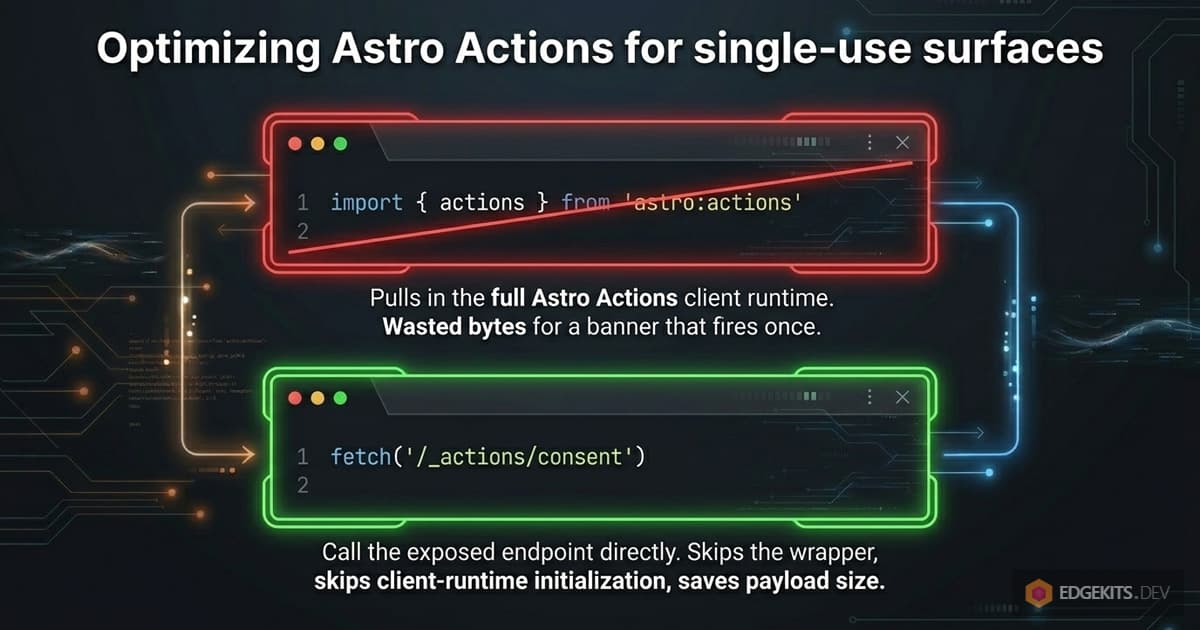
Astro exposes Actions at /_actions/<namespace>.<name> and accepts a JSON body. The native fetch skips the import and the wrapper, and runs without any client-runtime initialization. On a one-shot interactive surface, the direct call is the cleaner path - though where I need Zod-validated input on the server, I still wire Actions the regular way, as covered in the i18n part 2 article on Astro Actions with Zod and D1.
Configure Zaraz Consent in the Cloudflare dashboard
The custom banner is half the system. The other half lives in the Cloudflare dashboard, all on the Zaraz → Consent page in your account.
1. Enable Consent Management. Toggle it on, then fill in the Consent modal text field with your legal copy (the cookies you use, the data you collect, the rights the user has). You will not see the built-in modal because you are rendering your own, but Zaraz stores the text as a fallback if the Consent API is queried by another integration.
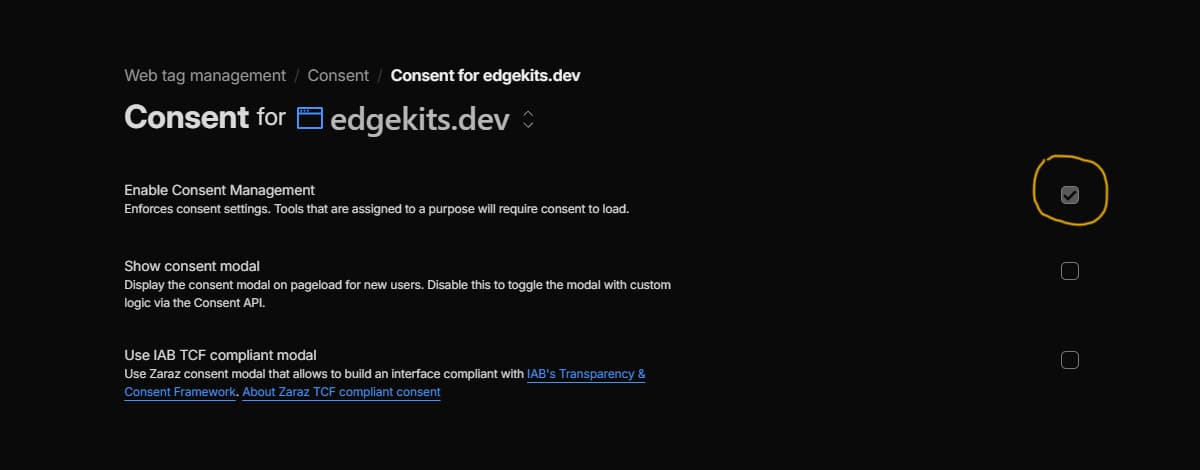
2. Create Purposes. Add one purpose per tool category - typically “Analytics” and “Marketing”. Each purpose gets a unique ID, which Zaraz stores in the user’s first-party cf_consent cookie as a JSON map of purpose ID to boolean (shape: {"a1b2c3":true,"d4e5f6":false}), readable via zaraz.consent.getAll() from the client.
3. Assign tools to purposes. This is the silent footgun. A newly added Zaraz tool with no purpose assigned runs unconditionally - the Cloudflare docs are explicit: “Zaraz does not assign any purpose to it. This means that this tool will skip consent by default.”
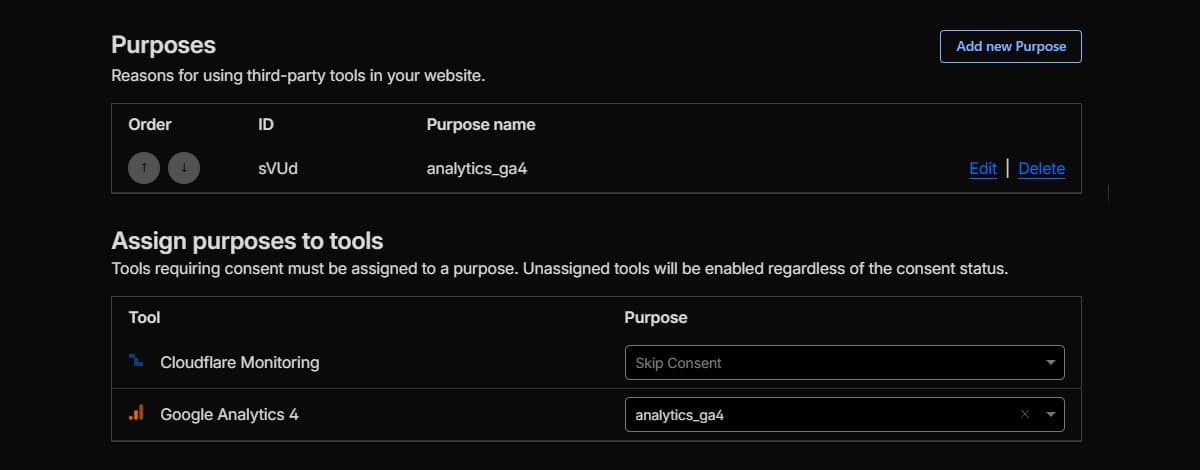
Open every configured tool (GA4, Meta Pixel, whatever) and assign it to a purpose. Audit every tool every time a new one is added.
4. Enable default-denied Google Consent Mode v2. On the Zaraz Tag Setup page (Web tag management -> Tag setup -> Tag setup for /your domain/), tick Set Google Consent Mode v2 state, which sets ad_storage, ad_user_data, ad_personalization, and analytics_storage to denied before the user makes a choice. Server-side requests to GA4 and Google Ads then include the correct gcd parameter from the first hit, per the Zaraz Google Consent Mode reference.
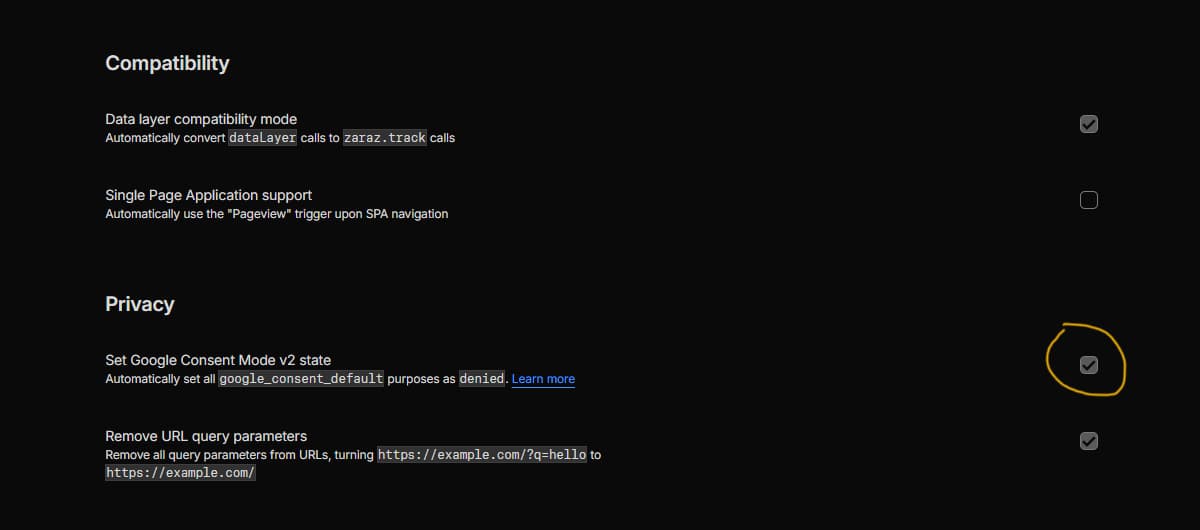
After these four steps, your tools wait for consent before firing, and Google receives the correct default-denied signal until acceptance. The custom banner is what flips both states.
Wire the two accept signals: Zaraz Consent API and Google Consent Mode v2
On Accept, the handler sends two distinct signals. They look similar; they do different things.
zaraz.consent.setAll(true)
zaraz.set('google_consent_update', {
  analytics_storage: 'granted',
  ad_storage: 'granted',
  ad_user_data: 'granted',
  ad_personalization: 'granted',
})
zaraz.consent.setAll(true) talks to the Zaraz Consent API. It marks every configured purpose as granted, which un-gates every tool assigned to a purpose in step 3 of the dashboard config. From this point on, GA4, Meta Pixel and the rest start firing on Zaraz events.
zaraz.set('google_consent_update', {...}) talks to Google Consent Mode v2 through Zaraz. It updates the four GCMv2 signal categories from default-denied to granted, so server-side requests to Google’s collection endpoints carry the updated gcd parameter. This is what lets GA4 model conversions correctly after acceptance, and what keeps Google Ads measurement intact.
Both calls are required because they answer different questions. setAll answers “should Zaraz fire this tool at all?”, while google_consent_update answers “if Zaraz does fire Google’s tools, what consent signal should the request carry?”.
Without one, you are in a half-state: tools firing without the right signal, or signals updating with no tool to use them.
There is an alternative wiring if you ever switch to Zaraz’s built-in modal: subscribe to the zarazConsentChoicesUpdated event, read choices via zaraz.consent.getAll(), and build the GCMv2 update from there. Same outcome, more moving parts.
Why send a pageview before consent, and how does Zaraz handle it?
The analytics manager component fires zaraz.track('Pageview') on every page load, regardless of consent state:
class AnalyticsManager extends HTMLElement {
  private trackPageview() {
    if (typeof zaraz !== 'undefined') {
      zaraz.track('Pageview')
    }
  }

  connectedCallback() {
    this.trackPageview()
  }
}
Hard-gating pageviews behind consent loses the top-of-funnel volume signal for every user who clicks Decline. Under Google Consent Mode v2 in default-denied state, a pageview fired before consent is automatically cookieless: the collection endpoint receives the hit with analytics_storage: denied, drops client identifiers, and uses the data only for aggregate modelling. After consent flips to granted, every subsequent hit carries identifiers and becomes a normal identifiable pageview.
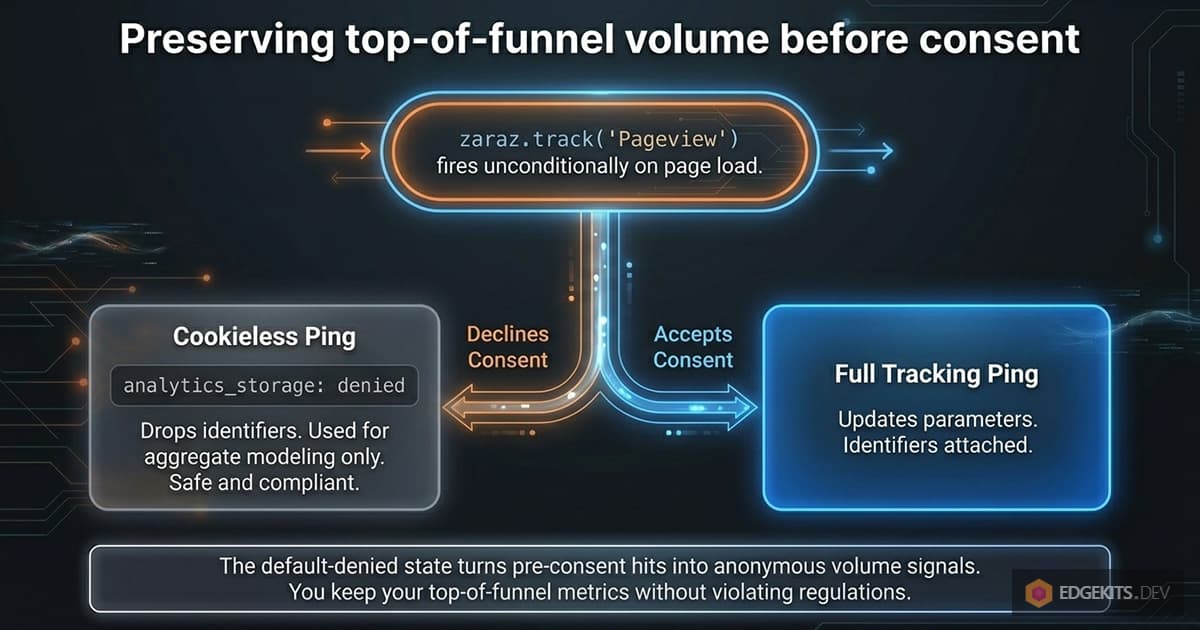
The volume signal is preserved. The user who declined is anonymous in the data; the user who accepted is fully tracked. Without the default-denied GCMv2 toggle from step 4, this falls apart - the pre-consent pageview would either send full identifiers on a non-consenting user (a regulatory problem) or stop firing entirely (a measurement problem).
The repeat-visitor payload is literally empty
Open the rendered HTML on a returning visitor’s first page load and look at what is actually there.
There is no <consent-banner> element in the markup. There is no inline script defining ConsentBanner. There is no JSON of translation strings for the consent locale - the fetchTranslations call was gated server-side, and the strings never reached the Worker’s memory.
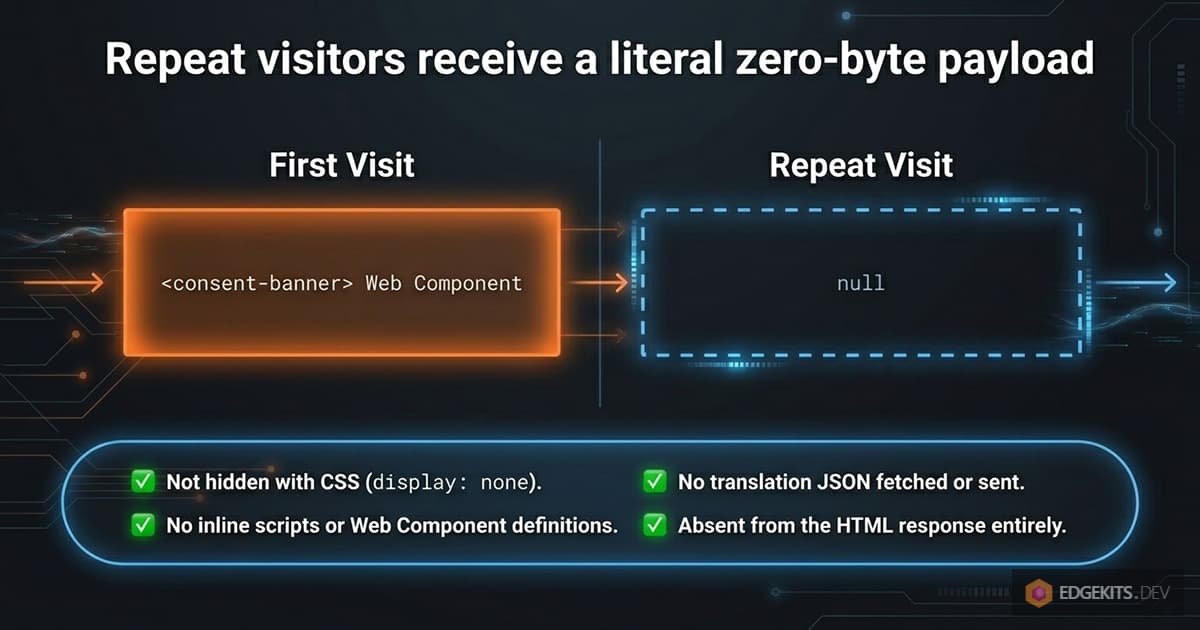
DevTools’ Network tab shows no fetch for the consent translations. The Web Component class definition is not in any bundle, because its <script> tag lives inside the .astro component, and the component only emits output when it actually renders.
The Analytics Manager web component still ships, because pageviews are always-on. Everything else - banner UI, banner logic, translation strings, network requests - is removed from the response body.
This is what “zero bytes on repeat visit” means. Not “small”, not “deferred” - gone from the response entirely.
What the first visitor sees - and what is gone from the HTML on every visit after that:

What this pattern gives up, and when you should not use it
Trade-offs, in priority order.
No per-category UI. A user who only wants Analytics but not Marketing has no way to express that here - it is all-or-nothing. Zaraz’s built-in modal solves this if you wire it; this pattern does not.
No preferences re-entry. Once the user clicks Accept or Decline, the banner is gone. Reopening it requires a “Privacy preferences” footer link bound either to zaraz.consent.modal = true (if you use the built-in modal) or to a re-rendered version of this banner triggered by a cookie clear. I have not built that footer link yet; it is the obvious next iteration.
Translation lives in your own i18n. The built-in Zaraz modal ships 30+ languages out of the box. This pattern leans on my KV-backed translation system because that is what the rest of the site uses. If you do not already have an i18n layer, the default Zaraz modal saves you that work.
No GPC signal handling. This pattern reads cookies; it does not check the Global Privacy Control header. For California (CCPA) or other GPC-mandated jurisdictions, you need either to add a Sec-GPC: 1 check in the middleware (auto-decline and skip the banner) or to use a vendor with GPC support.
Not for IAB TCF v2.2 publishers. Already noted up top. If the site runs ad-tech vendor lists, this is not the right pattern.

When you should not use this pattern at all: regulated industries with audit-trail requirements (HIPAA, banking, insurance), sites with more than five distinct cookie categories needing vendor-level consent, anywhere a compliance officer needs proof of per-category consent history.
For a SaaS marketing site, a Shopify storefront with three to five trackers, or an indie product page, the one-button Cloudflare Zaraz path is the simplest working implementation.
Frequently Asked Questions
How do you build a custom cookie consent banner with Cloudflare Zaraz on Astro?
Render the banner only when the consent cookie is empty. An Astro middleware reads the `consent_status` HttpOnly cookie into `Astro.locals.consentStatus` on every request. The banner component checks that variable in its frontmatter: if a choice has been recorded, the entire `<consent-banner>` element is omitted from the HTML and the translation fetch is skipped. On first visit the banner renders as a Web Component with Accept and Decline buttons. Both handlers call `zaraz.consent.setAll(boolean)` to gate Zaraz tools and POST to an Astro Action endpoint to set the cookie server-side. On every subsequent visit, the user receives zero HTML and zero JavaScript for the banner.
What does it mean to render a cookie consent banner only on first visit?
It means the banner element is conditionally rendered server-side, not hidden client-side. The Astro middleware reads the `consent_status` cookie before any component runs and exposes it on `Astro.locals`. The banner component frontmatter checks this variable and, if a choice has been recorded, returns no markup and skips the translation fetch entirely. The repeat visitor receives no `<consent-banner>` element, no inline script defining the Web Component, no JSON of translation strings, and no network request to the translation KV. This is different from CSS-hidden or `display: none` approaches, where the markup and JS still ship, parse, and execute on every page load. Server-side gating removes the entire payload from the network response.
What is the difference between Zaraz Consent API and Google Consent Mode v2?
The Zaraz Consent API gates whether Zaraz fires a tool at all. Each tool in the Cloudflare Zaraz dashboard is assigned to a Purpose (Analytics, Marketing, etc.); calling `zaraz.consent.setAll(true)` or `zaraz.consent.set({purposeId: true})` marks those purposes as granted, and Zaraz then sends or queues the tool requests accordingly. Google Consent Mode v2 is a separate signal layer: it tells Google collection endpoints (Google Analytics 4, Google Ads) what the user consented to via four categories - `ad_storage`, `ad_user_data`, `ad_personalization`, and `analytics_storage`. Zaraz integrates with GCMv2 via `zaraz.set("google_consent_update", {...})`. Both calls are required on accept: the first un-gates the tool, the second tells Google how to handle the data once the tool fires.
When should I use a custom Zaraz banner instead of the built-in Zaraz consent modal?
Use a custom banner when bundle size on repeat visits matters more than feature breadth. A custom server-rendered banner ships zero bytes on returning visits because the entire component is omitted from the HTML when the consent cookie is set. The built-in Zaraz modal ships its HTML, CSS, and JavaScript on every page load regardless of prior consent, because it is a client-side modal injected by the Zaraz script. Pick the built-in modal when you need per-purpose checkboxes out of the box, 30+ language translations without your own i18n, or want to skip implementing the cookie, middleware, and Web Component layer yourself. Pick a custom banner when the site is performance-sensitive, an i18n layer already exists, and one Accept/Decline pair covers the tool stack.
Does Cloudflare Zaraz Consent Management cover IAB TCF v2.2 compliance?
The default Cloudflare Zaraz Consent Management Platform is a purpose-based system, not an IAB TCF v2.2 implementation. The default CMP is suitable for first-party tracking and standard third-party tools like Google Analytics, Google Ads, and Meta Pixel, with consent granted at the purpose level. IAB TCF v2.2 is a separate framework for publishers integrating ad-tech vendor lists (SSPs, DSPs) where users must consent at the individual vendor level. Cloudflare documents TCF integration separately, but it requires additional configuration on top of the standard CMP. If the site is not a publisher running an ad-tech vendor list, TCF is not required and the standard Zaraz CMP is sufficient. Publishers with vendor-level disclosure needs should look at the dedicated TCF setup.
Why does my Zaraz tool fire without consent in the Cloudflare dashboard?
A Zaraz tool with no purpose assigned ignores consent entirely. When a new tool is added to Zaraz, its default state is "no purpose assigned" - which Zaraz interprets as "this tool does not require consent to fire". To gate the tool behind consent, open the tool in the Cloudflare dashboard and select a purpose from the Assign purpose dropdown. Until that assignment is made, calling `zaraz.consent.setAll(false)` or having a user decline does not stop the tool. This is the most common silent footgun in Zaraz Consent setup: tools running without consent because no one explicitly bound them to a purpose. Audit every tool after enabling Consent Management, and treat unassigned tools as a bug.
Why does a custom Cloudflare Zaraz consent banner ship zero bytes on repeat visits?
Because the banner is server-rendered conditionally, not client-rendered with state. On the server, an Astro middleware reads the `consent_status` HttpOnly cookie. If the cookie is set, the banner component returns no markup - no HTML, no inline script tag defining the Web Component, no translation JSON. The returning visitor HTML simply does not contain the banner anywhere. By contrast, a client-side CMP injects its modal script on every request and decides at runtime whether to display the modal based on its own cookie, which means the JavaScript still has to download, parse, and execute even when the modal stays hidden. Server-side gating removes the entire payload from the network response, including the translation fetch.
Resources & Further Reading
- Cloudflare Zaraz - Consent Management overview
- Cloudflare Zaraz - Enable Consent Management
- Cloudflare Zaraz - Consent API reference
- Cloudflare Zaraz - Google Consent Mode integration
- Cloudflare Zaraz - Pricing
- Astro 5 to 6 Migration with React Islands on Cloudflare
- Edge-Native i18n with Astro and Cloudflare - Part 1