
GA4 Engaged Sessions on Cloudflare Zaraz: the Missing Events

Cloudflare Zaraz only auto-forwards page_view, session_start, and first_visit to GA4. Here is why that zeroes out engaged sessions, and the engagement component that fixes it on Astro and Cloudflare Workers.
Cloudflare’s Zaraz FAQ has one line that quietly breaks analytics for most teams who migrate to it. Zaraz auto-forwards page_view, session_start, and first_visit to GA4, and nothing else. No user_engagement, no scroll, no outbound clicks. Everything GA4 calls an Enhanced Measurement is now your job.
Why Cloudflare Zaraz reports zero engaged sessions in GA4
The symptom shows up first in the GA4 reports, not the network tab. Sessions arrive, pageviews count, Realtime lights up, and then Engaged sessions sits at zero. Average engagement time reads a few hundred milliseconds, or worse, a negative number.
Every other GA4 property you have ever run reported engagement automatically, so the instinct is to look for a misconfigured data stream. The data stream is fine.
GA4 marks a session as engaged when one of three things happens: it lasts longer than 10 seconds, it fires a conversion, or it racks up two or more pageviews. The 10-second rule is the one that carries most sessions, and it is measured by a user_engagement event carrying an engagement_time_msec parameter.
The native gtag.js snippet emits that event for you. Zaraz does not, because the user_engagement event is not on its short list of automatic forwards.
So a single-page visit that lasts two minutes looks identical to a bounce. The session never crosses 10 seconds in GA4’s eyes, because no event ever told GA4 how long the user was actually there. Engaged sessions collapse, engagement rate craters, and any audience or report built on engagement inherits the hole.
TL;DR
- Zaraz auto-forwards only
page_view,session_start, andfirst_visitto GA4.user_engagementis not included, so engaged sessions read zero.- GA4 needs a
user_engagementevent carryingengagement_time_msecto mark a session engaged past the 10-second threshold.- The fix is one Astro Web Component that measures active, visible time and emits
user_engagementthroughzaraz.track().- Naive
setIntervaltimers overcount: they keep ticking on hidden tabs and idle users. The component is visibility-aware and activity-aware.- Scroll depth and outbound clicks stay with Zaraz’s own native triggers. Only engagement timing needs custom code.
What Zaraz actually forwards to GA4 by default
Cloudflare documents this directly. Their Zaraz FAQ answers the exact question developers hit after migrating: if Enhanced Measurements are configured, why does Zaraz report only Page View, Session Start, and First Visit?
The answer states plainly that this is “not a bug”. Zaraz does not ship the automatic events the standard GA4 snippet provides out of the box, and you have to build triggers and actions to capture the rest.
That is the whole gap in one sentence. The three events Zaraz forwards automatically are the session-bootstrap events: page_view opens the hit stream, session_start and first_visit tag the session and the user. They are enough to populate Users, Sessions, and Pageviews, which is why a fresh Zaraz install looks healthy at a glance.
Everything in GA4’s Enhanced Measurements list lives outside that set. scroll, click on outbound links, view_search_results, file_download, video_*, and the one that matters most for session quality, user_engagement. In a native gtag.js install these are wired by the snippet. Under Zaraz, none of them exist until you emit them yourself through zaraz.track().
The reason this surprises people is that GA4’s own setup flow encourages leaving Enhanced Measurements toggled on in the data stream. Those toggles control what gtag.js collects, and they have no effect on a Zaraz stream, because Zaraz is not running gtag.js.
It speaks to GA4’s Measurement Protocol directly with the events it decides to send. Flipping the toggles in the GA4 UI changes nothing about what arrives.
How to spot the broken engagement timing in GA4 DebugView
DebugView is where this becomes visible instead of theoretical. Open GA4, enable debug mode on the site (the GA4 debug extension, or ?gtm_debug style params depending on setup), and watch a session you drive yourself. You will see page_view, session_start, and first_visit arrive on cue. Sit on the page for a full minute and no user_engagement event ever lands.
That absence is the diagnosis. There is no error, no failed request, no warning in the console. The event simply is not in the stream, so GA4 has nothing to measure the session length against.
It gets more interesting when a user_engagement event does show up. Some Zaraz GA4 integrations emit one off the page’s visibility-change handler, and the engagement_time_msec it carries is computed from timestamps that can run backwards. In DebugView on edgekits.dev I logged values like -385, -14296, and 118. A negative engagement time is not a small bug.
GA4 discards non-positive engagement_time_msec during processing, so those events count for nothing, and the rare positive one (118 milliseconds) is three orders of magnitude short of the 10-second bar.
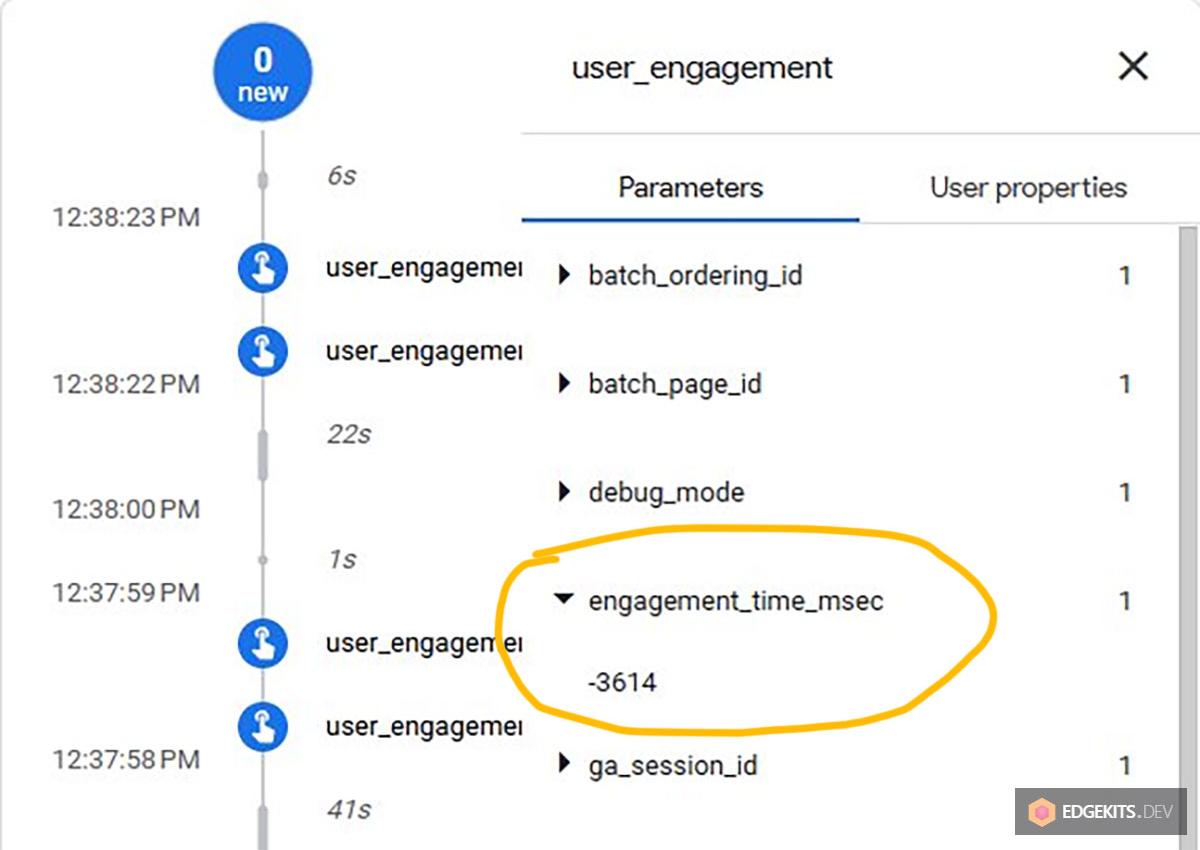
So the broken state has two flavors. Either user_engagement never fires, and engaged sessions are flatly zero, or it fires with garbage timing that GA4 throws away, which looks the same in every downstream report. Both point at the same root cause: nothing on the page is measuring real, forward-moving, visible engagement time and handing it to GA4 in the shape it expects.
The three-layer fix: an engagement component, native triggers, consent passthrough
The fix splits along the lines of what Zaraz already does well versus what it leaves to you. Three layers, each owning one concern.
The first layer is a custom engagement component. It measures how long the user is actually present and active on the page, then emits a user_engagement event with a correct engagement_time_msec through zaraz.track(). This is the only piece that needs hand-written code, because it is the only Enhanced Measurement with timing logic GA4 cares about getting right.
The second layer is Zaraz’s own native triggers. Scroll depth and outbound-click tracking do not need a component at all. Zaraz ships trigger types for both (Scroll depth and a click listener rule), and they fire into the same GA4 tool without a line of JavaScript from you. Reaching for custom code here would be reinventing something the platform already does.
The third layer is consent passthrough. Every event the first two layers produce flows through zaraz.track(), which means it inherits Zaraz’s Consent Management gate and Google Consent Mode v2 signalling automatically. When the user has not consented, the hit goes out as a cookieless ping under GCMv2 default-denied; when they have, it carries the full payload.
The banner that sets those consent signals on edgekits.dev is its own build, covered in the zero-JS Cloudflare Zaraz consent banner on Astro. The engagement component never has to know the consent state, because the transport layer enforces it.
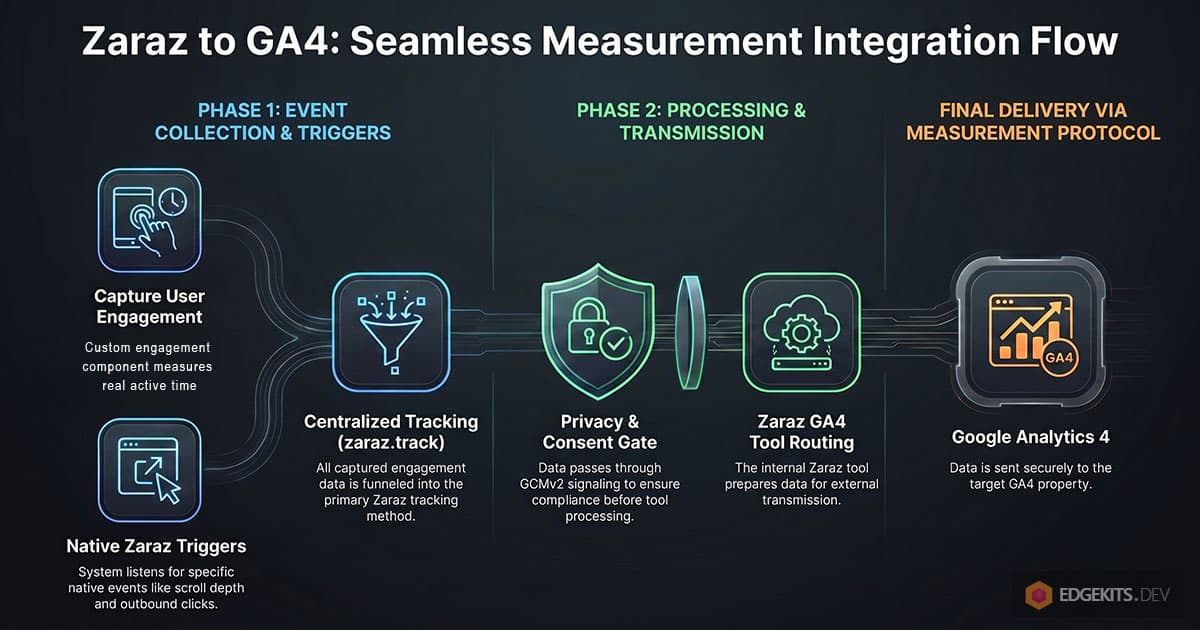
Diagram source (Mermaid)
graph TD
    A[EnhancedMeasurements component] -->|user_engagement + engagement_time_msec| T[zaraz.track]
    B[Zaraz native Scroll depth trigger] -->|scroll| T
    C[Zaraz native Click listener trigger] -->|outbound click| T
    T -->|Consent gate + GCMv2 signalling| Z[Zaraz GA4 tool]
    Z -->|Measurement Protocol| G[GA4 property]
Zaraz forwards each of these to GA4, preserving the engagement_time_msec parameter on the engagement event. The exact dashboard wiring (which trigger maps to which action) is mechanical and stable once set, so the rest of this article focuses on the one layer that carries real logic: the engagement component.
A setInterval timer can’t measure engagement
The obvious first attempt is a timer. Start a setInterval, add the elapsed time every tick, fire user_engagement once it crosses 10 seconds. It works in a manual test and then quietly inflates every metric in production.
The problem is that wall-clock time is not engagement time. A user opens your page in a background tab and reads something else for ten minutes, and a naive timer counts all ten minutes as engagement, because setInterval keeps firing on hidden tabs (throttled, but firing).
GA4’s native gtag.js does not do this; it pauses when the tab loses visibility. A timer that ignores the Page Visibility API reports engaged sessions for people who never looked at the page.
Idle time is the second leak. A user lands, reads for fifteen seconds, then walks away with the tab still focused and visible, but a plain timer keeps counting until the tab closes.
gtag.js handles this too, treating a long stretch with no interaction as disengaged. To match that behaviour you need an activity signal: mouse movement, keypresses, scrolls, touches, with a threshold past which the user is considered gone.
There are sharper edges underneath. A laptop sleeps and wakes, and the delta between two ticks is suddenly two hours; the system clock skews and a delta comes back negative; the tab restores from hibernation and fires a backlog.
Each of these can dump a nonsense value into the accumulator if the code trusts every interval blindly.
So the real component is not a timer with a counter. It is a small state machine that only accumulates time when the tab is visible and the user has been active recently, clamps each delta to a sane range, and flushes a corrected engagement_time_msec to GA4 at the right moments. That is what the next section builds.
Build the EnhancedMeasurements Astro component
Here is the full component running on edgekits.dev. It is a single Astro file with no framework, no hydration step, just a custom element that defines itself on load. Everything routes through zaraz.track(), so consent and GCMv2 are handled by the transport, not by this code.
---
// EnhancedMeasurements.astro
//
// Emits GA4 user_engagement events with a reliable engagement_time_msec
// via Zaraz. Replaces the short/negative engagement_time_msec values that
// fail to mark sessions as engaged with a visibility-aware, activity-aware
// heartbeat.
//
// Engagement is counted only when BOTH:
//   1. The tab is visible (Page Visibility API)
//   2. The user has been active within INACTIVITY_THRESHOLD_MS
//      (mouse move / click / keypress / touch / scroll)
//
// Scroll depth and outbound clicks are handled by Zaraz's native trigger
// types, so they do not live here.
---

<enhanced-measurements></enhanced-measurements>

<script>
  class EnhancedMeasurements extends HTMLElement {
    // Engagement is flushed each time activeTime crosses this threshold.
    // 10000ms matches GA4's engaged-session definition.
    private readonly HEARTBEAT_MS = 10000

    // After this many ms without user interaction, stop counting engagement.
    private readonly INACTIVITY_THRESHOLD_MS = 30000

    private activeTime = 0
    private lastTick = 0
    private lastActivity = 0
    private isVisible = !document.hidden
    private heartbeatTimer: ReturnType<typeof setInterval> | null = null

    private flushEngagement = () => {
      if (this.activeTime <= 0) return
      if (typeof zaraz === 'undefined') return

      zaraz.track('user_engagement', {
        engagement_time_msec: Math.round(this.activeTime),
      })
      this.activeTime = 0
    }

    private tick = () => {
      if (!this.isVisible) return

      const now = Date.now()
      const inactiveFor = now - this.lastActivity

      // User has been inactive too long - pause engagement accumulation.
      // Reset lastTick so the inactive gap is not counted when activity resumes.
      if (inactiveFor > this.INACTIVITY_THRESHOLD_MS) {
        this.lastTick = now
        return
      }

      const delta = now - this.lastTick
      this.lastTick = now

      // Sanity bounds: discard negative deltas (clock skew) and oversized
      // deltas (laptop wake from sleep, tab restored after long hibernation).
      if (delta > 0 && delta < this.HEARTBEAT_MS * 3) {
        this.activeTime += delta
      }

      if (this.activeTime >= this.HEARTBEAT_MS) {
        this.flushEngagement()
      }
    }

    private handleActivity = () => {
      const now = Date.now()

      // Throttle: mousemove fires hundreds of times per second. We only care
      // about "is the user alive right now", so 1Hz is plenty.
      if (now - this.lastActivity < 1000) return

      // If the user was previously past the inactivity threshold, reset
      // lastTick so the inactive gap is not retroactively counted.
      if (now - this.lastActivity > this.INACTIVITY_THRESHOLD_MS) {
        this.lastTick = now
      }

      this.lastActivity = now
    }

    private handleVisibilityChange = () => {
      const wasVisible = this.isVisible
      this.isVisible = !document.hidden

      if (this.isVisible) {
        // Returning to the tab counts as fresh activity.
        const now = Date.now()
        this.lastTick = now
        this.lastActivity = now
      } else if (wasVisible) {
        // Going hidden - capture the final delta BEFORE we pause, but only if
        // the user was still considered active.
        const now = Date.now()
        if (now - this.lastActivity <= this.INACTIVITY_THRESHOLD_MS) {
          const delta = now - this.lastTick
          if (delta > 0 && delta < this.HEARTBEAT_MS * 3) {
            this.activeTime += delta
          }
        }
        this.flushEngagement()
      }
    }

    private handlePageHide = () => {
      // Final flush before the page is gone.
      this.tick()
      this.flushEngagement()
    }

    connectedCallback() {
      const now = Date.now()
      this.lastTick = now
      this.lastActivity = now
      this.heartbeatTimer = setInterval(this.tick, this.HEARTBEAT_MS)

      document.addEventListener('visibilitychange', this.handleVisibilityChange)
      window.addEventListener('pagehide', this.handlePageHide)

      // Activity signals - all routed through handleActivity with built-in throttle.
      document.addEventListener('mousemove', this.handleActivity, { passive: true })
      document.addEventListener('mousedown', this.handleActivity, { passive: true })
      document.addEventListener('keydown', this.handleActivity, { passive: true })
      document.addEventListener('touchstart', this.handleActivity, { passive: true })
      window.addEventListener('scroll', this.handleActivity, { passive: true })
    }

    disconnectedCallback() {
      if (this.heartbeatTimer !== null) {
        clearInterval(this.heartbeatTimer)
        this.heartbeatTimer = null
      }

      document.removeEventListener('visibilitychange', this.handleVisibilityChange)
      window.removeEventListener('pagehide', this.handlePageHide)
      document.removeEventListener('mousemove', this.handleActivity)
      document.removeEventListener('mousedown', this.handleActivity)
      document.removeEventListener('keydown', this.handleActivity)
      document.removeEventListener('touchstart', this.handleActivity)
      window.removeEventListener('scroll', this.handleActivity)
    }
  }

  if (!customElements.get('enhanced-measurements')) {
    customElements.define('enhanced-measurements', EnhancedMeasurements)
  }
</script>
Read it through the four state transitions and it stops looking like much code.
flushEngagement is the only place that talks to GA4. It guards on two conditions, a positive activeTime and a defined zaraz, then emits user_engagement with the accumulated time rounded to an integer and resets the accumulator. Because it never sends a non-positive value, the negative engagement_time_msec problem from the DebugView section cannot happen here by construction.
tick runs on the 10-second heartbeat and is where time accrues. It returns immediately if the tab is hidden, then checks how long since the last activity and, if that exceeds the 30-second threshold, advances lastTick without crediting anything, so the idle gap is skipped rather than counted.
Otherwise it adds the delta, but only after the sanity bound rejects negatives (clock skew) and anything larger than 30 seconds (sleep, hibernation). When the accumulator passes the heartbeat, it flushes.
handleActivity is the liveness signal, wired to mouse, keyboard, touch, and scroll. It throttles to 1Hz because mousemove alone would otherwise fire hundreds of times a second for no benefit. If the user is returning from past the inactivity threshold, it resets lastTick so the dead gap is not retroactively billed as engagement.
handleVisibilityChange and handlePageHide are the flush points. Going hidden captures the final active delta and flushes, so engagement is not lost when someone tabs away. pagehide does a last tick and flush before the page unloads, which is the reliable place to send a final beacon. Coming back visible resets the timestamps to now, so the time spent on another tab never lands in the count.
The component is rendered once in the base layout, after the consent banner and the pageview tracker, so every page across the site is measured the same way.

Let Zaraz’s native triggers handle scroll and outbound clicks
The engagement component is the only Enhanced Measurement worth writing code for. Scroll depth and outbound clicks are already solved inside Zaraz, and rebuilding them in JavaScript would be slower, heavier, and more fragile than what the platform ships.
Zaraz exposes these as trigger types in the dashboard rather than as code. A Scroll depth trigger fires when the user passes a set percentage of the page.
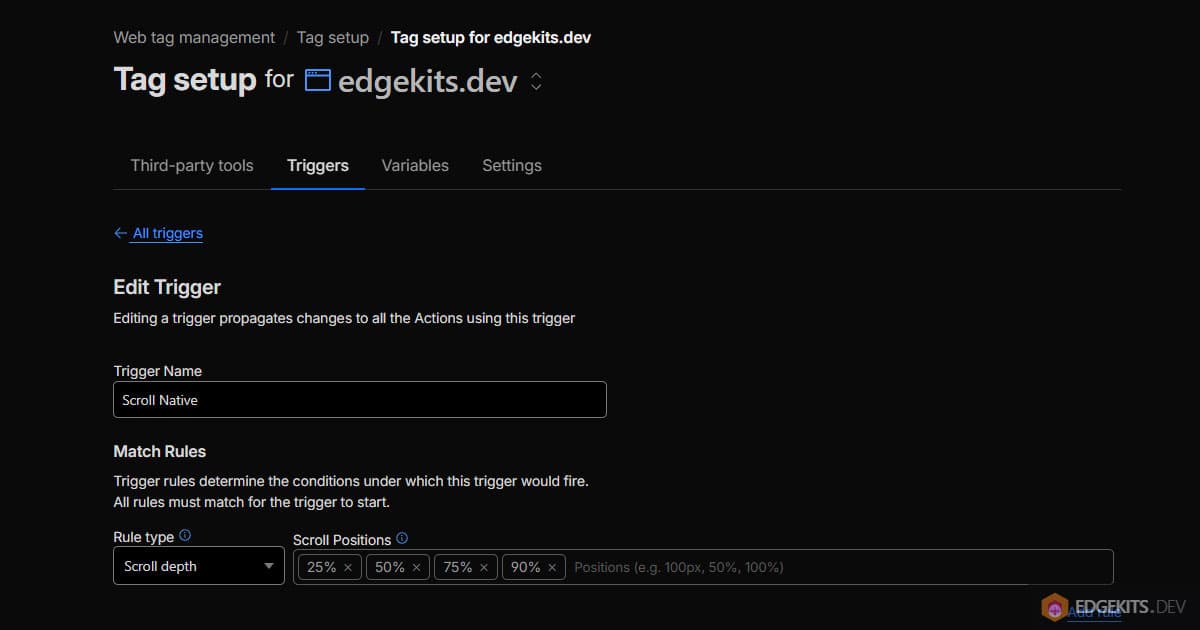
A click listener trigger, matched with a CSS selector, fires on outbound link clicks.
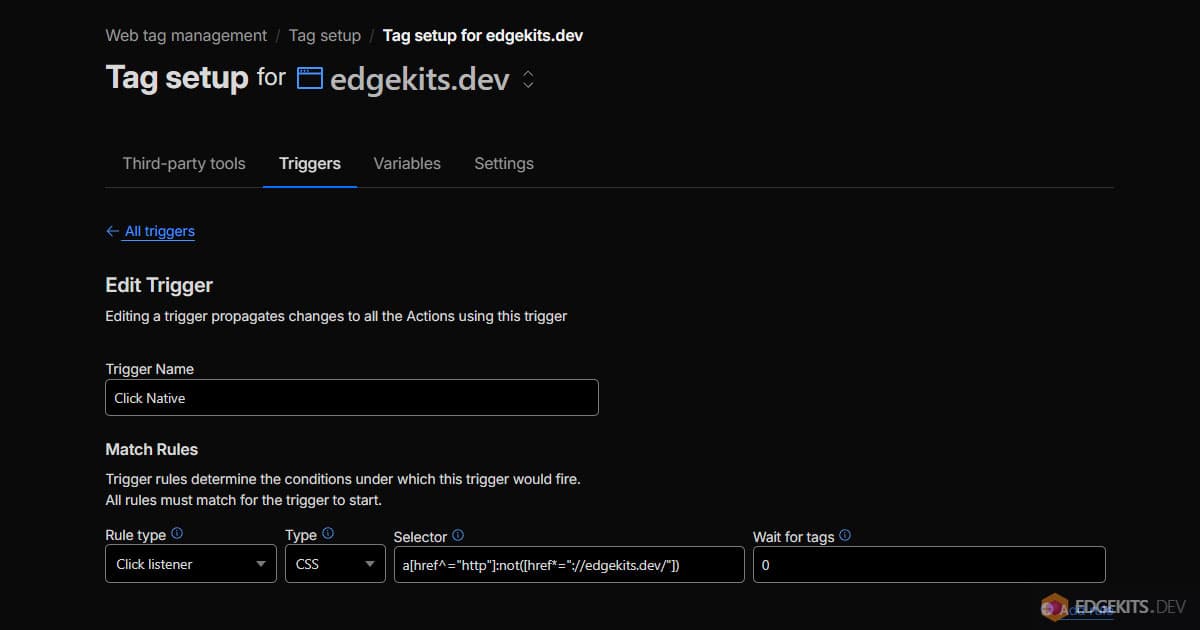
You point each trigger at the GA4 tool, map it to the event name GA4 expects (scroll, click), and Zaraz handles the DOM listeners, the matching, and the dispatch at the edge. The full set is documented in the Zaraz triggers reference.
The advantage goes beyond writing less code. These triggers run inside Zaraz’s own execution context, so they inherit the same consent gating and GCMv2 signalling as everything else, with no extra wiring. A scroll event from a non-consented user goes out as a cookieless ping for the same reason the engagement event does: it went through Zaraz.
The reason engagement timing is different, and the reason it cannot be a trigger, is that there is no DOM event for “the user has now been actively present for ten seconds”. Scroll and click are discrete moments Zaraz can listen for.
Engagement is a continuous quantity that has to be measured, corrected for visibility and idleness, and summed over time. That measurement is exactly the logic in the component, and it is why that one layer earns custom code while the rest stays declarative.
Two ways this setup quietly corrupts your numbers
These two work in opposite directions. The first is noise that looks like breakage but is harmless once you know where to check. The second is breakage that looks harmless until it has quietly skewed weeks of data. Both come down to reading the right surface.
The first is mistaking DebugView noise for a broken setup. Zaraz’s own GA4 Managed Component emits its own user_engagement events off a visibility-change handler whose timestamp math can run backwards, producing values like -14296.
This built-in source cannot be disabled separately from the GA4 tool itself, so the noise stays in the raw event stream regardless of what you build on top. The custom component sends 10342, the leftover integration sends -14296, and DebugView shows both.
The temptation, after a fresh deploy, is to conclude the component is broken and rip it out. The fix is to verify on the reports side, not the raw stream: GA4 discards non-positive engagement_time_msec during processing, so the negative events never land in Engaged Sessions, Average Engagement Time, or any downstream metric.
DebugView shows the firehose; reports show what GA4 actually counts.
The second is marking an engagement event as a conversion. It is tempting, because user_engagement correlates with the sessions you care about, but a conversion that fires on basically every engaged session is not a conversion, it is a second engagement metric wearing a conversion’s name.
It inflates your conversion count, poisons any Google Ads bidding that optimizes toward it, and makes the funnel meaningless. Engagement is a quality signal for the session, not a goal completion. Keep conversions tied to actual outcomes (a signup, a purchase, a qualified action) and leave user_engagement as the diagnostic it is.
Why everything routes through zaraz.track()
Step back from the engagement problem and the shape of the whole setup is one decision repeated: every analytics event leaves the page through zaraz.track() and nothing else.
The engagement component calls it. The native triggers resolve to it. The pageview tracker calls it. There is no parallel gtag() path, no second analytics library, no direct Measurement Protocol call from the client.
That single transport is what makes consent tractable. Because every event passes through Zaraz, the Consent Management gate and the Google Consent Mode v2 state are evaluated in exactly one place.
A non-consented user produces cookieless pings across every event type for the same reason, and a consented user produces full hits the same way. None of the individual components, the engagement state machine included, has to carry consent logic, because consent is a property of the channel, not the message.
It also means the gap Zaraz left in GA4 is closeable without giving up what Zaraz is good at. The platform forwards three events automatically and hands you the rest, but the rest goes out through the same edge-native, consent-aware pipe.
You add the one piece that has real logic, the engagement measurement, lean on native triggers for the discrete events, and let the transport handle privacy uniformly. The result is a GA4 property that counts engaged sessions correctly and respects consent on every hit, built from one Astro component and a handful of dashboard triggers. If you are still weighing this edge-native model against running vendor scripts in a web worker, the trade-offs are mapped in Partytown vs Cloudflare Zaraz.
Working on a Zaraz migration and want help with the analytics layer? gary@edgekits.dev
Frequently Asked Questions
Why does Cloudflare Zaraz report zero engaged sessions in GA4?
Because Zaraz auto-forwards only three events to GA4: page_view, session_start, and first_visit. It does not send user_engagement, which is the event GA4 uses to measure how long a session lasted. GA4 marks a session as engaged when it passes 10 seconds, fires a conversion, or reaches two pageviews. The 10-second rule is measured by a user_engagement event carrying an engagement_time_msec parameter, and the native gtag.js snippet emits it automatically. Zaraz does not, so a two-minute single-page visit looks identical to a bounce: it never crosses the 10-second threshold in GA4 because no event ever reported the time spent. Engaged sessions collapse to zero and engagement rate craters, even though the data stream itself is configured correctly.
How do I fix missing user_engagement events when using GA4 with Cloudflare Zaraz?
Add a small Astro Web Component that measures active, visible time on the page and emits a user_engagement event through zaraz.track() with a correct engagement_time_msec. The component runs a 10000ms heartbeat, accumulating time only while the tab is visible (Page Visibility API) and the user has interacted within the last 30000ms. It clamps each interval to reject negative deltas from clock skew and oversized deltas from sleep or hibernation, then flushes the rounded engagement time to GA4. Because every hit travels through zaraz.track(), it inherits Zaraz consent gating and Google Consent Mode v2 automatically. Scroll depth and outbound clicks do not need custom code; Zaraz native triggers cover those. Only engagement timing carries logic GA4 needs to receive in a specific shape.
What is the user_engagement event in GA4 and why does it matter?
user_engagement is the GA4 event that reports how long a user was actively engaged with a page, carried in an engagement_time_msec parameter measured in milliseconds. GA4 uses it to decide whether a session is engaged: a session that accumulates more than 10 seconds of engagement time qualifies. Without this event, GA4 has no signal for session duration on single-page visits, so engaged sessions, engagement rate, and any audience built on engagement all read empty. In a native gtag.js install the snippet emits user_engagement on visibility changes and page unload. Under Cloudflare Zaraz it is not one of the automatically forwarded events, so it must be emitted explicitly through zaraz.track() for engaged-session reporting to work.
What causes negative engagement_time_msec values in GA4 DebugView?
Negative engagement_time_msec values come from engagement timing computed off a visibility-change handler whose timestamp math can run backwards. Some Zaraz GA4 integrations emit user_engagement this way, producing values like -385, -14296, or a tiny positive 118 milliseconds. GA4 discards non-positive engagement_time_msec during processing, so the negative events count for nothing, and a value like 118ms is three orders of magnitude below the 10-second engaged-session bar. The result looks the same as no event at all: engaged sessions stay at zero. The fix is to measure engagement with a guarded accumulator that only adds positive, bounded deltas and never sends a non-positive value, which is what a visibility-aware, activity-aware heartbeat component does by construction.
Why can a setInterval timer not measure GA4 engagement correctly?
A plain setInterval measures wall-clock time, not engagement time, so it overcounts in two ways. First, the interval keeps firing on hidden background tabs, so a page left open in another tab accrues engagement for a user who never looked at it; native gtag.js pauses on visibility loss. Second, it keeps counting when a visible tab sits idle, while gtag.js treats a long stretch with no interaction as disengaged. A correct component is visibility-aware (it stops on document.hidden) and activity-aware (it pauses after 30000ms without mouse, keyboard, touch, or scroll input). It also clamps each interval to discard negative deltas from clock skew and oversized deltas from laptop sleep or tab hibernation, which would otherwise dump nonsense values into the total.
Do the GA4 data stream Enhanced Measurement toggles work with Cloudflare Zaraz?
No. The Enhanced Measurement toggles in the GA4 data stream control what the gtag.js JavaScript snippet collects. Cloudflare Zaraz does not run gtag.js; it talks to the GA4 Measurement Protocol directly with the events it decides to send. Flipping the toggles for scroll, outbound clicks, or engagement in the GA4 UI changes nothing about what a Zaraz stream sends, because Zaraz is not the collector those toggles configure. This is the most common point of confusion after a Zaraz migration: the GA4 setup flow encourages leaving Enhanced Measurements on, which creates the false impression they are active. Under Zaraz, every Enhanced Measurement beyond page_view, session_start, and first_visit must be emitted by you through zaraz.track() or a native Zaraz trigger.
Should I track scroll and outbound clicks with custom code under Zaraz?
No. Scroll depth and outbound clicks are discrete DOM moments that Cloudflare Zaraz already captures through native trigger types: a Scroll depth trigger that fires at a set percentage, and a click listener trigger matched by CSS selector. You point each trigger at the GA4 tool and Zaraz handles the listeners, matching, and dispatch at the edge, inheriting the same consent gating and Google Consent Mode v2 signalling as every other event. Writing JavaScript to replicate this would be heavier and more fragile for no benefit. Engagement timing is the exception that needs custom code, because there is no DOM event for "the user has been actively present for ten seconds"; it is a continuous quantity that must be measured, corrected for visibility and idleness, and summed over time.
Should user_engagement be marked as a conversion in GA4?
No. user_engagement is a quality signal for a session, not a goal completion, and marking it as a conversion corrupts the metric. Because it fires on essentially every engaged session, a conversion tied to it inflates the conversion count, makes the funnel meaningless, and poisons any Google Ads bidding strategy that optimizes toward conversions. A conversion that triggers on nearly every session is a second engagement metric wearing a conversion name. Keep conversions bound to real outcomes such as a signup, a purchase, or a qualified action, and leave user_engagement as the diagnostic it is. A separate trap is the negative engagement_time_msec values that Zaraz own GA4 Managed Component emits off its visibility-change handler: they look alarming in DebugView, but GA4 discards non-positive values during processing, so they never reach Engaged Sessions or Average Engagement Time. Verify on the reports surface, not the raw event stream, before concluding the setup is broken.